Typophile

The Raster Tragedy at Low-Resolution Revisited

This thread ran to 3 pages of replies and only 2 were recovered, so replies are missing.

The capture this came from was cut short by the archive that made it, so the text may be incomplete.

John Hudson0 votes

Beat Stamm has published an updated and greatly expanded version of his important 1997 article ‘The Raster Tragedy at Low-Resolutions’, which explained the reasons why hinting was needed, as a corrective to raster rounding problems in coarse grids. The original article, excerpted from a presentation that Beat gave at the 1997 OpenType Jamboree and still available on the Microsoft Typography website, dealt with the then predominant b/w rendering of text type sizes. The new version of the article ‘covers anti-aliasing including sub-pixel rendering, opportunities made possible by anti-aliasing, challenges in the rasterizer and elsewhere, and a discussion of "hinting" in the context of these opportunities and challenges.’

www.rastertragedy.com

This is a truly amazing document. Great to see Beat participating again and I look forward to the many comments and discussions I hope this revisit provokes.

I'm about halfway through a close reading of the document, looking with particular care now at the section on subpixel spacing (§3.3.2), which with yesterday's relatively quiet release of IE9 has suddenly ceased to be a pending issue. The first thing I noticed when setting up my IE9 homepage to match my Firefox 3.6 page is that the thin verticals of M and N (approx. 14pt Constantia, 96dpi) are becoming pale smudges. As Beat notes:

The main drawback of fractional advance widths and fractional pixel positioning is the loss of stroke rendering contrast at sufficiently small type sizes and device resolutions (cf 3.1.3). As we have just seen, it thwarts any intentions to carefully position strokes to “optimize” stroke rendering contrast. Informally put, at text sizes on 96 or even 120 DPI screens, text is simply rendered with more “fringe” than “core.”

_____

So far, the fundamental observation is this, from §1.2 (Beat's emphasis):

Even more math, equations, parenthesis—really!—why does this matter? It matters because it shows how rounding or sampling makes font rendering non-linear. Once it is non-linear, it is no longer scalable. The two concepts linearity and scalability are equivalent here.

The startling conclusion is that rounding or sampling makes the allegedly scalable font format non-scalable!

On why the ancient and obsolete efficiency measures of the Windows TT rasteriser will never be ‘fixed’ to enable greater precision (§4.0.3):

Think of it this way. With the existing rasterizer, a particular character may render in a particular way at a particular ppem size. The author of the constraints (or “hints”) may see no fault with the rendered pixel pattern. But he or she may be oblivious to the fact that it took the rasterizer a seemingly serendipitous chain of tiny rounding errors to produce this particular result.

Now, if any single one of these rounding errors is “improved,” the outcome may change easily, as we have just seen. And since the font looked “good” before, chances are that it will look “worse” afterwards. We simply have to learn how to deal with the available precision—it’s hardly ever going to be exact, anyway.

All of Chapter 6 should be required reading, and then required re-reading.

Unfortunately, one of the things it makes clear is that you can't, after all, hint TrueType in FontLab, at least not in accordance with Beat's definition of hinting:

“Hinting” designates the act of constraining the scaling of outline fonts to yield sets of samples that best represent the type designer’s intent at any point size, on any raster output device, having any device resolution, using any rendering method, in any software context, and for any end-user.

[Is there some markup mechanism by which I can differentiate roman and italics within blockquote tags?]

JH>...at least not in accordance with Beat's definition of hinting:

Honestly, when I read that and wondered how such an extreme definition could even form.

I think extreme or ideal definitions can be very useful, in that they oblige one to consider how something might or should work or be used, rather than proceeding on the basis of how it has worked or how it has been used. Beat makes a distinction between hinting and 'pixel-popping', and even when one acknowledges a practical continuum between these things in ‘getting the job done’, the distinction remains a useful one. What I take away from Beat's Chapter 6 is that we need to think about TrueType more as a programming language, which will make it possible to move closer on the continuum to Beat's definition of hinting, and away from using this potentially very powerful tool as a ‘technophiliac disguise for “pixel-popping”’.

Hence my comment about FontLab's TrueType hinting capabilities, which pretty much do function as a pixel-popping interface, and which hence have become increasingly less useful as we move away from bi-level rendering. We're now at a place where enthusiastic amateurs are finding that FL (auto)hinting can apparently improve the appearance of some glyphs in some fonts at some sizes in some environments -- heck, maybe even most glyphs in most fonts at most sizes in most environments --, but they're doing so ‘oblivious to the fact that it took the rasterizer a seemingly serendipitous chain of tiny rounding errors to produce this particular result’. In other words, they're hinting from particular outlines to particular results, rather than generalising hinting as a programming strategy that will provide the most flexible set of nested instructions and functions, such that varying raster output devices, rendering methods and user preferences are able to take most advantage of that hinting.

This, of course, presumes another point that Beat makes: hinting is (should be) all about acting, not reacting. If this is the case -- or becomes the case -- then hinting goes from being the cladding on a building that makes it look nice to being something like a foundation, something that new rendering methods and options for end users can reliably build on top of, and without resorting to the kind of ‘band-aids’ Beat was forced to enact in the Windows rasteriser to get existing fonts not to explode in ClearType.

“asking an artist to become enough of a mathematician to understand how to write a font with 60 parameters is too much.”

That's how Donald Knuth explained why Metafont failed to catch on with type designers. And while I realize that an apples-to-apples comparison is not appropriate to Metafont and TT hinting, looking at Beat Stamm's site makes me feel the same way about TT hinting.

>In other words, they're hinting from particular outlines to particular results

Whom?

>“asking an artist to become enough of a mathematician to understand how to write a font with 60 parameters is too much.”

first if all, hinting for contemporary windows environs requires less than 10 parameters, and second, the vast majority of the kind of artists you are citing juggle hundreds of parameters in the design of a font, no problem. Third, if you really believe hints should be more useful than what they are used for, you're a tad late to support it.

> think extreme or ideal definitions can be very useful, in that they oblige one to consider how something might or should work or be used

You mean like hearing someone saying the iPad is the perfect example of how a web device should treat typography? Does that oblige you to think, or just react with standard windows rhetoric?

>FontLab's TrueType hinting capabilities, which pretty much do function as a pixel-popping interface, and which hence have become increasingly less useful as we move away from bi-level rendering

when was Type 1 hinting ever really useful for bi level rendering in the resolution spectrum of text?

>then hinting goes from being the cladding on a building that makes it look nice to being something like a foundation

Finally, a great ideal! I initiated the first baby steps at integrating hinting in the foundation of font design last fall. We will see! Memes, can't live with them, can't live without them. ;)

David: when was Type 1 hinting ever really useful for bi level rendering in the resolution spectrum of text?

I didn't say anything about Type 1 hinting: I was talking about FontLab's TrueType hinting tools. [Those tools do try to treat aspects of PostScript and TrueType hinting as analogous processes and to leverage PS font and glyph level hints as a basis for TT hinting, but they expose and enable bi-level pixel-popping behaviour. My point was that they don't do much more than that, and do not expose TrueType as a programming language.]
___

David, we're not going to do Beat's article justice if we drag the discussion into our disagreements on other topics, e.g. the scalability of the iPad approach to typography.

James, even if you were to read just the introductory paragraphs of each chapter and then skip to the conclusions, I think you would gain a lot from Beat's work. He does nicely summarise the conclusions in plain English, and you can just take the mathematics and detailed analyses in between as evidence that he's not just making stuff up.

I've been learning from the Typophile Forums for a while now but I've never commented on any post.

Reading the revisited Raster Tragedy website (I'm on chapter 5) has been enlightening. In particular the section about “Natural” Advance Widths. I'm currently working on a text font for screen in Fontlab, and although Fonlab's hinting tools have been useful for fast prototyping, I've been hitting a wall with character spacing at certain sizes.

I know Mr. Stamm writes: "There is no easy “fix” to overcome the shortcomings of “natural” advance widths. It can be done, but it requires some serious efforts in terms of coding in TrueType!" but I was thinking David Berlow's description of quantizing values during the outline design process and font spacing (this post) could be a solution to this rounding problem, or at least help in minimizing it.

Of course I've only started learning about font hinting and TrueType Instructions so I don't understand everything or probably missed something.

The website certainly made want to learn more about the TrueType language and the manual instruction process, and also made me realize that for the final version of the font I should use VTT and not rely on the easy way (FontLab hinting tools).

Anyway, this seemed like a good post for my first comment.

Cheers,

José Miguel Solé B.

Thanks for the link to that old thread José. Was it really 2006?

Some things have changed since then. At the time, talk at MS was about subpixel positioning and y-direction AA in ClearType becoming widely used in Windows Vista. That didn't happen, although those features were present in the massively underexposed Windows Presentation Format. Instead, those features become widely used two days ago with the release of IE9.

The other thing that changed is that I'm no longer using a 145ppi screen. I'm back to 96ppi but a much larger monitor and sitting further away. :)

I think the intervening years have proven David right about quantising outline design and spacing, although with the ever more pressing caveat that this is a size specific solution, which makes me nervous given the widespead use of text zoom on touchscreen devices. Customers want scalable fonts, and I don't think we really have a good mechanism to deliver them while also getting the kind of quality of text on screen that we want, users deserve and customers might just be willing to pay for if only it also scales. Recently, I've been working on UI fonts, and the nice thing about the project is that there's a limited range of ppem sizes in which the customer is interested (in part because they're presuming a particular resolution), so I could quantise the design and spacing to work optimally at the most common of these sizes. But UI fonts are exceptional in that they tend to be used at static sizes. I still think it makes sense to decide on a target size for a design for screen, and to quantise accordingly, but as the text is scaled that design and spacing may appear freakish. I'll also point out that a project in which a customer is only interested in two ppem sizes is only half as nice as a project in which they are only interested in one ppem size.

JM>...but I was thinking David Berlow's description of quantizing values during the outline design process and font spacing

The demonstration of this was to show what would happen in Quartz or Windows if TT hints were all interpreted and to debunk the continued showing of Verdana at 11 ppm as evidence of CT quality, not as a general guide to tragedy avoidance.;)

JH> ...years have proven David right about quantising outline design and spacing, although with the ever more pressing caveat that this is a size specific solution.

Absolute quantizing of a type design to a size, quantizes absolutely, for sure. But, quantizing a type design non-absolutely, is, in my experience, not size specific. It is in a spectrum of quantizibles in which we work, after all, not just for the low resolution tragedy that makes us face it one big unit (pixel) at a time.

David: But, quantizing a type design non-absolutely, is, in my experience, not size specific.

I'd be interested to see how you make decisions with regard to quantising.

As I said, recently I've been working on fonts that have a prioritised ppem size, so I quantise for that size and then work outwards, watching the relationships of verticals and horizontals gradually degrade until, at some larger size, they coincidentally coalesce again.

I've also tried the trickier thing, which is to try to position a design within a field of sizes. The decisions to be made in this case are complicated, and I've not determined even if there are rules of thumb that can be generalised across different types. Of course, it doesn't help that none of these projects involve the same writing systems.
_____

Re-reading that old thread -- when did I find the time to produce all those screenshots! --, I thought of another thing that has changed since 2006. In that thread I was referring to 'contrast' in the sense of figure-ground contrast -- what Beat refers to, as in my first quote from his text above, as ‘rendering contrast’ --, but since then, to avoid confusion with contrast of stroke thicknesses, I've adopted the term 'stroke density' to refer to that desirable quality of text, epitomised in good quality printing, wherein the solid (blackness) of a stroke is not affected by the thickness of the stroke. My preference for (ASPAA) ClearType over other antialiasing mechanisms has always been based on the fact that it does a better job of preserving stroke density (as illustrated in numerous places in that old thread). As Beat observes, some of this advantage is lost in HSPAA ClearType, when subpixel positioning degrades stroke density in verticals (y-direction AA can degrade stroke density in horizontals, too, but should be controllable with the gasp table).

Which brings me to what I'm most looking for in hinting these days (beyond obvious things like y-direction alignment control): strategies to maintain a minimum stroke density, to keep the not-actually-black strokes as close to black as possible at normal reading distances.

JH> Which brings me to what I'm most looking for in hinting these days...

If one resolution-independently quantizes the only stems one can hint and then carefully controls the minimum distance to the sub-pixel, it's managable. With that, I believe you've reached the only hintish frontier that ain't server-based, drover.:)

JH> Re-reading that old thread -- when did I find the time to produce all those screenshots!

Lol. When I read that thread I wonder, "How did we all find time for such a glacial pace?", think of it, back then a conversation to establish guides for CT font developers could start behind the scenes in sept 2004, see me surface the conversation here on typophile in mar 2006, and later... get a "definitive" answer from MS in oct 2009...

dberlow: I understand. It just made some sense when I made the connection between that post and the information in the revisited Raster Tragedy site concerning Advance Widths, at least in general. I do think quantizing to a discrete group of values could certainly help me (maybe not with the same values that you describe in the old post). Of course I think of it as a guideline.

John Hudson: Scalability is certainly a problem that makes me uneasy when looking at the preliminary results with a fast hinting pass in FontLab. The only thing that gives me some comforting is that the project I'm working on (my graduate thesis) contemplates optical sizes, so I can concentrate mainly on a limited range of sizes for each optical size group.

I do think that in any font with optical sizes, each group of optical sizes (e.g., Captions, Text, Display, etc.) should work independently in the whole size range. That may be easy for print but for the screen I think it's only an ideal that may not be 100% possible (of course it depends on the characteristics of each optical size).

______

I thank you both for your answers. It's always a pleasure to read your discussions.

Cheers,

José Miguel Solé

Scalability is one of my main concerns, as well, taking priority over web fonts (font embedding) and fractional pixel positioning (sub-pixel positioning). Introducing more fonts on its own doesn't overcome the scalability and spacing issues discussed in §4.2.1. Likewise, introducing fractional pixel positioning on its own doesn't overcome the scalability issues discussed in §6.2.3 (compare columns "Vista SP1 fractional widths" and "fractional ppem sizes & widths"). To improve scalability, fonts must allow fractional ppem sizes and therefore abandon deltas, as illustrated in §3.3.3 (cf illustrations of figure '6').

Beat Stamm: First of all, thank you very much for making the revised Raster Tragedy website. I can honestly say it blew my mind, specially §6.3.1 & §6.3.3. Since I've just started learning how to instruct TT fonts, it made me realize there's so much more to it than CVTs and Links. I certainly want to learn how to code in TT language(although I don't think I will learn fast enough for it to be useful for my thesis [nearby deadline]).

I agree with you about how introducing more fonts won't overcome the scalability and spacing issues, but there are other reasons for why I'm making optical sizes (although maybe I should call them something else). While they are designed to work at different sizes and hierarchies, they are also stylistic variants with æsthetically different contours for an Editorial Design context. And well, for my actual experience in making fonts for the screen, it certainly helps to have a specific range of sizes to concentrate when designing and "hinting" each font (I hope I can update them later to fix any scalability problems).

I would like to ask if you have any recommendations for someone who wants to learn how to code TT instructions. I've downloaded the TT spec files and searched for other written material concerning TT, and I'm in the process of reading them. I've been exploring and manipulating the tables in some fonts in FontForge (Constantia, Georgia, etc. [VTT 4.4 didn't come with the example fonts]) to understand how each part works. I don't know if this is the best way to learn but it's the only one I can think of in this case. I would appreciate any recommendations you have.

_____________

Again, thank you very much for your time and for sharing your knowledge.

Cheers,

José Miguel Solé

There is indeed a lot more to it than CVTs and Links: Getting an intuitive understanding of the sampling process (“filling in the pixels”), realizing that the theory says this shouldn’t work (“wrong side of the Nyquist Limit”), seeing how type designers can craft rather legible bitmaps regardless of the theory (sharing an office with Hans Ed. Meier got me plenty of visual instruction), and finally bridging the gap between theory and practice by using a combination of typographic rules, math/geometry/logic, and software engineering.

When I developed the font-scaler for my PhD project, attempting to bridge said gap, I thought of font-scaling as Dynamic Regularization of Intelligent Outline Fonts, that is, the concept of constraining a single set of outlines to become progressively more regular as point size and device resolution decrease. Since then I have adapted this concept for use with anti-aliasing methods and for optimizing stroke rendering contrast (§3.1.2) and bi-level pixel patterns (§6.3.3). Importantly, I had to implement this concept in an obscure programming/assembly language called TrueType—not always an easy feat.

Unfortunately I am not aware of a textbook specifically on TrueType coding. By the time I first got exposed to coding in TrueType, I didn’t seem to need one. I needed the TT specs for sure, initially learned by example, and later sometimes by stepping through the rasterizer’s source code with the help of a debugger—an atrocious way to learn. Let me find out why the sample font “Myfont42.source.ttf” no longer comes with VTT (I don’t have it, either).

Glad to see that the Beat goes on ;-)

>Let me find out why the sample font “Myfont42.source.ttf” no longer comes with VTT (I don’t have it, either).

As I recall it was a separate download, maybe posted to the old VTT MSN Community. We're happy to provide it to any VTT licensee who wants it.

Cheers, Si

>We're happy to provide it to any VTT licensee who wants it.

I didn't have this when I went to do some hinting in VTT last summer, so I wrote and commented one on latin caps for some developers. What I also found in the most up-to-date version of VTT MS could supply, was that the excellent built-in tutorial, written I assume in the late 90's for aliased hinting, is considerably more complex than what's needed to add high quality CT-hinting to fonts for Windows use today.

That tutorial could be compressed down to alignments, overlaps, relative shifts or moves and light CVT management, as I proved to me in a series of font hintings. I suspect any template font from the "aliased age" might cause more confusion than help unless it too is compressed to what actually works in Windows for most users.

Then, if people want to go on to hinting for Windows Grey Scale/Freetype, that's a another dimension, but also quite different from aliased age hinting.

db>"Then, if people want to go on to hinting for Windows Grey Scale/Freetype, that's a another dimension, but also quite different from aliased age hinting."

This seems like a good thread to ask exactly what settings are up-to-date in the GASP table. (Sii, David, John, Beat, anybody, Help!)
Questions have been raised in various test scenarios:
John Daggett's:
Unhinted fonts and gasp table settings
Vernon Adams:
Webfont Rendering On Windows
Gasp Tool Tests. No.1

And recently, a bit of back-and-forth between Vernon, Thomas Phinney, Eben Sorkin, a few others and me on the Google Fonts discuss group about FontLab and FontForge's handling of GASP table Version 1 and what values make sense.
The GASP table that FontLab generates automatically doesn't seem to make much sense now, today.
As far as I can tell, a GASP table with a single entry seems to cover all relevant scenarios.
Viewed in XML format:

But something definitive from Microsoft on this would be appreciated.

What is best practice for the GASP table?

Have you read the current gasp table spec, Rich? You'll see in the example settings given that the same set of values is differently interpreted depending on the smoothing model used.

Best practice for the gasp table is always font specific. This is the whole reason for there being a gasp table: one set of gridfitting/smoothing settings does not work appropriately well for all fonts, with stroke weight being a key factor in determining the best options.

_____

I was thinking a couple of days ago that the gasp table spec could be usefully extended to enable the font developer to specify whether and at what sizes subpixel positioning should be permitted in DWrite or other environments that use that technology. I'm working on some fonts that, at specific ppem sizes, are designed for advance widths to round to full pixel boundaries, with the intent that the outline edges maintain the same relationship to the pixel boundaries, ensuring consistent and appropriate stroke density. The trouble is that when these fonts appear in the same line of text as other fonts, the sub-pixel rounding of those other fonts throws off the positions of my outlines on the line, defeating the whole purpose. It would be great if I could use the gasp table to enforce rounding to full-pixel boundaries at these key sizes.

JM Solé wrote " was thinking David Berlow's description of quantizing values during the outline design process and font spacing (this post) "

'That' post (CT Design Guide) talks a lot on 'Quantising'. Quantising being a technical practise of 'averaging out', used a lot in digital music production, to 'fit' musical notes onto the (beat) grid. It does make a lot of sense when dealing with fonts for screen to adopt such strategies of quantising (in David Berlow's post) to better fit stems, bowl edges, terminals etc to the digital pixel grid. This minimises the need for 'lots' of hinting instructions. With DirectWrite, where the need for comprehensive hinting instructions has been lessened it still makes sense to fit the grid as much as possible, for crisper rendering and minimising those weird blips at small sizes. It even makes for crisper rendering on Quartz.

re; gasp tables& truetype fonts - with DirectWrite coming online now, version 1 tables are essential for optimum rendering on Windows IExplorer 9 and Firefox 4. A version 1 gasp table is backward compatible with the pre- & GDI cleartype (i.e. a version 1 table will still do ye olde antialias & gridfit if it needs to), but a version 0 gasp table is not forward compatible; i.e. it wont bring out the best of DirectWrite font rendering.

ps Fontlab still can't generate version 1 tables! Fontforge generates version 1 tables, or you can use TTX to hack one. erm... or use VTT :o

You can also use DTL OTMaster to edit version 1 gasp tables, and to copy them between different fonts.

I prefer not to speculate what someone may or may not learn from examples addressing bi-level rendering only. Learning methods are about as individual as people are individual: What works for me may not work for somebody else, and vice-versa. If nothing else, Vincent’s sample font illustrates how the control program (CVT + prep), the font program, and the glyph programs work together (and I doubt there is nothing else to be learned).

Learning methods aside, David’s description of “hinting” reminds me of what was referred to me as “light-weight hinting” or “substantially y-direction only hinting.” The fallacy with this approach is that it causes seemingly unpredictable spacing issues, as discussed in §3.3.0 (end of paragraph, ‘O’ rendered in ClearType with “y-direction only hinting”) and §4.2.1 (end of paragraph, ‘lellellel’ rendered in ClearType). Likewise, absent or inadequate x-direction “hinting” can cause substantially equal stems to render with seemingly unequal sample counts, as illustrated in §5.1 (‘m’ rendered in ClearType with a darker middle stem).

Moreover, perpetuating the “you don’t need x-direction ‘hints’ in ClearType!” mantra can only help to never get the “hinting” to match the LCD sub-pixel structure, with all the consequences discussed and illustrated in §5.6. Whether it is text that is written vertically, or whether you rotate your screen/tablet from “landscape” to “portrait,” what was the x-direction now becomes the y-direction, and vice-versa. Sadly, Windows doesn’t handle ±90° rotation correctly because there are no fonts that are “hinted” to match the LCD sub-pixel structure—or the fonts are not hinted to match the LCD sub-pixel structure because Windows doesn’t handle ±90° rotation correctly.

Last but not least, I don’t see how “hinting” for gray-scaling is another dimension, as David put it. The stems are the same, the crossbars are the same, and so is the design contrast between horizontals and verticals or uppercase and lowercase. The only difference between gray-scaling (§2.1) and y-anti-aliased ClearType (§2.3) is a different set of oversampling rates, which can be addressed in the pre-program, and potentially a different method to “sharpen” strokes.

Quantizing outlines doesn’t make any sense at all except to demonstrate, as David put it, “to show what would happen in Quartz or Windows if TT hints were all interpreted and to debunk the continued showing of Verdana at 11 ppm as evidence of CT quality, not as a general guide to tragedy avoidance.”

I don’t know what the confusion is, but there is a difference between quantizing the beats in music (1-dimensional rounding in time), and quantizing the outlines of fonts (2-dimensional sampling, potentially followed by down-sampling with a suitable anti-aliasing filter which, in case of a box filter, could be understood as averaging).

To be sure, I have experimented with MIDI recording software, and I did get my piano phrases quantized—but certainly not to my beat. Conceptually, a thusly quantized MIDI file is still scalable in time, that is, you can play it back faster or slower. Just change the number of beats per minute. By contrast, a quantized set of outlines will demonstrate what David wanted to show at exactly one ppem size. At any other size, the screen will “re-quantize” it (ignoring potentially demonstrable effects at integer multiples of the one ppem size).

Quoting John: “It would be great if I could use the gasp table to enforce rounding to full-pixel boundaries at these key sizes.”

Excellent idea!

Beat> The fallacy with this [y-only hinting] approach is that it causes seemingly unpredictable spacing issues,

weird. The fallacy of y only hinting is that it causes spacing issues? No Beat, the policy of not interpreting x hints in low resolutions and at small sizes causes spacing issues. y-only-hinting is the only rational typographic reaction to CT, not an evangelized solution to the tragedy.

Beat>Quantizing outlines doesn’t make any sense at all except to demonstrate,

Terms: Typeface Design is, (beyond the drawing of compatible but dissimilar shapes), assigning dissimilar values to similar letter features to compensate for the optical effects caused by feature location, and by the combination of features within a glyph.

This "Dequantizing" is a big part of type design; the O is taller than the H because of feature location, the cross strokes of the B are lighter than the H's because of feature combination.

Typographic Quantizing, generally is grouping dissimilar values of letter features to an identical value for some reason, either in spite of the optical effects, or in anticipation of the effects of output.

Absolute Quantizing means the letters are systematically fit to a grid, to compensate for the effects of low resolution at a particular pixel per em size.

Relative Quantizing means to group some features relative to each other, and to an output range of pixels, but not to a grid location or pixel value, maybe because the optical effects of the dequantized features are not going to work for the output.

Now from a Y point of view: there are big alignments one almost never quantizes, like the difference between upper and lowercase;) Each of these alignments has a daughter overshoot/undershoot. And each of these has daughters too! for shapes that need more or less shoot than the O e.g.

Well thank Ptah for Y instructions in Windows and heavy rendering on the Mac, but still, having the grand-daughter alignments of the H in a text face for the web means more hinting for no user benefit. Relatively quantized, the problem goes away.

I have proceeded and demonstrated that quantizing in X direction letter design makes lots of happy screen fonts too. Again, this is not my choice — I wanted a world where all fonts could work because all hints could work. Apple said absolutely not and fixed it with rendering. MS said "We'll see", and we have seen a lot.

And John, just noticed his vertical thin stems are disappearing in the ClearType collection, 6 years after I told him he could not design a font for screen text and print display without x instructions.

Quoting David: “the policy of not interpreting x hints in low resolutions and at small sizes causes spacing issues.”

The last part of §3.3.0 illustrates an UC ‘O’, rendered in ClearType, that contains no instructions in x-direction whatsoever. Have a look at the left and right side-bearing spaces this yields, and let me know how the rasterizer is supposed to interpret nothing to do the spacing?

jh>Have you read the current gasp table spec, Rich?
yeah.

jh>You'll see in the example settings given that the same set of values is differently interpreted depending on the smoothing model used.

Interpreted by what, where? Assuming that Cleartype is turned on, no matter what the settings in the GASP table, I'm not seeing any differences in the rendering of a hinted font in any browser using GDI or DWrite. So under what conditions does it make a difference? The spec can say this, that, or the other thing, but if I'm not seeing a difference, I have to wonder if this stuff applies to conditions that are obsolete.
Do you have an example handy?

For the sake of pedantry :)

Digital music software does quantize to the beat - the timeline of music being divided into 'beats to the bar', e.g 16 beats to the bar. Quantizing in music takes the position of each note in the timeline and rounds it's position to the nearest beat.

&

A quantized outline would surely work for not just a single ppem size, but also for multiples of that value. no? an outline quantized to the pixel grid at '6pts' would also fit the grid at 12, 24, 48... etc. No?

To be sure, I have experimented with MIDI recording software, and I did get my piano phrases quantized—but certainly not to my beat. Conceptually, a thusly quantized MIDI file is still scalable in time, that is, you can play it back faster or slower. Just change the number of beats per minute. By contrast, a quantized set of outlines will demonstrate what David wanted to show at exactly one ppem size. At any other size, the screen will “re-quantize” it (ignoring potentially demonstrable effects at integer multiples of the one ppem size).

I enjoy splitting hair :-)

As far as I remember, I had to tell the software to quantize e.g. to the nearest quaver (eighth note), and this took the swing right out of the phrase. Yet I learned in jazz theory classes that out of two consecutive quavers, the first one is longer than the second one, but that the two still add up to a crotchet (quarter note). Coming from classical music, I would have notated it in triplets, using a tie across the first two out of three, but that didn’t seem to be an option. When I told the software to quantize to the nearest hemidemisemiquaver (sixty-fourth note), the midi timing got a lot closer to swing, but the notation became unreadable.

And yes, like I wrote, the quantized outline would have demonstrable effects at integer multiples of the ppem size, hence a set of outlines quantized to 12pt at 96dpi = 16ppem would work at 32, 48, 64, 80, 96, … ppem but likely not at 15ppem or 17ppem or similar (besides the missed opportunities to do a better job at 96ppem with rendering stroke design contrast, under- and overshoots, serifs, etc).

Beat Stamm & dberlow: I understand what you were saying about quantizing to fit the grid. Although, as dberlow said, quantizing has some value in type design, even if it's not really helpful in font rasterization for the screen.

Beat Stamm: I'm having some trouble with the Raster Tragedy website. FF4 renders in a different way than Chrome. There are many features missing (like the sidebar navigation, titles and example images [!]). Here's the start of Chapter 2 in Firefox & here's Chrome(I scrolled down a bit to show that images do render in Chrome). I don't know if this happens to anyone else.

Cheers,

JM Solé

Beat Stamm: This is just a parenthesis. Some music software (like Ableton Live or Reason) allows you to add swing. In Reason you can simply add swing with a switch and not mess with the quantized notation. In Live you can add any sort of syncopation pattern (they call it Beat by the way ;) and can even control the intensity of each note (useful for a jazz ride cymbal pattern, for example) but if you want to have it "stay", it hardcodes it to the notation, modifying your original notes and (many times) destroying the quantization.

Cheers,

JM Solé

I think David and I were talking about quantization at two different levels of abstraction. David’s recent post reminds me how Hans Ed. Meier explained aspects of type design to me, although I don’t recall Hans using the term “quantization” in the process. In one of David’s earlier posts he referred to “to show what would happen in Quartz or Windows if TT hints were all interpreted” which I interpreted as being related to font rendering, as opposed to font design.

As to FF4, I had it installed for a very short time but didn’t like how it seemed to “hard-wire” my screen’s DPI to 96, hence I reverted to 3.6.16. I don’t recall not seeing the navigation bar, titles, and illustrations, but from these symptoms can only guess that JavaScript is disabled or not executing. The front page should give you a warning (CAUTION: […]) if it is disabled.

Last but not least, good to know that midi recording software has improved since I last tried some eight years ago. Should give me something to try next winter.

Beat Stamm: Apparently the problem is with my FF4. But I'm sure I don't have JavaScript disabled. I'll have to investigate what could be doing this. Thank you.

Good day,

JM Solé

David: And John, just noticed his vertical thin stems are disappearing in the ClearType collection, 6 years after I told him he could not design a font for screen text and print display without x instructions.

a) I didn't just notice this: I knew it would happen when subpixel positioning was introduced, and noted that it was the first thing to be noticed when looking at Constantia in IE9;

b) The thin verticals rendered with nice stroke density in GDI ClearType, even down at 9ppem...

c) ...because Constantia was hinted to render that way in GDI, including x instructions, (just not deltas); we've never made any fonts without some x hinting, because like Beat we continue to find it useful.

So we're back to my earlier question for Beat: what potential is there for hints to improve stroke density in subpixel positioning environments?

There are two aspects to this problem.

As illustrated in §3.3.2, fractional advance widths and fractional pixel positioning “thwarts any intentions to carefully position strokes to ‘optimize’ stroke rendering contrast.” In other words, even if I prefer the “navy core” over the “maroon core,” because I may think it yields a higher contrast, I don’t get to choose this and choose sub-pixel positioning.

The other aspect is the minimum distance. As mentioned in §4.1.3, “To minimize distortions caused by aggressive bi-level constraints, it was eventually decided that ClearType rendering should reduce the minimum distance criterion to one half of the value specified by the author of the constraints.” This wasn’t my decision, but IIRC decided by majority vote.

There is a simple and a practical way to overrule this “divide-by-two” minimum distance. Both effectively require doubling the minimum distance. The simple way to try out if this works for you is something like this:

XLink(parent, child, cvt, >=2)

In the long run this would be very impractical and “hard-wired” for ClearType. Hence, once you’re certain that this is worth your while, I’d try to conditionally set the minimum distance, something like this:

ASM["
IF[] “ClearType and in x-direction”
    SMD[], 128 /* 2 pixel */
ELSE[]
    SMD[], 64 /* 1 pixel */
EIF[]
"]

JM Solé >...as dberlow said, quantizing has some value in type design, even if it's not really helpful in font rasterization for the screen.

Lol. That is definitely not what I said. Absolute and relative quantizing are both used, and they are used exclusively in the design of fonts for screen rasterization.

Beat>Have a look at the left and right side-bearing spaces this yields, and let me know how the rasterizer is supposed to interpret nothing to do the spacing?

I don' think the rasterizer is supposed to interpret anything at that size, it should obey the instructions. And the instructions in your example should be building a tidy O, shorter and narrower, or taller and wider, depending on the adjoining sizes. But that wasn't the point.

Beat>... eventually decided that ClearType rendering should reduce the minimum distance criterion to one half of the value specified by the author...

Mystery solved, now I can use smd again.

dberlow: This usually happens when I exaggerate something and/or write something in a rush without stopping to think about it. Thanks for making me see this. It made me have a second look at your description. I had a specific case in mind, so Absolute quantizing did not seem all that useful, but I forgot about some UI fonts and other size-specific fonts.

Also, even when one is not designing fonts for screen rasterization, quantizing is very useful for regularizing your design and sometimes saving time, or at least that's what I've seen in the little experience I have.

But really, I think I will stop writing about quantization. I don't want to hijack the topic with something that has already been discussed.

Cheers,

JM Solé

Quoting David: “I don' think the rasterizer is supposed to interpret anything at that size, it should obey the instructions. And the instructions in your example should be building a tidy O, shorter and narrower, or taller and wider, depending on the adjoining sizes. But that wasn't the point.”

The part of the rasterizer that executes TrueType instructions is called “interpreter,” hence in this context “to interpret” means “to execute” (or, to use your words, “to obey”) the instructions. I gather this terminology may cause confusion, but that’s what’s used conventionally and actually. I’ll try to remember to use “to execute” henceforth.

But, returning to the point I am making in §3.3.0: The fallacy of the “you don’t need x-direction ‘hints’ in ClearType!” approach is that it causes seemingly unpredictable spacing issues. The following example, taken from §3.3.0, rendered in ClearType, contains no instructions in x-direction whatsoever, hence there are no instructions for the rasterizer to execute, to obey, to disobey, or to “misinterpret.” Yet the spacing is off—off enough that even I can see it:

However, with instructions in x-direction I can tackle the proportions, take the advance width as a “budget,” and allocate left and right side-bearing spaces in accordance with the design.

I’m sure there are other strategies to allocate side-bearings and black-body-width, given the advance width (which I prioritized) and the proportions of the ‘O,’ and I’m open to suggestions, but the above is what I get following the aforementioned strategy. Notice that all strokes are rounded to the nearest 1/6 of a pixel, CVTs are used for all strokes and heights, but there are no deltas involved in the process.

Beat! whomever @microsoft "voted" for the current solution elected no X hints. It's a one-party system and they are all Y-men. Thus, the distance between the CT quality floor, (no hints), and the CT quality ceiling, (a little Y hinting), is a tiny space with no room for anyone to distinguish themselves hintingly. What are you gonna do about it now!? :)

This has been in my head for a while now, so i'd be interested to have cold water poured on it :)
The idea of 'quantising' values in a font design in order to aid rasterisation reminds me of the faces Frutiger did for IBM's Selectric computer/typewriter. There was a hardware constraint, so the designer worked with the constraint to better the output. in the case of the Selectric there was the constraint of fixed widths to characters, yet a wish for a more 'typographic' fitting of the characters. So Frutiger came up with a set of 6 char widths (including their fixed sidebearings) that he resolved by 'quantising' his fonts (he never called it 'quantising' !) But he took eg, Univers, and quantised the face down to only 6 character widths, with each character fitting into 1 of those 6.

My question into this is , could a similar approach aid screen rendering of a font in any way ? Could a similar approach help in hinting of a font?

Quoting David: “[...] no room for anyone to distinguish themselves hintingly. What are you gonna do about it now!? :)”

Show the font makers of this world that x-instructions (“x-direction hints”) represent an opportunity to improve spacing and scalability, if that’s what they care for, and show the typophiles at large what font quality they could get, if only they knew what to ask for?

Just because “some Y-men said so...“ doesn’t make anything a fact nor a ceiling of what can be achieved.

Beat>Show the font makers of this world that x-instructions (“x-direction hints”) represent an opportunity...

Lol. After trying for several years trying to show MS, and eventually detonating our relationship over the issue, I gave up.

Did I "show" them...

...in every single way I could. You are preaching to the Pope of screen font quality, and please do not assume that just because some stopped working on it, all stopped.

Quoting Vernon: “My question into this is , could a similar approach aid screen rendering of a font in any way ? Could a similar approach help in hinting of a font?”

Not entirely sure I’m not trying to answer the wrong question. Conceptually, in the illustration below, I have taken the outlines of a lc ‘m’ and quantized them for the purpose of making them easier to hint.

Looking at the pixels this gets me at 12 pt and 96 DPI (16 ppem), I find that this makes it very easy to hint.

Essentially no hinting required. However, if I’d rather have 11 pt at 120 DPI (18 ppem), this gets me back to square one.

Back to hinting.

As mentioned before, if I were to use an integer multiple of 12 pt, say 24 pt at 96 DPI (32 ppem), the quantized outline would be again very easy to hint.

I could repeat the above exercise with a lc ‘n,’ but even allowing for a different character width, this would get me substantially the same results.

The point is that the character shapes on the golf ball type element of the Selectric typewriter are analog (even if the advance widths have been quantized to just a few), the ribbon that’s struck by the type element is analog, and the paper that holds the imprint of the ribbon is analog. No raster tragedies, no hinting required.

Conversely, the screen is digital. Even the outlines that have been quantized as above get re-quantized (rasterized, or sampled), causing raster tragedies and requiring hinting.

I could repeat the above exercise with any kind of anti-aliasing, with substantially the same results on the abstraction level of samples instead of pixels. But as illustrated in §3.0, the raster tragedies don’t go away, they’re merely less obvious to see.

il papa ;-), is the image you posted supposed to represent some 'pinnacle' of screen font design?

“please do not assume that just because some stopped working on it, all stopped.”

Cool! We seem to be on the same X-page, hintingly speaking.

V.A.>My question into this is , could a similar approach aid screen rendering of a font in any way ? Could a similar approach help in hinting of a font?

Any two identical ingoing values (in x) that are submitted hinted or unhinted to the CT rasterizer will come out as an identical number of pixels or sub-pixels. A similar but unidentical group of values will not. So, if the difference in an unidentical group of values is not important, much less beneficial, to the screen font, quantize or face quality issues.

M.D.>...is the image you posted supposed to represent some 'pinnacle' of screen font design?

You can't style a screen font to please everyone, but subjects get it relatively. You can't weight a screen font to please everyone, so I did something about it!
You can't please every pixel picker, but if I point out the quadrillions of misplaced cleartype pixels relative to a few here, I absolutely don't get it :?
Is that old illustration above the pinnacle of screen font design? relatively or absolutely my son?

>>Is that old illustration above the pinnacle of screen font design? relatively or absolutely my son?

do you mean Beats illustration? if so, then with ye olde pixel blocks, there was always room for interpretation, but not that much room.

the image you show, seems to contain a good bit of blur, almost like no hinting at all.

Beat: Even the outlines that have been quantized as above get re-quantized (rasterized, or sampled), causing raster tragedies and requiring hinting.

Right. Hence my earlier comment:

I've been working on fonts that have a prioritised ppem size, so I quantise for that size and then work outwards, watching the relationships of verticals and horizontals gradually degrade until, at some larger size, they coincidentally coalesce again.

MD>the image you show, seems to contain a good bit of blur, almost like no hinting at all.

Lol...Please, show a specimen with a higher ratio of black pixels to non-black pixels in the same size range, 8-16 ppm, of a font you "approve". Something with a solid black core in every letter and consistent x stem weights throughout. I will keep asking this time instead of letting you off as usual. Habeas proofus Mike.

Beat>Show the font makers of this world that x-instructions...

See the problem? E.g., if mike is the authority at MS, and he can't see, or produce, specify or evaluate anything close to quality screen type, how is Joe Blow type designer gonna get an education?

JH>...at some larger size, they coincidentally coalesce again.

but... Only the repeatedly weighted and located stems coalesce again. Besides the repeating 1st stem of H, e.g., H, J, M, N, T, U have stems that are rarely if ever consistent with CT, e.g. What do you do then?

DB> I will keep asking this time instead of letting you off as usual. Habeas proofus Mike.

Ask away

DB> See the problem? E.g., if mike is the authority at MS, and he can't see, or produce, specify or evaluate anything close to quality screen type

if DB is the Pope, and based on what I see as the best he can do, then God help us!

Beat - re your 'quantised' lowercase m.

I have done similar experiments. Some seem to work ok, though i did them more as a way of stimulating a working brain, rather than as a design process. I did conclude though, (without any proof whatsoever!), that as this sort of process creates 'key waypoints' that fitted the grid at specific size intervals, (in your illustration those waypoints are 12, 24, 48 etc at 96dpi) then surely the points between waypoints would at least inherit 'some' of the grid fitted qualities of the waypoints. Seems like a fair backbone system for laying out a font design for digital screens. For example, i noticed that in a system where the key waypoints were 12, 24, 48, then actually the intermeadiate points (10, 18, ... ) were pretty well fitted too. Sort of makes sense?

Dave, here is an example of hinting combined with DirectWrite ClearType. This example includes y-direction antialiasing, although for greater contrast at lower sizes, this can be disabled via the GASP table. For most body text fonts, this approach of disabling y-antialiasing works well.

In my example I have not done this, to match what you have shown. If I had your fonts, I could do a closer proof. In these hinted examples, the approach is to grid-fit the y features, Cap Height, baseline, x-height, and hint in. This maintains a higher contrast at these alignment zones. in your examples, you don’t do this, but rather have greyer pixels defining the alignments. see the top of the Caps, in the first line of your example.

this example I am showing maintains more contrast. I don’t think however that at lower test reading sizes, that the y-antialiasing is beneficial.

M.D.> Ask away

Mike, do you have a specimen of what you mean by less blurry over the range of low resolution anti-aliased weights from thin to black, and from 8 to 16 ppm, that can be viewed at a single distance? Or, just one weight? ;)

Here is a closeup of Franky my way, with Calibri and MS's version of Helvetica below.

Notice the solid black cores of the letters on top, as opposed to the less solid cores you appear to be saying are less blurry? Y and then y, also show what happens when the grand theory of CT collapses, which it can on any character in the small size range, without warning to, or concern for... the word ;)

M.D.>if DB is the Pope, and based on what I see as the best he can do,

The best the I can do? practically, is much worse than that old specimen. But I think most people got, and get the idea.

M.D.> ...then God help us!

I have it on very high authority that it's we who are supposed to be helping Him.

I dont have a sample, but if I do at some point, I will post it. Trying to combine hinting and CT+Y at smaller sizes reduces the contrast. If you want to do it, then I believe that keeping the alignments as sharp as possible will help maintain a higher level or contrast in the text, than not alighing. When I view your samples, I see the blur at the cap heights and x-height.

That really really light grey stuff is quartz rendering outside the contour and as such is out of scope for this demo.

@mike_duggan

"here is an example of hinting combined with DirectWrite ClearType. This example includes y-direction antialiasing, although for greater contrast at lower sizes, this can be disabled via the GASP table. For most body text fonts, this approach of disabling y-antialiasing works well.

Please see my comment above.

There seems to be some confusion about what results various settings in the GASP table provide, so I'll ask again:

What is best practice for the GASP table?
And if there is no "best practice", what, at least, are the key result areas and basic criteria for selecting one setting or another?

There exists a rendering system that takes the idea of solid stems (not antialiased) to the extreme. Perfectly black (actually, very dark grey) and without any color fringing around stems, not only in small sizes, but anywhere:


This is currently used in Google fast flip as static images (btw gamma in images is probably wrong).

That is pretty interesting. It looks like they are using old system fonts which have aliased hints, they are using all the hints and then they are anti-aliasing. Freetype probably.

Gasping for straws I think deserves it's own thread.

>Google fast flip

ӨMG! Has Raph seen this!?

I wonder if this is to aid compression of the pages?

Agree a separate thread would be good.

>>That really really light grey stuff is -quartz rendering- outside the contour and as such is out of scope for this demo.

so I was right about no hinting ;)

>>Gasping for straws I think deserves it's own thread.

>>Agree a separate thread would be good.

I think DB meant a new thread on GASP, not Fast Flip... but anyhow you have started it now, just not sure it deservers its own thread ;) If someone wants to start a GASP thread, go ahead.

Quoting Vernon “Sort of makes sense?”

Sort of—but I still prefer tackling font rendering issues in code, because I’m comfortable writing code. Certainly more comfortable than designing a font.

This seems ironic or ignorant how Mike laments “a good bit of blur” in David’s example, because it has a little bit of gray on top of solid black bars, and then turns around to show us an example that has some of the worst displayable contrast and blur on the stems.

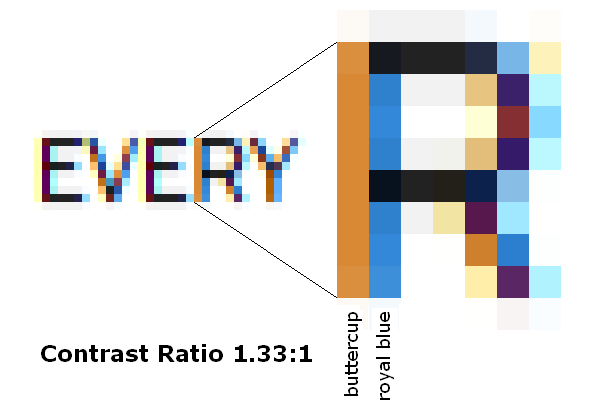
First line of Mike’s example, first ‘R’ left stem:

According to the W3C’s Web Content Accessibility Guidelines (WCAG 2.0, §1.4.6), on a scale of 1 to 21, with 1 being worst (gray on gray [sic]), and 21 being best (black on white), the combination of “royal blue” against “buttercup” yields a CONTRAST RATIO OF 1.33:1, which is marginally better than what you’d get for middle gray on middle gray.

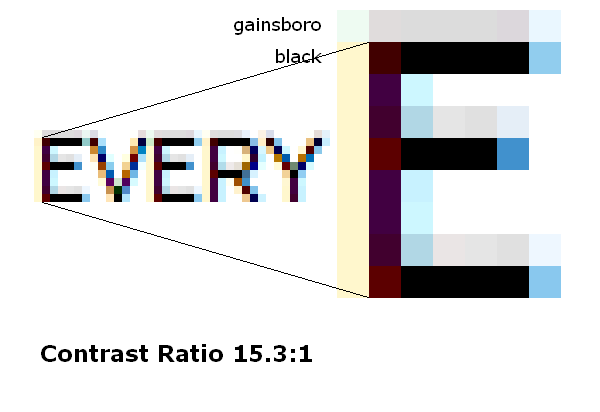
By contrast, for the same type size (9 pt at 96 DPI) in David’s example, top bar of the first ‘E’

for the combination of “black” against “gainsboro” the W3C metric yields a CONTRAST RATIO OF 15.31:1.

For reference, the WCAG 2.0 recommend a MINIMUM CONTRAST RATIO OF 7:1 for type sizes below 18 pt and AAA Rating.

I’d encourage everyone to draw their own conclusions. Mine are presented in §6.1 (end of §6.1.1 to beginning of §6.1.3). In Mike’s example, there is simply more “color fringe” than “black core.”

>> I’d encourage everyone to draw their own conclusions.

yep

Beat> I’d encourage everyone to draw their own conclusions.

Though it'd be infinitely better for readers, if we could hint to our own conclusions and not be restricted from serving our markets to the utmost of our abilities, by the opinions and technologies of a very few, as is now the case.

Exactly! That’s what I’m proposing in §6.3.6 and §6.3.7. Of course, with Quartz ignoring any and all hints, this is hopeless, and with DirectWrite only allowing fractional pixel positioning (sub-pixel positioning), this is not much better, certainly for anything below 200 DPI...

Beat.

I made the mistake of taking the screenshot from VTT, which results in extra bleed above the Cap height, and below the baseline, even though these alignments have been yanchored to the baseline and cap height grid. Why does VTT do that?

Here is a shot from a DirectWrite client, which eliminates this bleed. see top and bottom of E, above and below is white.

my point was, that if you want to hint a font to display with x+y CT, I think it is better to have these alignments fit to grid, and not have them defined by less than black pixels.

And I think my point is that I was demonstrating a broader and deeper issue, everyone knows what you are talking about exactly. I mean when I'm finished hinting for CT, there are no weeny weight gray pixels hanging out, just huge stripes of orange, burgundy or tan where I don't want em. Please Note, I do not mind the blue or grey as used in your last illustration ;)... Kind of makes me wonder if there is nothing wrong with grey in y, why not use grey in x as well! :)

>>And I think my point is that I was demonstrating a broader and deeper issue

is this your deeper issue?

displaying over the range of low resolution anti-aliased weights from thin to black, and from 8 to 16 ppm, that can be viewed at a single distance

>>everyone knows what you are talking about exactly.

everyone.. great!

>>DirectWrite only allowing fractional pixel positioning (sub-pixel positioning), this is not much better, certainly for anything below 200 DPI...

how do you come to that conclusion?

Mike, your hinting strategy has little or nothing to do with VTT. The small amount of extra bleed originates in the sinc filter proposed by MS Research at the time, which is the correct kind of anti-aliasing filter. DirectWrite may have chosen a box filter, instead, which doesn’t get you that extra bleed, at the potential expense of being less smooth in almost-horizontal glyph parts. This is the same kind of filter that is used in standard gray-scaling as well.

But that’s beside the point. Have a look at the 4th E in your size ramp (12 pt at 96 DPI). Its stem is a combination of cobalt blue and tawny orange. This combination yields a blurry mess with a WCAG 2.0 Contrast Ratio of 1.37 only. You can look at this in two ways: You have a 2-pixel wide blurry stem of vibrating colors, or you have something blueish that hardly distinguishes itself from an orangish background, like I did in §6.1.2 with the Schillerstein example. Neither way to look at it gets you anywhere near the high contrast of David’s example—not even anywhere near the minimum WCAG 2.0 recommendation of 7.0 for point sizes below 18 pt.

Speaking of hinting strategy and yanchoring, why is it that there is a 2 pixel jump in cap height between #6 and #7, but no jump between #5 and #6?

Quoting Mike: “how do you come to that conclusion?”

Simple: Below 200 DPI the stems get too thin for their black core to dominate the color fringes, and fractional pixel positioning (sub-pixel positioning) thwarts any intentions to optimize what little stem width is left for rendering contrast (cf §6.3.2).

you spend your time quoting numbers and references. Have a look at some type sometime, on a device below 200, say between 150 and 200. SPP works just fine. It also can work well at lower resolutions.

>>Speaking of hinting strategy and yanchoring, why is it that there is a 2 pixel jump in cap height between #6 and #7, but no jump between #5 and #6?

I adjusted the Cap height to round up @ 20ppem, the rest is the natural rounding based on the cvt value.

Beat> DirectWrite only allowing fractional pixel positioning (sub-pixel positioning)

I think DWrite supports other modes, I think IE 9 compatibility mode is not sub-pixely

Mike> I think DB meant a new thread on GASP,

Ha, you're probably right. Oh well, at least the new thread may keep this one on-topic.

Glad we have established that SPP (sub-pixel positioning) works just fine for looking at type between 150 and 200 (DPI).

Now let’s start reading text in real world.

>I think DWrite supports other modes, I think IE 9 compatibility mode is not sub-pixely

By definition, one would hope so, but no one can use that mode for anything useful, can they?

Mike, what do you think of my suggestion to extend the gasp table to be able to turn off/on sub-pixel positioning at specific ppem sizes/ranges? This is something I am interested in because fonts that are being designed to a full pixel grid at discreet ppem sizes are being thrown off that grid by sub-pixel positioning when used on the same line of text as other fonts not designed to the grid. This leads to some bizarre and distracting situations: I have an Arabic font spaced to a full pixel grid at 12ppem with most stems snapped to pixel edges, resulting in high stroke density and consistent glyph rendering at that size when the font is used in the first half of a line of text, but then if a different font is used to insert even a single glyph in the middle of the line, the same Arabic font in the second half of the line looks totally different because the grid has been shunted onto subpixels: dark and crisp in the first half of the line, light and fuzzy in the second. What I would like to be able to do is to say that a font designed to be spaced on full pixels at given ppem sizes should always be spaced on full pixels at those sizes.

Beat, I'm not sure that it is fair to cite the WCAG recommendations re. contrast with regard to one vertical stroke that, as the same englargement shows, is atypical. This is not to say that the rendering of that stroke is not a problem -- I'm not happy about it at all --, only that the WCAG recommendations surely refer to overall text contrast.

What interests me about David's illustration is that it manages to both have higher stroke density and yet to look fuzzier than Mike's. I presume we have Quartz to thank for this, and that Apple manage to make even quantised designs fuzz out even when they don't grey out. I'd like to see the same size range comparison as rendered in GDI and DWrite ClearType.

The other thing that interests me about David's illustration is what happens in this medial size (14ppem, yes?)...


...and to a lesser extent in the next size up, before all the horizontal weights snap back to neat proportions at 16ppem. Is this an example of the gradual degradation as one moves away from the optimally quantised size, to which I referred earlier?

Gasping for straws it is!
(Been feeling like the pivot man in a circle jerk. :)

rich

J.H.> Is this an example of the gradual degradation as one moves away from the optimally quantised size, to which I referred earlier?

In absolute quantizing, which this old demonstration represents, there is not much gradual degradation, to me. Now... people are very used to wysiwyg quality rendering, so, it is most difficult for people to see it perecisely, unless you show something maybe like this:

Mini-waterfall above, (and if it's not utterly clear pixel-ed, don't view it in your browser, drop it onto your desktop and use your default graphic viewer), is the font, Franky 14 Thin composed at 8-15 ppm. Mini-waterfall below that, is each size appropriate, (and absolutely quantized) font of Franky Thin, (until the weight merges with the regular), and then 9 and 8 ppm Franky Regular.

Then I changed the text slightly to show how easy it is to manipulate opinion if you want to cherry pick arguments about font rendering ;)

So, what you observe is probably not gradual degradation, it's probably an example of; 96 (glyphs) x 48 (weight/sizes) x 6 (approx. ave. params. per glyph?) / 24 days = 1,000 or so features to grid align per day by hand. Or, an example of the gradual degradation as one designer rests his face on the grindstone in motion.

J.H.> I'd like to see the same size range comparison as rendered in GDI and DWrite ClearType.

Me too, but right after the last time I tried to fight through word files not bringing the proper styles from the Mac to Windows, Windows rendering 1/3rd the fonts shown here too light to see in it's un-familized menu, 1.333 pixels per point everywhere, and word not using fractional points — that was when I stated that it was just too much, "Competition" as you put it, to try and help Windows users with fonts... this way.

After all, that demo was done for Mac, where hinting and antialiasing are never combined. On Windows, full x and y hints are the way to effect what's in this demo on Windows, (using "Standard" rendering on lots of weights).

Thanks, David. I wasn't sure if, in the original image, I was looking at absolute quantisation (size-specific fonts) or relative quantisation (range-specific fonts), and wondered if, the latter being the case, some of the things I was seeing were due to rounding off the relative quantisation in non-optimal sizes.

With regard to rendering demos, you could make a nice live demo with Franky web fonts, and then I could take a look in various browsers on Windows. :)

...nevertheless, here's a peak at this Windows font-head's head crash.

When I try to use MS Publisher despite all the "competitive" barriers mentioned in my last post, because Publisher does allow fraction points sizes, (giving me a chance to get the Franky fonts and their ppms properly composed), it's a completely different gamma (below), vs Word (above).

So does Franky have any hinting? I thought you were quantising and hinting, à la Verdana.
_____

Word and Publisher are both, ultimately, print media producers -- despite the creeping bloat of crap web export functions --, and what they're aiming for is wysisneuwygwyp (what you see is something not entirely unlike what you'll get when you print). If we're talking about fonts for screen readability, then we should be looking at HTML/CSS/webfont examples: wysiwspsigtttrohp (what you see is what some poor sucker is going to try to read on his phone).

J.H.> I thought you were quantising and hinting, à la Verdana.

True of the Reading Endge fonts which came after Franky.

Quoting John: “not sure that it is fair to cite the WCAG recommendations re. contrast with regard to one vertical stroke that, as the same englargement shows, is atypical”

Fair or not—I’ll leave that judgment to this thread’s readers. Here’s how I got there: For the sake of the example/argument, we’re trying to render nominally black text against a white background. With the combination of ClearType, sub-pixel positioning, and the actual pixel fraction on which an individual character/stem ends up, at text sizes and common display resolutions, I get all kinds of colors on these stems, but few if any black pixels.

As a dichromat these colors don’t mean all that much to me, but I do notice that some stems look sharper than others. With gray-scaling (box-filter) it seems fairly easy to see what combination of fractional stem position and width makes stems look fuzzy, and which ones render black pixels as black. With the colors it isn’t—certainly not for me—and hence the WCAG contrast ratio used in the process.

The contrast ratio is an entity I can see: in the “Schillerstein” example referenced above, the various ClearTyped and sub-pixel positioned ‘i’ and ‘l’ seem to render in some “malibu blue” against “peach orange” which means next to nothing to me, but I can see it is blurry, and the WCAG puts a number on that blur, telling me I’m looking at something that’s close to gray on gray.

The 2-pixel wide stem referenced earlier seems to render in a combination of “cobalt blue” and “tawny orange” which again means next to nothing to me, but the WCAG metric puts a number on it, telling me how little they contrast from each other. In other words, I am looking at a 2-pixel wide stem in gray where the actual/natural stem width is about 1 1/3 pixel. The colors with little contrast blur the 1 1/3 pixel to what looks like 2 pixels.

I picked a single stem as an example to avoid bothering this thread’s readers with too many numbers. Numbers seems to be discouraged—unfortunately so. If someone tells me it’s hot outside, this means little to me, because what’s hot for them may mean a furnace to me or a very pleasant Sunday afternoon, and vice-versa. Tell me it’s 25°C/77°F and I can decide on my own.

Likewise, if someone tells me this text looks blurry or works just fine, this means little, because it doesn’t put an objective number on the blur or contrast. If any of you know of a better method to determine blur or contrast, I’d love to hear. For instance, in David’s sample, I could count the number of black pixels on a stem and would find that there are about none, but it still looks more contrasty. The WCAG metric seems to give me a more useful criterion.

That’s why I don’t have a good explanation what makes “David’s illustration [...] to both have higher stroke density and yet to look fuzzier than Mike’s. What is it that makes it fuzzier to your visual system? If the Apple rasterizer executed instructions, maybe David could ‘put’ the gray at the top on the inside, instead? Or maybe your visual system picks up on black sub-pixels more easily?

There are a number of “tricks” to “boost” stroke density. Deliberate gamma under-correction comes to mind (choose the darkest sample in the ClearType tuner, or similar), along with various mathematical formulae I got to experiment with. If anyone knows what’s Apple’s “trick” and is in a position to tell, I’d love to know.

It all has to work together: Hinting (or outline quantizing in the absence of hinting), rasterizer, gamma, …, and—importantly—the end-user's visual system. If, like David, someone knows what they’re doing, “it is [easy] to manipulate opinion if you want to cherry pick arguments about font rendering.” That’s why I try to communicate objective criteria and refer to their sources, rather than looking at type and making subjective determinations. For, when it comes right down to it, I won’t accept “hand waving” or the statement that “some Y-men said so…” for a fact.

@Vernon Adams
I’m a bit late to this discussion but still wanted to point out Zuzana Licko’s contribution to quantising, which she did when she designed Base 9 and Base 12 in 1995.

Hi Mr Stamm, especially your latest comment makes me wonder who the anticipated target audience of Raster Tragedy is and, depending on the former, what the message is. Does it address type designers? Font producers? Rasterizer developers? And what would be the consequences for each of them?

Beat: “[...] a blurry mess with a WCAG 2.0 Contrast Ratio of 1.37 only.”
I agree that those CT stems are blurry & have lower contrast but I think the methodology for calculating contrast ratio is incorrect and gives much lower values than they really are.

In this thread, you used the blue and red color from the same stem to calculate the contrast ratio. So the calculated contrast is the inner contrast of the stem, which is not very useful. But what is the contrast ratio between background (white in this examples) and the stem? Something different and higher.

Using colors from the stems as a background does make sense when they are actually a background, like in “Schillerstein” example in the “ill” letters. But even here something bothers me, the images which are supposed to have the same contrast ratio look like they have much worse contrast than original.

One reason is that the contrast ratio is calculated for “ill” letters and then applied for the whole word, although some stems are on white background (which means higher contrast) and there are also perfectly black pixels for horizontal features which have a very high contrast.

Another reason is that this method completely ignores the subpixel effects heavily used by ClearType. The Schillerstein image could be viewed on a rotated LCD screen, or on B-R-G screen making the hard coded rendering a mess, yet the proposed contrast ratio is exactly the same in all circumstances.

Furthermore I think the subpixel effect is also a variable, depending on viewing distance, DPI, user settings... When looking closely I see more color fringing and less contrast but if the distance is great the colors are almost gone and contrast seems higher. So: When looking very closely (or on a magnified image) the calculated contrast ratio in “ill” is correct. With the higher DPI/distance it’s harder to perceive actual colors, subpixel rendering takes effect and the contrast ratio is not the same any more. This is also perhaps a reason why there is no definite answer for how much does CT increase resolution.

I am not sure how to properly calculate contrast for antialiased type. First thought: with grayscale antialiasing it could be that you have to calculate the average gray in the stem and then use this value as a type color. And similar with subpixel AA, only using the luminance of each subpixel instead of the whole subpixels. But the correct method is probably more complicated and includes the fact that one very bright color in the dark stem contributes only very little to the lowering of the contrast.

Also the blurriness, if we define it mathematically like some sort of filter (but exactly how?), and the contrast ratio are independent. I can imagine glyphs with two different blurry levels but with same contrast ratio, and the other way around, glyphs with two different contrast ratios but the same blurriness.

If you think that CT Schillerstein example is very bad, well, it gets even worse in terms of contrast. DirectWrite has much less prominent colors by default setting. Color fringing is reduced but on the other hand there is more blurriness and less contrast, generally speaking. Some stems, in this very sample letter “i” get rendered extremely lightly but than again, some stems have relatively high contrast (second “l”).

PS: I hope I don’t go into details to much. I learned a lot from The Raster Tragedy at Low-Resolution Revisited and really like it.

Beat, I'm going to avoid talking in terms of contrast, because I think what is really at issue is what I call stroke density. Contrast is a problematic term because it has a different common meaning in typography: stroke weight modulation, i.e. contrast between thick and thin strokes normally of the same stroke density. I also think by talking about (figure-ground) contrast we are talking about the symptom rather than the cause: if you have good stroke density, you can have whatever contrast you like, i.e. you can set light grey text on a dark grey background if that is what you want to do, and the structure of the letters will remain intact even if the contrast is not ideal for reading, which is not the case if stroke density is diminished.

The paradigm of stroke density is black ink, which is equally black on the page whether the stroke is a main stem or a hairline. This is not only the paradigm of typographic printing, but of the much longer, global manuscript tradition. I do not know of a single writing system that did not favour media that produced strong and consistent strong density. Even when such media were not available, people tried to get as close as they could with what was at hand. There is no writing system I am aware of that sought to exploit shading as a feature for quotidian text production and reading. So why are we even contemplating screen rendering mechanisms that rely of fuzzy shading to render letter shapes? Primarily, I think, to increase individual typeface verisimiltude, i.e. to make fonts on screen look more like identifiable individuated designs and less like generic bitmaps. Part of that involves something that I consider potentially beneficial to reading: filling in the corners between pixels so that curved strokes look like continuous strokes and not like disjointed sequences of straight stems and individual bricks. I say ‘potentially’ beneficial to reading because I think their value has to be measured against the overall stroke density of letters and against the definition of the figure-ground interaction (sharpness or blur).

Which brings me round to ‘Apple’s “trick”’ as you refer to it. There is a direct correlation in Apple rendering between stroke density and blur or fuzz: the stronger the stroke density you want, the greater fringe blur you have to put up with; conversely, the sharper the edge definition you want, the lower consistency in stroke density you have to put up with. For me, this is a lose-lose proposition, because I can't put up with either, and I do not believe that verisimilitude to a single unhinted set of outline across an open ended range of sizes is the right goal. TTF hinting enabled us to to tailor designs to specific device sizes, in effect implementing a form of optimised scaling from a single outline set. If hinting is taken away, we have no option but to create the individual optimised outlines for each size, as David did with Franky, because there is no other way to optimise for device sizes.

J.H.> ...because there is no other way to optimi[z]e for device sizes.

Relatively, agreed. But abolutely, there is another way, without anyone changing their rasterizer, their scaler, without leaving the dominant font format, or changing even the way type is specified by the user, (simplifying font specification by an uncalculatable order of magnitude in many cases for both print and web).

Back when Longhorn was a justborne calf, OFF was not on yet, WOFF had not yet begun to be forgotten, and this discussion was new... (and I want to render tiny big context here: Apple and MS were rightfully proud of their renderers, they didn't see need for any other options, a 'universal rise in resolution' was on the way "There are several 100 208 dpi monitors outside my office right now David", said one high ranking MS employee;), I suggested to you and this audience, (or was it the ATypI list back then?)), that the only way out + a long term right thing t.d.? — is Variation Technology on the client side, dear developers, and John.

@Karsten: I had a diverse audience in mind: font producers, interested end-users, and to some degree software or website developers. The dilemma with writing about font rendering is that it touches on a broad spectrum of topics which are not equally appealing to everyone, yet all the pieces of the puzzle have to somehow fit together for the end result.

I sense that some of this thread’s readers seem to have some kind of aversion for numbers, but I don’t know why this could be. Most of the math is mere arithmetic, adding and subtracting pixels and fractions of pixels, much like adding up sales and expenses when running a font business. Beyond that I’ve tried to accompany the math with a description in plain English (with the exception of §4.0.3)

When it comes to hinting in TrueType, the barrier may be TrueType itself. It takes a combination of computer geometry and programming in an obscure assembly language called TrueType, and a good deal of engineering to cater for the various font rendering methods and end-user preferences—assuming (and hoping!) the rest of the world doesn’t follow Apple’s example to abandon hinting altogether. Unless, of course, Apple’s example reflects your preference, in which case hinting is a non-issue.

@Miha: The reason I used the blue and red color seemingly belonging to the same stem is because that’s how stems are rendered when positioned approximately halfway between pixel boundaries. We are at the limit of what can be resolved by pixels. There is no “room” for white in-between. Put another way, if I render ‘ill’ in bi-level, with all stems positioned on pixel boundaries, using blue pixels against a red background, I get the same set of pixels as when I render ‘ill’ in sub-pixel positioned ClearType, nominally in black against a white background.

The numbers for “peach orange” (#FFD093) and “malibu blue” (#69B5E9) on white are 1.43:1 and 2.24:1. When the sub-pixel sequence is reversed (ie text rendered for a BGR screen is viewed on an RGB screen), the numbers can change, since red, green, and blue make weighted contributions. For RGB rendering, blue (#69B5E9) on orange (#FFD093) yields 1.57:1, while BGR rendering #E9B569 on #93D0FF yields 1.13:1.

Sure, the contrast isn’t all the same for the rest of the sample word; what I tried to show is what it would look like if the entire word were rendered the same way. If only part of the word is rendered with low contrast or high blur, it’s simply harder to see what this may do to the process of word recognition.

Also agree that we should separate the concepts of blur and rendering contrast (or stroke density), and that an appropriate mathematical model of blur would involve some kind of a filter. In turn, this gets us into Fourier transforms, convolutions, and what not college level math—a direction I was trying to avoid.

What we can see without math is the number of black [sub-]pixels (the black core), and the number of [sub-]pixels it takes to “ramp-up” from the white background to the black core (the fringe). For the purposely chosen Schillerstein example, there is simply much more core than fringe, avoiding to say, all fringe, smudging the distinction between contrast and blur.

How to determine this in a simple way that can be explained to a wide audience? For instance, in that 4th E I picked apart from Mike’s size ramp, the outline would have the stem 1 1/3 px wide (4 sub-pixels), it is rendered with 2 px (6 sub-pixels), yet only 2 sub-pixels are solid black. We could define an “aperture ratio” relating the 2 solid black pixels to the total of 6 sub-pixels involved. For larger type sizes or higher dpi, this aperture ratio would increase, but without filter that models the contributions of the fringe sub-pixels I’d hesitate to put a number on it.

@John: I was struggling with the terminology given the relative generality of the word “contrast.” At the time, separating rendering contrast from design contrast is the best this engineer could come up with. But if stroke density is more common and less problematic than rendering contrast, I’ll be happy to revise the text.

Also, separating figure-ground-contrast from stroke density makes sense, certainly at large enough ppem sizes where we don’t get all sorts of symptoms mixed up. In technical terms it reminds me of the difference between the alpha channel and the text/background color pair blended by the alpha channel. I’ll need some time when back from vacation to give this some deeper thought.

Giving up stroke density for verisimilitude is not my preference, either, particularly when I have to read text, as opposed to looking at a print preview. But people’s preferences vary, which is why I suggested to make hinting more adaptive and allow end-users to select their preferences in a control panel that goes way beyond the ClearType control panel. That is, if future rasterizers execute any instructions at all.

Thank you. I am not scared of numbers, I only think that numbers alone are not enough. And TT instructions are not that obscure.

Since you mention "following Apple's example" – perhaps the first thing to do is pointing out that there are two fundamentally different approaches to rasterization, i.e. two different & mutually exclusive rasterization ideals or goals:

Goal 1) Rasterizing true to the device grid. Method: pre-rasterization grid-fitted scaling. (Microsoft, Adobe.)
Goal 2) Rasterizing true to design. Method: linear scaling and modulated rasterization. (Apple, Karow.)

Both of them are legitimate goals/ideals, yet: From a goal 1) perspective, asking for methods originating from goal 2) can only be perceived as compromising goal 1). And from a goal 2) perspective, asking for methods pertaining to goal 1), like grid-fitting, even if a little bit, can only be perceived as compromising goal 2). Now there are two things that bother me about both Raster Tragedy and this subsequent discussion. One is the obvious attempt to reduce questions of goals/ideals to questions of methods, technical questions. Dealing with the latter, however, is pointless as long as one is not clear about the former. The other is that that the goal 1) approach is presented as rasterization-as-such and ideal rasterization in one when it is but one specific approach to rasterization among others.

You and John are asking for more options. Yet, noticeable in Raster Tragedy and even more evident here, the problem is not too few options but too many and on too many levels. You mention catering "for the various font rendering methods and end-user preferences". This is the source of problems, Microsoft Windows's problems actually, which you present in Raster Tragedy. These problems are self-made problems. And the solution is not adding more options but reducing options. Allow a font to clearly express whether it expects goal 1) rasterization (b/w or Standard or ClearType smoothing) or goal 2) rasterization which then is binding – regardless of applications' or, worse, end users' preferences. (This is not about goal 1) vs goal 2) but about failed infrastructure design.)

Type designers' expectations. I am certain that most type designers with a print background design type with a goal 2) perspective in mind and (a misunderstanding) consider 'hinting' as, well, some additional data needed to please Windows's rasterizers. Most designers just want to design type, not program TT instructions. Like designers just want to design books, not program PostScript. Then, economy of input vs output. Microsoft's goal 1) approach is highly demanding as to the required input: production work, amount of data produced, bothering users with options. Apple's goal 2) approach isn't. Feeding Microsoft's goal 1) approach rasterizers with the same input as Apple's goal 2) approach rasterizers gets me rather poor results. There are other factors that render a technical solution & its methods (in turn based on one or the other goal) practicable. In the real world there are limitations on time and budget. These do not necessarily speak against goal 1) rasterization as such but against current methods to achieve it. In so far it were nice if Microsoft would acknowledge the real world and offer, as an alternative, better goal 2) rasterization too – not for all fonts, but for those that ask for it (see the preceding paragraph).

David: Variation Technology on the client side

Yes, thanks for the timely reminder.

Captured from web.archive.org on 20 Aug 2019. view this capture