Typophile

CT Design Guide

David Berlow

So is this right?

Alpha CT Omega Font Spec.

Take TT outline that has been made for screen use, e.g.:
a. alignments quantized to a norm of 8, 2 for descent, etc.
b. vertical stems quantized to 8, Cap round and square, etc.
c. horizontal stems quantized to 4, 2 thick, two thin for O.S* e.g.
d. all laterally and bilaterally symmetrical contours, are exactly.
e. Quantize all kerning data.
f. There are also built-in assumptions about good screen letter design including, but not exclusively, managing maximum distinctiveness-in-appearance among 1lI!ijïíî and ¡, e.g.

Additional CT specific outline manipulations:
a. for full horizontal adaptability to the rasterizer,
1. Quantize all horizontal counters.
2. Quantize all inter-character spaces.
3. Quantize all kerning data.
4. Lighten all diagonal strokes.
b. for full familial adaptability to the rasterizer,
1. Lighten all diagonal strokes in Italic.
2. Lighten all diagonal strokes in Bold Italic the same amount as
was reduced from the normal italic, (and from roman diagonals?)

Quantize, in this context, means to reduce an indiscrete group of values to a few discrete groups by averaging them together. This should be done to the values, representing features of typefaces, whenever the complexity of these features far exceeds the ability of the output to display them to the user.

Lighten in this context, means to remove areas of black (that would otherwise be controlled by TT hints).

Nothing?

hhp

I pinged the ClearType team, some of them are on vacation this week.

Si

Does anyone else have a link to good documentation on CT hinting? I feel like it should be somewhere with the MS typography area. Would it be with the documentation for the VTT tool?

[Edit] Carl, In general the CT team has said that in most cases special CT hinting is not required, but 'light' y direction hinting is appropriate, with some x direction hints to help in print and certain other scenarios.

There are some advanced techniques but these are really only appropriate in very specialized places (for example in a UI font), but in these cases they've often been able to give more specific advice and pointers to those that need it.

[edit] David, the CT team are discussing your question - expect a post here within the next day or two.

Cheers, Si

Hi David, I am not sure I fully understand your spec, but I think I get the general gist of it. It actually sounds like you are describing a spec to design for low resolution which is the case with ClearType, and so generally makes sense. Up until this point we have made no fonts targeted to work “only” with ClearType onscreen. The fonts we made were primarily made for that purpose, but also intended to work for high res print, so we did not take the approach of Quantizing everything. It seems like a good idea to do this, and may help the individual glyph(s) render better onscreen in a more uniform way, but it also may push the design in a direction of slight uniformity. As with any “spec” for designing a typeface, it’s a pointer in the right direction, but the real task to getting it right is in the proofing. And so like any other type design project, it’s not that different. The glyphs you mention as having to be designed to be different, seem more like general rules for any typeface design. In a spec for CT, I would be more inclined to give “rules” for the design of parts of glyphs, i.e. serifs, horizontal features, diagonals. Let’s take the CT font collection. One of the things we noticed as we proofed existing fonts in ClearType was that certain glyphs did not render well and produced more "jaggies" than we liked at the lower screen sizes. As you know CT works in the direction of the stripes, so in general for LCD screens, that would be the horizontal direction. For Western fonts at least this is fortunate, as this is where most of the main info is, stems, symmetry, spacing, all of the things we had problems with in bi level rendering. So with CT turned on most of these problems go away, and actually with your approach to Quantize, this may give great results straight away. However we are still using the old full pixel method in the y direction. So, in the design of glyphs like the lowercase "g" particularly the spectacle type of "g" the horizontal part is better designed as horizontal as possible, to reduce the effect of “jaggies”. Take a look at Perpertua on screen with CT, it works pretty well, but the "g" really does not render well, as it has a very vertical and lengthy part to the glyph. By making the design features as horizontal as possible, you can get great looking results, without making too many compromises, and it also helps the rasterizer naturally render the glyphs more cleanly. I think lightening the diagonals is a good idea, but not too much, and once again this can be best viewed when proofing. Same goes for the Bold weights. Actually as I mentioned to you before, it may be better to design the Bold font a little bolder then normal, as it now needs to stand out from the Roman a little more. In the bi level rendering, the regular font was usually 1 pixel while the bold was 2. This was way too much, and CT makes this situation much closer to print.

As far as hinting for CT, there really is no big mystery. Of course as Si mentioned there are some advanced techniques, but in general, all that is needed is a good solid set of ydirection hints, to control alignments, x-heights, cap heights, all the usual suspects, remember that the y-direction does not get the extra resolution, so actually it becomes more critical to get this right. I will have a chat with Simon and see if I can get something posted on the Web about this.

let me know if any of this helps

mike

It does thanks. I have some questions on what you said, but the biggest is about the Roman/Italic weights. If horizontal hints are abandoned, but vertical are not, then horizontal weights can only increase relative to verticals, they cannot decrease. Diagonal strokes, likewise, can only increase in weight if un-hinted. Since Italic increases in weight faster than the Roman, as the resolution goes down, then one must expect, and John Hudson indicated that it was the case in the CT fonts, that Italic styles needed to be lightened from their nominal weight for print. I should be obvious in either the print samples or the screen samples.

Also, I'm confused by the conflicting guide to hinting from You and Si...

> conflicting guide to hinting from You and Si

Please ignore me, Mike is the expert. I may well have mistyped when transcribing Mike, Tom and Beats advice to this forum.

Mike, if you spot where I've contradicted your advice let me know - fortunately unlike real life typophile lets me correct my mistakes.

I think David was referring to the y-direction hinting for print advice. Actually its mostly the other way around. For the purposes of this discussion we are talking about CT onscreen, but if you also care about print, then adding x-direction hints to main stems, will help maintain good output at higher resolutions such as printers. If you do not care about print output, or you do not care about black and white screen output, then you can mostly do away with x-hints. There are some cases where some might be needed, as you cannot always do x and y hints totally independant of each other, but for the most part I have found generally good looking results without x hints for CT. The y alignments, x-height, caps height, decender control, and accent control, as well as contolr of certain glyphs like lowercase "e" and anything with a crossbar, need careful attention. The goal in all of this is to cause as little distortion to the original outline as possible.

as far as italic weights go, it would seem to me that once again proofing some key characters in the regurlar v the italic, from the outset will give you the idea on weight. I will have to go read Johns theory on italics again, but either way its all pretty subtle, and making these decisions by eye are what type design is al about.

mike

Not directly concerning CT, but arising from some of Mike's comments:
Doesn't TT allow hints to depend on output PPEM? If so, shouldn't it be
possible to avoid compromising screen display for print and vice versa?

hhp

True Type is pretty powerful and adding ppem specific hinting will increase code and time, but can be done. Other advanced methods of hinting for CT can also be done. I will try and cover some more of this in detail when I get around to posting more information on the MST website.
apologies for the typos in my last post...
mike

> will increase code and time

For diminishing returns - I understand.

One other tangential question: I remember when VTT was modified to be able to specify if a hint was for 1-bit OR grayscale rendering (the former being the old MS core font cornerstone). What I've since wondered (and at TypeCon'04 somebody from Ascender replied to me in the affirmative, but I'm still doubtful) is whether anybody actually ever made a font with rendering optimized for teen-PPEM grayscale (non-subpixel) rendering. Or did CT and/or too-much-effort/size kill that avenue.

hhp

with a little investigation you can find out if you are in CT.

Then with a function you could do something different such as lightening or thickening a stem in X. But you never actually know what your target device is so it's a bit of a waste of times in many cases.

It can be done but it's really a bit academic. I've done conditional CT hinting but its mainly CT Deltas (functions not true Deltas) and these were mainly to thicken up an UC stem that was a bit light compared to other stems.

>I think David was referring to the y-direction hinting for print advice.

Fixed, thanks Mike.

"Take a look at Perpertua on screen with CT, it works pretty well, but the “g” really does not render well, as it has a very vertical and lengthy part to the glyph."

I've migrated to a bilaterally symmetrical lower bowl for screen fonts.

"The goal in all of this is to cause as little distortion to the original outline as possible."

A noble goal. But as the resolution falls the goal should change to causing as little distortion to the best outline possible.

"If you do not care about print output, or you do not care about black and white screen output, then you can mostly do away with x-hints. "

The other "if" you should add, is, "if the composition system is exclusively going to sub-pixel position the origin and advance width of each letter according to the original outline, and only the original outline, then you must! mostly do away with x-hints, because, in the lower reaches of resolution. One cannot design/hint for separate distortion of figure and ground, can they?

The other if, is: if type were just x and y, this'd be short discussion. The only reason it continues, is because type has x, y, and a. and these angled strokes are both x and y. I of course, believe that no avenue to a fully crafted solution exists unless x and y and a are all under complete control of the designer, which is TT and any number of "natural"rasterizers.

But, be that as it may be, I think everyone agrees that at the very lowerst reaches of resolution aliased type works best yes? (7-10). Agreed? So, is CT going to have a base ppm, below which aliased letters & spacing are used, or in the lower reaches, what?

"Johns theory on italics again, but either way its all pretty subtle, and making these decisions by eye are what type design is all about."

I am certain that making decisions by eye is appropriate in many many instances of type design. But, there are other instances of type design, where the term eye is not appropriate because the decision is bigger than any eye can take in.

"is whether anybody actually ever made a font with rendering optimized for teen-PPEM grayscale (non-subpixel) rendering. Or did CT and/or too-much-effort/size kill that avenue."

Rip Van Papazian just woke up? Can you say that again?

> I think everyone agrees that at the very lowerst reaches
> of resolution aliased type works best yes? (7-10)

1) The lowest reaches are below that, and there a-a adds a critical dimension to legibility. Not that I enjoy reading that stuff. :-)
2) Show me any bitmap font in your range, and I will improve its readability with grayscaling.

> Rip Van Papazian just woke up? Can you say that again?

Are you thinking I'm asking for something that's been
done a million times already? Then let me try again:

Is there a font that controls its (non-CT) grayscale rendering using hinting?
For example makes the top-right of the "n" actually look nice.

Is there a font that looks like this
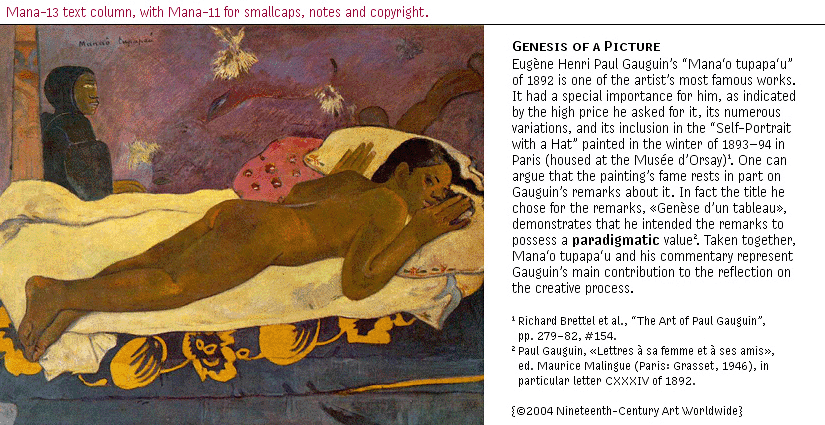
http://www.themicrofoundry.com/other/Mana13&11.gif _
via hinting?

(BTW, that there is nothing exotic format-wise: it's a
TT font, and it works the same in Windows and OSX.)

hhp

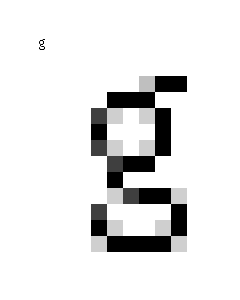
So:
How hard would it be to hint a "normal" print font to rasterize the "g" below?

hhp

in Windows you are normally best to turn off grey scale when the stems are one pixel. So you would not end up with that image.

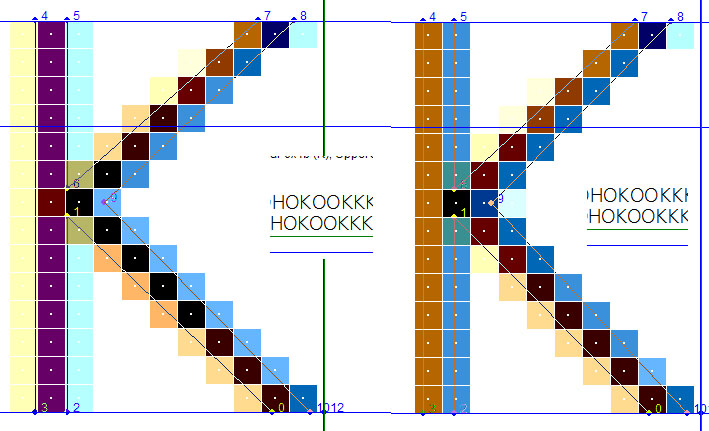
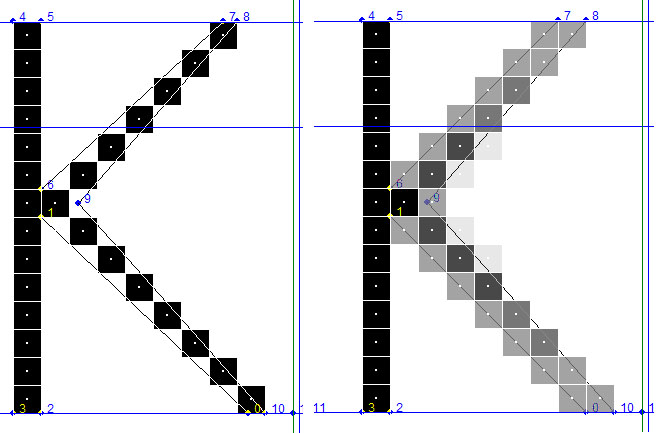
Cleartype tweak example:

image on the left, left stem of 'K' is light, image on the right a conditional change is made.

same size and glyphs in binary and greyscale same hints. Final font used 'gasp' table so that this size would not be greyscaled since it had only one pixel stems. (20 ppem)

> you would not end up with that image.

Hmmm, let me try this again: I want to end up with that image. Currently I do it using partial "virtual pixels" in a pixelfont; but the resultant outlines can't be used for print. What I'm wondering is why some TT hinting guru hasn't -as far as I know- produced a "normal" outline font with grayscaling enabled at teen PPEM sizes, solid stems and bars, and hinting to makes the curves and diagonals looks decent. Is it because it's too much work? And the stems don't have to be 1 or 2 or 3 pixels - they just have to be solid (and monochromatic, please).

The "K" example is intresting though.

hhp

Actually, the stems (and bars) don't absolutely have to be solid,
they just have to be controlled, not left to the luck-of-grid-draw.

hhp

you can get close but in the outline the curve points will create percentages of grey and not full black as you have done.

but in TT you can almost anything (except randomize). this isn't correct = You could vectorize the outline by using the lowlevel TT instruction flipon/flipoff which runs a point to/from an on curve to an off curve, put them all on curve at some sizes then back to off curve then you could align points to a grid. but you can flipon/off is for something else. I'll have to look up how I did manipulate the outline. But yes you can manipulate any outline to do almost anything at low sizes as long as the instructions are used.

I made an example of that turning a Uppercase N into a lowercase n, at small pointsizes at RIDT back in 97 I think.

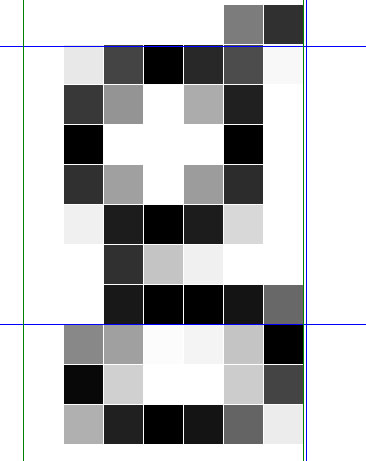
this is a random lowercase 'g' hinted in VTT that I could get near to what you have but would have to vectorize the outline to make those extreme black to white area that are only possible when you are on a pixel boundary.

Thanks for trying your expert hand a this. I hadn't heard of "vectorize the outline" before. Is that different than delta-hinting? Because delta-hinting can make solid pixels at whim, no? If so, why not use that?

> I made an example of that turning a Uppercase N into a lowercase n

Yes, I remember that! Even more impressive to me
was your usage/supression of traps depending on size.

--

BTW, about italics again, here's an old -cached- thread with interesting stuff:
http://72.14.203.104/search?q=cache:a4_AVy_YddIJ:www.typophile.com/forum...

Look towards the middle of that thread at the "h"s.
Honestly, which italic is better?

hhp

OK, the hijack is over. All hostages released unharmed.
All the RSB (Revolutionary Screenfont Brigade) asks is
that they alert their network media to the following:

http://typophile.com/node/18802

hhp

Sorry to be late to the party. David, my comment about CT italics on the ATypI list was not that 'that Italic styles needed to be lightened from their nominal weight for print'. On the contrary, what I noted was that although the diagonal stems gather more pixels the colour filtering makes them appear lighter than the vertical stems (although this is in part dependent on the tuning of the CT renderer). So in order to maintain a good contrast (notan for Hrant) in the italic, you do not want to make it too light. So my recommendation is to sort out the weight of the italic first with a few test glyphs, and then derive the appropriate weight for the roman relative to the italic.

Here is the exchange from the ATypI list. Your initial quetion in italics, and my response in bold. The link is still live.

We all know that to make a non-upright style to match an upright style, you make the non-upright style lighter to compensate for the angle, and you're done for print. But we also know you cannot trust the weights to look right on the screen, because the upright gathers fewer pixels than the non-upright, the "color" of the non-upright out darks the upright, (until it's time to print).

Some of this depends on how one tunes the CT renderer. What I notice, with the fairly light tuning I use, is that although the oblique stems gather the same number or more subpixels than the upright, the colour filtering is such that they appear lighter. The contrast of the pixels gathered in the upright stems tends to have a higher contrast than those in the oblique.

When I was designing Constantia, my solution to the issue was to make the roman a touch darker than I would have for a purely print type, and this gave me more leeway with the weight of the italic: I could ensure that it didn't render darker than the roman without making it too light when printed.

See: http://www.tiro.com/John/CTroman-italic.gif

[Note that this screenshot is of Windows XP CT rendering in Word, so does not display subpixel positioning. The usual caveats apply about looking at ClearType in screenshots, especially on different monitor resolutions.]

David, of the MS CT fonts, Jelle's Cambria is probably closest in approach to the kind of quantizing you describe.

> Jelle’s Cambria is probably closest in approach
> to the kind of quantizing you describe.

Is it telling/worrisome that Cambria also happens to be the ugliest one?
I mean in its outlines.

hhp

hrant, i thought you were a fan of ugly. >^P

Ah, touché.

hhp

"not that ‘that Italic styles needed to be lightened from their nominal weight for print"
oh.
"my solution to the issue was to make the roman a touch darker than I would have for a purely print type,"
Yo ko...
"" So my recommendation is to sort out the weight of the italic first with a few test glyphs, and then derive the appropriate weight for the roman relative to the italic."

Not really on any design trajectory I'm familiar with, but I can do that.

So, really, even moderately optimized CT fonts should not be used for print.

> even moderately optimized CT fonts should not be used for print.

1) Is that your opinion of the Longhorn/Vista fonts?
2) There's always superhinting... :-)

hhp

So, really, even moderately optimized CT fonts should not be used for print.

It depends what you like type on paper to look like. It depends on what kind of printing you are talking about. It depends on what kind of paper you are talking about. There is no more a general case for print type than there is for screen type. There are probably some screen and print conditions that are actually closer to each other, in terms of what is desirable in an optimised typeface design, than to other conditions in their respective media.

I should probably add that I like dark type, and think that a lot of common types used in print are too light and grey.

"It depends what you like type on paper to look like. It depends on what kind of printing you are talking about. It depends on what kind of paper you are talking about."

It also, apparently, depends on who you talk to. ;)

"There are probably some screen and print conditions that are actually closer to each other"

Can you give an example?

"There’s always superhinting… :-)"

No, there isn't superhinting, as you call it, is only useful in systems where the spacing is discrete.

> superhinting, as you call it, is only useful
> in systems where the spacing is discrete.

You mean integer (because 1/3 is still discrete).

I can understand that in terms of results-for-effort*, but not technically. What's there to stop a hinter from tweaking the outlines, per PPEM**, with 3x x-axis resolution? And why would VTT have been given the ability to distinguish between 1-bit versus gs hints? For somebody who prefers Mana's rendering quality to the CT stuff (for more than one reason) might it not be not only doable but worthwhile?

* Which is probably a big reason why no font -except maybe Palatino
Linotype, but I suspect to a very limited extent- has done that yet.

** BTW, I got "superhinting" from the big boys. The difference between regular hinting is the addressing of PPEM. I could use "delta-hinting", but that's too specific to the small movement of individual vertices.

--

So John, you're saying that CT leans designs towards a darker weight; and causes italics to be the pivot point for weight determination? Interesting. Stuff's coming out the woodwork - gotta love Typophile. I like darkish fonts too; but I much prefer it determined by humans, as opposed to being a side-effect* of a corporation's need to keep "improving" (as much as I like CT).

* Unforseen, and/or maybe uncared for?

And David, you're saying that CT optimization puts too much
strain (aesthetic?) on outlines. Interesting. I can use that.

hhp

"And David, you’re saying that CT optimization puts too much
strain (aesthetic?) on outlines. "

I did not say that. What I said was that dividing the optimization among hints, outline and rasterizer, (the way CT does), puts enough strain on the outlines to make them less better for print, which John and MS are obliged to deny.

OK. So what kind of division of optimization would be better?
Isn't the solution to have superhinted-CT, so you can warp
print-optimal outlines to whatever you'd like onscreen?
I still don't understand why you think that's not doable.

hhp

Can you give an example?

No.

What I said was that dividing the optimization among hints, outline and rasterizer, (the way CT does), puts enough strain on the outlines to make them less better for print, which John and MS are obliged to deny.

I don't think I'm obliged to deny that. But I think I can say that the statement is less accurate about ClearType than it was about b/w bitmap rendering, and it is less accurate about ClearType on my Dell computer than it is about ClearType on my Panasonic computer, and it is less accurate about the way I have my ClearType tuned than the way huge swathes of Windows users have their ClearType tuned.

I certainly don't claim that ClearType has erased the distinction between screen and print, but together with advances in screen technology it has narrowed that distinction and, in the process, created an interesting design space. Constantia was a deliberate attempt to create a hybrid screen/print typeface within that design space. If I had optimised it for screen alone, it would be different. If I had optimised it for print alone, it would be different. But I was trying to optimise a dual-media typeface, making it as good for screen as possible without making it completely inappropriate for print, and as good for print as possible without making it useless for screen.

So John, you’re saying that CT leans designs towards a darker weight; and causes italics to be the pivot point for weight determination?

The observation about italics is simply my own conclusion, arrived at while designing Constantia. It is a methodology that I found helpful in managing the relative weights in the ClearType environment. I'm quite certain that there are other methodologies.

The observation that a slightly darker weight is desirable in ClearType has been expressed numerous times by people in the ART group at MS. The Berling Antiqua fonts that shipped with the MS Reader are slightly heavier than the common version. I'm not sure about the Frutiger.

> the statement is less accurate about ClearType
> than it was about b/w bitmap rendering

Really? I don't see that, when you consider that the 1-bit stuff was superhinted, while the CT fonts are not (and David seems to think they can't be). But let me ask David, since I myself am actually not seeing the problem (yet): is Georgia closer to your ideal than the CT fonts?

One place where I do agree though is the Bold: even though I've never managed to extract a confession that the Bolds were too bold in the old MS core fonts because of the screen, there have been slips that affirm it, plus it's really obvious anyway.

> it is less accurate about ClearType on my Dell computer than
> it is about ClearType on my Panasonic computer, and it is less
> accurate about the way I have my ClearType tuned than the way
> huge swathes of Windows users have their ClearType tuned.

You're talking about the screen. David is talking about print,
and no matter how the CT fonts look onscreen using a given
setup the outlines are the same.

> it has narrowed that distinction

1) Again, as above, I'm not seeing that.

2) In terms of WYSIWYG, I think that's an illusion.
When resolutions are so different, it's just not the same design.

> Constantia was a deliberate attempt to create a hybrid screen/print typeface

But therein lies the problem, no?
(BTW, as you know, I do like Constantia.)

> I’m quite certain that there are other methodologies.

But you like yours best, no?

> The Berling Antiqua fonts that shipped with the
> MS Reader are slightly heavier than the common version.

I didn't know that.

BTW, I'll always remember my abrupt shift in opinion when I first saw Berling used for the Reader: I started with a "pfft", but then it hit me how suitable the vertical proportions and details of finish were (at least for a canned, as opposed to custom, font).

hhp

But therein lies the problem, no?

No, therein lies the design brief :)

Obviously, if you are not optimising for either screen or print, then you are compromising both. But if your goal is not to optimise for either, but to create as good a hybrid as the target rendering technology on the screen side will allow, then compromise is the design solution. Now I think David is quite right to question whether the target rendering technology of ClearType is really good enough, close enought to print, to establish a design space in which such hybrids are viable. That is the sort of question that should be asked, and in many respects the CT font collection represents the efforts of several different designers to respond to that question, since the general design brief was for types designed for CT rendering which would also look good in print, and the specific brief for Constantia was for a typeface that could be used in both eletronic and print media editions.

But you like your [methodology] best, no?

There were half a dozen different designers working on the CT fonts (not including the Japanese design, but including Matthew's Latin, Greek and Cyrillic companion), and each took a different approach to the brief and worked out a different methodology. Far from saying that I like mine best, I think the range of possible approaches is far from exhausted, and I don't think we're in a position to claim that there is a right way to design for ClearType that everyone should follow. It is still very much a live design problem, which should be subject to more thought and, crucially, explored in more designs.

If I were starting Constantia now, with what I've learned and observed, I would certainly do some things differently. Most likely, my approach would combine aspects of the methodology I developed for weight with Jelle's approach to spacing in Cambria, which I think worked out better for screen than Constantia's.

Certainly, I'm a big believer in the centrality of compromise.
But your/David's question concerning the viability of these CT hybrids stands.

> Jelle’s approach ... worked out better

Could you elaborate?

hhp

I'd need to spend some time actually analysing Jelle's spacing: at the moment I'm just responding to the overall results. In general terms, the spacing of Cambria is slightly looser than Constantia, but I'm not sure how much this accounts for.

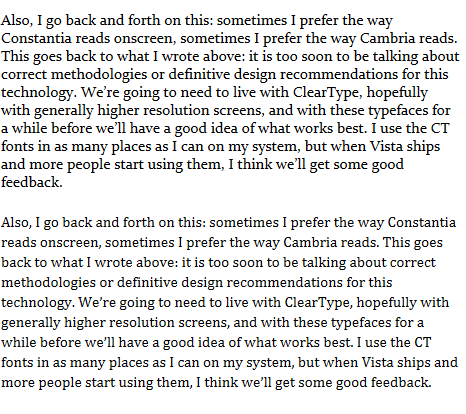
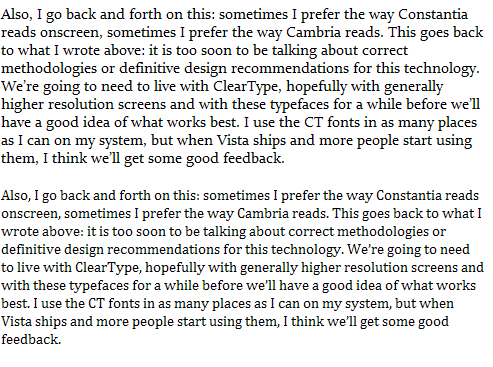
Also, I go back and forth on this: sometimes I prefer the way Constantia reads onscreen, sometimes I prefer the way Cambria reads. This goes back to what I wrote above: it is too soon to be talking about correct methodologies or definitive design recommendations for this technology. We're going to need to live with ClearType, hopefully with generally higher resolution screens, and with these typefaces for a while before we'll have a good idea of what works best. I use the CT fonts in as many places as I can on my system, but when Vista ships and more people start using them, I think we'll get some good feedback.


_

I like the fact that Constantia looks black like type should, and not the aenemic grey of most onscreen type, but the slightly looser spacing of Cambria is very pleasing.

The Cambria example also seems to have — or at least it feels it has — more interlinear space. When I look at the two paragraphs, the one set in Constantia feels like it was set solid, or was vertically "squooshed".

In addition to being lighter than Constantia, one other thing making Cambria more pleasing to read might be its narrower proportions. I feel that the wider proportions of Constantia make it less faster to read too.

That sample uses subpixel positioning. If that's not available until Vista, could you please show what Windows XP would, since that's what people will be seeing for at least another year? But a more important adjustment I'd ask for is to make the apparent sizes closer. I can see that you've equated the x-heights, but Constantia has fully two pixels more height there*, plus it's darker**, so it becomes harder to compare the two. The third thing I'd recommend changing is the leading: Constantia has less apparent leading than Cambria (which makes it look [even] darker). If you could put up a revised image that would be nice.

* Proof that there's certainly more to apparent size than the x-height.

** Which is why it needs to be tighter, clearly.

As it stands, on my screen (pretty lo-ppi) Cambria looks better; and this makes me wonder if there isn't something to David's complaint after all: as I've said before (sorry, Jelle) Cambria is also the one I find uglier. But I'd rather wait for a revised image to be sure.

BTW, another question: At what PPEM does Constantia
acquire two full pixels of stem width? And Cambria?

hhp

Something else:
I noticed that double-el combinations in Cambria exhibit the same color pattern for each el. This is not the case for all doubles (like "ee"), although the double-el arguably has the greatest need to look consistent, seeing as how it's just a pair of adjacent sticks. For me this a big plus, with the double-el in Constantia shows one of the three main things wrong with ClearType (that a character's rendering varies depending on where it falls on the subpixels). What I'm wondering is, is this something Jelle did on purpose, or is it a happy coincidence? If the former, is this something he did for this PPEM only, or did he use [super]hinting to make the width of the "el" snap to the subgrid for each PPEM?

Also:
Why do you think Cambria is exhibiting less color fringeing than Constantia?
Is it simply a matter of luck what PPEMs each "likes" in that way?

hhp

Oh John, you and spacing, your bete noire. Please comment on the latest spanner I have to throw into the works: Cnet's shootout of the two available 30-inch high res consumer LCD monitors reveals that Dell's has antialiasing built into its hardware. What are the implications of this for ClearType and other rasterisers? Will hardware antialiasing become prevalent? How will it conflict with software antialiasing?

And how necessary is hinting today if Apple's Quartz presently discards all TT and PS hints and users appear to be delighted?

Would someone - John is probably the only person with both the energy and the expertise to do so - please post some illustrations revealing the effective differences between ClearType, CT2, Cooltype, and Quartz rendering, along with some discussion points? Obviously this should include comparative representations of CT fonts, 'ordinary' TT, and 'ordinary' T1. A daunting task but it would be very illuminating.

What will be far more difficult is to test and illustrate how well Dell's hardware antialiasing is working, since that would require some sort of standardised photographic setup I imagine. Who else is doing hardware antialiasing or has plans to do so? Are there any publications that refer to it? David I realise this isn't entirely on-topic, but it's not altogether off either, and I was so surprised to learn of hardware aa that I thought I had to mention it.

On this blog

http://www.digg.com/hardware/30-inch_Apple_Cinema_Display_vs._Dell_Ultra...

there are some interesting comments on the Cnet review, some casting doubt as to whether hardware AA is really occurring. Could the reviewer really have made such an error? There is also an interesting comment by someone who claims that Quartz-rendered text is easier to read than CT.

Hardware anti-aliasing works based on bitmaps, right?
So it's necessarily hopelessly inferior to anti-aliasing from vectors.

The thing is, AFAIK such display systems work by taking a
double-resolution image and anti-aliasing it down to their
native resolution* (because it's cheaper than having that
great a resolution) and this might throw off CT's colors.
But: you could always write a special driver; and you
should be able to turn off the hardware AA.

* Not much to test, really.

BTW, anybody remember those hi-res b&w monitors (Viking, I believe) from the 80s? Not a new idea.

> how necessary is hinting today if Apple’s Quartz ...

Small stat for you: Mac market penetration: ~5%.

> users appear to be delighted?

Apple users get delighted at anything with an Apple logo on it.
Except maybe if it blows their eardrums out.

--

The global comparison you want would be revealing, but there is
the issue of gamma difference between platforms, and you would in
fact be hard-pressed to find anybody to do it for you. Why don't
you do it? And be sure to include the rendering that outperforms
them all onscreen: handmade gs.

BTW, some combinations of such comparisons have been done,
including on Typophile. My own conclusions have been that:
1) For Roman, the quality order is: handmade, CT, Quartz, CoolType.
2) For Italic: handmade and CT are tied overall, then the rest again.

But what would blow them all away is superhinted CT.
Or handmade subpixel, which however requires color addressing.

> someone who claims that Quartz-rendered text is easier to read

Let me take a wild guess: he also happens to be the
proud owner of both the iPod and the Mini iPod,
and an Apple-branded hoodie?

hhp

The comparison above was thrown together very quickly in my CT test tool (yes, using subpixel positioning), with both fonts at a nominal 9pt. I didn't play with the various tuning and API option settings in the tool, and Constantia actually looks heavier in that example than it does using my normal tuning.

Here is a comparison in WordPad on Windows XP SP2, i.e. without subpixel positioning, using my preferred tuning. Both fonts are nominal 9pt again, but this time on explicit 11pt leading.

_

Miguel, I generally find condensed typefaces considerably slower to read than nicely round ones: too many upright stems in close proximity and not enough well defined horizontals. Constantia aims for something close to traditional book face proportions with longer extenders and rounder proportions.

In raw legibility testing (accurately identifying individual glyphs flashed on screen), the alphabet characters in Constantia scored higher than Cambria. Unfortunately, the results for non-alphabetic characters were skewed by the fact that Constantia has default oldstyle numerals and currency symbols and Cambria has default lining forms. It's remarkable how few people can tell the difference between an oldstyle zero and a lowercase o when they see it at 8-t on a 120dpi screen for 34 milliseconds :)

John, thanks for the new graphic.
The apparent sizes are still not matched, but OK.

In this sample Constantia has an acceptably dark color to me,
not overly dark like the previous sample. Interestingly though
Cambria doesn't look any lighter.

Do you guys think subpixel positioning is helping? I'm assuming subpixel positioning is making overall spacing look better... but I can't actually see it. Linebreaks probably become more predicatable too. But one bad thing subpixel positioning is definitely doing is making the rendering of a character vary. So is this a good trade-off?

> I generally find condensed typefaces considerably
> slower to read than nicely round ones

At the same point size, sure: they're bigger. But equalize
the apparent sizes, then things become decidedly different.
(I'm talking about normal text sizes here.)

> Constantia aims for something close to traditional book face proportions

Which also means it should be used at a larger point size than
something like Cambria - and it's cool to have such distinctions.

The thing is, if you compare two fonts that have the same set-width but different x-heights, the small x-height one only seems wider, while in fact all it's doing is looking smaller (hence less readable, at least onscreen). The Latin x-height isn't so over-populated with stems that I think they need to be short to make things readable.

> raw legibility testing

Cool - when did this come out?

> tell the difference between an oldstyle zero and a lowercase o when ...

Shoulda used hybrids.

hhp

> greyscale antialiasing of a single pixel stem reduces the contrast.

But can’t hinting alleviate that?

> up to the font developer.

Cool. In the TrueType spirit.

> I’m actually reassured by how cautiously ClearType has been implemented.

It’s been cautious in terms of positioning, but in terms of leveraging
the color (hence sharpness) of subpixels it’s by far the most aggressive.

> MS are the only people rigorously testing their screen readability

Indeed - kudos to them.
Now if Kevin could just get his test subjects deeply immersed... :-)

hhp

John wrote:
ClearType doesn’t do anything with PS fonts. PS fonts are rendered by Windows using the Adobe-provided Type 1 or CFF rasterisers.

Urm. Sort of true. In Vista, ClearType running under Avalon (Windows Presentation Foundation) works with CFF as well as TrueType, because the CFF rasterizer has been carefully integrated with ClearType.

Regards,

T

“John, why do you think Bill’s Cycles sample didn’t exhibit subpixel positioning?

No idea, I’m largely ignorant about the Max rendering. Could it be because Cycles is a PostScript font while Georgia, obviously, is TrueType?”

So Quartz is not using either TT or PS hinting (or so ’tis said) yet PS is not getting s-p’d while TT is? ? ?

As to evaluating these comparisons: I’m trying to look only at the unenlarged six together, trying to figure out which is actually better looking to me subjectively. I think they all look good except Mac med and Strong, but CT2 looks best. However, to my eyes, only Mac presents the g properly, i.e. without the appearance of a break. How can that be? It seems to be one advantage of the brute force approach (are there others?), or perhaps it’s just a decision by the Georgia hinters I would argue with—strongly. (However, I also see the same - to me - distracting effect in Camb and Const.) I also have the feeling that Apple’s medium looks better to me on a lower DPI screen (i.e. 1920x1200x24”), while light seems perceptibly better on a higher DPI screen (i.e. 1920x2300x15”).

I should have started, and defined the more basic stuff then? : CT rounds in the Y dimension to integer values and rasterizes in color. A new Gasp table allows, in addition to the existin’ gaspabilities, the ability to separately control use of y color. CT recons in X in sub pixel values but doesn’t round†, rasterizing X in color, always. Correct so far?

The steady stream of wisdom from MS Typography has been that regularly, or well-hinted TT fonts will work fine in the CT environment, (sans post IUP deltas)*.

*IUP is a hint, you look it up in definition and usage, it’ll make total sense. These (post IUP deltas), were common in early hinted TT, and spread monstrously as the technology was employed at the lower levels of the production quality spectrum to make bitmaps from outlines on-the-fly crappily. I raise this issue, because system quality hinted TT , (as we called it), for Aliased or Antialiased use (sans post IUP deltas) and Hrants “super hinted font” are, like Sir Charles and the Phantom, one and the same.

†if a width value is 33.333 pixels, it rounds to 33.3 and keeps or tosses the .033?

Tom, thanks for the information about ClearType and CFF in Avalon; I wasn’t aware of that, or hadn’t registered it. Anyone got any screenshots of CFF fonts in Avalon. It would be especially nice to compare TT and CFF versions of the same fonts, to see how ClearType handles the different outline and hint data.

Bill: So Quartz is not using either TT or PS hinting (or so ‘tis said) yet PS is not getting s-p’d while TT is? ? ?

I don’t know, it was just a suggestion. You would have to ask someone at Apple for clarification. But so far as I know, Apple is still using the Adobe-provided PS rasteriser, so if they are providing subpixel rendering for PS fonts they may be doing it after-the-fact, i.e. after initial rasterisation by the PS rasteriser. [This would be similar to what hardware AA is presumably doing: applying smoothing on top of whatever the dedicated font rasteriser is producing.]

Anyway, this is mainly guesswork, and some solid information would be welcome.

It’s been cautious in terms of positioning, but in terms of leveraging the color (hence sharpness) of subpixels it’s by far the most aggressive.

The gradual implementation is what has been cautious, i.e. how different versions of ClearType have gradually extended the subpixel rendering model in released products, accompanied by testing. Regarding the ’aggressive’ use of colour, don’t forget that even the first public version of ClearType was the result of a lengthy R&D process, and it is precisely the colour-filtering aspct of ClearType that is most innovative (and which Microsoft have patented). The CoolType and Quartz renderings look pretty cobbled-together in comparison, and also lack the focus (pun intentional) of Microsoft’s readability interest. Making type look nice and smooth is not the same thing as making it readable.

> Making type look nice and smooth is not the same thing as making it readable.

You took the words right out of my mouth!

But I would be far less dismissive of CoolType than Quartz.
The former has none of the vertical haziness of the latter,
plus when you try my convert-to-grayscale trick, the large
drop in quality (like CT, but quite unlike Quartz) seems to
indicate a serious reliance on the subpixel. Furthermore, I’m
not so sure that CT’s eschewing of y-AA (something CoolType
doesn’t seem to sacrifice - although I understood your point
about the necessary firmness of horizontal blacks) is in fact
absolutely always a good thing... I’m still wondering: isn’t
that something hinting could help unlock?

hhp

I’m still wondering: isn’t that something hinting could help unlock?

In what way? You have a horizontal stem. You have a non-divisible pixel in the y-direction (presuming typical horizontal RGB array). At small sizes, you only have the one pixel height to represent that stem. Making the pixels that make up that stem anything other than black is a reduction in contrast. Look at that CoolType lowercase a: the contrast in the hairline on the bowl is completely shot, the grey is less than 50%. In the Quartz examples, event the flatter portion at the top of the letter is cut through, despite grabbing up to three pixels of height to render the stem in the ’strong’ version. What are you hoping that hinting will improve in this? Making the stem darker? Why not just make it black? Adding a second layer of grey pixels around the outside of the letterform? That’s what Quartz is doing, and the result is superfuzz, with even flat serifs being rendered by 2-3 pixels in height, creating a fuzzy grey zone along the x-height and baseline.

Further to what I just wrote:

Hrant, the issue of y-direction greyscale antialiasing at small sizes in ClearType is exactly the same as the issue of greyscale antialiasing at small sizes vs. b/w bitmaps. You don’t turn on greyscale antialiasing until main stems pop to 2 pixels, and then you make sure that any thin stems that are still rendering at 1 pixel are gridfitted. But you lose contrast on thin curves even in a font that has been as well-optimised and hinted for such environments as Georgia:


_

Black and white, single-bit bitmaps still out perform all other screen rendering technologies for small text in readability studies, even ClearType. ClearType puts back most of the contrast in the intermediate sizes that is lost with greyscale antialiasing. This is probably ClearType’s single biggest contribution to screen readability, especially since increasing screen resolution means that those intermediate ppem sizes (approx. 17-25) are now rendering typical text sizes such in the nominal 9-12pt range:


_

It’s the notan, stupid. :)

“Black and white, single-bit bitmaps still out perform all other screen rendering technologies for small text in readability studies, even ClearType. ClearType puts back most of the contrast in the intermediate sizes that is lost with greyscale antialiasing...probably ClearType’s single biggest contribution to screen readability”

I can accept this as being generally true, but if it is I am wondering why CT1/2 and Cooltype render the middle part of g in Georgia, Const and Camb too light, while Quartz renders them more like the ideal b/w bitmap. What I am more generally trying to discern is this: can it be accepted that each anti-aliasing system may do some things better than the others? Even if it is generally conceded that CT2 probably does more things better than the others? I suspect we are looking at this too simplistically. Also I worry that the thread is turning into an AA-evaluation thread. Though that’s quite interesting, it’s not informatively dealing with the issues that Berlow started the thread to bring up.

I totally agree that the original topic is being unfortunately sidelined. A couple of times I’ve been tempted to spin off another thread, but have been expecting this side-topic to die off - except it hasn’t, and might not for a while with John’s recent post requiring a concerted countering; plus it takes some work doing a spin-off elegantly. But since David is clearly still pursuing his original line of querry, I think it’s for the best. But please give me until tomorrow.

hhp

Bill, you are talking about the weight of the horizontal stroke across the top of the lower bowl of the g, yes? This appears light in the Georgia comparisons for ClearType and CoolType because it has been hinted to be only one pixel deep at the sizes shown. All three of these rendering systems respect y-direction hinting; Quartz doesn’t and allows this stroke to be up to three (grey) pixels deep. In the strong Quartz example, the space between the two bowls is completely lost.

The key to the enlargements below is as in the previous post:

Images 1-3: Mac OS X Quartz rendering, with strong, medium and light antialiasing. The medium setting is apparently what Apple recommend for LCD screens. [Note: the top of the light sample is cropped too tight.]

Image 4: Acrobat CoolType rendering in Windows Acrobat 7.05

Image 5: ClearType rendering in Windows XP. This is as I have CT tuned on my Dell system; a more thorough test would involve different kinds of CT tuning.

Image 6: ClearType rendering with subpixel positioning.


_

What you see in these images is the difference between darkness produced by heaviness in the Quartz rendering, and darkness in pixel contrast in the ClearType rendering. The CoolType rendering has fairly decent contrast in the horizontal stroke, but becomes weak in the vertical join to the upper bowl.

The horizontal stroke at the top of the lower bowl of the lowercase g is a problem area for screen type, because the ductus pattern of the letter usually means that this stroke is heavier than other horizontal stems, and often close in weight to vertical stems. This means that at transitional ppem sizes, where vertical stems are jumping to two pixels and horizontal stems are remaining at one pixel (usually around the 17-19 ppem size for typical text faces), this stroke will either appear too dark (if it jumps to two pixels) or two light (if it remains at one pixel). In b/w and greyscale rendering, this problem can be largely hidden, since both horizontal and vertical stems are rendered to whole pixels and my employ shades of grey. But in subpixel rendering, the problem becomes acute, because the vertical stems will actually be rendering to intermediate weights between one and two pixels, while that stroke of the g must either remain at one or jump to two.:


_

Obviously, in a more monoline design, this kind of problem can be avoided.

OK, that’s very helpful - to me, at least. So is the superior (to me) Quartz rendering of the g for the screen simply to be considered a positive artefact of an inferior system, or is it to be considered as deliberate philosophical difference with some defensible rationale? Furthermore, the problem could be avoided in CT2 by hinting, if the hinter so chose, right? It seems to me that in this case the hinter may have got carried away, and done what could be done rather than what should be done. In other words, there may be no one right way to hint certain characters.

One thing that interests me is that the hinting of all the other elements of the g seems to be so superior in the CT2 enlarged example, yet that does not seem to be obvious in the unenlarged examples. I guess I better have another look!

David, note that my last visual, the progression of CT-rendered g, is a different font from the enlarged g images above, which are Georgia enlarged from the previous comparison images.

So is the superior (to me) Quartz rendering of the g for the screen simply to be considered a positive artefact of an inferior system, or is it to be considered as deliberate philosophical difference with some defensible rationale?

Are you talking just about the middle horizontal stroke, or about the whole letter. I think the whole letter looks like a fuzzy mess in all three Quartz renderings. But if you look just at that middle stroke, then I think an argument could be made in favour of exceptional greyscale antialiasing in the y direction to improve two-pixel rendering of such strokes, i.e. of horizontal strokes that jump to two pixels at smaller sizes than other horizontal. But I think it needs to be exceptional, because I don’t want greyscale antialiasing being applied to single pixel stems, because that reduces the contrast. Apple seem to be simply ignoring all hints and letting the colour and grey fall where they will at all sizes. So I think you have to say that any nice bit is ’a positive artefact of an inferior system’. If you don’t like losing x-direction hints in ClearType, I presume you are not in favour of losing all the hints in all directions in Quartz.

In the Vista version of ClearType, you could indeed hint for greyscale antialiasing of this stroke, but it would be unexceptional, because you would have to set the gasp table to allow y-direction antialiasing at all the sizes you wanted to render this part of the g in that way, and so all other horizontal stems would be affected.

Georgia, of course, at the size shown above, was hinted for b/w rendering, which explains why the g is hinted as it is. My last example is Constantia, hinted for CT but without y-direction antialiasing turned on in that sample (a quickly made grab from inside the FontLab hint preview). Here is the same showing the y-direction antialiasing kicking in at 26 ppem:

_

Note that the horizontal stems are still contrained by their hints, so you don’t get the wandering double- and triple-runs of grey pixels on every hairline as in the Quartz rendering, but you gradually see the effect of the y-direction antialiasing along the curves.

Ah, yes, here the Const g looks very good, although I would like to see it in context, and though that showing brings up a lot of other issues. But still, that is very impressive. I was just talking about the middle stroke of the g, as that was what stood out for me as the most distracting defect in the previous CT1/2 and Cooltype showings. The contrast is excellent here.

Our exmination seems to reveal that the Quartz method is too fuzzy in comparison to the others, but on the other hand what strikes me is how good it looks given that there is no use of hinting whatever. It doesn’t seem fair!

And that leads to another question. Judged by the simple criteria of sharpness and contrast (one might borrow the term ’acutance’ from image evaluation, although that technically should only refer to the evaluation of a knife edge image), the CT2 method seems unquestionably superior to the others. But those are very simple criteria. Is it possible that readers may prefer fuzzier images? Further, is it possible, as I suspect it might be, that for long term reading (i.e. reading over a period of many hours) a fuzzier image may be less tiring? I worry about fatigue in any high contrast reading system but most particularly in any transilluminated reading system. In other words, I am trying to shift the ground away from simplistic evaluation of legibility towards a discussion of what might happen over very long periods of reading which, after all, is what really counts.

Then there are other questions: the only system we have evaluated without hinting is Quartz. How do the other systems behave when confronted with unhinted fonts? With badly hinted fonts? Apple seems to be looking ahead three or four years, MS seems to be looking backwards two or three. What is going on in LCD development? Are we coming closer to the point when 200 or 300 dpi screens may be common? Even if we do get there, well-hinted fonts will look better, but, with AA, how much better?

It would be interesting to know how MS controlled for screen brightness, contrast, gamma in its research. Then there is the issue that most users dial up brightness much too high for comfortable long-term viewing, even though that may provide an apparent short-term boost in viewability.

Is it possible that readers may prefer fuzzier images? Further, is it possible, as I suspect it might be, that for long term reading (i.e. reading over a period of many hours) a fuzzier image may be less tiring? I worry about fatigue in any high contrast reading system...

All the studies I’ve heard about indicate the opposite: that high contrast is essential to good readability, that reduction of contrast reduces readability, and that fuzzy text causes eye strain. Kevin Larson would be the best person to summarise the literature on this for us. Eye strain is one of the most easily measured aspects of reading, since movement of the involved muscles can be tracked very accurately.

It would be interesting to know how MS controlled for screen brightness, contrast, gamma in its research.

I know they spent a lot of time dealing with the gamma issue, and correcting for gamma is one of the key purposes of the CT tuning applet. Greg Hitchcock speaks about this in the ART team ’fontblog’:
You can tune a font but you can’t tuna fish... (see comments also).

> All the studies I’ve heard about indicate the
> opposite: that high contrast is essential
> to good readability, that reduction of
> contrast reduces readability, and that fuzzy
> text causes eye strain.

Perhaps the studies are wrong. Out of the five samples of Georgia you presented earlier, Quartz Medium and CoolType look best for me. The ClearType samples always make me think of offest prints on glossy paper. Novel books don’t use super-sharp type on strikingly white paper and I’m sure I’m not the only person who thinks that extreme contrast does not help reading. ClearType may generate the “crispest” images but the property “crisp” does not relate in any way to readability.

Whenever I can, I read long web pages on my Mac instead of my Dell, although the latter has a higher dpi.

A.

” fuzzy text causes eye strain” :) then I’ll make some?

I’ve tried pretty “rigorously” to get this spec. Like MS, I didn’t bother to ask children, elderly, or any of those pesky foreign script readers anything, but I’ve seen of pretty pictures of letters, and lots of nice looking text faces at subhead sizes.

IIIIIIIIIIIIIIIIIIIIIIIIIIIIIIIIIIIIIIIIIIIIIIIIIIIIIIIIIIIIIIIIIIIIIIII I thank you.

(P.S. “If you see a smooth even tone to the I’s, then you are probably running away from CT. If you see alternating bands of gray running through the I’s and uneven fencing, then you are probably running towards CT. These bands are caused by rasterizing artifacts.)

And, I had a long description of why John and Hrant don’t want hints or HZ (lol), ’cause all their problems would be solved with extrordinaty clarity and ease For All, or Any Rasterizer, by the humble but perfect variation axis for resolution, were every single feature of every single character can be perfectly positioned for any or every size without ever compromising the print quality, the other sizes, or the designer’s life.

Maybe in, some future boot camp... ;)

John, Adam: you couldn’t wait one day eh? :-/

> “If you see a smooth even tone to the I’s ...

:->>

Seriously John: subpixel positioning is doing more harm than good.
Since Vista’s launch has been delayed, maybe there’s enough time
to put a recall on that through the pipeline.

hhp

high contrast is essential to good readability

That’s not using the term “contrast” in a typographic sense. The scientists are getting to you John :-) What’s meant is sharpness.
High contrast faces (Didone) don’t usually rank highly with typographers for extended text.

A little sharpness is useful, but why overdo it? The best faces have their share of adnate and ball terminals. To make sharpness the main feature of a face is somewhat limiting (I did that with Beaufort; Arrow seems to be the face in that genre that does best, and it’s not a popular taste). Vendome, Esprit also. Interestingly, ClearType Calibri has a softening, apparent in print and at larger sizes.

Surely the thick horizontal stroke on the bottom bowl of the “g” is an important feature of the traditional contrasted-stroke serif face? The idea being that the horizontal stroke should have the same visual weight as the two vertical strokes on the sides of the round above. But the CoolType and ClearType versions shown do away with it completely!

A traditonally important “role architectural” (to use an Enneson term) feature of the “g” has been sacrificed at the altar of sharpness — perhaps it works, but it seems peculiar.

I’ll chime in fully soon (and in the imminent OTHER thread),
but for now I can’t resist pointing out that the Georgia “g”
was hinted for an older technology, and that’s why the top
of the lower bowl is too thin - not CT’s fault (well, maybe
a little bit - I’ll explain later).

What would be interesting is seeing in Constantia in CoolType...

hhp

Nick: That’s not using the term “contrast” in a typographic sense. The scientists are getting to you John :-) What’s meant is sharpness.

No, what is meant is contrast in terms of the letterforms being black rather than grey (presuming a ’white’ background). Sharpness is a different measure. In print, all parts of a letter have the same contrast and the same sharpness. That is, the ink is the same blackness on the hairlines as on the main stems and bowls, and the outline is equally sharp (which is not to say that the type image is always rendered sharply, i.e. clearly, but only that the quality of the line where the black meets the white is largely consistent). On screen, as soon as you move away from b/w bitmaps, you lose the consistency of contrast and sharpness. Whether you are dealing with greyscale or with subpixel rendering, some parts of the letter will be lighter or darker than other parts, and some parts of the outline will be rendered sharper or fuzzier than other parts. This is a degradation of the identity of the letters, with significant impact on every proposed model of reading, regardless of whether the fundamental cognitive unit is considered the individual letter, the bouma shape or the role architecture of parts of letters. As soon as you reduce the consistency of contrast and sharpness, you are relatively inflating the importance of some features and degrading that of others. Because the effect is relative, it is independent of the question of what is ideal contrast or ideal sharpness: as Adam notes, printed books vary in sharpness, and we find that matte, offwhite paper is better for continuous reading than bright white paper (but this is not because of contrast per se but because of the glare factor from reflected light). What matters is not whether contrast or sharpness is ideal, but whether it is consistent and does not degrade parts of letterforms.

David: I’ve seen of pretty pictures of letters, and lots of nice looking text faces at subhead sizes.

Don’t sit so close to your screen :)

Seriously, if you are seeing the text samples posted here as subhead sizes, then you must have much bigger pixels than I do. This is always a problem in discussing this kind of thing across the Internet. Ideally, we’d all be sitting in the same room, looking at a bank of different screens, and actually know that we’re seeing the same thing when we talk about it.

Hrant: What would be interesting is seeing in Constantia in CoolType…

Your wish is my indulgence:

_

Nominal pt sizes 7-14

Re Const in Cooltype, can it really be that bad? I mean that is by far the worst rendering I think that we have seen so far. John, what were you feeding it? Some kind of TT with any kind of hints it could understand? What about autohinted PS? Surely that is not the best that CoolType can do?

> In print, all parts of a letter have the same
> contrast and the same sharpness. That is, the
> ink is the same blackness on the hairlines as
> on the main stems and bowls, and the outline
> is equally sharp

John, you seem to be completely ignoring one fundamental difference between print and screen. On screen, the whitespace GLOWS. It emits light. If you want to compare it with print, think of the screen behaving like glossy paper. One of the most important elements of having readable type in print is selecting a paper that does not heavily reflect light so the amount of light that whitespace reflects is reduced.

The human eye should avoid looking straight into a light source for a long time, and it cannot stand shapes that appear in extreme contrast.

I would be interested to see black/white contrast studies of well printed books. I don’t know if such studies were ever made but to my intuition, this is one of the fundamental elements of readability. I wouldn’t be surprised if we discovered that there is a certain sweet spot in the contrast the amount of perceived light black printed type reflects vs. the amount that the paper reflects, as well as the overall amount of perceived light. Simulate this and you’ll have readable type.

Remember that early computer screens used white type on black screen, and were generally perceived as quite readable. This is obviously because “glowing” screens where type is white emit less light than “glowing” screens where type is black and the “paper” is white.

I think optimizing the black-vs-white contrast (in terms of delivered light) should be at least the next step in looking for an optimal readability solution. I personally strongly prefer screen reading environments where type is relatively bold.

This is where Mac OS X excels: it delivers pretty bold letters even for very delicate designs. In a sense, it simulates optical scaling of the old prints to some extent: it consistently adds a certain amount of boldness to the edges. The added boldness makes up a relatively larger part of the letterforms in very small screen sizes and a very small part in the larger screen sizes. In other words, the Mac OS X algorithm helps preserving more consistent stem weights across the 7-12 points range. In addition, it never delivers type with weak, pitiful one-pixel stems that I truly detest.

One-pixel stems are death of readability. When bitmap fonts were done for screen, and later, when Verdana originally came out, the users would see the small screen sizes (7-10 pt) on CRT monitors that added some boldness to the pixels by slightly blurring them. But the moment I saw Verdana 8 pt, monochromatic, on an LCD panel, I screamed: oh my God, this is too thin and too “sharp”. So I went on to look for bolder fonts for my screen. When I got my first Dell notebook with a 133 dpi screen 4 years ago, I begged Microsoft for a review copy of Matthew Carter’s latest addition to the Verdana installment, Nina (which is now finally available for sale on http://www.myfonts.com/fonts/ascender/nina/regular/opentype-tt/298825/ ). I used it as my normal Windows UI font at 18 ppem because that was the size where 1-pixel stems turned into 2-pixel stems.

More recently I started using the ITC Officina version hinted by ParaType because it comes in a large range of weights (Regular, Medium, Bold, Extra Bold, Black), that are all carefully hinted and deliver very pleasing images on various screen sizes.
http://www.twardoch.com/tmp/officinaui1.gif
http://www.twardoch.com/tmp/officinaui2.gif

It is still far from a perfect screen font for me, but it’s the best I could get so far. For monospaced fonts, I’ve been always using the gorgeous Lucida Console which at 18 or 19 ppem delivers images that are simply great:
http://www.twardoch.com/tmp/lucidaconui.gif
(Since it’s a monospaced font used for programming, I don’t mind the very condensed linespacing).

As for John’s Constantia CoolType sample, to my eye (and in my screen reading environment which is the 17” wide panel built into the Dell Inspiron XPS2 notebook), the sizes 7, 8, 9 pt look good (apart from the “la” blob in the 9 pt size. 10 pt and 11 pt appear weak, way below the boldness of the type that I like. The last three sizes display some annoying discrepancies in the regularity of the type (“o” generally appears weaker than the other letters, “m” and “w” are optically larger than “o” or “u”, also the perceived stem thicknesses vary).

A.

“Don’t sit so close to your screen :)” Which one :) there is the entertainment screen, a work screen, laptop screen, a phone screen, and a watch screen. They all want different distances, types, sizes and at least three technologies.

“Ideally, we’d all be sitting in the same room,...” three years ago, this might have made a difference.

..but now:
“# re: You can tune a font but you can’t tuna fish...
I see vertical strips, and I’m DEFINITELY running at native resolution.
Friday, January 13, 2006 5:53 PM by alex

# re: You can tune a font but you can’t tuna fish...
Can you recommend any way of getting ClearType to work with a portrait oriented display?
Tuesday, December 13, 2005 1:24 PM by James Kreines

# re: You can tune a font but you can’t tuna fish...
I see alternating lines, not a “smooth even tone”, but I have a CRT, not an LCD.
So what am I doing wrong? :-)
Tuesday, October 25, 2005 3:30 AM by Waszszaf

...it’s too late.

I have pointed out to Kevin and Greg, that “people” need a more comprehensive tuner, NOT just a CT tuner, but one that covers the needs of the whole audience, all the technologies they are going to hit, all the applications that have defaults, all fonts and all sizes to 1/10th of a point, I.E. a true Windows font tuna, and not the limited thought tasty, Yellowfin they’ve squatted on.

One of the biggest reasons for this is that none of the experiments have been slanted quite enough to give a 100%, 90%, 80%, or even 70% majority to CT in the IDEALIZED experimental environments created by MS. So, the real world is likely to break at 52% happy, 8% en migrano, 20% finding another way, and 20% sticking to Aliased. Sad, I say.

I guess forget the other thread - it might just make more work for everybody. :-/
(Unless David asks for it.)

hhp

Adam, you seem to have bypassed my main point about consistency of contrast and sharpness. I’m not arguing with you that ideal contrast and sharpness may not lie in extremes of either, I’m arguing that the level of contrast and sharpness in letterforms should be consistent, as it is in print. What is not good is variable contrast, where one part of a letter is lighter or darker than another part of a letter, or where one part is sharper and another fuzzier. The great thing about print is that the ink is a single tone, whether it is on a straight stem, a round bowl, a hairline — the colour of the ink is consistent. This is what is lost in greyscale antialiasing, but largely regained in ClearType because of the colour filtering which makes it possible to render curves and fine lines with contrast similar to that of straight stems.

“Adam, you seem to have bypassed my main point about consistency of contrast and sharpness.”

Which he shouldn’t have done, but we’ll have to forgive him since there are many complex things going on here. Adam, I think, is turning his focus to what constitutes an ideal screen reading font, which is not quite the same thing as the CT2 focus, which has the perhaps too ambitious goal of finding fonts equally at home in print and on screen. I can imagine that might be true even if displays were 600 dpi.

Adam reminds us of Lucida Console and white type on black screens. I do a lot of writing. I couldn’t do it unless I used XyWrite, which gives me a black screen and Lucida Console in white.

But that’s an experience totally outside of WYSIWIG, which is not even contemplated by CT2. So in a way it is unfair to hold CT2 to these absolute standards, but equally, it is fair, since where are we if you can’t now give me a better extended time screen reading experience than I had in PC-DOS?

Adam’s comments on the fuzziness he likes in Quartz remind me a bit of what happened when laser printers went from 300 dpi to 600 dpi. All of a sudden, users were miserable, because Courier at 600 dpi is so much less readable than at 300 dpi. The old stuff was fuzzier, bolder, vastly more legible.

I have what I might describe as a Volk-theory, that noise in reading and in music can be helpful as a subliminal aid to concentration. However, perhaps it’s stupidly distracting even to mention that.

In the meantime, David is bringing to our attention that CT2 has noise forms that may impair legibility and concentration, i.e. irrationally moving stems. However, I cannot see evidence of artefacts in the row of I’s here, and I am looking at them with CT1. On the other hand, I remember in previous threads some persuasive illustrations of this problem. Am I running at a sufficiently high dpi count to negate the problem in this instance?

“What is not good is variable contrast, where one part of a letter is lighter or darker than another part of a letter, or where one part is sharper and another fuzzier.”

However, John, what do you think of this? That perhaps the more complex letterforms we are seeing in the pretty seriffed CT fonts inherently suggest lightness and darkness in a way that simpler letterforms do not? Because contrast, light, and darkness are also formal attributes of every font quite apart from the rendering system, and that goes beyond intercharacter space, counter space, etc. - it’s terribly complex. Am I making sense?

So I’m wondering if Adam isn’t ultimately calling for a kind of design simplification that isn’t really consistent with the CT2 project as it has evolved and may only be consistent with a few users’ expectations.
Deep issue! At root is the possibility that WYSIWYG should not be the invariable modality, and think how that would confuse most users today.

Adam, I looked at the Officina images you referenced, and I must say they look terrible on my 1920x1200 screen. Are they intended to be examined on a lower-res screen?

I wouldn’t be surprised if we discovered that there is a certain sweet spot in the contrast the amount of perceived light black printed type reflects vs. the amount that the paper reflects, as well as the overall amount of perceived light. Simulate this and you’ll have readable type.

A non-technical observation: It’s interesting that Typophile treads are set black against gray. I’m not sure it’s a “sweet spot”, but I think I prefer it to a white background. If it were white I might have to turn down the brightness on my screen.

In college, I took a couple classes in television production. One of the things I learned, was that no matter what level of techincal precision one is working with, you can never stop a user from “fooling around with the nobs” to make things look the way *they* want. In the case of television production, this was often discouraging because of the loss of control over the product. In the case of type, I’m not sure it would be a bad thing...

>It’s interesting that Typophile treads are set black against gray.

Some old grouches such as me said it would be better against white.

However, John, what do you think of this? That perhaps the more complex letterforms we are seeing in the pretty seriffed CT fonts inherently suggest lightness and darkness in a way that simpler letterforms do not? Because contrast, light, and darkness are also formal attributes of every font quite apart from the rendering system, and that goes beyond intercharacter space, counter space, etc. - it’s terribly complex. Am I making sense?

Yes, you are making sense, but the formal aspect of contrast, which is inherent in the design, needs to be distinguished from the medial aspect of contrast, i.e. the contrast provided by the medium. In print, you have a consistent medial contrast, provided by the monotone ink, which is the same colour whether it is on a stem, a bowl or a hairline. This medial contrast provides, if you will, the base level on which the formal contrast of light and dark design elements rests. The same is true of single-bit bitmaps on screen, although obviously the design opportunities are greatly reduced by the crudity of the pixel grid.

In antialiasing, whether greyscale or subpixel, the medial contrast is reduced. The stems, bowls and hairlines are no longer made up of the same colour. The colour, and hence the relative contrast, varies in different parts of a letter. So the medial base contrast is degraded, undermining the formal contrast of the design. There are two approaches to improving text rendering in such circumstances:

One is to design typefaces with formal characteristics that are tailored to the degraded medial base contrast, i.e. designs which respond to the effects of antialiasing and try to counteract the degradation. The usual method is to design formally low contrast shapes, e.g. sans serifs and slab serif typefaces with little modulation in stroke weight. The limitation of this approach is seen in the variation of sharpness between straight stems and curves, and artifacts of degraded medial contrast that remain even in designs tailored to the medium. Greyscale Verdana has better consistency of contrast than greyscale Georgia, but medial degradation is still visible where curves narrow to join stems: as the stroke becomes formally lighter, the medial contrast is inevitably reduced.


_

So the other approach is to tackle the problem from the rasteriser side rather than from the type design side. This is what ClearType aims to do, by using colour filtering of subpixel antialiasing to restore, as far as possible, the medial base contrast, to make it as consistent as possible, so that stems, bowls and hairlines are rendered in similarly dark tones.


_

The benefit of attacking the problem from the rasteriser side is that it greatly expands the design opportunities. You are not tied to low modulation designs that try to reverse the medial degradation of greyscale, because the medial base level is so much higher. Now, obviously it is still not as high as ink on paper, but it is a lot closer than greyscale, and this opens up the design opportunities considerably. Some of the MS ClearType Collection fonts push those design opportunities more than others. I admit that there are days when I look at the formal details of some Constantia glyphs and wonder if I have not pushed too far, or if the current CT rendering and screen resolutions are really good enough for such shapes. But the design is aimed at an improving technology, not a static one.

The fault I find with the Quartz and CoolType rendering is that they achieve improved smoothness of curves in the x-direction with subpixel rendering, but they do nothing to improve the medial base contrast. Stems, bowls and hairlines are all still rendered with varying levels of tone, often as bad as greyscale antialiasing. It is as if someone had partially scrubbed a printing plate with solvent before taking an impression: fracturing the medial contrast and washing away bits of the letters.

“Am I running at a sufficiently high dpi count to negate the problem in this instance?”

Not ness. Every character has a sweet spot to the resolution spectrum. Characters designed for screens has more sweet than sour, and CT has even more with 3x apparent resolution. but there are still sour spots, just keep trying.

I have just rebooted and gone back to this thread and find that for a couple of days I was looking at this thread with some video defects that have obviously since gone away. The g’s in Constantia look much better, and the CoolType version looks very much better. I also now think I can discern uneven fencing in the I row. Evaluative perils lie everywhere. Today the thoughtful design of the a and g in Constantia comes out for me. I’m not sure I am ultimately convinced by the approach but I see that there is a good idea here that is being carefully worked out and it is good that we have a chance to see this and work with it. The blobless a has perhaps been taken too far but one can see here a clear will to design the letter such that distortion will be minimal in the top half. One can also easily see that the design is marred by the CoolType rendering because there is clearly insufficient contrast in the top stroke of the a, exactly what John is complaining about in this renderer. In the g, there is careful thought to make the space between the two bowls as distinct as practically possible. This preserves the glyph integrity maximally though I am not yet convinced it helps legibility or ’scansion’ (my theory being that having the two bowls touching probably makes for a more legible character, but that doesn’t detract from the interest in seeing what happens when you make them as separate as you can). The k also seems to have some interesting thought. Altogether one can see that this is very far from a print type translation to screen, rather, that careful thought has gone into maximising the glyph forms for legibility.

And now in an attempt to cut through the noise (admittedly some of it produced by me) can I ask what this thread is really about? What I see is that someone (who just happens to be the world’s greatest font technician) is very tactfully asking for some detailed information about CT2 hinting. Then I see a lot of quite interesting discussion on side topics, but I don’t see much hard info coming out. What does this mean? What are the implications? Is ClearType ClosedType? Is there a desire not to share information, or is it simply that nobody has yet had time enough to document the required information properly?

David, can I ask, re ’3x apparent resolution’ gain from anti-aliasing. This is the figure that has been claimed ever since Xerox and others started showing off their ’600 dpi’ LCDs a few years back, i.e., 150 dpi LCDs with anti-aliasing. Is the 3x figure really justified?

But John, you are comparing against the Windows 2000/XP greyscale rendering with 21 shades of grey which I always considered a huge flop. It creates far too weak diagonal and round shapes. The old Windows 95/98 rasterizer that did antialiasing with just (AFAIR) 5 shades of grey was much much better, and Mac OS X is *way* better than the Windows 2000/XP greyscale a-a.

What the Windows 2000/XP greyscale antialiasing does to stems rendered at 1 pixel is the worst thing of all renderings I’ve seen. It’s worse than ClearType, Mac OS X, Windows 98, CoolType, FreeType, Flash classic, Saffron etc.

Georgia and Verdana were developed with the Windows 95/98 rasterizer in mind. The “transitional” sizes of Verdana and Georgia (where antialiasing knocks in but the stems are still mostly 1-pixels) are just a massive catastrophy. I’m sure neither Carter nor Rickner envisioned in that way. I guess I’ll install Windows 98 in my VMware and make some screenshots. (BTW John, if you have a Windows 95/98/98 SE CD somewhere, you can set it up easily and at no extra cost — I’ve written an detailed recipe at http://www.fontlab.com/FontLab-Product-Support/FontLab-FAQs/FAQ-Fontogra... )

But this does not tell you anything about the superiority of ClearType subpixel rendering vs. classic antialiasing. I think I’ll agree that ClearType does better than the Windows 2000/XP antialiasing for small sizes but I’m still in heavy doubt whether it’s significantly better than the good old Windows 98 antialiasing.

Adam

Now this, (from the MS Ct website, is truely Amaaaazing:

“To turn on ClearType, go to Control Panel > Display > Appearance > Effects and turn on the checkbox for “smooth edges of screen fonts,” making sure that the popup menu reads “ClearType.”

There, reading the Alertbox just saved you $2,000.

To estimate the cost-savings from anti-aliased screen fonts, consider a business professional who makes $50,000 per year. If this user spends 20% of his or her time reading emails, intranet pages, and other documents on the computer screen, then the screen costs the company $20,000 per year (using the traditional rule that employees cost twice their salary due to benefits, overhead, etc.). ClearType will make this user at least 10% more productive while reading from the screen, for a gain of $2,000.”

Zo, eeef ve remove de Y hints too, add some yellow and blue, and you can save $4,000!
And by then, it’ll be improving your sex life! growing hair on stones! and a perfecting floor wax AND and dessert topping formula.

The Windows 95/98 rasterizer should be our third alternative to CT and Alias’d, thanks Adam.

And by then, it’ll be improving your sex life! growing hair on stones! and a perfecting floor wax AND and dessert topping formula.

But it still won’t have cured piles: you need GX for that. (Homage à Robert Norton.)

Bill: I see a lot of quite interesting discussion on side topics, but I don’t see much hard info coming out. What does this mean? What are the implications? Is ClearType ClosedType? Is there a desire not to share information, or is it simply that nobody has yet had time enough to document the required information properly?

I don’t see the discussion regarding different rendering systems etc as side topics. They are directly relevant to the questions David raised and organic to the discussion of those questions.

I don’t think anyone is being stingy with information; rather the opposite: there is a lot of data, as the images attest, but no definitive set of guidelines, which is what David’s original post was aiming for. As I wrote earlier, the CT font collection represents the response of several designers to the question of how to design type for the CT environment. There are some commonalities in the approaches, and also some differences. At the initial briefing, the MS ART folk explained how CT rendering works, and made some suggestions based on their observations and experiences working on the Frutiger and Berling fonts for the MS Reader, then through the design process they provided testing and feedback. But they largely let the designers find their own way. The point I tried to make in the early portions of the discussion here is that we are collectively still finding that way: looking at what works and what doesn’t, getting a more accurate picture, through images, of what ClearType does with letterforms, and so on. In starting this discussion, David has written what may be the first attempt to formalise or systematise design guidelines for ClearType. It is not ’simply that nobody has yet had time enough to document the required information properly’ but that the required information is still being collected, and I think there needs to be more practical type design experience before guidelines can be considered anything but preliminary. The approach from Microsoft in the CT font collection was to approach design for CT from the perspective that CT is sufficiently close to print for types to be made that will work well in both media. David disagrees with this perspective — and I’m cautious enough to both question it and try to apply it —, and I think an important contribution to design for CT will come from that disagreement.

Thanks, John, that’s a good overview, and the back story about how everyone is still finding their way with CT is helpful in dispelling any hint of conspiracy.

I didn’t realise the Win95/98 rasteriser was so good. I think I went straight from 98 to XP, and the minute I turned on CT and saw how good Arial looked in Eudora, I would never have thought of going back. I believed I had never seen such good screen type. But I never did a comparison with Win 95/98 at comparable resolutions, and would be very interested to hear more.

On my near 150 dpi screen, I must say Georgia really does look like 300 dpi type, or maybe even 600 dpi type. But only from a viewing distance of at least 18 inches. Just as in depth of field calculations in photography, real world viewing distance is the crucial variable, and enlargements are evaluatively misleading except to persons highly skilled in the art.

Thanks John: “David has written what may be the first attempt to formalise or systematise design guidelines for ClearType.[..,] I think there needs to be more practical type design experience before guidelines can be considered anything but preliminary.”

Regardless of the reasons for not having any truly clear guidelines, MS has neither tested this technology Truly Rigorously, on old, young, or on Chinese, or on connecting scripts e.g., (in their minds eye* or with their hands eye†), yet it is released, it is the option MS is building on. I’m supposed to uncover the issues myself, okay...

I have framed a pretty decent research path, ((test print vs. online SAME FONT, SAME SIZE, test online aliased (win 96), grey scale and CT, SAME FONT SAME SIZE, ITALIC not ness., Latin, Chinese and Arabic, test all for all age groups, test A Wide Variety of Styles). I only do the proof when I want to make claims, or fonts.

I don’t want to make any claims, and I can’t see a way to make some of the kinds of typefaces I think users want. So...if I can only make the kinds of fonts MS wants, (or Think users want, which also match the capabilities of the technology), then how many are there?

* e.g. You only have to think a little to know that without x hints, your connecting scripts (and I don’t mean the Cabarga type or Sealtest’s logo).

† Imagine a monospaced serif typeface that begins with disturbed rhythm, disturbed weights and disturbed serifs, all in X. Now, try to make a low res. version, with your “x hand” tied behind your back :)

Imagine, thanks.

You only have to think a little to know that without x hints, your connecting scripts (and I don’t mean the Cabarga type or Sealtest’s logo).

That seems to be an incomplete sentence. Your connecting scripts what?

Let’s talk about this. What kind of connecting scripts are you talking about? When I hear the phrase, I think Arabic, Mongolian, etc., but perhaps you are thinking about connecting script in Latin typographical terms.

“Your connecting scripts what?”
Exactly.

“but perhaps you are thinking about connecting script in Latin typographical terms.”

Time is of my essence, sorry for the incompleteness. Yes, arabic and Sealtest have horizontal connectors, who cares. Most connecting scripts don’t. Latin has many scripts that connect in 2 minensions, x, and y. Prove CT will do this at low res., please.

thanks.

....if not, that’s fine, I’ll revise the spec.

Latin has many scripts that connect in 2 minensions, x, and y.

You mean the kind of design in which letters have diagonal connecting strokes on both sides, which are supposed to line up neatly? [Personally, I think this is a totally crap way to design a script font, and is an ugly holdover from metal type when that was the only way to do it. But yes, they exist so must be dealt with.]

I’m trying to find such a font on my system, but I don’t think I have any. The few script fonts I have are all made with a connecting stroke on the right only (Snell Roundhand, Bickham Script Pro, Zapfino).

Oh wait, I have Matthew’s Gando (the Bitstream French 111 version). Would that do for a test (I would have to convert to TT)? Or can you send me a TTF that you would like me to test?

“Personally, I think this is a totally crap way to design a script font”

That’s one way of saying it. But that li’le pokey comin’ out of the same place worked, from metal, to film, from film to digital, and from digital to low resolution digital. And that pokey now seems quite quaint, compared to some totally crap ways of designing, e.g. URW once offered the relief of a program that auto-inserted li’le ink traps and elephant feet on every junction and terminal to offset the effects of a hideous film font process. And even that now sounds quaint. Try Mistral. Try Courier.

Okay, here’s Mistral, rendered with subpixel positioning and y-direction antialiasing. Sizes from nominal 16pt down to nominal 8pt at 145ppi. [This is all I have time to do now, and I’m going to be away for the next week.]

I don’t know about you, but that looks pretty friggin’ good to me.

Mistral is a good choice, quite fat. I’d like to see something with thinner hairlines that might have a chance to break.  ;-)

Here is Monotype’s French Script MT, again with subpixel positioning and y-direction antialiasing; nominal sizes 22pt down to 12pt at 145ppi. The subpixel kerning does cause some connection problems with this font, but the y-direction antialiasing cleans them up very well. So this would be an instance of the kind of design for which one would want to turn on y-direction antialiasing in the gasp table at quite small sizes. In this case, y-direction antialiasing does cause a loss of contrast in the very light lower right area of the d, but considering that this was not intended as a screen font I think overall the results are very impressive.

Thank you!
Yes, it’s quite good.

Karsten

“Sizes from nominal 16pt down to nominal 8pt at 145ppi.”

145 ppi? I see. Yes, it’s quite good. Now, back to reality,
(i.e. the approx. 329,695,432 users below 145 dpi.)?

Just to be clear, “big lie” testing can be pretty clearly demonstrated here, and in nearly every other test MS has run. One large typographic flaw sits somewhere, in the pile skewing the result, waiting to be found. In this case, using resolution 1.5 to 2.0 times the installed base is not a test that answers the question, John.

The best “big lie” marketing so far is the “save $2,000 per employee with CT” assuming everyone will use “improved text” to read long “work” documents, as opposed to the more likeable reading on ESPN.Com, Ebay, or Wikipedia.

The “big lie” in design, told repeatedly and even AFTER the CT fonts were designed and tested, is that “normal hinted TT fonts work fine in CT”, when in fact, they don’t. And, they didn’t to a degree extreme enough to require the core set of outlines to be specially designed for CT and then redesigned until they worked with special hints.

If we are to get past the big lies John, you are helping in a way called “not”...Even an idiot like me can make a perfect screen font at 24 x 72 pixels (12 pt 145 dpi). I learned by 1988 that waterfalls as you show are only effective on typographic baboons, lower echelon clients, and below average engineers. A script face that can be CTed at any size from 10.1 to 13.5, 96 dpi., and Courier, same sizes and resolution, i.e. I said proof, not froof, poof or goof...:)

David, the resolution on my screen only determines which ppem size will be rendered for which nominal point size. If you want to see smaller ppem sizes, I can prepare those (but I can’t actually read them on my screen because the pixels are too small).

I went down to a size below which the counters in the x-height collapsed, which has nothing to do with ClearType and is the same in greyscale or b/w rendering. Last time I checked, people tended not to use type at sizes where the counters collapse, regardless of their resolution.

I can’t read either of these, but the top one still manages to look something like the typeface in question:

I have to go catch a plane now.

Okay, I’m back, if anyone wants to continue this discussion or look at additional examples.

First a question: are we agreed that the smallest practical size to look at is that in which the x-height = 5 pixels, regardless of screen resolution or any other factor? This is determined by the normative shape of the lowercase e, which needs a minimum of five pixels in order to be rendered with two counters. [Some italic e glyphs may be recognisable with a 4 pixel height, e.g.


but we should consider the general case.]

Hmm. I don’t know why my bitmap graphic didn’t show up in that last message. Anyway, you can probably imagine the form.

Glad to see you are back among the living John! You were looking pretty pale there in New York.

ChrisL

“Anyway, you can probably imagine the form.”

I agree, a healthy imagination is best when dealing with the Emperor’s new fonts.

Answer the question David: do you think there is any point in making and discussing samples with an x-height smaller than 5 pixels? You charged that I was contributing to a ’big lie’ by making samples on a high res monitor, despite the fact that my monitor resolution is irrelevant to the range of ppem sizes in the samples. I responded that I showed samples down to a 5 pixel x-height, and that below that the counters start collapsing and the text becomes unreadable regardless of whether it is rendered with ClearType or b/w bitmaps. So where is the big lie? You asked for samples of script faces with joining connecting strokes. I provided them, down to the ppem size at which the letters remain legible.

[Since Typophile’s image upload doesn’t seem to be working properly, I have posted my image of a 4-pixel e here. Again, the point regarding that image is that this form is an exception, not the rule or the norm, and the letter e almost always requires 5 pixels to render legibly.]

“Answer the question David: do you think there is any point in making and discussing samples with an x-height smaller than 5 pixels”

Sorry, I was out on other treads. No, there is no point, as I’ve said Numerous Times, 8 pixels per em, is the minimum in a Hrantless world

There is also no point in trying to get someone who is rasterizing at 150% of the norm to “think Normally”, I guess. 145 x 435 is it? We keep coming back to this, seemingly to suit your need to say “Soon!” But when do you expect your ivory tower resolutrion to expand to cover 10% of the 100% of users MS wants CT to cover?

John, just about every time you open you typewriter, I need to drag very important details out about how YOU are forming your opinion. Everybody knows you are an authoratative type person, so if you say, :It looks Great here!” leaving out that its 145 x 435 is it? & Some Hints and on Fonts HandTaylored to CT, NO ONE IS SURPRISED. We don’t expect and font at any size above 10 pt to be a big problem Okay?

The big thing, is that if what you believe the CT = Everything line, you make a reasonable and stable core set of values for your testing, that are unimpaired, impartial, and thorough. If you don’t do that, if every single truth has to be teased out, then you’re saying more than any test could.

I’m going back to the CT spec. to specify a specimen, so I can write the spec. again. It’s certainly become Clearer, but unfortunately, it’s becoming less Type. ;)

> 8 pixels per em, is the minimum in a Hrantless world

And a Fleishmann-less world, and a Tracy-less world, and...
Abbreviating x-height features to give some more room to
the extenders is a very old trick, and there’s no reason it
can’t be applied to save em-space in bitmap fonts (if you
really want to save as much space as possible, which is of
course never the only factor).

Furthermore, you can make an “e” like John’s (in fact people
already have) and readers will read it fine as an “e”; you can
even make a binocular “a” that’s missing the bottom row and
it’ll still work (because when it comes to individual letters,
people are really very very good at deciphering them).

So although 8 pixels is indeed a healthy lower bound, it’s by no means
an absolute minimum, and in some cases breaching it is Good Design.

hhp

More:
And what about Hobo? It uses no space at all for the descenders. Sure, it’s not a text face, but it’s entirely legible (which is pretty much what makes for adequacy at an extreme, like that of small size) and people don’t think it’s not a “real” font.

hhp

So although 8 pixels is indeed a healthy lower bound, it’s by no means
an absolute minimum, and in some cases breaching it is Good Design.

Define “health” and “case”, please.

I chose “healthy” exactly because it’s a bit mushy (like humans).
But trying to elaborate, I would say that 8 point is a lower bound
when certain other things are assumed, things that normally are safe
to assume, but not always. For example by making the bowl of the “g”
one pixel shorter to allow descenders to be 1 pixel, you create a certain
ugliness, which is nominally undesirable; but whether it is in fact too
ugly depends on other things, like if you absolutely must fit a paragraph
within a certain vertical bound, or if the display font in the composition
at hand exhibits a lot of irregularity, etc.

Think for example of this:
http://www.tdc.org/news/2005Results/Minuscule.html _
(And that image shows the least pushy cut in that family.)
The question is, do the “distortions” inherent to this
design make it useless? I tend to think not.

hhp

David, I’ve been pretty vocal about the fact that CT doesn’t look very good on my Panasonic 96dpi screen: it looks too fuzzy, but then so does greyscale on the same screen. The first screens on which I saw CT looking good were c. 115dpi. I know my Dell 146dpi screen is higher resolution than most people use. The irony, of course, is that my Panasonic with the shіtty screen cost more than my Dell with the great screen :)

The specific thing we were looking at above, though, was the linking strokes of script faces, and the question, as I understood it, of whether these needed x-direction deltas in order to connect correctly. This seems to me independent of the question of whether the type looks good over-all at the low end of ’normal’ monitor resolutions. The important observation is that subpixel positioning, i.e. Vista CT, handles the connections very well, even down to an x-height of 5 pixels. If full pixel positioning is used, as in XP CT, then some of the connections will break.

CT doesn’t look very good on my Panasonic 96dpi screen
I knew that, but never ever knew that you did...
my Panasonic with the shіtty screen cost more than my Dell.
as a Mac user, I’m pretty much immune to getting good deals on screens, but they’re all good... :)
the question, as I understood it, of whether these needed x-direction deltas
Actually no. Deltas are not used. The question I had was: without x direction control of any kind, in the lower reaches of the spectrum (11-23 ppm), before aliased takes over (8-10ppm), can fonts that are rich in x requirements survive without hints, on rasterizing alone.

Two examples of this are simple connecting scripts (not fancy as they’d be less useful to read at small sizes), and monospaced serif fonts, (though sans’ll be no picnic either).

The first example says: fix my width and then mdap or mirp that connector to a regulated cut-through and ensure consistent connectivity.
If full pixel positioning is used, as in XP CT, then some of the connections will break
Not my way, ever.

The other example, monospaced, says to set that width to maintain it’s exact consistency for all characters, and then work your way into the glyph to settle the unruly stems, side blurtings and counters therin.

No matter how you look at it, without pixel positioning, without high resolution displays, without x-hints, and without CT modified outlines, (i.e. where the world, its fonts, and screens are today), these x-rich typographic problems are only solveable as the rasterizer sees things and the craft of making it right, to the pixel, has been jettisoned.

The irony, of course, is that until recently, the future actually, there was no market for the craft, and our industry has been beaten up for not “providing solutions.” Now, the W3c is proposing a way out!, so that well hinted fonts can actually be marketed outside of that tight OEM circle, licensed, linked and counted, but: a. MS is against it, and b. the environments where crafted fonts can be use, well, done been discontinyoud frum lack o quality pro ducks. dahhhhh. :)

Captured from web.archive.org on 8 Nov 2013. view this capture