
i just found purple warning in the metric window, what is this? Why some letter are black others are purple?
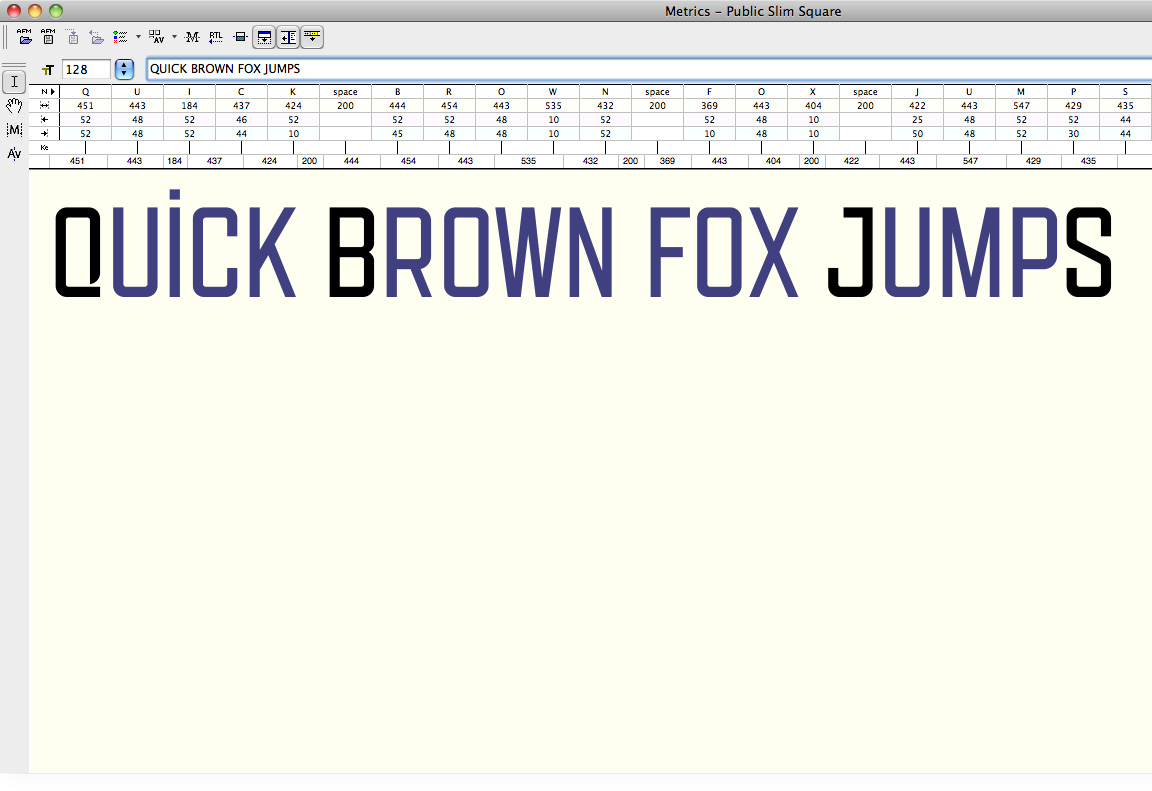
i just found purple warning in the metric window, what is this? Why some letter are black others are purple?

The second glyph of any pair will be colored if it is a dependent member of a kerning class (to remind you that if you're going to alter the kerning, you should use the master glyph, unless you want to create an exception). To eliminate the distraction you can change it in Options, Metrics window colors.
how can i change "dependent status" when will it become a black letter?
is there any answer?

As cerulean said, in Metrics windows colors* you can change the color from purple to any color you wish, including black. By doing this the dependent letters don’t change their status, only the color in which they are shown.
* I am on a Mac, so the path is: Fontlab Studio menu > Preferences > Metric windows > Metric Window colors > Dependant pairs.
[Double post. Sorry.]
[Triple post. Sorry again.]
Captured from web.archive.org on 15 Apr 2015. view this capture