
U+20DD (COMBINING ENCLOSING CIRCLE) doesn't render correcly in MS Word neither in this editor. Does anyone know why ?
In MS Word :

Using Typophile's editor :
1⃝
U+20DD (COMBINING ENCLOSING CIRCLE) doesn't render correcly in MS Word neither in this editor. Does anyone know why ?
In MS Word :
Using Typophile's editor :
1⃝

Enclosing signs should precede the character that they enclose, not follow it. I believe this is standard for Unicode enclosing signs, regardless of text direction.
Whether the combination of a particular enclosing sign and a particular following character render in a desired fashion, though, depends on the individual font. Some fonts provide ligatures of particular combinations expected to be used, others provide complex GPOS positioning (including, in the case of some Arabic enclosing signs, handling of multiple characters within the sign, e.g. end of ayah marks containing numbers), and some trust to blind luck.
John,
I cannot help wondering how you keep all these little details in your head.
Thanks again
John
That (typing the enclosing circle before the character) didn't work either, with the Calibri font

But, by typing the character '1' followed by a space and then the enclosing circle, and by typing '2' followed by space and the enclosing circle, I got this result with the Cambria font which seems to be ok.

But I tried the same procedure with Calibri without success.

What happens if you type them in Cambria, then change the font to Calibri?
riccard0
Thanks for your reply. The result is the same as shown above.
As I wrote, this ends up being dependent on the capabilities of the individual font. Enclosing signs are a pain in the neck to deal with, because ideally the enclosed glyphs are optimised for that use, e.g. you might want to reduce the size of numerals and perhaps lift them off the baseline. There are always going to be limits on what combinations work acceptably, and the great majority of fonts don't support enclosing marks at all.
Re. the behaviour you note with Cambria, it is entirely possible that what is happening is a Word-specific character substitution that happens to be supported by Cambria. It is likely that the resulting display that you see is actually a behing-the-scenes mapping to the circled numeral characters in the Unicode 2460 range. I also suspect that what you see working for Cambria roman might not work for the other fonts in the family. The roman has an expanded glyph set on account of its maths coverage.
"Re. the behaviour you note with Cambria, it is entirely possible that what is happening is a Word-specific character substitution that happens to be supported by Cambria. It is likely that the resulting display that you see is actually a behing-the-scenes mapping to the circled numeral characters in the Unicode 2460 range."
This is what I've got from MS Word

The first encircled number was obtained by typing 1 + space + U+20DD. The second was rendered with U+2460, both with the Cambria font.
"I also suspect that what you see working for Cambria roman might not work for the other fonts in the family. The roman has an expanded glyph set on account of its maths coverage.
What do you mean by Cambria roman ?
I mean the Cambria Regular font, as opposed to the Bold, Italic or Bold Italic. The Regular is bundled as a TTC file with the Cambria Math font, and shares the latter's glyf table, although with distinct cmap, name and OTL tables.
Can you set the text larger and post fresh screenshots. The images you have provided are too small for me to be able to confirm what is going on.
These were printed with Cambria 20 and 36 pt sizes, no bold.

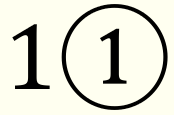
The first of these looks like the default Cambria numeral 1 placed within the U+20DD glyph. The second of these is not Cambria at all. The circled number characters were added to Cambria only relatively recently, so it is possible that the version you have does not support them, in which case Word is applying font switching to render the character with some other font. Word tries never to fail to display a character, so will opt to switch fonts rather than show a .notdef box (there may be an option setting to disable this).
This is what the actual Cambria circled number 1 character looks like, shown beside the default numeral glyph for comparison of size and positioning:
John
You are absolutely right. After a while I realized what went wrong.

Sorry for this and many thanks for your efforts in clarifying this mess.
Captured from web.archive.org on 23 Aug 2013. view this capture