Typophile

Macbook Pro, retina screens, hinting, the future

George Frederick

Hello all,

In light of yesterday's unveiling of its Macbook Pro (with Retina Display), seems like good time to restart this question:
What do you see as the future of TrueType hinting? The short-term value is obvious. I get it. I'm with you.
But when breaking out the checkbook, how do we measure the value of hinting in the context of improving rasterizers, iOS's limited appetite for hinting, screen resolution, etc.?

This is an honest question, not a statement. It's a wonderful, daunting, inspiring, confusing time of possibilities and pitfalls.
Love to read some thoughts on this, in light of Apple's news. Many thanks.

We had recently a similar discussion on the same topic. Maybe someone could retrieve the link.

I was waiting for this thread to be started.

I think the biggest impact of the new hi-res screens is going to be how pixels are seen by web designers. Up till now, a pixel was a fixed measurement, equal to a point (on most screens). Whereas in print, pixels (or printed dots) have always been of different sizes and therefore irrelevant as far measuring things goes, in the world of the web, the length of something in pixels has always dictated how big it is, in terms of real-world size (inches, etc). Now, finally, that will have to change, as 220 pixels on one screen will be the same actual size as 72 pixels on another. The only difference will be that the first is a higher resolution — an attribute that now, for the first time on the web, is independent of actual size.

So I'm waiting to see a paradigm shift where web designers will have to specify the size of things in real-world terms, and let the browser sort out how big to make each pixel. In other words, the concepts of "resolution" and "size" on screen will start to be understood more like the way they always have been in print.

Since Mac's haven't used TrueType instructions in a long time, how does a new Mac impact TrueType hinting? Unless you think that the Retina display will lure Windows users. But I think a new Win OS that didn't use hints would have much more of an impact, wouldn't it?

Jason C

web designers will have to specify the size of things in real-world terms, and let the browser sort out how big to make [them]

A dreadful prospect, looking at history of browsers’ consistency…

the concepts of "resolution" and "size" on screen will start to be understood more like the way they always have been in print

To me it could be the opposite: in print you have the page, with its “real world” fixed dimensions and a somewhat fixed “resolution”. Screens will never give you neither of those.

> and let the browser sort out how big to make each pixel

I might be wrong, but I think that on the MacBook Pro with Retina display that resizing (to compensate for the higher resolution) is done by the operating system, not by individual programs like browsers.

..I think that on the MacBook Pro with Retina display that resizing (to compensate for the higher resolution) is done by the operating system ..

Correct -- up to a certain point, at least.
On an iPad 3, if you used 'regular' interface commands, dimensions in "pixels" are silently doubled. However, if your software generates a bitmap in memory and copy it "manually" on to the screen, the image will be too small.

Frustratingly, Apple still calls their old resolution "1 pixel" -- to make sense of high-resolution coordinates you are now supposed to deal with "1/2 pixels" as well!

"Since Mac's haven't used TrueType instructions in a long time..."

Oh?

> Since Mac's haven't used TrueType instructions in a long time...

I was waiting for David to jump in there. David -- I've read your thoughts re Macs and hinting on other Typophile posts. Very helpful.

> how does a new Mac impact TrueType hinting?

In a way, not much at all. But it's not so much about the new Mac. It's the wave other other manufacturers that will race to compete. Apple now has raised the bar on screen display. So where will that leave us?

Thanks folks for the response.

I found one, not sure if it's the one I had in mind. However I think it touches several related aspects: http://typophile.com/node/91063

Thanks riccard0. I appreciate it. Didn't see that one.

I searched for similar posts before adding this one. Found helpful thoughts in other comments streams, but not anything recent in this context. I'll give that thread a read.

> I think the biggest impact of the new hi-res screens is going to be how pixels are seen by web designers.

Joshua, thank you. This is another thought that keeps me up at night (in a good way). What is the impact of responsive design and relative type sizing on hinting? I don't know enough about the mechanics of raterizers and the way they trigger font meta data. But seems to me the scenario would be the opposite of the way you describe. No? In responsive design, there is no real-world fixed size. Everything is relative.

In responsive design, there is no real-world fixed size.

Real-world?
It’s a veil of illusion (whatever the resolution of that veil).

My web site makes extensive use of line diagrams prepared in a paint program, for example on this page. They would not be legible if displayed at an arbitrary resolution where 1 pixel in the image translated to 1 1/8 pixels on the screen.

Therefore, specifying image sizes in inches, for example, is not an option, since then, although the images might be legible enough on a very high-resolution display like the Retina display, they wouldn't be legible on different resolutions (60 dpi - old Macintosh, 72 dpi - common Windows, 96 dpi, 144 dpi, alternate Windows) on conventional computers.

Instead, Apple's current solution, of having a real pixel be equal to 1/2 or 1/4 of a virtual pixel, does work.

Ideally, in future, I would have to change how I specify image sizes, but how it would be done would be to specify image sizes in pixels, but then also note a base screen resolution: above twice that resolution, each pixel would be replaced by an integer number of pixels.

i.e., if I specify the base screen resolution as 72 dpi, then at resolutions from 144 dpi to 215 dpi, each pixel becomes a 2 x 2 square, at resolutions from 216 dpi to 287 dpi, each pixel becomes a 3 x 3 square, and so on.

That would combine resolution-independence with the ability to control the relationship of image pixels to screen pixels.

Naturally, for things like photos, it should also be possible to specify image size in inches, where resizing will not injure visibility.


"Since Mac's haven't used TrueType instructions in a long time..."

Oh?

-----------------
Oops, David caught me. But the effect is virtually the same.
Jason C

Lol:) I'm happy I don't have to go to déjà vu U. For me as a user, this is not an interesting Apple product. I'm sure I'll get one the next time I need a laptop, but that's just a matter of course. As a developer, the big web resometer in the sky still reads 16.6 ppm for text. So I have to break out the checkbook. What check are you asking about writing to whom?

True, true, DB. Still, if anything/anyone is going to make hi-res displays commonplace, this is the event. Hooray! Now, those of you who don’t think hinting is worth it just gotta sit tight for a decade or two.

There is some confusion here. At least with iOS and OSX, there is no 'thinking different' (pun not intended) about pixels for web designers.

Designing something 10px square in mobile Safari, and setting type to 8px will result in the same physical sized elements on a retina display as on a non-retina display.

As previously stated, this is because apple now treats a 'pixel' as a more virtual concept. On retina displays, it uses 4 device pixels to render the one 'code' pixel.

So, generically speaking, a web designer has to do nothing to accommodate retina displays.

If they do want to give retina users higher resolution images (Again, displayed at the same size) there are a few steps they need to take care of, but it's nothing daunting.

What is frustrating for web/mobile designers, however, are the other high-density screens being developed that don't do what Apple does. Instead they just use smaller pixels. Some of the BlackBerries do this and it causes issues in that the designer sees everything smaller on the device compared to the iPhone so insists that we resize everything for the BlackBerry. However, they often fail to realize that EVERYTHING is smaller on that user's BlackBerry so the user has already likely taken steps to change the defaults to their liking to begin with.

The bottom line is that high density screens are going to cause weird problems going forward--at least until all OSes start using resolution independent rendering. But Apple is the one place where we shouldn't see too many problems.

But Apple is the one place where we shouldn't see too many problems.

Personal experience from opening a couple of freshly-made ePubs on an iPad 3 shows that is more of a hopeful statement than fact...

I find it ironic this question popped up on a type design board. Seems like out of all the visual digital artists out there type designers will have to change the least. Everything we do is already designed to look good at any resolution.

The first big impact this tech will have will be on computer memory, both hard drive and RAM. I've already heard grumblings from other designers about how insane the project file size gets. Can you imagine how much RAM and hard drive space you would have to have to edit a full length film? With dozens of hours of raw footage? And the after effects guys, they might as well hit render and go on a four week vacation... But of course, technology will improve, and things will get faster and cheaper.

@Theunis...what are you seeing?

@Ryan...I agree that this should have little to no effect for type design. In terms of hinting, it makes it less important.

It shouldn't affect video editing at all, though. Unless people decide to start creating film at 4x HD resolution...which they may. ;)

> What check are you asking about writing to whom?

Thanks David. I'm referring to a check written to a talented type technician to hint an non-TrueType hinted font. That's a sizable expense. I'd hint my alpha-bits if I could, but increasing screen resolution makes me wonder how sharper screens will affect the value of intense hinting and the ability to justify the investment.

> I find it ironic this question popped up on a type design board. Seems like out of all the visual digital artists out there type designers will have to change the least.

I'm not a type designer. I'm a type user. The fact is, outside of the type designer/provider universe, there aren't many people who can intelligently weigh in on hinting conversations. So I value the feedback I get here.

Screen resolution may not be a strong consideration when designing your typeface, but isn't it something you consider when making the decision to invest lots of time and resources at your foundry to add hinting information? If better screens improve the display of the typeface, that would seem to lessen the motivation of designers and publishers to invest in hinting. Wouldn't that affect your decisions?

Likewise, there are third parties who can do this work well (WebType, Typekit, etc). I imagine the service they provide would lessen a designer's urge to invest heavily in hinting.

Well its seems on the face of it that if the resolution goes up, the hinting should become easier to do. Eventually, perhaps, when we hit 24 000 x 24 000 pixels it should become unnecessary altogether.

But I've been wrong many times before, and will be wrong many more times in the future.

(note: various figures on the web point to human sight having a resolution of 576 megapixels, which works out to 603 979 776 pixels, the square root of which is 24 576.)

> I've already heard grumblings from other designers
> about how insane the project file size gets

True, but increasing file sizes has been the trend for decades. I remember the early days when I could back up my computer on a stack of floppies. Today that same stack probably wouldn't have the capacity to hold a single big video file.

Interesting stuff, all of it.

Yes, high resolution screens will, or just might, make low-level hinting obsolete. But not every screen you see around you is, or will be in thefuture, a high-rez screen. There will always be a market for properly hinted fonts, I think.

Perhaps it'll make a nice niche market, one day, when there are just a few experts left that can make fonts good looking on any screen.

As for iPad 2 vs. 3 differences: images that were scaled in e-pubs, to either a certain scale of the total width, or a certain size in pixels, opened up on the '3 at ... half their size! In Real World measurements, of course. Another thing I noticed was that same text in (supposedly) same size spaces just a tiny bit differently on the '3. Tiny bits add up, though, on an entire line. So it seems subpixel alignment was not translated into half-subpixel alignment (or double-subpixel, perhaps).

True, but increasing file sizes has been the trend for decades. I remember the early days when I could back up my computer on a stack of floppies. Today that same stack probably wouldn't have the capacity to hold a single big video file.

Making bandwidth hogs of us all, for which we pay and increasingly dear price...

Theunis...that's interesting (and obviously annoying!). I haven't done much with ePub. That certainly sounds like a bug/oversight (either on Apple's end or the ePub author's end).


Yes, high resolution screens will, or just might, make low-level hinting obsolete. But not every screen you see around you is, or will be in thefuture, a high-rez screen. There will always be a market for properly hinted fonts, I think.

I'm sorry but you're way off base here. Technologies judged as inferior by the masses become obsolete quickly.

As soon as the market recognizes a truly superior and readily available technology, all the money will switch over to that. Nobody will care about your 15 year old mint condition monitor. If the new fonts don't work on your system, the response from Support will be, "oh well, buy a newer computer." This is just the reality of markets.

Nice to see my fonts improving with age :-)

@Ryan – The only choice the consumers get is that which the manufacturers afford them. And more often than not, it is marketing that sways a consumer's mind. Had Sony gone with more aggressive marketing than they did (including licensing to other manufacturers), JVC's VHS might well have become the also-ran instead.

I trust you are all aware that pixels are a strictly notional unit in CSS? A pixel positively does not correspond to one individual dot. (In fact, rather akin to the reference kilogram, you have to avail yourself of a reference pixel.)

I make this point because there is actually a great deal of experience in mapping presumed-immutable physical dimensions to virtual ones. (Have you ever drawn a dimensioned architectural drawing in AutoCAD? Is the drawing the same size as the building?)

Not everyone knows that W3's world is 96dpi through and through.

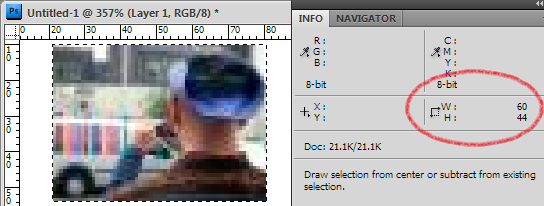
Joe, when I right-click your avatar image and choose "Properties", I get a value of "60 x 44 pixels". That's the same as when I make a screenshot and measure it in Photoshop:

So what values do you see? What measurements "is" the actual image, in "pixels-in-single-units-of-one-RGB-color" when you download the file and inspect it with a binary editor? Surely that would circumvent any 'file to screen' translation?

" (Have you ever drawn a dimensioned architectural drawing in AutoCAD?"

100s, only you don't need to dimension them anymore, you output them with dimensions if you want. All the objects know their "actual size".

"Is the drawing the same size as the building?"

Ideally, exactly the same, in CAD. Architectural scales are for the analog world. And if you're CADing anything with type on it, like signage or emergency fire systems, and you want to know its actual size, you better be drawing at 1:1 or you get hideously unuseful font sizes.

Whoever gave the web the ideas it has about sizing, IMHO, should be rendered.

Theunis: OSX/iOS treats 'pixels' as virtual units.

Or, rather, Apple calls them points. I think. I dunno. The terminology is weird.

But the point is that on a non-retina display, 1 pixel measurement = 1 pixel on the screen. On a retina display, 1 pixel = 4 pixels.

That means that for most software, nothing changes at all on the retina display. Your UI will still be the same size. However, elements of said UI will look sharper if the software accommodates that.

Té Rowan:

The W3C, being about the web, really has no concept of DPI.

OKAY, PIXELS per inch, ya ferschlutiweeblefetxcer pedant!

If I remember correctly, the square pixel (1 px = 1 pt, screen resolution 72 ppi) was a technological breakthrough by Apple, in an era when computer graphic screens used a rectangular pixel (I had Ventura Publisher on Hercules? GEM? or VGA?). As a result, the Mac was the only computer that could display type at anything like its real size.

A day without a cranky, supercilious rejoinder from David “Fools!” Berlow is as a day without sunshine.

The fact remains that the pixel is a notional unit, not an immutable object.

Also, David, answer my mail about caption fonts.

A pixel had better correspond to one individual dot, if that dot is of a reasonable size (somewhere between 60 dpi to 96 dpi) - and, failing that, it needs to what Apple did, and correspond to an integer number of dots in each direction, and be square.

Then existing web pages will render legibly.

But ideally, a pixel should be an individual dot, and designers should have tools in HTML to cope in an accurate fashion with pixels that have unusually small dimensions. For the term "pixel" to mean one thing in a hardware manual, and something else in CSS, can only lead to confusion.

Well, you wouldn't be the first to question some of the terminology adopted by the W3C for their CSS specifications. ;)

Té's 96ppi comment *is* related to the spec. The W3C refers to a 'reference pixel' in the latest working draft:

http://www.w3.org/TR/css3-values/
"Note that this definition of the pixel unit and the physical units differs from previous versions of CSS. In particular, in previous versions of CSS the pixel unit and the physical units were not related by a fixed ratio: the physical units were always tied to their physical measurements while the pixel unit would vary to most closely match the reference pixel. (This change was made because too much existing content relies on the assumption of 96dpi, and breaking that assumption breaks the content.) "

Granted, it's still up to browsers to decide what to do and not all care. For instance, there are several high-density BlackBerry devices where the pixels are simply smaller. Which is unlike the iOS reitina implementation where the 'real' pixels are much smaller, but the 'virtual' pixels remain the same offering a more predictable rendering in terms of physical size.

At some point the operating systems/OSes will have to just do away with the concept of pixels altogether (at least from the perspective of the content authors). As we approach much higher density screens, adopting a resolution independent system would make more sense. That way 1" = 1" regardless of the particular screen. Fingers crossed.

A pixel on a web page has been a slippery concept on all iOS devices going back to the first iPhone. Web pixels ("px") almost never correspond to device pixels. The page is scaled to the device based on the nominal width of the page. Sites designed for narrower widths will appear bigger than sites designed for wider widths. All images and text are scaled accordingly. (This can be annoying when you are trying to look at screenshots posted on a website.)

The only way to force exact pixel correspondence in Mobile Safari is to set the page width to the same width as the pixel width of the view (vertical or horizontal orientation) on the iPhone or iPad, as is done with web apps.

"At some point the operating systems/OSes will have to just do away with the concept of pixels altogether (at least from the perspective of the content authors). As we approach much higher density screens..."

Just for the sake of confusion, if they ever get to the "some point" mentioned above, let's call it "PostScript".

high resolution screens will, or just might, make low-level hinting obsolete

I don't think so. Low level hinting is already obsolete without the high resolution hardware, because the latest Apple, Microsoft and Libre font rendering system software can render unhinted fonts well enough.

The issue is that the old Microsoft rendering system software ("GDI") is hard-coded by many Windows applications - so the new DirectWrite system software isn't used even if it is available (c.f. Google Chrome today)

I expect plugging in an Apple Retina screen to a Windows 8 computer that is running such 'legacy' software is unlikely to render text any better than the previous screen. The Retina display drivers will use 4 or 8 hardware pixels to represent 1 pixel in legacy software, so it will look the same as it always has.

Because that is what businesses want; change on their schedule, which might be never.

When you peek at the computer on the checkout stand at the grocery store, you'll often see a Windows 7 computer running a VT100 terminal emulator with a UI that looks like this:

If the software using GDI rendering is updated to use DirectWrite, then even on old screens an unhinted font will render fine.

But when breaking out the checkbook, how do we measure the value of hinting in the context of improving rasterizers, iOS's limited appetite for hinting, screen resolution, etc.?

If you are going to pay for hinting, my suggestion is to make a contribution to the http://freetype.org/ttfautohint/ project and use it to bridge the gap between now and the time when most people are no longer using applications linked to GDI.

This is an education re the nature of pixels. Comparing the relationship to CAD helps (I'm a Lightwave user). I see a dimly lit rabbit in the distance, beckoning me to follow deeper into the rabbit hole.

To respond to Theunis’s question: Your example contains its own answer. The image has a claimed pixel dimension but can be viewed at other dimensions. In fact, you already are doing so in the example screenshot.

The Statue of Liberty is available in only one size. The same does not hold for a pixel.

"If the software using GDI rendering is updated to use DirectWrite, then even on old screens an unhinted font will render fine."

Pass the mushrooms please.

Um, Joe, you are correct. I think the solution to the problem at hand finally dripped down into my skull (akin to Chinese water torture).

W3C indeed uses "the pixel" as a valid measurement unit, so you can ask for an image to be sized 44 x 30 pixels (either in HTML or through CSS). If the pixel were not a valid measurement unit, this would not be possible!

However -- dropping upon me like a bone thrown into the air by a careless simian --, it depends on the browser how this value gets interpreted. So in my example screen shot, using Internet Explorer on Windows, this only tells us that Windows treats a given pixel unit as ... real-world pixels. It does NOT tell us say anything for my current reading platform (Safari per iPad 2) and it won't tell us anything for the same on an iPad 3. Wait -- I feel an experiment coming up. ... Okay, when I go from landscape to portrait mode, your avatar scales down a bit.

Resuming? When we are talking about pixels, do we henceforth have to refer to "W3C pixels" (as shorthand for "1/96th of an inch", just like the nominal point is "1/72th of an inch") and "device pixels"?

Joe, the Statue of Liberty comes in several sizes, the big one being impractical for souvenirs.

Rosalind Kraus wrote an interesting essay on this sort of thing, about Rodin's work, the factory he contracted to reproduce it, and the issue of copyright and originality in art.

@abattis – The local grocer's checkout is DOS-based and with a GUI. Ain't seen a Win7 checkout yet, but the video rental has some Linux boxes with touch screens for renters to view the catalogue on.

I agree totally with David, Joe, Nick, Dave (abattis), Mark, Té and Theunis on all this.

Oh, and BTW, I think the idea of pixels being "actual" and corresponding exactly to each and every illuminated dot on the screen took hold mostly because the unit of measurement is named the same as the illuminated dot but also partially from a misunderstanding about "relative" units versus "absolute" units in the Cascading Style Sheets spec.
Yes, the pixel unit is a "relative" unit, but not in the same way as an em or percent. The pixel is relative to the size and resolution of the physical screen, whereas the em or percent is relative to the computed size of the parent element within the HTML.

Write HTML pages, post HTML pages, view HTML pages. Adjust. Repeat.

the pixel unit is a "relative" unit

It was, but my understanding of the new definition in CSS3 is that 1 px is now defined as an absolute unit equivalent to 1/96 inch.

John ---

Correct. From the CSS3 spec (March 2012):

"For print media and similar high-resolution devices, the anchor unit should be one of the standard physical units (inches, centimeters, etc). For lower-resolution devices, and devices with unusual viewing distances, it is recommended instead that the anchor unit be the pixel unit. For such devices it is recommended that the pixel unit refer to the whole number of device pixels that best approximates the reference pixel. "

"The reference pixel is the visual angle of one pixel on a device with a pixel density of 96dpi and a distance from the reader of an arm's length. For a nominal arm's length of 28 inches, the visual angle is therefore about 0.0213 degrees. For reading at arm's length, 1px thus corresponds to about 0.26 mm (1/96 inch). "

Based on the responses, I'd say this is the pure form of the truth, but there are real-world implementation compromises.

<"The reference pixel is the visual angle of one pixel on a device with a pixel density of 96dpi and a distance from the reader of an arm's length. For a nominal arm's length of 28 inches, the visual angle is therefore about 0.0213 degrees. For reading at arm's length, 1px thus corresponds to about 0.26 mm (1/96 inch). "

A circular argument.
The stuff about the angle and reading distance is redundant, a pleasantry, methinks.
Also, if the reference pixel is an angle, it’s not precise, as the 28" could be either to the edge of the pixel, or the centre—which are different distances (assuming the pixel has a flat surface).

Nick, 'visual angle' is a measure of object height at a set distance (in this case 28") determined as the angle of arc at which the object is subtended at the eye. It is indeed precise, and of course the height is a measurement from top to bottom object edge, since that is what is being measured.

@Nick – Nothing circular or otherwise elliptic in there, just clumsy wording. 25.4 (mm in 1in) / 96 (dpi) = 0.26458333... (pixel width in mm). The visual angle presented is correct, too. I just checked both on a pocket calculator.

We have device and reference pixels in CSS, which is merely one method of reckoning them. As such, pixels are not immutable objects, I say again.

I believe what is really interfering with our understanding here is original Mac 128/512/Plus/Classic/Color Classic pixels, every one of which was individually discernible to a person with good vision. (Surely you remember the 1984–86 fetish for “woodcut”-like illustrations laboriously clicked into existence in MacPaint.) This 1:1 equivalency tainted our mental image of what a pixel must be. We persist in this misapprehension even as every one of us in this thread type away on machines that use more than one screen dot to represent a pixel.

I don't know what taints the mental image of web designers. As a type designer, I still mostly operate in a world in which the most significant use of the term pixel still relates directly to device dots: pixels per em.

"...absolute unit equivalent to 1/96 inch"

Correct! 1 px = 1.333333333333333 points.

"...'visual angle' is a measure of object height at a set distance"

Correct! The 'visual angle' is and angless object.

@John: 'visual angle' is a measure of object height at a set distance (in this case 28") determined as the angle of arc at which the object is subtended at the eye. It is indeed precise, and of course the height is a measurement from top to bottom object edge, since that is what is being measured.

If the object size is already known, then the visual angle is not the reference, the object size is.

If the object is flat, then its distance from the eye is not exact, because it is further away at the edges than the centre.

Forgot to mention it, but a pixel's visual angle is arctan( pixel_width / distance_between_screen_and_eye ).

Oh, and @dberlow, your number is correct for a 54ppi screen.

It was backwards day:) Correct! 1 point = 1.333333333333333 pixels.

But how come we need anything at all between font master ppm and device dpi?

Sodomy non sapiens...

"It was, but my understanding of the new definition in CSS3 is that 1 px is now defined as an absolute unit equivalent to 1/96 inch."

Well, that's the reference pixel browsers should (but may or may not) adhere to. And one based on a desktop screen. Which is hardly the norm anymore, so likely not all that useful. Alas, W3C recommendations take quite a while to flow through the pipeline.

That said, if it were widely supported, that'd be great as it'd move us away from resolution dependance.

David: But how come we need anything at all between font master ppm and device dpi?

The CSS3 pixel isn't between font ppem and device dpi (at least, no more than the point or the millimetre etc. can be said to be between them). In fact, it isn't a pixel at all in any physical or raster understanding of the term: it is just a new reference unit of measurement, like a point or a millimetre, by which the font outline is to be scaled and then rasterised to the closest approximation given the ppem and the device resolution. The only reason it is called a pixel is that the goal of the new definition is for user agents to be able to take all that old web content spec'd in px units and make it big enough to see on higher resolution displays. It is easier for W3C to make the px unit device independent than to require web developers to rebuild their sites using existing device-independent units.

"The CSS3 pixel isn't between font ppem and device dpi..."

It isn't!? I thought it says, "Hi, I'm a pixel but not a device pixel. I'm a pixel that's some number of device pixels. Nice to meet you."

I'll be sad if it isn't who it says it is, 'cause I've wrapped my head around it, and now I'm going to hold my breath until it dies.

"Hi, I'm a 'pixel' but I'm not actually any kind of pixel at all: I just have a backwards compatible name for a non-backwards compatible unit equal to .75 point. My relationship to actual pixels is the same as that of .75 point. If, every time you see me, you remember to mentally substitute .75 point and ignore what I'm called, we'll get on fine."

Here's a couple of goodies that have helped me wrap my head around this. In addition to the sage counsel provided in this forum, of course.

http://www.youtube.com/watch?v=4wscVOXjIzQ

http://blog.cloudfour.com/pixels-are-ruining-my-life/

Ideally, device screens will have a rangefinder with iris-recognition software which computes the viewer’s distance. That would enable accurate (default) specification of image sizes in terms of angle-of-vision*.

From this, page designers would figure out what kind of resolution they would like, in terms of matching image pixels to various screen pixel dimensions.

Rather similar to spec’ing a photo for print, taking into account how sharp the original is, what screen value the publication is, and thence deciding how big the final image can go before reproducing original-image artefacts such as film grain; the digital equivalent would be compression and anti-aliasing artefacts.

*This principle of constant optimum size is not presently employed when one rotates an iPad thru 90°, and image and font size change.

If any of you are using a Macbook Pro with retina display, you might find this useful — Apple has updated a FAQ page about retina displays.

http://support.apple.com/kb/HT5266

Thanks James. I'm particularly fond of the "larger text - just right - more space" concept.

"http://www.youtube.com/watch?v=4wscVOXjIzQ" this was really interesting. I'm quite font of speakers who "hope I don't confuse you" 4-5 times an hour. ;)

But in the end the speaker in this presentation doesn't know the actual size of anything and just hopes his sites start out reasonably well and end well for the user via resolution, pan, zoom and chewing gum.

Did anyone ever mention to the web consortium that type works best when it scales non-linearly? and that at the bottom and the top of the actual size scale this non-linearly is relatively precipitous? Just a thought:)

David: Did anyone ever mention to the web consortium that type works best when it scales non-linearly?

I mentioned it to them, complete with illustrations (CSS3 briefing, TypeCon Los Angeles, following webfonts working group meeting), and everyone agreed that my non-linear, size-specific type looked very crisp and legible, but that having text reflow when zoomed is a non-starter. So unless you're going to make a distinction between scaling and zooming -- i.e. a distinction between what happens to the type depending on how it is made bigger/smaller -- there's going to be zero uptake for non-linear biggering and smallering. Put it another way: user experience of blocks of text at variable sizes trumps user experience of reading text at particular sizes.

Once again, I'm not endorsing this view, just reporting it.

Did anyone ever mention to the web consortium that type works best when it scales non-linearly?

I don't think that this is true, or rather, I think that this is dealing with a problem by way of one specific approach when there are other (and less 'destructive') approaches too.

Repeat: WYSIWYG is a succubus.

hhp

@Hrant:
WYSIWYG is a succubus.

I would like it if one could use word processors in a mode that allowed the body copy to flow automatically, so that one could change the point size of a whole document and just check that everything worked out right, instead of reformatting each page...

Think of old-style text formatting programs - such as the one that still survives in Unix, troff.

However, for a word processor to let you see what your printout is supposed to look like, so that you can minimize your use of paper, instead of making multiple printouts during the revision process, is, I would still say, a good thing, not a bad one, even if there are technical challenges in bridging the gap between the screen and the printer.

Recently, it was the lower resolution of the screen that was the problem (requiring the problematic technical solution of hinting), in the past, when many people used daisywheels instead of printers, or when laser printers had their own fonts (actually still true of specialized ones today) WYSIWYG (of course, that phrase has an offensive origin, so in the very early days, they risked insulting secretaries by using it in their presence), at least when proportional spacing was used, had problems in the other direction - the computer had to be informed about the metrics of the font used within the printer, as it couldn't impose the screen font it was using on the final copy.

Hrant, when it comes to reading on screen, as opposed to previewing print, WYSIATI -- What You See Is All There Is -- and WYSINWSES -- What You See Is Not What Someone Else Sees. The ideas that informed the succubal WYSIWYG are irrelevant. The gap we need to mind has moved.

Really? I think the mind we need to move has a gap.

WYSIAYG – What You See Is All You Get.
WYSIWYGAINGW – …And It's No Good Whining!

@quadibloc – I think that most instances of troff nowadays are as part of groff. Mind, the Heirloom Toolkit has a free-standing one that can deal with TrueType fonts.

Hmmm, John?

“…non-linear, size-specific type looked very crisp and legible…”

Oh no, that’s not the point.

“…having text reflow when zoomed is a non-starter.”

Text reflow, having it and stopping it are entirely up to the developer and/or user.

“…So unless you're going to make a distinction between scaling and zooming…”

Resizing, is a lot like reflow in that its ways of happening and whys are up to the developer and/or user.

“…there's going to be zero uptake for non-linear biggering and smallering…”

It’s already taken-up big-time by the public in both old and new media.

So, in general, we’re reading a 3-yr old report that says “if non-linear scaling from a single font file were allowed as an option, no one would be safe.”

The problem comes with “responsive media” vs. “Write HTML pages, post HTML pages, view HTML pages. Adjust. Repeat.”…

…(on either end of the point size spectrum), without “responsive type” as the resolution spectrum is attenuating, according to this thread...

A similar typophile thread: Will hinting be necessary when 300dpi high-res screens are the standards?

Really? This conversation again? Yeesh.

Posted elsewhere:

http://prometheus.med.utah.edu/~bwjones/2010/06/apple-retina-display/

“So, if a normal human eye can discriminate two points separated by 1 arcminute/cycle at a distance of a foot, we should be able to discriminate two points 89 micrometers apart which would work out to about 287 pixels per inch. Since the iPhone 4G display is comfortably higher than that measure at 326 pixels per inch, I’d find Apple’s claims stand up to what the human eye can perceive.”

See also:

Curcio, C. A., Sloan, K. R., Kalina, R. E. & Hendrickson, A. E. (1990). Human photoreceptor topography. Journal of Comparative Neurology, 292, 497–523.

Long short, there’s only so much detail the human eye is physically capable of detecting. Sure, if we get in an look at the type 1 cm away we’ll see a difference, but at 12 inches, ~300 DIP is our threshold. Beyond this neither resolution nor hinting make a significant difference.

Take the hint. It’s pretty much dead (and before you say it, yes, there will always be a crappy ATM in a third-world country airport).

It’s also important to point out that the people arguing for the importance of hinting are quite possibly the most biased population you could ask. The bulk of them stand to profit from its significance. You’d be hard pressed to get a type designer who gets paid to hint to admit what they do is makes no significant difference aesthetically, in measures of human performance, and will eventually become extinct.

"Sure, if we get in an look at the type 1 cm away we’ll see a difference, but at 12 inches, ~300 DIP is our threshold."

Yep, but the screen in question is 220 DPI.

What Si said.

I've no problem with the notion that hinting gets less relevant at higher resolutions and will eventually be either unnecessary or easily automated for the kind of resolutions we're looking at in an increasing number of mobile devices. But we're not there yet.

I'll also point out that hinting isn't just a technology for making type look nice in otherwise friendly conditions, which seems to be all you're thinking about. Hinting is also a tool for addressing frankly unfriendly conditions, such as inherited vertical device metrics. We spent a lot of time over the past year trying to squeeze ten Indic scripts into the vertical metrics of a Latin UI font -- don't ask! -- and hinting was essential to the process of making the forms legible at target ppem sizes.

Its not like we're going around the place selling hinting services to people who don't need them, Christopher. Clients come to us because they discover problems that need hinting solutions.

I'm not concerned about hinting.
I'm just happy that retina displays will allow us to add much more detail to our fonts.

"I'm just happy that retina displays will allow us to add much more detail to our fonts."

And how much detail did you need to remove before?

And, i hint, for longer than anyone else and i admit it — where it makes no significant difference aesthetically even in unmeasured measures of human performance, it will eventually become extinct.

How hard was that press pressed?

"And how much detail did you need to remove before?"

For example:
In standard screens, concave stems becomes visible at about 40px or up.
In retina, you see the concave effect at 16px.

You don't need to remove anything, but below a certain threshold details becomes invisible. In retina, instead, that threshold is much smaller and much more details are now visible (for good or worst :)

Christopher, your data is flawed, as is your interpretation. One thing consistently ignored by the "300 dpi is enough" people is that we have two eyes! And this could very well translate to (and anecdotally does seem to translate to) much more than a mere doubling. See the end of this page for an example:
http://www.bbc.com/future/story/20120719-awoken-from-a-2d-world/2

hhp

I would tend to think that 300 dpi is enough for a display, because we know from our experience with laser printers that while 60 dpi is crude dot-matrix printing, 300 dpi seemed indistinguishable from the product of fully-formed character printers.

Of course, it is also true that this initial impression was flawed, because 300 dpi was still a tad fuzzy, and certain types of subtle detail in some typefaces - notably the flared stems of Optima, for example - were lost.

But in a display, unlike with a laser or ink-jet printer, one can control the color of each pixel exactly. So if one combines a technique like Microsoft's ClearType with a 300 dpi display, which, unlike hinting, can be carried out in an automated fashion, I think the results will meet any reasonable standard of adequacy.

That doesn't mean that there's anything wrong with pursuing higher resolutions when the technology gets to the point that they will be easily available, but it does mean that at 300 dpi, there will not be any pressing need to seek further improvements in display resolution... and, thus, there will be a disinclination on the part of consumers to pay premium prices for higher resolutions beyond this level.

Captured from web.archive.org on 20 Apr 2015. view this capture