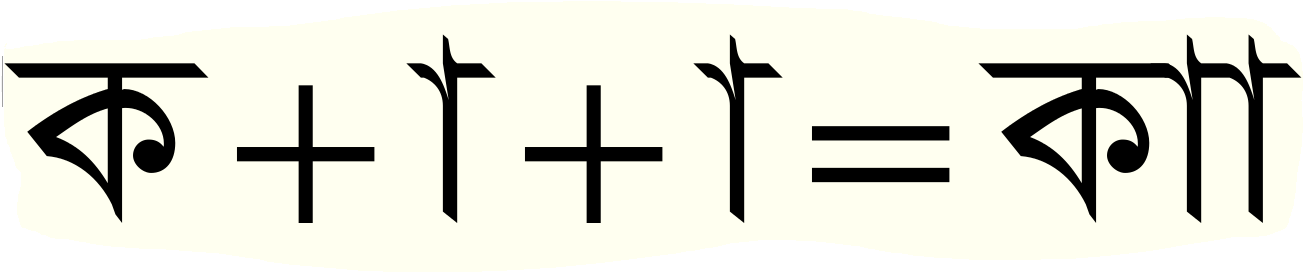
I need help for the image below to make this work in volt. Please any body help me on that. Thanks in advance..
This type I use it in my book to show there is prolongation in the letter.
| Attachment | Size |
|---|---|
| bn_ka_aaaa.PNG | 22.09 KB |
I need help for the image below to make this work in volt. Please any body help me on that. Thanks in advance..
This type I use it in my book to show there is prolongation in the letter.
| Attachment | Size |
|---|---|
| bn_ka_aaaa.PNG | 22.09 KB |

I think the Build section is a better place for this kind of inquiry.

The sequence you show involves two dependent vowel signs being applied to a single letter. In normal Bangla text, surely this is considered invalid, as only one dependent vowel sign can be applied per letter. So what you probably see, at least in Windows applications, is a dotted ring between the two vowel signs. This is inserted by the script shaping engine in Uniscribe, and is independent of the font lookup tables.
It is possible to trick the shaping engine into hiding the dotted circle, but this generally isn't advised unless you really, really need to do something contrary to normal Bangla layout. If you have evidence of more than one vowel sign being applied to a single letter, then you should contact Microsoft and present it to them so that they can change the shaping engine.
"In normal Bangla text, surely this is considered invalid, as only one dependent vowel sign can be applied per letter."
Grammatically it is wrong but phonetically, it is not wrong at all. I don't understand why we need to follow grammar in typing. I want to make transliteration of Arabic to present there is prolongation in that letter. that's why I need it. I can type in English the way I want. I can do aaa dddks;afslj;eee but I can't do in my own language and others. Why?
"It is possible to trick the shaping engine into hiding the dotted circle, but this generally isn't advised unless you really, really need to do something contrary to normal Bangla layout."
I really need. Can you please tell me how do I do that in ms volt? It will be great help thank you.
"If you have evidence of more than one vowel sign being applied to a single letter, then you should contact Microsoft and present it to them so that they can change the shaping engine."
I have told Microsoft long time ago about 6 years ago but those people they don't listen. Even in Arabic there is many issues are wrongly applied to the font.
I am entirely in agreement with you that the shaping engine should not prevent unorthodox character sequences. I have argued with folk at Microsoft for years that this is, in effect, spellchecking, and belongs at the language level in applications not at the script level in shaping engines. I think most of them are now in agreement, but getting longstanding behaviour of a core .dll changed seems difficult for them.
This is how you can trick the shaping engine. Note that the dotted circle (Unicode 25CC) is inserted in a buffered character state, before OTL glyph processing. So what you can do is use GSUB ligation to remove the dotted circle glyph from the string. You can either do this globally for the font, or you can do it contextually, targeting only the specific sequences in which you wish it to disappear. So, for example, you could specifically target the double-aa situation you illustrate with a VOLT lookup like this (I've used the naming I employ in my own Bengali fonts):
uni25CC bSignAa -> bSignAa
in context
bSignAa |
i.e. changed dotted circle + aa to just aa when preceded by aa.
____
By the way, the Bangla font you show looks a lot like the classic Linotype Bengali. I know there are a lot of versions of this design now in use in India and Bangladesh, as well as in immigrant communities elsewhere. Which version is this?
if you google it you will find it. "SolaimanLipi" I didn't take it from Linotype.
So what you can do is use GSUB ligation to remove the dotted circle glyph from the string. You can either do this globally for the font
Can you give me some example I am struggling and it doesn't work for me. Thank you.
I used pstf
dottedcircle bn_aakaar -> bn_aakaar
it doesn't work
In other scripts I have put this looking in the 'ccmp' feature. Because ideally one wants to get the dotted circle out of the way before doing and text shaping. However, I don't think 'ccmp' is processed by Indic shaping engines (although you could try it). You could also try using the 'akhn' feature, which processes ligations before other shaping. But it might be that the Indic shaping engines prevent this kind of trick if the dotted circle is simply not passed to the shaping engine for OTL processing on the grounds that it isn't an Indian character.
As a last resort, you could replace the dotted circle glyph in the font with a zero-width no-outline glyph, still encoded as U+25CC. This should get inserted by Uniscribe instead of a visible dotted circle, solving your problem. Of course, the presence of such an invisible glyph in the string will still prevent complex interactions between glyphs on either side of it, but it should work for your aa-aa case.
thanks
I used akhn it works thank you.
I have the next problem that I am facing. Here is below a image what I want to do.
I want to change the semicolon and others for Bengali letter when it has been used by Bengali letter. What I do to make that happen?
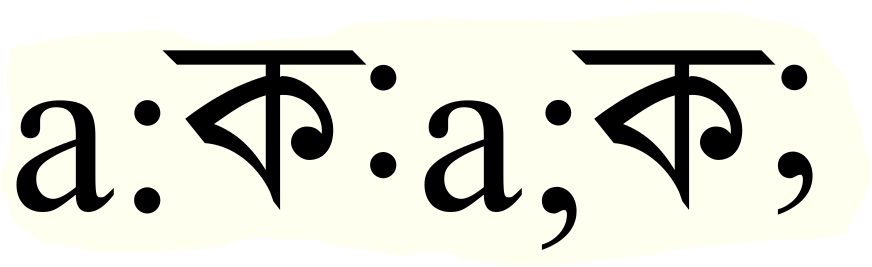
This is what the 'locl' feature is for, but I've not tried it in this situation. One of the concerns will be whether the European punctuation characters are rolled into the glyph run with the adjacent Indian characters. They should be, but operating systems and app have been flaky in supporting this. So it may not work, or not everywhere.
Try making a 'locl' feature for the Bengali script and 'dflt' language system, and substitute the punctuation glyphs you want.
I did that long time ago it doesn't work and still tried it it doesn't work
In what software and on what platforms have you tested this? Please include software and OS version numbers.
windows 7 in word 2010
Alas, that is one of the places in which I would hope it might work.
Have you tried doing it backwards: make the Bengali raised punctuation forms the default encoded glyphs, and then use a 'locl' substitution to change to the European forms for the 'latn' script languages?
I use the dflt and Bengali as locl but it doesn't work i tried with akhn and others one by one. Also I tested with notepad it seems like it worked but I am not sure completely as I am sure about word 2010. In word 2010 is messed-up. I did what you told me I am still getting same problem.
any solution for that?
Sorry, I'm out of ideas for now.
here is another example.. I want to remove the circle how do I do that. Kindly let me know
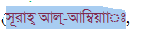
no help
Only the suggestions I made above to remove the dotted circle glyph from the string using 'ccmp' lookups. I've done that successfully in Hebrew fonts. If it doesn't work for Bengali, I don't know what else to suggest. Sorry.
I think that's what I will do to see if it works or not. thanks for your help.
here what I did but how i am going to fix the spacing between them. Please can you tell me?

How did you get it to display like this? Please describe the steps you took.
well i didn't assign the dotted circle any unicode that's why it is like that.
Why not delete the dots from the dotted circle glyph, set the advance width of the glyph to zero, and then encode it, as normal, as U+25CC? In other words, assign a non-spacing and invisible glyph to U+25CC.
I want also microsoft to solve this issue so all the font out there they follow the this type of structure. What do you say about?
The case for transliterating e.g. Arabic using Bengali letters seems to me serious and should not be something that is prevented by the shaping engine, any more than a Latin shaping engine should prevent a sequence of diacritics to transliterate non-European scripts and languages. So I agree that this is something that Microsoft should change. But then I also think they should completely stop performing what amounts to spelling or grammar checking at the shaping engine level, and have told them so many times.
i will give you my transliteration. check it.
That's what exactly I told MS 6 years ago but they don't listen.


how do i do this john?

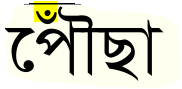
or on top of bn.Aumark
To confirm, do you want the candrabindu to be on top of the vowel sign as in the top example, or to the left as in the larger example?
on top it is better.
There are a couple of ways in which this can be done. First, it is important to note that normal character input order for this should be Consonant + Vowel + Candrabindu, i.e. the candrabindu should be typed after the vowel, not before it.
One method is simply to use an 'abvm' feature GPOS mark positioning anchor attachment to position the candrabindu mark where you want it on the vowel sign. If you want to adjust the size or weight of the candrabindi in this situation, you can do this GPOS operation after first applying a contextual GSUB substitution to replace the normal candrabindu glyph with a variant form.
The other method is to build a precomposed ligature of the vowel sign + candrabindu, and use an 'abvs' feature GSUB ligature subsitution to form this from the vowel sign + mark sequence.
Captured from commoncrawl.org on 27 Apr 2015. original URL