
Hello everyone,
I was trying to import some kerning data from a FontLab file to the VOLT using 'kern2VOLT' tool; but somehow it's not working for me. Can someone here explain me how to use this tool, step-by-step?
Thanks in advance!
Satya
Hello everyone,
I was trying to import some kerning data from a FontLab file to the VOLT using 'kern2VOLT' tool; but somehow it's not working for me. Can someone here explain me how to use this tool, step-by-step?
Thanks in advance!
Satya

My memory is a little fuzzy, but I did this on two font families back in November. Here is what I did (I think…):
1. First, generate the TTFs from FontLab (with the VOLT info box checked in the FL preferences, and the flat kerning, too)
2. Copy the kern2VOLT.exe file into the same folder as your TTF on Windows
3. Open the TTF up in VOLT. VOLT will tell you that all OT data will be overwritten. This is OK, OK, of course. Rename all of the glyphs using the Glyph Names. Save the TTF.
4. I will presume that your font is named something like MyFont-Regular.ttf
5. Open up the command line. Type:
kern2VOLT.exe MyFont-Regular.ttf Kern.vtl
6. This should generate a VOLT look-up file in the same folder as the .exe file and the TTF, called Kern (of course, it does not matter what you name the look-up … the name will be whatever you type before the .vtl extension in the command).
7. In VOLT, you can import this look-up, and assign it to features
Maybe someone will come along and correct any discrepancies I have here. Perhaps my order of stuff in the command line is off … I'm pretty sure that it is the .exe, then the .ttf, and finally the .vtl, though. Good luck!

Dan's explanation is basically correct. kern2volt requires as input a TTF with a) an oldstyle kern table containing all the kerning you want to import into VOLT and b) glyph names imported in VOLT. So generate a TTF with a kern table from FontLab, open it in VOLT, import the glyph names from the post table, save from VOLT, run kern2volt from the command line.
Note that kern2volt has an option for right-to-left kerning, but if your project involves both LTR and RTL kerning you will need separate TTF sources for each. If a font contains multiple scripts, you might also want a separate TTF for each, so that you get separate VOLT lookups for different scripts rather than one giant one.
Thank you, Dan and John for your detailed explanation - however - I'm still unable to make it work. The Font 'TulikaBengali-Bold" contains Flat kerning and Post-script names (as you explained), but when I run the Commandline, this is what I get:
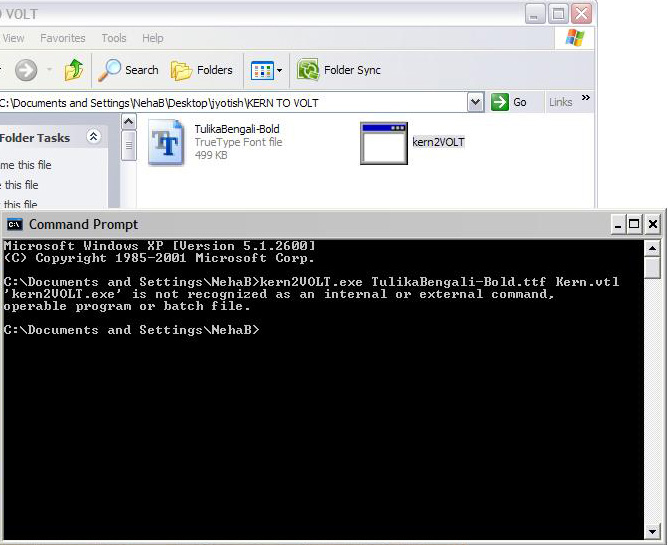
Any idea where I might be doing wrong?
Thanks!

Your running the command from the wrong directory.
As Janic mentioned, I was running the command from a wrong directory, and that is why it was unable to located the script and font. But since I never used the command-line before, I didn't realized. Anyway, all sorted now. :)
Thanks to you all for the great help and support.
It is also possible to add kern2volt to your Windows path variables, so that you can run it from any directory.
Thanks for the tip, John!
Captured from web.archive.org on 14 Apr 2015. view this capture