
On Pages, some kerning pairs of my font are missing. Surprising for me is that this happens for just some of the glyphs within a kerning class created in FontLab. The inconsistencies are consistent through my whole type family:
- /W/ and /V/ both belong to the same kerning class (right and left), but the behavior is not as expected.
- /Va/ works but the kerning pair /Wa/ is missing.
- For both /Vo/ and /Wo/ the kerning is not recognized.
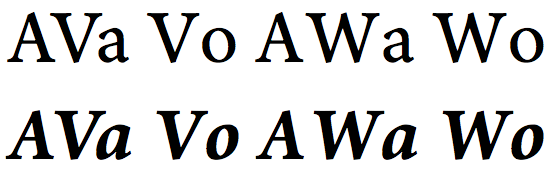
Only the characters belonging to the kerning classes shown have this problem in Pages.
In InDesign (using the font's kerning, not optically calculated), Font Book and TextEdit everything works fine, but in Photoshop the behavior is even worse, with more missing kerning pairs, which were present in Pages, like /Va/ or /TA/.
Any hints?


