
Does anybody know?
Does anybody know?

According to these fonts' properties:
Cambria: "Authors: Monotype Imaging and Tiro Typeworks".
Calibri: "Authors: Luc(as) de Groot"

hi John, what is the issue?

Theunis — Cambria was designed by Jelle Bosma (with Steve Matteson & Robin Nicholas of Monotype). Not sure what Tiro is doing in the font properties. Are you sure you didn’t mistakenly check Constantia (John Hudson’s contribution) instead?
I’m always mixing up those C faces, myself.
hi Kent, Tiro/John Hudson, did much of the work on the Math additions to the font.

Ross did most of the Cambria Math work, although some of it based on Jelle's initial work. I did most of the the languages extensions for the Win7 versions of Cambria Regular and Italic, with David Březina working on the bold weights.
The issue regards capital Cyrillic letters in italics with combining diacritics.
Can you give examples, illustrations of the issue? Also, which versions of the fonts are you using? The initial, Windows Vista versions did not support mark positioning; the Win7 versions do.
Hello, John.
Yes, I can give you a screenshot. I've been doing some experimenting in Word (yup) and the issue arose when I wanted to use what Word calls "contextual alternates", ie. italic Cyrillic letters different from Russian ones. In order for that to work, I had to pick as a language the most bizarre thing ever Serbian (Cyrillic, Serbia and Montenegro (former)) and then select standard ligatures and contextual dialogues in Font properties.
This is what I get

The question is: how does one get the correct italics and correctly combined diacritics with capital Cyrillic letters?
Which Cambria version is the most recent? 5.93?
Okay, I've looked into this and found a problem in the VOLT source for the Cambria Italic and Cambria Bold Italic fonts: the 'ccmp' feature lookup that substitutes the cap versions of above combining marks for subsequent positioning when preceded by an uppercase letters is not mapped to the feature in the Serbian 'SRB' language system. So far as I can tell, this only affects the Italic and Bold Italic fonts.
Thanks for catching this. I'll get this logged as a bug and will send a fix to Microsoft today. I can't say how or when they will get the fix released, though.
Thank you very much! I have to ask: when this gets fixed, will it be available as an Windows (Office) Update? How does Windows update its fonts? And also will this enable these alternates also to be used with the simple Serbian (Cyrillic)?
Sylph, is the issue in Calibri the same? Or did you want to report a different problem?
The issue in Calibri is similar. I will post a screenshot.
Could you answer my question: do you know how will Microsoft release the fix? Thank you.
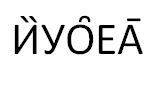
They're misplaced, leaning to the right.
In Constantia it doesn't work at all. I haven't checked the other Microsoft typefaces.
I'll ask Microsoft to look into this Calibri issue. It looks like the substitution of the cap accent forms (ccmp) is working fine, but the positioning (mark) is not. Possibly this is another situation with a lookup not being correctly associated with the SRB language system.
This is not expected to work in Constantia: of the original ClearType font collection, only Cambria, Calibri and Consolas were extended and mark positioning added for Windows 7.
I don't know how Microsoft will release a fix. Typically, critical bugs get rolled out using the Windows Update mechanism, but font issues are seldom considered critical in this sense.

Thanks John A for reporting the problems with these fonts. As John Hudson indicated, Microsoft is rarely able to update fonts via Windows Update. The fixed fonts will likely ship with the next version of Windows.
Thanks, Si
Oh, OK. Thank you, John! I figured that it will ship with the next installment of Windows, as Sii says.
As for Constantia, I was just wondering why do the combining diacritical marks exists when they don't work properly. I thought typeface designers checked if all of that worked well. Segoe is another such typeface.
A subset of combining mark characters are supported in Constantia and many other fonts without mark-to-base GPOS support in order to be able to create precomposed diacritic composites using these glyphs. It would be possible to do the same thing while leaving these glyphs unencoded, but that would result in a bigger fail when these characters occur in text, since the font wouldn't be able to display them at all.
Oh, I see. Of course. Thank you for all your help and explanations!
Also, in Cambria, is the Combining Ring Below supposed to look like this? With the Cyrillic r it doesn't even show up.
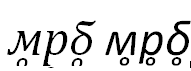

Here is what I get with XeLaTeX (Russian left, Serbian right) using Cambria italic.
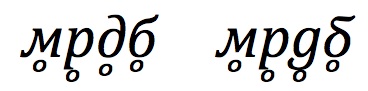
Could you share the document preamble? Why does it differ that much? And how does XeLaTeX know how to use the correct italics forms?
\documentclass[12pt]{article}
\usepackage{polyglossia}
\setmainfont[Script=Cyrillic]{Cambria}
\setdefaultlanguage{russian}
\setotherlanguages{serbian}
\newfontfamily\serbian[Script=Cyrillic,Language=Serbian]{Cambria}
\begin{document}%\color{blue}
\large\itshape
м̥р̥д̥б̥\quad\textserbian{м̥р̥д̥б̥}
\end{document}
That is the full input.
The line with \newfontfamily\serbian can be deleted.
Sylph: Also, in Cambria, is the Combining Ring Below supposed to look like this?
What is happening here is that the GPOS mark positioning is moving the mark beyond the OS/2 table usWinDescent value. This means that the mark will be clipped in some software, but not in others. If you are using MS Word, you can prevent this from happening by using an exact size of linespacing in the paragraph settings, rather than a multiple of the default linespacing.
In Michel's image, I'd say that the position of the mark under the default italic д is a bug. Probably my fault, I'm afraid. I think the mark height must be inherited from the upright font, where it needs to be lower because of the descenders of the д.
Thank you, Michael and thank you, John. I hope I'm not being too tedious about this.
John, yes, I've searched for your posts about this and managed to find here
http://www.typophile.com/node/61330
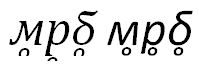
the suggestion about leading. With a font size of 12 pt and line spacing set at Exactly 20 pt, this is what happens
Another matter with Cambria is the difference with a U+00E0 character and Cyrillic a with U+0300 (Combining Grave Accent):
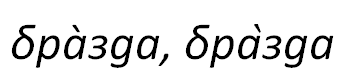
XeLaTeX again, with Michael's preamble, does this correctly with the latter.
These characters with the ring below aren't invented – though they are extremely rare. It's used to denote a syllabic consonant, which is usually m, l, r, n.
Charis SIL does this correctly, but it doesn't have the correct italics whereas Gentium Plus does have the feature, but it has to be turned on with the TypeTune tool.
I have to admit that I've almost given up trying to understand how MS Word determines when and where to clip. Setting the linespacing to an exact value appears to do a better job avoiding clipping of marks above than below. Testing the sequence you show, less of the ring is clipped as the linespacing gets larger, but obviously this isn't a viable solution.
Note that this clipping should not occur when you print the document, including printing to PDF: it is the result of how Word paints each line of text on screen.
I'm not able to reproduce the problem you show with Calibri à vs а̀: these display identically in Word 2007 on my system.
Look closely at your image, above: the grave accent on the right appears to be from a different font, so maybe what you are seeing is a copy/paste error. Select the whole word and ensure that the font is Calibri.

Seems that language specific metadata for ascent and descent was slain and will never rise from the ashes... But maybe some clever dude(s) or dudette(s) will remedy the situation with a pan-linguistic cross-platform script to help typographers by making that metadata available on the fly... now.

I have to admit that I've almost given up trying to understand how MS Word determines when and where to clip.
But maybe some clever dude(s) or dudette(s) will remedy the situation with a pan-linguistic cross-platform script to help typographers by making that metadata available on the fly...
There is not need to even try understanding it. :) This is clearly an application bug and needs to be fixed by the application developers.
GPOS, and its arbitrary mark stacking mechanism in particular, by design (designed by Microsoft!) contradicts the idea that any font metadata would delimit the vertical region up (or down) to which attachments are visible. And likewise, the suggestion that OS/2 ascent and descent values would need to reflect every possibly additional mark is in contradiction to the idea and design of GPOS.
They sure do look stupid. But we owe them time to fix their QA process... again and again and again.
I have just checked the typeface version in Windows 8 Consumer Preview, and for Cambria it is still 5.96. Oh, Windows, will you update these fonts?
Oops, it's 5.98. Let me see if something has changed.
OK, the Cambria issues seem to be fixed in Windows 8 (albeit, one still has to pick a language for a non-existent state, you cannot get the right italics for Serbian (Cyrillic)), the Calibri misplacement of combining diacritics isn't fixed.
It seems also that both still don't have the U+203F character.

@John Hudson, who last year correctly said, ".. font issues are seldom considered critical in this sense."
A little late to the party, but as far as I know, the only time that MS issued a CRITICAL update for a font was some nine years ago when they removed the hindu/greek/american indian symbol that was a swastika from Bookshelf Symbol 7. If I remember correctly, they first replaced it with a star of David, but later versions have that unicode slot empty.
The inability to create text properly certainly isn't a critical bug to MS.
- Herb
Not quite right, Herb. MS didn't replace the swastika with a star of David; in 2004 they removed two swastikas and the star of David from the font, presumably over GeoPol sensitivities.
[For another client, I once had to replace a six-pointed asterisk with a five-pointed on the grounds that the former might offend Arab customers by resembling the star of David. That was when I instituted the stupidity premium of +25%.]
OK, more issues:
http://s10.postimg.org/3xvthn3gp/sshot_66.png
Note the different height of the combining diacritical mark. It doesn't help if one picks the character U + 0450.
You can also copy and paste the following characters
а́ а̀ а̑ а̏ а̄ а̂ е́ ѐ е̑ е̏ е̄ е̂ и́ ѝ и̑ и̏ ӣ и̂ о́ о̀ о̑ о̏ о̄ о̂ у́ у̀ у̑ у̏ ӯ у̂ р́ р̀ р̑ р̏ р̄ р̂ А́ А̀ А̑ А̏ А̂ Е́ Ѐ Е̑ Е̏ Е̂ И́ Ѝ И̑ И̏ И̂ О́ О̀ О̑ О̏ О̂ У́ У̀ У̑ У̏ У̂ Р́ Р̀ Р̑ Р̏ Р̂
and for example zoom in to see the issues with a lot of characters.
Confirmed. There seem to be a number of issues with combining mark anchors on Cyrillic letters in Calibri. In addition to the raised acute on е, there are some incorrect horizontal positioning with the marks too far to the right.
Have directed our Calibri program manager to this thread. Thanks for the heads-up.
Si
Thank you, John Hudson, for everything regarding this issue! You've really helped me a lot!
And thank you, Si, for directing the manager to the thread.
If you check the corresponding characters in Latin script, you will see that everything is alright. Though, some of these aren't made with combining characters:
á à ȃ ȁ ā â é è ȇ ȅ ē ê í ì ȋ ȉ ī î ó ò ȏ ȍ ō ô ú ù ȗ ȕ ū û ŕ r̀ ȓ ȑ r̄ r̂ Á À Ȃ Ȁ Â É È Ȇ Ȅ Ê Í Ì Ȋ Ȉ Î Ó Ò Ȏ Ȍ Ô Ú Ù Ȗ Ȕ Û Ŕ R̀ Ȓ Ȑ R̂
These aren't invented combinations, they are used in the real world.
Another bizarre issue I have is if I choose Contextual Alternates and choose the language as Serbian (Cyrillic, Montenegro) and convert the document to PDF, it doesn't use the alternate it should shown in the .docx file. But everything works fine if the language is Serbian (Cyrillic, Serbia and Montenegro (Former)).
Stuff happens in Cambria, too:

I can't reproduce what you are showing here (the marks slightly too far to the right). This is what it looks like for me, which is by design:
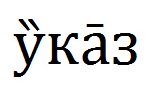
I'm looking at this in Wordpad on Windows Vista.
[I would normally set the relative position of double-acute to the anchor position further left, but the approach to mark positioning in Cambria favoured centring the width of marks rather than having them lean left or right.]
OK, I've opened WordPad on Windows 8 and it seems to be appearing correctly:

Why does it happen in Word? It must be language-related again.
Can you check it by changing to all the Serbian Cyrillic language options?
Italics in Wordpad:

Is this how it should be?
I guess that depends how you define 'should be'. I'd say that the double grave is too far right, but that seems to be an issue with the default offset of that mark -- which might be intentional --, and not an error in the anchor attachment lookup. I'll look into this and check whether to advise a global adjustment to Microsoft.
?!
What I get with textedit and XeLaTeX on my mac (Cambria Italic.ttf, Version 5.96) is not so far to the right:
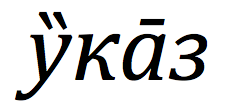
So... What is going on?
I have the version 6.80.
It's been what? Two years since I first started this up? And it couldn't be corrected? Consider also that the new version of both Windows and Office were released in that time period.
Look at Gentium, compared with it, Cambria is too far to the right:

Creating these sort of things and messing with VOLT scripts and other font-creating tools, how difficult a job is to make this right? Is it a one-day job, a week-long job, a two-hour job?
...a lifetime job? Several generations?
You tell me.
Imagine that these symbols were first used by a guy around 1877. And Microsoft introduced the above listed Latin script symbols with diacritics only when they introduced these two typefaces. But for Cyrillic almost 130 years after the introduction they still don't work.

Byzantine, really byzantine matter.
If even John fails to manage it, there must be something *seriously* wrong. (not on his side, of course)
Based on current technologies we’ll never get rid of such problems I suppose.
I just trap myself imagining that those things being automated by default in the font making application one day. Otherwise, I fear, we’ll never live up to the goal…
sorry for becoming radical again.
I've checked the double grave horizontal offset in our Cambria italic glyph source, and it is correct. The problem seems to be in the actual anchor attachment data. Will investigate and discuss with MS.
_____
Update: bug found; fix underway.
That's great!
Will they release it via Windows Update this time?
>Will they release it via Windows Update this time?
That is unlikely. Based on the kind of issue that have met the bar for a Windows Update font update (for example new currency symbol support requested by governments) I don't think this is likely. But thanks again for reporting these issues. Of the billions of people who use Cambria and Calibri every day you are the only person to reach out and report these problems. Thank you!
What I find frustrating is that, due to the EULA, users may not fix the bugs for themselves even if it is just a minor fix.
I agree that that EULAs of commercial software are not conducive to tinkerers who want to stay within the "rules". At least on Windows installing additional fonts doesn't require any jail-breaking.
...easy to say now. When I was a kid, every time we wanted to install a font on Windows, first we had to go build a jail.
That's not a fair comment. Adobe Type Manager,was a lot of things, but really, a build it yourself jail? :-)
You're welcome, Si!
But could you tell me the reasoning behind not releasing a patch?
Basically, I will need to wait for the first service pack?
Sorry, no I can't. But if you review the typical fixes that go into software service packs and updates they are usually the most critical and serious of issues, affecting many customers. The problems you've identified are real, but I don't think they would meet this definition.

Macron over r:

Hopefully the October Windows 8.1 release will fix these annoying, several years long problems.
Captured from web.archive.org on 21 Aug 2013. view this capture
