
I was wondering if you might know where I could find a tutorial to create the lined shadow effect you see behind this type.
Really appreciate your advice!

I was wondering if you might know where I could find a tutorial to create the lined shadow effect you see behind this type.
Really appreciate your advice!

I believe that was drawn up by Tal Leming as a custom variation of the font. I don’t think you can get there with any fancy filter tricks, if that’s what you mean.
Didn’t you borrow that image from the Fonts In Use blog?
The caption there says: “Fortune’s section heads, using a modified and shaded MVB Solano Gothic, were created by Tal Leming.”
I did. I've seen the effect used quite a lot and I thought that I might try something similar. Tal's work is stunning.

Get the book "The Logo, Font, and Lettering Bible" by Leslie Cabarga for detailed instructions on how to do old-fashioned lettering treatments like this digitally.

I would start with the 'extrude and bevel' tool in illustrator and use the result of that to mask a series of lines created either by hand (snapping to grid, and copy paste) or with the blend tool. Then add the little details by hand. Hope that helps.

What I've always done was to copy the text and paste it in a new layer and move that new layer to where I want the "shadow effect"to end. This layer is treated as a guide so my lines follow the forms of the letters

I think Photoshop will help you in this
I have worked with Photoshop many times a created lot's Graphic but never seen such one. But now soon i will see this one. As i will try make the same then update you with the same graphic.

I haven't tested it but couldn't you take some parts of the outline and apply a brush to it for the small lines?

It's a great effect, due in part to the intricate detail. I'm sure you could do this using PhotoShop, but I would be using Illustrator and creating a series of vectors you can reuse. This is time consuming, but you'll get the best result as you can exercise a lot more control over the shadows and line work.
You can import these into PhotoShop and add textures later.
This tut doesn't show you exactly how to achieve this effect, but may help:

I just asked Mr. Leming himself how he accomplished this, and he was kind enough to reply with a picture:
Thanks! It's a bunch of layered clipping paths in Illustrator. It looks messy in AI but it works.
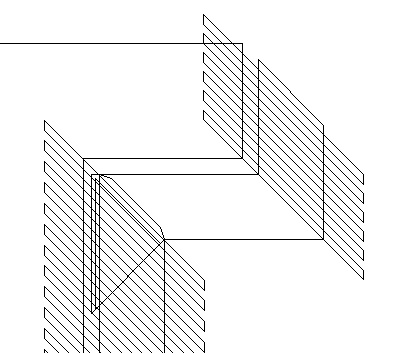
Guess that answers that, then! :)
I know the answer's already there, but I was just thinking:
as to making the “extrusion” behind the letters, you could use the 3D Filter in illustrator, keeping only the faces you need. Give the text a relatively thick outward outline. Then use an Expand-ed version of the text outlines to punch the space between the letters and their extrusions. And then follow with the clipping paths..

This is quite an Idea for somebody to create a Filter in Photoshop or Illustrator!
Captured from web.archive.org on 24 Apr 2014. view this capture