Typophile

How to Access glyphs from a non-system font with Special Characters in Lion

Mike Diaz

Hello All:

It seems Apple took a step backward with the new character palette with Mac OS X Lion.

I’m trying to access the ornaments in Hoefler Text for use within Pages and the only typeface the Character Palette is showing is Lucida.

Does anyone know how to help with this one?

Thank you in advance,

Mike Diaz :-)

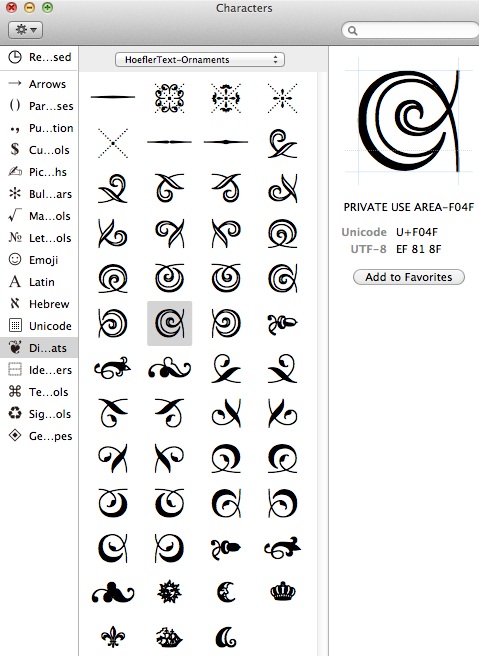
In Lion, Hoefler regular, italic, bold and bold italic are in a .ttc file, and the ornaments are in a separate font file "Hoefler Text Ornaments.ttf", and moreover they are in the PUA and the character viewer does not display the glyphs in the PUA. Here is the best I found: you can insert them in Pages by clicking on the character with the right unicode number in the character "viewer" even if it is not displayed (after selecting the Hoefler Text Ornaments font). Here are the numbers:

  0xF030:'orn.brassdash.middle.smooth',
  0xF031:'orn.border.tile.4',
  0xF032:'orn.border.tile.3',
  0xF033:'orn.border.tile.2',
  0xF034:'orn.border.tile.1',
  0xF038:'orn.brassdash.middle.dimple',
  0xF039:'orn.brassdash.middle.lozenge',
  0xF041:'orn.border.arab.engraved.wave.h.d.l',
  0xF042:'orn.border.arab.engraved.wave.h.d.r',
  0xF043:'orn.border.arab.engraved.wave.h.u.l',
  0xF044:'orn.border.arab.engraved.wave.h.u.r',
  0xF045:'orn.border.arab.engraved.wave.v.d.l',
  0xF046:'orn.border.arab.engraved.wave.v.d.r',
  0xF047:'orn.border.arab.engraved.wave.v.u.l',
  0xF048:'orn.border.arab.engraved.wave.v.u.r',
  0xF049:'orn.border.arab.engraved.scroll.h.d.l',
  0xF04A:'orn.border.arab.engraved.scroll.h.d.r',
  0xF04B:'orn.border.arab.engraved.scroll.h.u.l',
  0xF04C:'orn.border.arab.engraved.scroll.h.u.r',
  0xF04D:'orn.border.arab.engraved.scroll.v.d.l',
  0xF04E:'orn.border.arab.engraved.scroll.v.d.r',
  0xF04F:'orn.border.arab.engraved.scroll.v.u.l',
  0xF050:'orn.border.arab.engraved.scroll.v.u.r',
  0xF051:'orn.fleuron.acorn.light',
  0xF052:'orn.fleuron.1.light',
  0xF053:'orn.fleuron.2.light',
  0x261C:'orn.hand.left',
  0x261E:'orn.hand.right',
  0xF061:'orn.border.arab.simple.wave.h.d.l',
  0xF062:'orn.border.arab.simple.wave.h.d.r',
  0xF063:'orn.border.arab.simple.wave.h.u.l',
  0xF064:'orn.border.arab.simple.wave.h.u.r',
  0xF065:'orn.border.arab.simple.wave.v.d.l',
  0xF066:'orn.border.arab.simple.wave.v.d.r',
  0xF067:'orn.border.arab.simple.wave.v.u.l',
  0xF068:'orn.border.arab.simple.wave.v.u.r',
  0xF069:'orn.border.arab.simple.scroll.h.d.l',
  0xF06A:'orn.border.arab.simple.scroll.h.d.r',
  0xF06B:'orn.border.arab.simple.scroll.h.u.l',
  0xF06C:'orn.border.arab.simple.scroll.h.u.r',
  0xF06D:'orn.border.arab.simple.scroll.v.d.l',
  0xF06E:'orn.border.arab.simple.scroll.v.d.r',
  0xF06F:'orn.border.arab.simple.scroll.v.u.l',
  0xF070:'orn.border.arab.simple.scroll.v.u.r',
  0xF071:'orn.fleuron.acorn.dark',
  0xF072:'orn.fleuron.1.dark',
  0xF073:'orn.fleuron.2.dark',
  0xF074:'orn.sun',
  0xF075:'orn.moon.crescent',
  0xF076:'orn.crown',
  0x231B:'orn.hourglass',
  0xF078:'orn.fleurdelys',
  0xF079:'orn.sailship',
  0xF07A:'orn.aflourish',
  0xF8FF:'apple',

I think the app PopChar will let you see and input these.

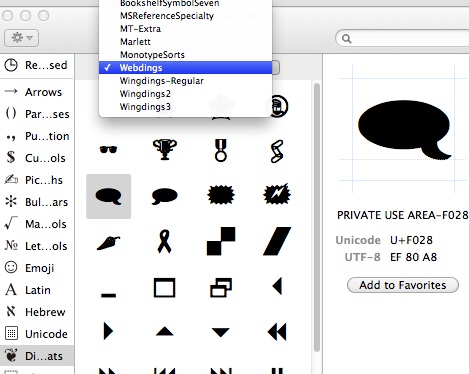
Now that Insert image is back, here is an additional comment: there are other fonts with pictures in the PUA that are accessible from the character viewer as dingbats


I fail to see why 'Hoefler Text Ornaments' is not listed with the others.

I think there is probably no one who can see why Apple decided to do away with the very useful general ability to view/input all the glyphs in a font which was found in previous versions of Character Viewer (View = Glyph). Let them know you want it back here:

http://www.apple.com/feedback/macosx.html

The Dingbats category is the only one where you can select a font. If they had not provided that, I think it would be essentially impossible to use any of those 4 fonts in many apps.

PS How odd to have a category called "Dingbats" that does not actually include any of the official Unicode Dingbats U+2700–U+27BF.

I have not checked on 10.7 but on 10.6 a simple web page allows you to see, copy and paste the desired characters.

PS: the web page above works with Safari on 10.6 and 10.5 but not with Firefox. I can't check with 10.7 for the moment.

When I click on that link I get Page Not Found

Bad. Then use this link.

Just opening with Fontforge the .dfont on 10.5 and saving as "TrueType (Symbol)" the ornaments and installing on 10.7 gives this in the Lion character viewer:

My guess is that someone forgot something when installing the fonts on OS X 10.7.

I'll point Apple over here.

Cheers, Si

Thank you every one for their participation. This issue has been a great source of consternation. Apple really needs to get with it when it comes to type!

Mike Diaz :-)

I did get an acknowledgment mail from the Apple font folks but not an indication if the issue would be addressed.

The blogs with discussion on technology based questions are educational as well as helpful in learning. From the educational point of view, your blog is one of the best. I used to find many things related to my assignments here. In order to hire professional writer at affordable rate, students must compare top essay writing websites reviews and recommendation from friends who already used a service would be beneficial. Thanks

Captured from web.archive.org on 10 Jan 2015. view this capture