Hello everyone,
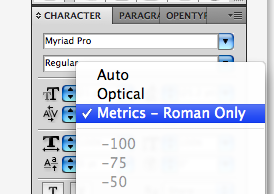
I wonder if anyone ever bump into this case. I am creating a font for a client. When I compose the font in illustrator CS5 I have no problem with spacing and kernings. But when my client use it in her illustrator all the kernings are gone. I ask her to send me her file to look after the problem. But the strangest thing happen when I open her file. To be simple the red line is my client composition and the blue one is mine. The font is exactly the same. The settings of the font panel are the same. Even when I am trying to use the Eyedropper the setting doesn't change. No kernings on my client composition. Anyone ever had this problem ? Is it a way to tell illustrator to use disable the kernings just for one line of text ? Any help would be much appreciate :-)
| Attachment | Size |
|---|---|
| ex.jpg | 152.05 KB |
| pano.jpg | 17.26 KB |