Typophile

InDesign - GREP - replacing hyphens with en dashes

jidoe

Hi folks,

I'm trying to figure out how I can get the GREP function to locate all hyphens in my document and change them to en dashes. In addition, I'd also like to add a space before and after the en dashes... a lot of the hyphens in my text document are sitting adjacent to the last letter in a word.

Attached is a screen grab of what I'm hoping to achieve (top is bad, bottom is what I'd like to change to).
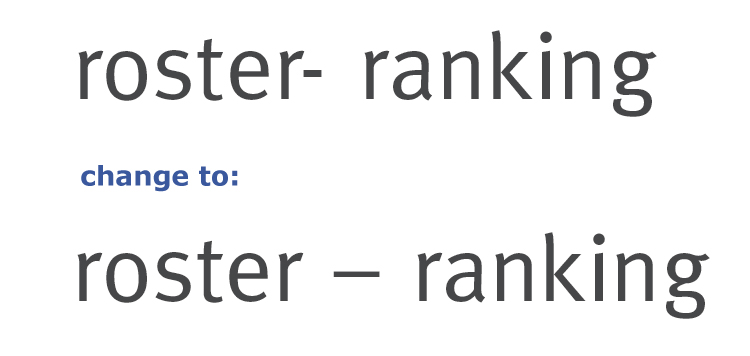
Any tips would be incredible helpful. Adobe forums have been useless!

Thx

J

No need to use grep. Just use the regular Find&Replace to replace hyphen with 'space' en-dash 'space', then replace 'space' 'space' with 'space'.

With GREP, you could search for \s*-\s* and replace that by _–_ (use spaces instead of the underscores).
This will match any number of spaces (including zero) and any kind of spaces (including non-breaking and thin ones etc.), before and after the hyphen.

> then replace 'space' 'space' with 'space'

One of the built-in GREP searches is "Multiple Spaces to Single Space". It's better than just searching for "space space", because it'll also take care of situations where there are more than 2 spaces.

I use it routinely on documents to eliminate multiple spaces.

it'll also take care of situations where there are more than 2 spaces

That’s why I always run the replace more than once, until there are zero substitutions.

By the way, Joseph (jidoe), are you sure there are no legitimate hyphens in your text?

Captured from web.archive.org on 16 Jun 2011. view this capture