
For some of my favorite identity work on Behance, I frequently see diagrams with well placed grid lines and circles such as Denis Olenik's gorgeous work for Savviva:
http://www.behance.net/gallery/Savviva-Corporate-Identity/688520

In practice, I'm struggling with how to get the shape to actually conform around these circles when using Illustrator. I thought I was decent with the pathfinder options, but when it came to actually rounding shapes, I'm struggling with having perfect accuracy for where the circle falls.
For example, if I want to round off the corner, and activate Preview Mode in Illustrator to more clearly see the lines, the two shapes don't share a common point to snap to. Just eyeballing it doesn't feel terribly accurate either.
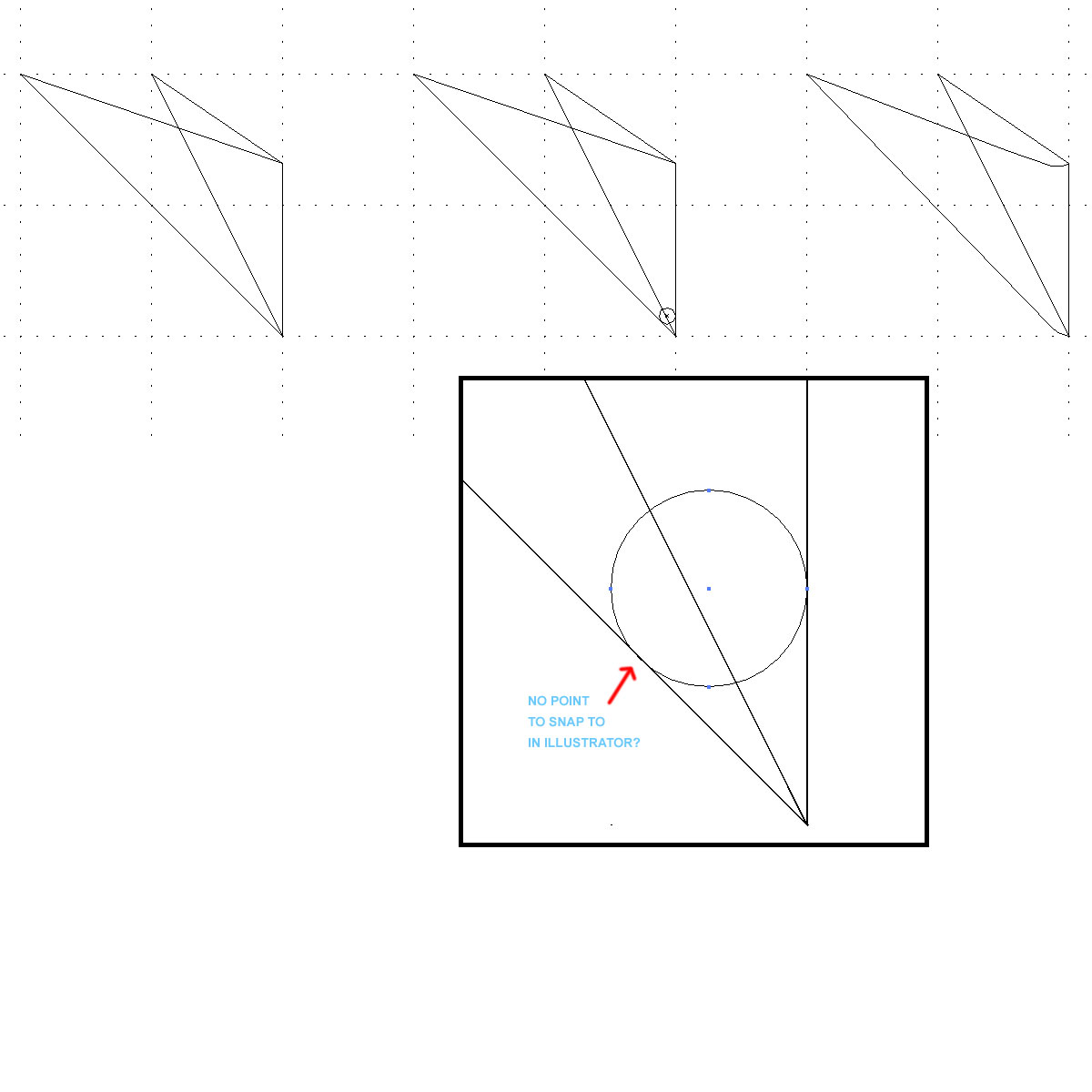
1. Is there a way in Illustrator to be more accurate with snapping shapes to their sides rather than their points?
2. Are there any resources out there that teach the techniques used by many type and logo designers that use custom line and circle guides?
I hope one day to be as good as Denis at rendering these exquisite type shapes.

