Typophile

Crisp Text, a Google Chrome for Mac OS X extension that turns browser font antialiasing off and on

twardoch

A bit of shameless self-promotion: I’ve just written a small extension for Google Chrome for Mac OS X that can aid Mac users to select webfonts that work well on Windows. It’s called Crisp Text and installs a button in Google Chrome that allows the user to toggle the text rendering on any web page between unhinted antialiased (the Mac default display) and hinted black-and-white (which is what Windows users will see with smoothing turned off).
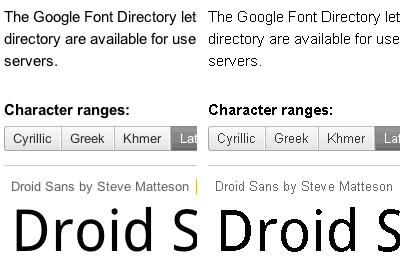
It works well with webfonts, so you can navigate to any webfont-offering service that uses live webfont previews and check the screen quality in the crudest of all environments (black-and-white aliased).

It’s a one-click install at the Google Chrome extensions page (visit the link with Google Chrome, then click on Install).

After installation, you'll see a small icon:


next to the Chrome address bar. Clicking on it will turn font antialiasing off and on again. The extension is not perfect (you need to click twice on the button sometimes, and you need to activate the black-and-white rendering on every page), but it works well.

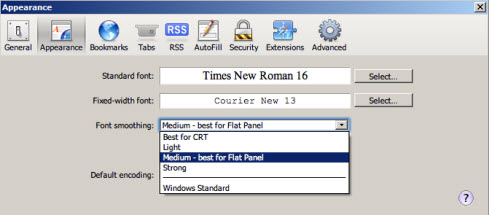
It only works on Google Chrome for Mac OS X. Windows users should use the system-wide font antialiasing switch (in Control Panel / Display).

Enjoy,
Adam

Some discussion already:
http://typographica.org/2010/on-typography/the-webfont-revolution-is-ove...

(A good article by Stephen Coles, above all.)

Two steps forward, one step back, but at least it's free;)

Does this display the actual hinting-assisted characters? Is that an OS X default when you turn off the anti-aliasing? (I believe OS X ignores hinting data entirely.) Just two questions that popped up. I'm liking this a lot, despite the step back — at least I don't have an excuse not to check anymore, and for my own font development, it's a lot easier to check the hinting like this.

Well done, Adam. Now I need a Firefox extension with DirectWrite rendering under windows XP. :-)

David,

I'm only exposing what's in the OS. No magic :)

Rob,

the black-and-white rendering does indeed use hinting to its full extent. It's switching to the "old" Apple TrueType rasterizer. Verdana and Georgia render pretty much identically to what they look like on Windows. There may be minimal differences due to some potential differences in how Apple and Microsoft treats some instructions, but really really minimal.

Actually, I was rather surprised that the CSS -webkit-font-smoothing:none property (which my tool simply applies to the "body" element of the HTML page -- there is no magic involved) works, and what results it delivers. I did not know that hinted TrueType display is possible in modern Cocoa apps, but well -- it seems that it works.

As I explained in the Typographica thread, I do not consider the tool an "ultimate solution", more a little helper that helps the lazy Mac user who does not own a Windows license to get a peek at what Windows rendering with ClearType disabled might look like.

Best,
Adam

Thanks, Adam. I also didn't think Cocoa apps would even parse the hinting data. Very nice in any case — it's not an “ultimate tool”, sure, but it makes the threshold for preliminary checking of hinting a fair bit lower.

AT> ...a little helper that helps the lazy Mac user who does not own a Windows license to get a peek at what Windows rendering with ClearType disabled might look like.

Oh, my mistake, one step forward, two operating systems back. But...

>...I did not know that hinted TrueType display is possible in modern Cocoa apps

It's always been possible and has always existed as a preference in "Appearance" with a range from 4 to 12.

Check and see if Lucida Grande anti-aliases still with your tool.

Apropos of quick checks, on Windows, Safari for Win has several rendering modes available in its Preferences that I find handy until bouncing a font over to the MAC for a native look-see.

The changes are immediate.

One other solution, short of multiple machines, is VMWare or Parallels running XP or Win7, or Ubuntu, for that matter. They can all run in virtual machines on the Mac.

None of which look like Mac aliasing fonts.

Yawn.

The pixel outerform of a TT glyph as it's hinted to appear onscreen doesn't look like it's outlines, either. Yet there is a relationship. One thing can tell you things about the other once you become familiar with that relationship.

I find printing to a PDF and viewing the font in that helpful, too. That isn't native to any OS, either.

To each their own.
But sooner or later you DO need to look at it in its native environ and not some gif screenshot.
Unfortunately, this is becoming a very expensive proposition. A major problem.

Sorry to bore you, David. Some espresso, perhaps?

Captured from web.archive.org on 25 Jan 2015. view this capture