Typophile

me, being lazy, whiny, about grep styles. . .

Charles Ellertson

In a way, this is an InDesign post. My only excuse for posting here is there may be some implications for OT features. And that a bunch of you have greater skill writing regular expressions . . .

* * *

It always bothers me when full caps aren't letterspaced, or are set with old style figures. The latter can happen with newspaper section page references (e.g., C2), U.S. Interstate highways (e.g., I-85), and other things (e.g., Box 42A) etc. -- usually in notes/references/bibliographies.

Some would say just set the full caps as small caps. Well, finding them is still a chore, and some publishers prohibit small caps in backmatter (notes, references). This isn't as bad an idea as some might think. Additionally, some construction, (e.g., Interstate I-15) don't work well with small caps & o.s. figs.

For my purposes, it's enough that some publishers banish small caps in the backmatter, though I hope I've shown there are other reasons for an automated solution. And there is the matter of letterspacing full caps, just like small caps.

Now with InDesign, a grep style could do this. Problem is how to write it. At fist glance, it would seem that anything within word boundaries that doesn't have a lower case letter would qualify. But no, straight numbers would then qualify, and that's no good. What's needed is

1. There must be at least two letters.

2. There must be at least one cap.

3. There can be no lowercase letters.

4. At least some punctuation should be allowed -- period, hyphen, slash, quotes, maybe parens and brackets . . .

5. Numbers should be included.

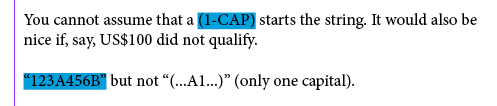
You cannot assume that a cap starts the string. It would also be nice if, say, US$100 did not qualify.

Anybody think of other inclusions/restrictions?

* * *

As I envision a grep style rather than a grep search, one could use more than expression.

Since you'd be calling a character style, everything could be hand-coded there -- letterspacing and figure style being primary. But if *cpsp* and *case* were adequate in the font, a lot of niceties would come along for free.

Ah, the wonders of GREP styles -- how did I ever work without them?

Let's see -- the following GREP style will find any run of the following characters, with at least two uppercase characters anywhere (not consecutively): Capitals, digits, hyphen, period, open and close single and double curly quotes, and round parentheses.

It will match "123A456B" but not "(...A1...)" (only one capital); 'word' delimiters are all possible kinds of white space, plus begin/end of string.

It works like this: to the left of the starting point there should not be NOT a space (I cannot use the regular \b boundary here, because it seems some non-whitespace characters also define a word boundary; in addition, I cannot use "to the left should be white space, because then it will fail at the start of a paragraph). Then, from the start, there should be any number of allowed characters, excluding uppercase, followed by an uppercase, followed by again any number of allowed characters and again at least a single uppercase. That's to fulfill the requirement "1. There must be at least two letters" (which, incidentally, is repeated in "2. At least one cap" and "3. No lowercase letters"). If the previous check matches, all characters are allowed up to NOT a non-space at the right.

(?<!\S)(?=[\d\-\./~[~{~}~]()]*\u[\d\-\./~{~[~]~}()]*\u)[\u\d\-\./~{~[~]~}()]+(?!\S)

To test, you can set up a character style with a fat colored underline, so you can see what it picks up and what gets ignored:

The great thing about GREP styles in InDesign is that they are entirely live, so you can type text and see the result immediately!

Hi Theunis.

Nice. I screwed up the spec. (1) should read "there should be at least two *characters*," not two *letters.* That way, A1 would qualify, but a single cap -- I, A, O -- wouldn't. And (2) wouldn't be redundant . . .

BTW, do you think this useful? OK to say no.

Okay ... this needs a slightly different approach, then:

(?<!\S)(?=\S*\u)([\u\d~[~]~{~}.()]){2,}(?![^\s[:punct:]])

This needs at least a sequence of non-spaces followed by an uppercase (the (?=\S*\u) part), then the same characters as above may get repeated, at least two times and as much as possible.

I also changed the "end" condition slightly. Rather than a space character -- or, as I said before, "not not a space character --, it also needs to check for regular punctuation. My previous try also failed on "... A1, .." (a single comma right after a 'good' expression).

BTW, do you think this useful? OK to say no.

"Jugdement call. Ask a real human." (Quoted freely from -- I think -- a Terry Pratchett novel.)

As you can see with a highlight style applied, it picks up everything mildly applicably and relentlessly. GREP Styles are the Terminators of InDesign -- They Will Not Stop. You cannot manually override a GREP style, unless you make another one with every attribute set to the exact opposite. The Highlight style, for example, needs one with Underline forcibly switched Off. Worse is that you have to apply them manually as well.

I'd have to see a run of the text you intend to apply it to, because it may well be it works as intended ... So do try out with a Highlighting Style, so at least you can see where it gets applied.

Here's one I missed so far: since it also includes the parentheses, the closing ones in your short list of examples get picked up. It's virtually impossible to force "matching parentheses" in a GREP style ...

Captured from web.archive.org on 17 Jul 2012. view this capture
