Typophile

Invisible Text on Photoshop?

bn.trmn

I am curious to find if there is a style available for Photoshop
that allows a blank colored layer to be 'erased' by type to reveal (eg. a photo in this case) layer underneath?

I did a quick example but I had to merge the text and blank layer together then magic wand the black text and delete, leaving rough edges so it then had to be blurred.

Any input would be helpful!

AttachmentSize
Nostalgia_Kills.png339.48 KB

As far as I know you can’t leave the text as editable text for this effect. You have to either rasterise the text or just select it (CMD/Strg + Click on the text layer), then create a mask on a coloured layer.

Command click the text icon in the layer panel, select photo layer and hit backspace.

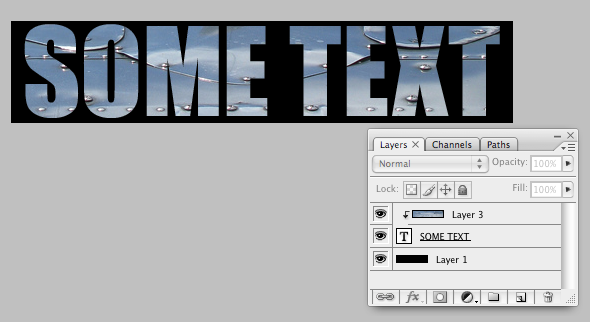
I might not be understanding what you're trying to do, but if you want text filled with a photo over a background, you can keep the text editable by making the text into a mask layer, like this:

The key is to option-click on the line dividing the text from the photo. That'll indent the photo (Layer 3) and mask it to the text.

I probably have my terminology wrong.

Ah, that's what you mean. Please disregard my response.

maxgraphic: Thank you so much, my request was a little vague and everyone else for the contribution, this is the exact result I needed!

Captured from web.archive.org on 27 Dec 2010. view this capture