
In Metrics window, can't make the Auto menu and Kern classes work. I click on them and nothing happens.
Mac OSX 10.5.8
Fontlab 5.0.4 build 2741
The font has 131 kerning pairs
Kerning classes defined
Any idea?
In Metrics window, can't make the Auto menu and Kern classes work. I click on them and nothing happens.
Mac OSX 10.5.8
Fontlab 5.0.4 build 2741
The font has 131 kerning pairs
Kerning classes defined
Any idea?

Those two buttons don't work for me, either, but you can access all the commands in them elsewhere.
All the items in the Auto Menu are also in the Tools menu at the bottom of the Metrics window:
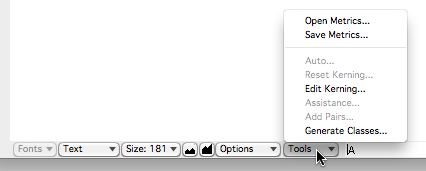
(If you don't see these menus at the bottom of the Metrics window, click on the little button with the square in it just below the right end of the Metrics window toolbar.)
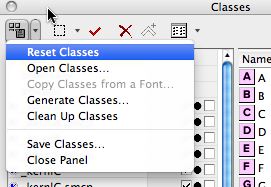
All the items in the Class Kerning menu are also in the Class Kerning menu at the top of the Classes panel:

Occasionally the Auto Menu button in the Metrics window craps out on me as well.
Trash the preferences and restart the program and you should regain access.
Thanks Marks,
I will do that. it works.
You mean trashing the file named: FontLab Studio 5.0 Installer.plist?

The preferences file should be named com.fontlab.fontlab5.plist
In spotlight, no results for:
com.fontlab.fontlab5.plist
or
fontlab.fontlab5.plist
or
fontlab5.plist
this is the file you are looking for:
com.fontlab.fontlab5.plist
It should be in the preferences folder in the User library
Haleluya - that worked. Thanks.
Captured from commoncrawl.org on 18 Apr 2015. original URL