
Hi what are the best books to learn about:
Grids
Kerning
Leading
Color theory
Production
Hi what are the best books to learn about:
Grids
Kerning
Leading
Color theory
Production
Thanks, I just got that book out of my college's library. (Grid Systems in Graphic Design/Raster Systeme Fur Die Visuele Gestaltung (German and English Edition) [Hardcover])
What about for the rest, kerning, leading, and color theory?

You won't learn much about leading from books, unless they are mid-20th century foundry/typesetter specimens which show a typeface with a variety of leadings.
The best way to learn about leading is to experiment.
AFAIK, there is no study of kerning per se, generally the topic is covered under the rubric of letter spacing.
Color theory: Josef Albers is the man.
I have tried experimenting on my own about kerning but have had no success. A book on letter spacing would help me. I have tried justifying paragraphs and they have that huge gap between words that I am unable to get to look correct.
Concerning leading, a book is not so important I really could experiment and learn it.At the end of the day it is all about visually looking at the text and seeing if it looks correct, and that no line enters the space of the next line.
...that huge gap between words...
There has been some discussion about H&J settings at Typophile.
> I have tried justifying paragraphs and they have
> that huge gap between words
Have you tried adjusting the hyphenation settings? Are you using InDesign?
Yes, I am using Indesign. I am unsure what the hyphenation settings is, and due to that and lack of knowledge of how to properly fix kerning issues I want a book that can help me learn.
I understand that I could look around the forum here for how to solve it, but I would much rather have a book that I can read.
> I am using Indesign. I am unsure what the
> hyphenation settings is
Spacing problems in justified text can often be improved by telling InDesign to use more hyphens, but the hyphenation controls are a little hard to find.
1. Select the paragraph(s) you wish to adjust
2. Open the Paragraph palette (Window > Type and Tables > Paragraph)
3. In the upper right corner of the Paragraph palette is a tiny little arrowhead. Click and hold the arrow and select Hyphenation in the popup menu.
(An alternate way to reach the hyphenation controls is to assign a style sheet to the text. The style sheet options include hyphenation controls.)
Anyway, once you've reach the hyphenation controls, you'll have various options which are mostly self-explanatory. Try different settings and see how they affect the appearance of your selected text. Be sure that "Preview" is selected so you can see immediately how the text is affected.
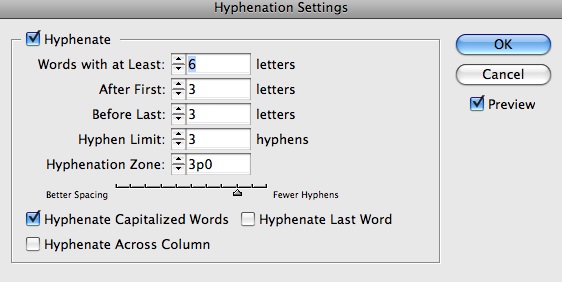
Here's what the controls looks like (these are default settings). And remember that your changes will only affect the selected paragraphs.
I am playing around with the hyphenation option right now and it only seems to help if there is hyphenation.
What do I do afterwords when its just an issue of kerning?
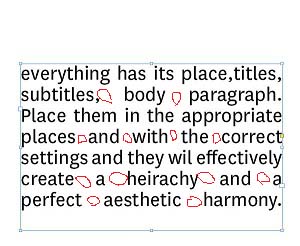
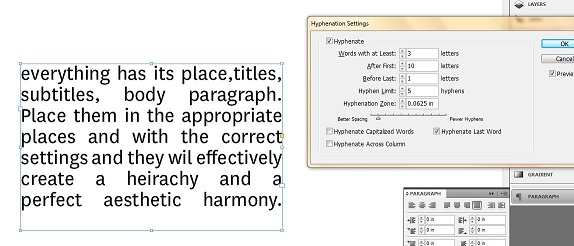
The problem is that you've got a narrow column and 0 hyphens.
Select the paragraph and then change the first three numbers in the settings to 5 2 2 (instead of 3 10 1) and see if that helps create more hyphens.
Also keep in mind that it's difficult to get attractive justification when there are only a few words per line. Try to get more words per line by widening the column, or by making the type smaller, or by switching to a condensed font.
And fix "place,titles" (space missing); InDesign thinks its one long word.
Making these changes should help, but remember that InDesign justifies text by adding extra space between words. So you're unlikely to get perfectly consistent spacing between words.
I know all those things can help fix my problem.
What if this was part of a grid layout and it was the same font and size as the rest but since it has so little text it has this spacing issue. What do you do then to fix it?
> What do you do then to fix it?
I would avoid using justified type in that situation.
But if you had no choice, adjust hyphenation settings to get the best results, hyphenating manually if necessary. You might find it helpful to temporarily change the justification to flush left rag right so you can clearly compare the actual lengths of each line and adjust the hyphenation until each line is as close to being the same length as possible. After doing that, change it back to justified.
You could also adjust the tracking of each line to reduce the gaps between words, and make adjustments to the Justification control panel, but if you've got huge gaps between words to begin with then I don't think those things will give you really attractive lines.
If this problem is occurring only in a few spots in your document, another approach is to rewrite those sentences so they break better.
I have tried kerning the words but it either lessens the gap( but not making it any better) or it just jumps and overlaps the words. There has to be a way to do it, if you look at books and magazines their text is always justified and it forms such perfects squares and magazines especially do not change their grid just to fix the justification problem.
Adjusting the hyphenation setting- changing it from the settings I posted in the picture would either lengthen the gaps or would do nothing. I understand adding hyphenations manually could help but it wouldn't necessarily help in this situation. I could try to post or email a copy of the indesign file and see what ways people could come up with to fix it.
I ended up not using justified text in my design because I couldn't get it to work but my professor wants me to and said I just have to sit there and fix the gaps. I found this site and thought I would try to find a good book or some advice on how to fix it, since experimenting on my own I was unable to do get the desired results.

Might also try playing with Justification Menu (Off of Paragraph Palette)
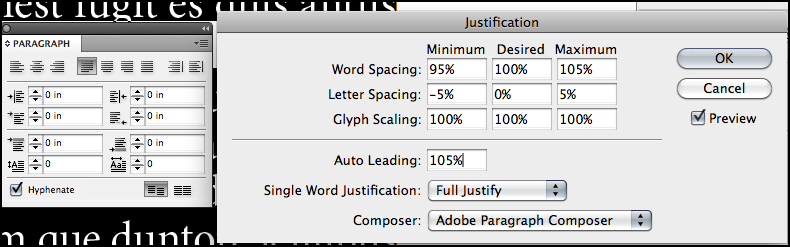
I tried that also nothing would change no matter what settings I changed. I am surprised there's no book teaching how to kern, not even a book with projects to do to get some practice.
> if you look at books and magazines their
> text is always justified and it forms such
> perfects squares and magazines especially
Please post an example from a book or magazine showing a column so narrow that only 3 to 5 words fit on each line and yet it's justified and looks great.
I'm not saying it's impossible to achieve, but I think you'll find that most justified columns that are attractive are wider than that.
You are right that they are all wider and have more text. I just believe there has to be some way to accomplish it even in such narrow situations.

On H & J settings, the Complete Manual of Typography by James Felici is useful.
I suggest you get Visual Quickstart for InDesign from Peachpit Press - covers how to do Paragraph Styles - Justification etc. You get alot for not a big price.

>I just believe there has to be some way to accomplish it even in such narrow situations.
Yes, you are right. Changing the text can accomplish it if that includes contractions, abbreviations and many alternate versions of letters and letter pairs.
See Johannes Gutenberg's books.;)

Way to go, DB ; )
I was going to recommend John Miles' 'Design for Desktop Publishing' which is an older, but useful entry-level primer and going very cheap all over abebooks.com. It would provide some quick answers for the first three of the listed topics.
Nick, when you said Color theory: Josef Albers is the man you weren't perhaps thinking of Johannes Itten?
Josef Albers "Interaction of Color" is the book -Yale University Press

>I tried that also nothing would change no matter what settings I changed. I am surprised there's no book teaching how to kern,
The solution to your problem is proper Hyphenation & Justification, as others have tried to point out — not kerning. (The general public is getting into a disturbing habit of using the term “kerning” to address a multitude of things which it is not. This is becoming a pet peeve of mine.)
With a narrow column, you will have to employ hyphenation to have any hope of getting good justification. The numbers in your screenshot are way off base.
There are plenty of books discussing the principles behind good hyphenation & justification. Some have been mentioned. Find one and educate yourself about the purpose of each of the settings in both the Hyphenation and Justification dialogs.
There are also plenty of previous discussion on Typophile, with examples.
I don’t recommend using the actual numbers in Bojev’s example above. You’ll need much tighter minimum word spacing for that particular setting.
Captured from web.archive.org on 27 Dec 2010. view this capture
