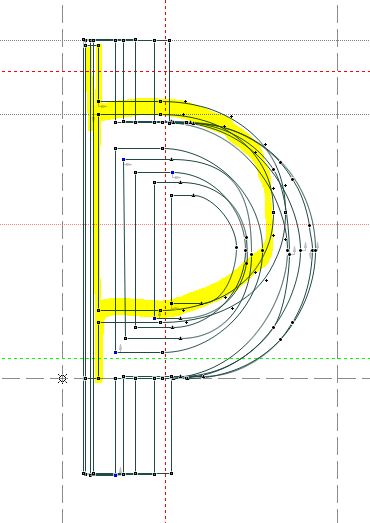
After many revisions of six weights of a font family, I want to compare all six outlines of the same glyphs together. The aim is to adjust any glyphs that differ markedly from the others.
Here is one method I used in Fontlab but perhaps there is a better way? This method does not show the sidebearings. Any suggestions are welcome as to how to adjust the spacing uniformly for each of the six weights will be welcome.
Say the fonts are named 1,2,3,4,5,6. Open them all. Save 6 as a new font called Multifont. Keep the other fonts open but do not work on them.
Open Multifont (it has the outlines of font 6). Select all glyphs, and keep them selected .
Tools/Mask / Assign Font Mask as 5. Save All. Tools/Mask /Copy Outlines to Mask. Save All. Tools/Mask /Swap Outline with mask. Save All.
This overlaps fonts 6 and 5 in the Multifont.
Continue the same process by assigning 4 as a mask and similarly 3,2,1. I ended up with all six outlines overlapping in each glyph of Multifont. Here is a screen shot of the glyph for Thorn, The lightest weight is obviously wrong (highlighted in the screen shot).