Typophile

quotation marks sometimes work sometimes they don't

Evie

Hi everyone,

i have a question concerning a typeface i'm working on (nothing fancy, still learning and experimenting)

Sometimes the left/right single quotation marks as well as the double quotation marks just don't work all the time when i try and type them in Indesign, they do work sometimes when i use the alt-option key but not without, well sometimes they work.

Also a strange thing is that when i type some text in MS word with this same exact font, everything works except when i type the quotation marks it shows default Times New Roman instead of the quotation marks that belong to the typeface. I did check for open contours in fontlab or something like that but couldn't find it. Does annyone please know what this problem could be because i really can't figure it out myself.

Oh i did check indesigns setting for typographers quotes and all seems ok

Evie

Have you corrected the path direction for the kind of font you're generating?

CONTOUR > PATHS > Set PS Direction / Set TT Direction

Hi oldnick,

thank you for replying, as i'm fairly new to this i hope you don't mind me asking how the path direction should be? i'm generaring an OT font.

.otf = CONTOUR > PATHS > Set PS Direction

i'm going to try it out now, let me get back to you! :D

Ok i checked it but the path direction seems correct...

Anny other ideas?

weird thing is in indesign they sometimes work...sometimes i have to use alt-shift comand.

In Word it just doesn't work without using the alt-shift key combination. and in word because of the alt-shift combination only the right single and right double quotation marks work.

Mac OS 10.5, and I believe 10.6, has intermittent bugs relating to inputting quotation marks via direct keyboard input that I can’t really figure out. It might be related to remapping the option key, which I do. Usually rebooting fixes it.

hi dunwich, tryed rebooting and nothing, also i tried it (just to make sure) on my old Mac running 10.4 and still has the same problem :(

"Mac OS 10.5, and I believe 10.6, has intermittent bugs relating to inputting quotation marks via direct keyboard input that I can’t really figure out"

James, is this only in things like TextEdit or also in InDesign?

What happens if you direct enter them in InDesign using the Unicode numbers -- 2018 and 2019 for the left and right single quotes, 201A and 201B for the double? I don't know how you enter Unicode directly on the Mac, surely someone does. If you are using a Windows platform, I can tell you how.

If direct entering with the Unicode number works, I'd think you can be pretty sure the problem is not with the font. Famous last words.

i'd like to try it out using the unicode numbers in Indesign, i'm on a mac does annyone know how this could be done please?

thnx everyone for trying to help me out, really appreciate it!

James, is this only in things like TextEdit or also in InDesign?

It happens intermittently across applications and often does not occur in all applications simultaneously. For a long time I thought it was a Firefox bug. It does seem to happen most often with the right single quote.

i'd like to try it out using the unicode numbers in Indesign, i'm on a mac does annyone know how this could be done please?

Enable it in the Preferences, here:

Then Google on how to actually use this ;-) -- I once knew it but forgot.

Do you mean that the curly quotes do not appear when you type "dumb" quotes?

Is this a work in progress?

If your font does not yet have glyphs for the standard straight quotes, then InDesign won't recognize any quotes and won't sub smart quotes. However, it should still allow you to type them in directly using the opt- and shift-opt bracket keys.

Does this describe the behavior you're experiencing?

> i'd like to try it out using the unicode numbers in Indesign, i'm on a mac does annyone know how this could be done please?

What I do:

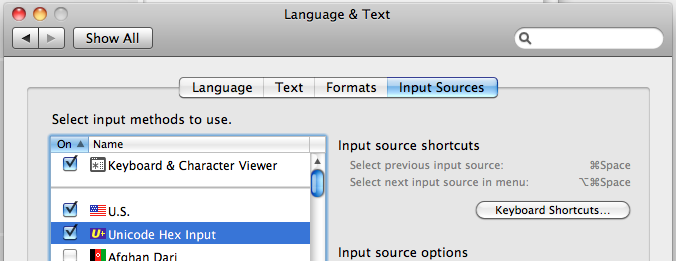
Go to System preferences > Language & Text > Input Sources > activate Unicode Hex Input.

Now you should see some little flag at the top of the bar in Finder (which flag you see depends on what language your keyboard is). Click it and change it to Unicode Six Input.

Now, in InDesign: press alt (also called option) while you press any Unicode number you want. It should work everywhere, for example here:

alt 2018: ‘
alt 2019: ’
alt 201c: “
alt 201d: ”

Now, how do you do this in Windows?

Kentlew, i do have the straight quotes...what i did do was i installed the font on a windows machine and tryed it out in word...no problem on windows, everything just works as it should, so i guess it does look like a OSX bug.

either way thanks everyone for helping out, i always get great help on this forum!!

cheers guys

oh yeah i did manage to get the unicode thing to work and the quotes just show up when i type in the unicodes!

Now, how do you do this in Windows?

Normally, one would press ALT+#### on the alphanumeric keypad:

0145 ‘
0146 ’
0147 “
0148 ”

Hey, just a minute. Why do you press, say, 0147 to get “ instead of 201c, which is the actual Unicode number?

How to directly enter Unicode on a Windows platform, with InDesign:

1. make sure *Num Lock* is on.

2. Whilst holding down the "alt" key, hit (on the numeric keypad) *plus* then the Unicode numbers. For an alpha character, use the regular keyboard, of course.

That's all there is to it. No change to the System preferences or anything else.

Pre-Unicode legacy. This is the encoding of Latin-1 native to Windows. First of all, the code is in decimal so that it can be entered on the keypad: To get é you type Alt+0233. In Unicode é is Ux00e9, which is hexadecimal for two hundred and thirty-three. Secondly, the quotation marks are in the two rows of characters which don't match up with Unicode at all. In the history of computing there have been dozens of various encodings and changing standards, so in terms of the final fit it could have been a lot worse.

Everything is clear now. Thanks!

Captured from web.archive.org on 14 Oct 2013. view this capture