
—
—

To me the »O« looks too small compared to the other characters. The »V« also looks a little too wide, maybe it's the kerning which is not tight enough.
I also think the kerning between »T« and »I« could be tighter and the kerning between »I« and »M« is too tight.
Those are my thoughts so far.
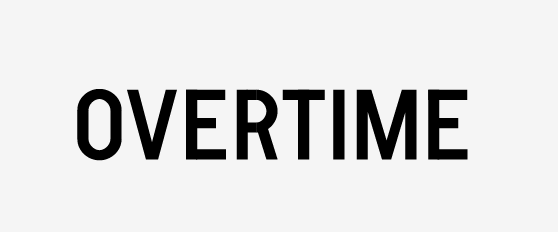
Much better! At this point my only suggestion would still be to enlarge the »O« even a bit more, maybe you could also make it a bit rounder? Not sure, though. Something about this character isn't perfectly right …

This is a good start! Over time you'll probably learn that things rarely are what they look like in type. A perfect circle does not look "right" - someone more experienced can probably explain better exactly why - but this is apparent in your O and R. In O, the parts where straight edge meets curve needs to be smoother. You can try nudging your nodes and extending the vertical bezier handles to make the transition smoother and the half circles less perfect round (more of a slightly sqooushed circle). Try the same with your R, only horizontally.
V, E and M are too wide compared to your other narrow letters (or the other way around). In this style, capitals tend to be rather uniform in width.
Hi Frank, thanks for your comment (love your works)
I totally forgot about the joint of line-curve, thanks for pointing that out, here's how i corrected it:
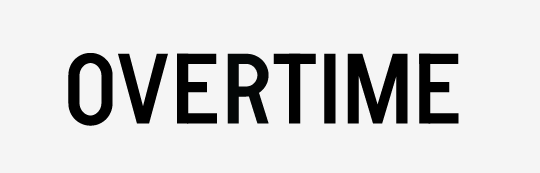
Is the "wideness" of V-E-M so evident?
By making the M narrower i fear it might become too "black" compared to the rest of the logo and, while i can adjust again the points of connection between stems and diagonal strokes, that would ruin the evenness of strokes and would result in a less mono-line effect...
Here's my logo compared to the (bolder) trade gothic:

Thank you, Alesandro! I think you can extend those beziers even further, but this is coming along nicely. Have you considered lifting the apex of your M up from the baseline? That way you could make it even narrower. It's great that you observe the weight issues with M. This is where optical adjustments come in handy. It looks quite good now. The last optical thing I would adjust is the top bar of E. It could be slightly shorter, and I think it's the main reason it looks so wide to me.
Honestly, I'm far from a pro. Take my advice with a barrel of salt.

Thank you, Alesandro! I think you can extend those beziers even further, but this is coming along nicely. Have you considered lifting the apex of your M up from the baseline? That way you could make it even narrower. It's great that you observe the weight issues with M. This is where optical adjustments come in handy. It looks quite good now. The last optical thing I would adjust is the top bar of E. It could be slightly shorter, and I think it's the main reason it looks so wide to me.
Honestly, I'm far from a pro. Take my advice with a barrel of salt.
This worths.
Good thread, at first seems boring, but becomes an intriguing read.
Just pointing out that my advice might not always be the best. Perhaps I should shut my mouth the next time around.
@Frank - no I have not, here's how it looks, I like it!
About te "E" I had already slightly shortened the top arm, perhaps too slightly! I corrected that too
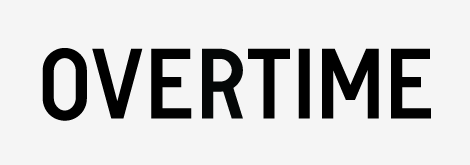
the M could be made more narrow as a result of lifting the apex.
(IMO)
it is narrower (perhaps too slightly, again...)

If you make such a simple logo, it has to be absolutely perfect. I suggest you take a short break from it and have another look in a few days.

Optically the bottom stroke of the O and E look a bit heavy. Also the waist of the R is looking a touch heavy as well. The V form in the M is also looking dark. The waist of the E is a matter of taste, but the shorter you make it the more 19th century the letterform becomes. The short waist is not helping the space between the E and R. In fact the VE, ER, RT and TI look too open when compared with the straight-to-straight spacing of the IM, ME.
The O still has some problems at the tangent.
Ed Benguiat first clued me in to the trick of lightening the bottom strokes of letters ever so slightly to compensate for the optical illusion of them appearing too heavy. It has to be a tiny move, maybe only a unit or two in FL. But it does make a difference.

The short waist is not helping the space between the E and R. In fact the VE, ER, RT and TI look too open when compared with the straight-to-straight spacing of the IM, ME.
Almost to reiterate terminaldesign, spacing this is utterly key, and since you are drawing the letters you actually have the opportunity to improve the spacing by adjusting things like the waist of the E, or apex of M. If you were spacing a font you'd eventually have to reach a compromise between a form and it's spacing but here you can really tweak it. Then know when to stop ;-)
Agree that this thread improves.

I think there is some fine tuning to do on kerning, especially in the first part of the word (OVER). It's seems there is two kind of kerning in OVERTIME. While the first part are loose, the end (TIME) is tighter. At my own, I prefer the second part. So, I would suggest that you tight a bit more OVER. Also, I think your R would be better if you move a bit to the left the top of the oblique, under the bottom bowl or move the bottom to the right. Actually to me it's seems like a P with a bar under. Keep going.
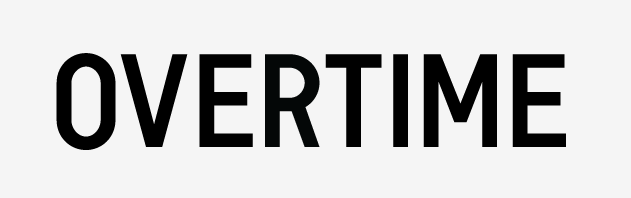
Here's the logo after all the corrections, i tightened OVER and stretched the waist (central arm?) of the E, changed (veeery slightly, maybe will move it more) the R's tail, lightened the M:
By the way, for any amateur in type design reading this: waist isn't a popular term, neither Bringhurst nor Thinking with type mention it, as well as typedia and fontshop, here's the best i could find: http://www.luxecetera.com/2009/08/17/fonts-101-part-2/
Thanks to everyone who answered so far, it's amazing how i couldn't notice some "problems" but they appear so clear to me, now.
Thanks to everyone who answered so far, it's amazing how i couldn't notice some "problems" but they appear so clear to me, now.
This never seems to go away for me. Besides knowing the rules, actually seeing problems seems to take me forever.
Take it only as a suggestion. I think the R needs some work again, I draw what I tried to explain earlier in this post. Also, I see some bad spacing between the O and the V. I know the spacing is optical thing, but to me the V should move to the right a bit. Try to move it first and you will see if the spacing has to be fixed again. Keep going
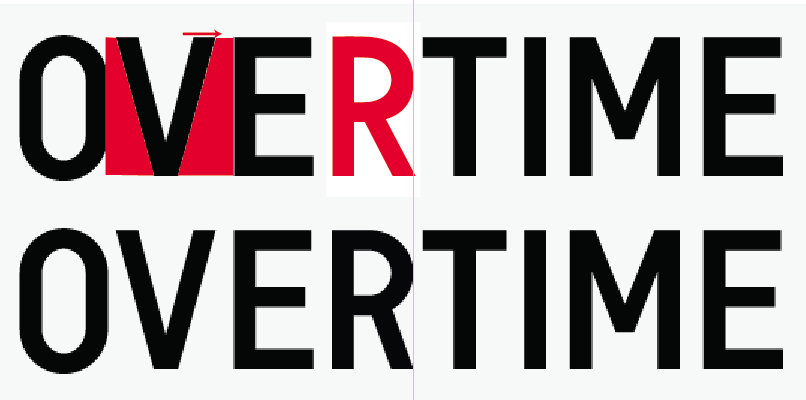

I think you have problems here with rhythm, because of the relative widths of different letters. The widths affects the amount of white within and between characters, and this needs to be more visually even to get a good look, IMHO. Normally, the R and T would be wider than the E. My impression is that the E is the odd man out, but probably everything needs to be adjusted relative to the O, if that's the width you want.
I find it instructive to open other fonts--sans fonts in this case--and see what they do. Then try OOVOOEOOROOTOOIOOMOO IIOIIVIIEIIRIITIIMII, etc. and play with widths until you think it's all balanced. Since you're only doing these letters, not a font, theoretically it isn't needed, but you might find it helpful.
@sim: I see your point but I always believed that:
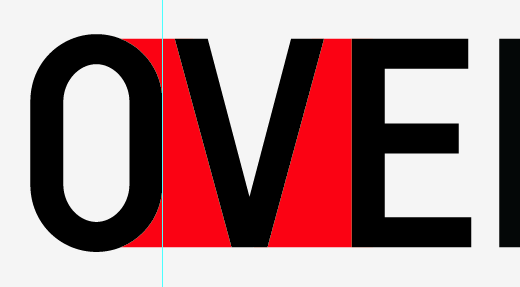
@William: I tried to compare the logo with trade gothic's letters:
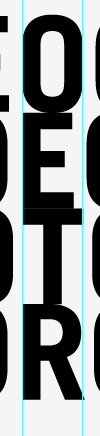
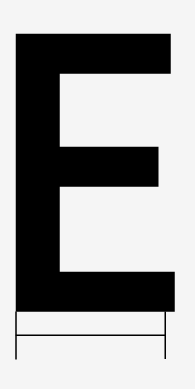
I will try to compare my letters to others as soon as i have the time!
Just checking Trade Gothic (and News Gothic, to which it is similar), I see that the O is rounder and wider. When you do the straight sides, that will affect the rhythm of everything else, so you can't just take widths of glyphs in Trade Gothic as a guide. Though, still, your E is too wide compared to the R there. Also in your first drawing, on the grid, your E and R are the same width.
Not only width, but volume of whites matters...
Also your idea, if I understand it rightly, that "more constructed" equals "more polished" is not sound, I think. Trade Gothic is actually very polished, and pushing it into a coarse grid makes it very hard, if not impossible, to keep the polish.
Thank you William for your advices.
My idea was more of a "trade gothic meets DIN".
I'm trying my best to pay attention to the "white" more than to the "black" since, at least for me, it is much harder to see.
I ordered "Letters of credit", hope to improve in some way in the near future...
Here's the latest version:
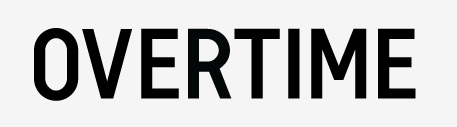
--- OT ---
I have found this font on Gestalten, it's called Regular:
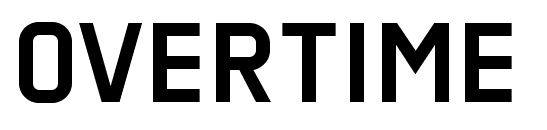
"Wrong" depends on if it is a conscious decision or not. It's perfectly acceptable to disregard optical correction, if that is your intention!
Everything is debatable in type, and what is "wrong" in one design works in another. But I'm not that impressed with 'Regular'. If I were trying to design something like this, I'd look at the condensed versions of Klavika, Flama, and Antenna, all of which are very impressive to my eyes.
good thread and very tidy outcome. Nice work.
It could just be me but does the O seem to sit a little low.
@Sarcoma: in the last 2 examples it isn't, but in the previous ones (ex. Sim's post) the O was moved past the baseline and optical corrections... obviously it was an error

Are you OK about the M?
I'm not sure about the latest M, with the shorter diagonal.
Instead, you can try a splashed M.
The Angles will reference the V in the beginning of the word, and you will benefit from the white space introduced there.
It can be a little more friendlier and memorable.
Just my 2 cents.

To me, the only thing that looks wrong now is the 'R'. I would narrow the leg at the top just a bit to help get rid of the dark blob that's appearing where it joins the bowl, and to make it look a little more stable (a little thicker at the base).
- Lex
Yes I see what you mean, I think the latest one seems a little low because of the wider gap on the bottom side between the O and the V.
Like I said could just be my eyes lol
Captured from web.archive.org on 21 Aug 2013. view this capture