Typophile

Need advice on ID h&j settings for a literary journal

Darla

I've inherited an InDesign file for a journal based on works from a classic author. The size of the journal is 6"w x 9"h, line measure is 27p4.5, body typeface is Adobe Garamond Pro regular, 12/14.5. Client wants justified type throughout. Previous designer used ID's default h&j settings, but client wasn't happy with the hyphenation that resulted.

I've showed a few new sample settings but client wasn't satisfied with end-of-line hyphenations, though word and letter spacing looked fine.

My question is: can someone suggest h&j settings that would work well with typeface and line measure?

P.S. Client is resistant to any change to template.

Thank you.

You’re going to have to strike a compromise between end-of-line hyphenation and word/letter-spacing. That’s the nature of justification.

Can you tell us what settings you’re using and what, specifically, the client is finding objectionable about the hyphenation?

The number of consecutive hyphens can be controlled. The number of letters before or after a hyphen can be controlled. The relative penalty for hyphenating can also be controlled (with the slider at the bottom of the H&J dialog). Beyond that, there’s always custom-editing the hyphenation dictionary for repeated unacceptable breaks.

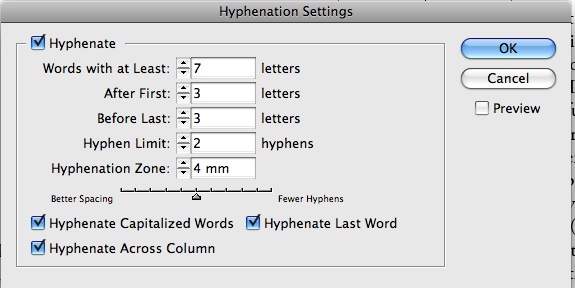
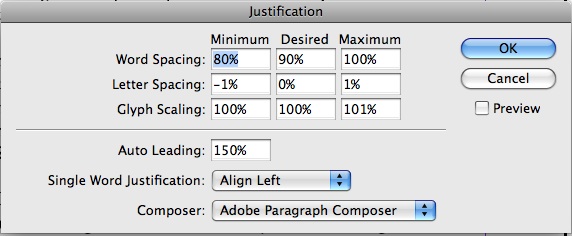
One of the settings I tried was the following:

Client did not like the way the words were breaking, said the syllabication was not correct, yet all words broke to ID's dictionary. Client did not want me to change ID's dictionary because there were too many instances that would have to be looked up manually and then changed.

Eventually I gave up on hyphenating anything, the body copy looked good anyway, but client would like hyphenation back for the next issue since it looks "more professional."

Are the client's objections to the hyphenation typographic or orthographic? If it's the latter, fiddling with the H&J's isn't going to solve anything. Maybe try using the UK English dictionary for hyphenation, in case your client prefers British syllable rules? (Potential drawbacks: It would mean you would have to add some American spellings to the dictionary and probably couldn't spell-check usefully.)

I don't understand why this is a problem.
You've got 60+ characters on a line, which is plenty for adequate justification.
Does this "classic author" use really long words?
I suspect your client is a ragophile, or a bibliophile who feels claustrophobic with the tight fit of digital text.

I do think 12 pt type, even Garamond, is a bit big though.

One thing you might try is increasing the number of letters before and after hyphenation to 4 or 5, and setting word space to 100/100/200. This will give a more "old school", metal type look, very open, and IMO quite apropos for an oldstyle face like Garamond in a justified book setting. And turn off the kerning while you're at it!

I've done tests trying to duplicate Monotype metal setting in InDesign, and discovered that the word spacing is waaaaay, way more than the digital defaults of today. One thing you have to be careful with in emulating the classic mid-20th century letterpress look is the last line of a paragraph, though, as it always sets to the tight default, which can look out of place.

Which is exactly the end-of-line problem? Too many hyphens or wrong syllabication?

I'm not an English native speaking so may I be missing something here. But as long as I know, there are many words with five and six letters in English which had syllabication (as total, tribal, yellow, pillow, under, other, etc.).

Thus I believe your settings are not optimal when you define a minimun of seven letters to hyphenation. The same with three as the limit before and after. To use 5/2/2 must produce better results.

Hyphenation zone does not applies to justified text, so the value you put here does not matters.

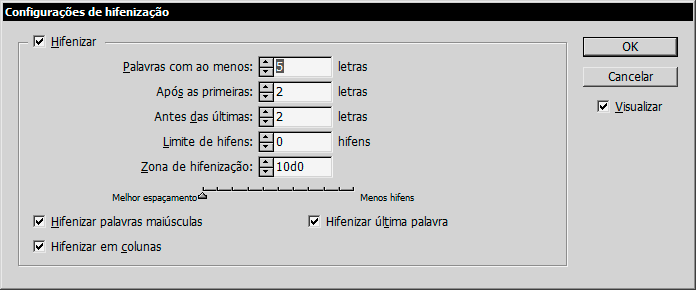
I like to use no hyphen limit (0) and set the slider to maximum better spacing. ID tries to keep as few hyphens as possible, so you will hardly gets a hyphen cascade.

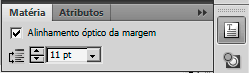
Another resource you must consider is optical alignment. It produces a much more regular verticial margin.

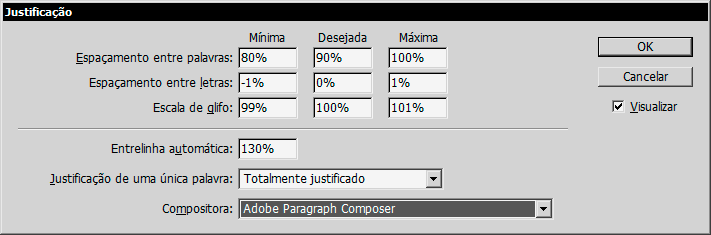
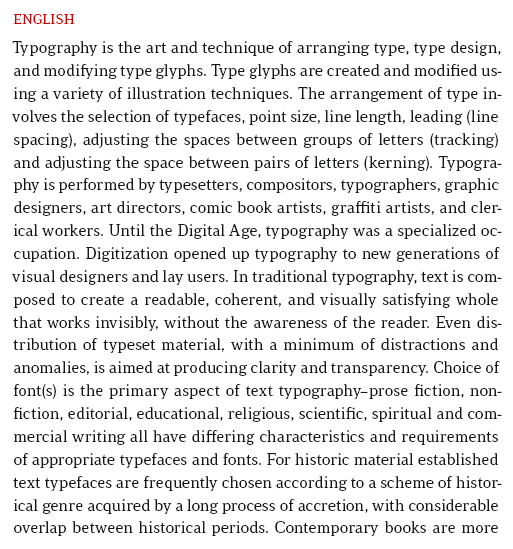
The settings I use to English texts (sample text block with 27p width):


.

[Although these captures are from a Portuguese ID installation, the fields are exactly the same you have in English.]

Client's objections were to syllabication, said ID hyphenated words incorrectly (though I didn't find that to be the case.) I don't even think she would know the difference between UK and US English hyphenation. Not sure that she really knows what she wants at all, but I do appreciate all suggestions. I will do type tests (next edition begins in August) and hopefully I can hit on something she finds acceptable. I would bet she will find a more "metal type" look to be what she has in mind, but has not been able to verbalize. The journal reviews works by a mid-18th century classic British novelist, so old school may be the key.

Thanks all for the suggestions, much appreciated. I will follow through.

> Client's objections were to syllabication...
> Not sure that she really knows what she wants

I've had clients who simply didn't like any hyphenation. They thought that breaking words at the end of lines was unattractive and disruptive.

If you can't convince them otherwise, the solution is pretty simple -- just minimize the number of hyphens. Set the hyphenation preferences to have at least 4 characters before and after a hyphen, move that slider to "fewer hyphens", etc. As Nick said, with 60+ characters per line, you should be okay as long as there aren't a large number of unusually long words.

There are “legal” hyphenation points in a given word (according to whatever dictionary/standard is being used — American and British conventions differ, as has been noted); and then there are “preferable” hyphenation points — those that seem most natural, like between compounds or only at distinct prefixes and suffixes. The latter is a subset of the former, and probably more what your client is looking for.

If you move the slider in the H&J dialog to the right, “Fewer Hyphens,” it will encourage InDesign to use only the more preferable hyphenation points. It won’t stop “bad breaks” altogether, but it will give greater penalty to the less desirable hyphenation points. (Of course, no dictionary will be able to read your publisher’s mind ;-)

I would not necessarily recommend limiting the before/after character fields to 4, unless those cases are completely unacceptable in all situations. Doing so will take away InDesign’s option to hyphenate a word with a three-letter prefix, of which there are many (like “pre-”, for example) and which should be a completely acceptable break point for your client, since these are considered by most to be natural and logical points.

The fewer options the H&J engine has to work with, the harder it is to get good settings.

Good luck.

>Client's objections were to syllabication

Why we always use a custom dictionary -- with InDesign, or any other layout program. InDesign makes it tough, though. It will always revert to the Proximity Dictionary (algorithm) settings when a word is not in the exception dictionary. The only solution is to have all the words in the text in the exception dictionary. Even here there can be differences with some words where, for example, an apostrophe occurs. Further, there are issues with using the "document" dictionary, but other issues if you don't. Controlling hyphenation with InDesign is a nightmare. So too is justification -- the Single Line composer doesn't work like any other single line composer I've ever used, and the Adobe Paragraph Composer, under certain circumstances, will not always make the same line-ending decisions, even though there was no change to the text in a paragraph. Finding that out cost us $4,000 to reprint a book for a customer (we split the cost, they didn't catch the problem at F&G's). We now run a PDF to PDF comparison of the entire book at each proof stage to make sure nothing changed.

BTW, technically speaking, InDesign's dictionary is a plug-in. By now, there may be others out there. We quit looking & developed our own.

Captured from web.archive.org on 5 Mar 2011. view this capture