
Hey, I have been trying to figure out how to create this embossed/punched out effect (below) and I can't seem to find any useful tutorials. Is there anything out there that you guys could point me to?
Or could you give me a quick run-down? Thanks.
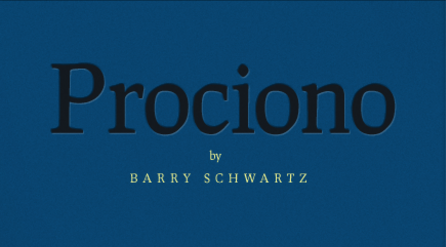
Hey, I have been trying to figure out how to create this embossed/punched out effect (below) and I can't seem to find any useful tutorials. Is there anything out there that you guys could point me to?
Or could you give me a quick run-down? Thanks.

Here's a simple way:
1. Make the background black
2. Create new layer and add the blue color and add bevel&emboss/contour to it.
3. Write the text (a new layer is automatically created)
4. Rasterize this layer
5. Use the wand, mark the type and select the blue layer..
6. ..and hit delete.
Voilla!

If you're using Photoshop, there is an even easier way and it leaves the text editable.
To mimic this example:
1. Make the background blue
2. Add your text in dark gray (as Northbay previously stated, this automatically creates a new layer)
3. Add a layer style to the text layer – Outer Bevel, direction down
4. There is no stage four
This is not necessarily the best way, but it's quick.
The general rule of thumb is to add a softened drop-shadow of the text in a lighter colour to mimic a highlight. You can even get an approximation of this effect in CSS (see here) and throughout the iPhone UI, for example.
My quick example here is:
—Style: Outer Bevel
—Technique: Smooth
—Depth: 1%
—Direction: Down
—Size: 3 px (this is only a small test image, a higher-res image will be different)
—Soften: 5 px (same)
—Angle: 90º
—Highlight Opacity: 65%
—Shadow Opacity: 50%

That is great. I did not expect such a comprehensive response. Thanks so much.
You're welcome.

Here's a quick example if you ever want to do it with css:
html{background:#888}  //This is just to bring the embossing out.

h1{

font-size:3em;

color:#111;

text-shadow:0 0.04em 0.05em rgba(255,255,255,0.6),0 0 0.04em rgba(0,0,0,0.8);

}
It's all in the shadows.
Captured from web.archive.org on 19 Oct 2013. view this capture