
User selectable fonts in Apple's new iBook app:
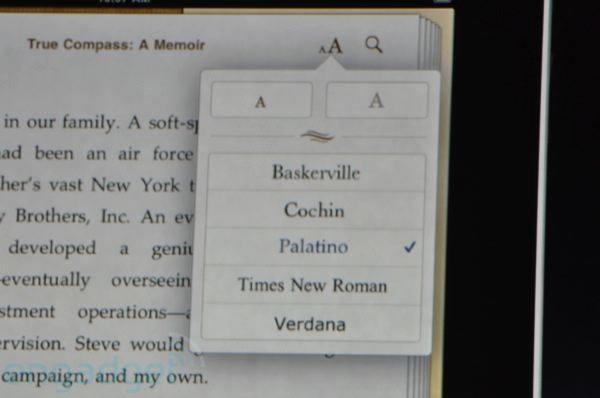
User selectable fonts in Apple's new iBook app:

I just tweeted that same image. That is horrible text setting, once again. Why don't they do a right rag? I don't get it.

that was fast.

A new era of typographical challenges and oppurtunities knocks on the door. On iPad Eve I feel, as book designer, editor and typographer, much the same excitement that came with the introduction of quality paperbacks in the 1950s. Our book culture cannot without mediation just be republished in new media. All our typographical skills are needed to make the tablets function in a humane and literate way and thereby assist the survival of the book.

Where did Chalkboard go!?
I found the page turning effect interesting. It's not something that's been done on an eReader yet (that I know of) perhaps for a number of reasons including processor power and, well, it usually tends to be cheesy. But it may make sense on the iPad.
I didn't see all the detailed spec's on the screen yet. Anyone know if it's just standard backlit LED?

Why don't they do a right rag?
Because a few thousand designers who care about rivers in copy will complain far less than the millions of people who will get ticked when digital novels don’t look just like the paper versions.

>User selectable fonts in Apple's new iBook app:
lol. That list is too short to label user selectable. ;)
Cheers

Nina, Apple hasn't cared about typography for many years now.
hhp

The display is a LED-backlit IPS-display. App. a tech. developed by Hitachi with a larger viewing angle than other LCDs.
Apple cares about typography. It’s the endusers that don’t.


:-)
Bert, Apple now only has a skeleton staff for type. They no longer show up to conferences. The only notable things they do in our field these days is stuff like plagiarize Comic Sans. Come on.
BTW, the screen is only 1024×768. For that high price, a rip-off. Also, it's not usable under light; they should have added an OLPC-style monochrome overlay, not least to compete against eBook readers.
--
You don't have to only target the limited conscious tastes and sensibilities of users. A company can choose to make things better, deep down, long-term, in fact even if it only believes in the bottom-line.
hhp

Is the inclusion of Verdana a nod to the screen reading generation? ;)
AFAIK the EPUB ebook format which the iPad uses can contain embedded fonts. So it's more the question if the publishers still know that appropriate choice of typeface can add to the reading experience.
Why don't they do a right rag?
Or implement hyphenation. Can't be that complicated.

@james
Because a few thousand designers who care about rivers in copy will complain far less than the millions of people who will get ticked when digital novels don’t look just like the paper versions.
Don't be so sure about those millions of readers who are looking for versions that "look like the paper versions".
Digital books aren't about the paper version onscreen. We've got PDF's for that already.
Just MHO.
Good H&J will win out over bad in the end. But in the meantime, there will be a lot of ragged right - you'll see.
What a long strange trip it will be...
rich

EPUB can contain embedded fonts, basically using the @font-face rule in the CSS and packing them up in the assets. But most e-reader software that I’ve looked at ignores any embedded fonts.
I haven’t done exhaustive research, but Adobe’s Digital Editions is the only one I’ve encountered that supports @font-face and utilizes the embedded fonts. But I don’t think it’s available on any mobile or e-reader platforms.
Setting aside the licensing etc. issues of @font-face, my question is whether the Apple iPad e-book software will support @font-face embedded fonts, or is only selectable among system-installed fonts. I suspect the latter, unfortunately. And it will probably be a closed system typographically, like the iPhone and iPod.
If by some chance it does support @font-face, then the next question will be whether it supports WOFF. Again, I suspect it doesn’t.
Oh, and most e-reader apps offer a very simple setting to toggle justification off.

The fact is that Apple is working its way to books in the same way it did with music. (Apps are something Apple generated all by itself.)
With books, I do get a bit concerned; Apple does not have a perfect record in the field of typography. And if Apple gets big enough, it does not have to think about that. Like Microsoft in too many fields; lowest common denomerator is quite enough.
But fingers crossed; this was long coming.
I agree with hrant. I think the iPad is great, and I'm sure I'll buy one at some point, but they didn't quite go all the way into eReader land with a proper screen. Maybe that's a good thing giving the competition some hope to continue innovating on that level.
I do wonder if things like the kindle app will be allowed to co-exist on the iPad. There's the hardware, but if they still allow other eReader apps, that could be a very good thing.
"Apple does not have a perfect record in the field of typography"
That said, many many book publishers don't have a great record in the field of typography either. :/
I think Hrant is right. Sadly. I mean sure it's nice that Apple is now «cool» and successful instead of a bunch of weird outsider hippie nerds, but I'd still prefer them to stay true to their original target audience and what they originally stood for, and continue to focus on making their computers good tools* rather than sucking up to a broad consumerist and entertainment-craving public.
* Which for the record, I do think they are.
But 1024×768? What is that, a joke? :-\
> I found the page turning effect interesting. It's not something that's been done on an eReader yet
Lexcycle’s Stanza app on the iPhone/iPod Touch has a page turn transition. And the speed of the transition is tunable to achieve something that feels natural with your reading speed. I don’t find it cheesy at all, and much more familiar than the other options like slide or none.
> Like Microsoft in too many fields
MS did not "have to" spend money having the Core Fonts or CT fonts made.
hhp
@kentlew
I don't find the page turn cheesy either. And it's a fun little virtual reality thing.
What I'm waiting for is the digital equivalent of the flip-through. Which I'm imagining as a continuous right-to-left scroll. (At least on a per-chapter basis. I hate having to go back to the TOC or Index to go searching. And what if I just want to get the gist of the book?)
Anybody seen anything like that?
rich

So, a million dollar question... drum roll... are you going to buy it ?
> MS did not "have to" spend money having the Core Fonts or CT fonts made.
They could also give up their idea of a font family consisting of Plain, Italic, Bold and Bold Italic, and give us a brake with the coding.
@Richard: When you tap at the bottom of the screen, Stanza will present a scroll bar that takes you quickly through by chapter. Not quite the flip-through you describe. But easier than clicking out to a TOC.
Why would there be Coching or Baskerville for text?!?
I understand Palatino (and to some extenct Times). Baskerville for those disappearing thin lines? And Coching just for the small x-height? Verdana is given. For Ikea.
> are you going to buy it ?
You know, if I didn't have to pay $15/month* to get 3G access
on it, I might. The way I see it, I already pay money for Internet
access with my cable provider - I don't want to pay some monthly
tithe to one of those skanky cellphone companies. Right now I can
use my HP 2140 just fine with WiFi. And it multi-tasks...
* At the low end.
hhp
@hrant: 3g is an added option. It does wifi by default.
I know - I'm saying I already have a highly-portable, WiFi
device that does more than the iPad. Except react to petting.
BTW, you need to pay about $350 more to get a model that's 3G-capable...
hhp
Sorry, an article I read earlier seems to have been incorrect about
the premium for getting a 3G-capable version. Engadget is saying
the difference will be about $130.
BTW, I don't know if you guys know this, but the B&N Nook has a
hack that lets you run a browser on it. And it has 3G built-in, all
for $260 (and no monthly fee). The main issue is it's grayscale.
hhp
I think the reason for Apple not going to OLED was books.

I just found this font on the ipad site, can anyone identify it?
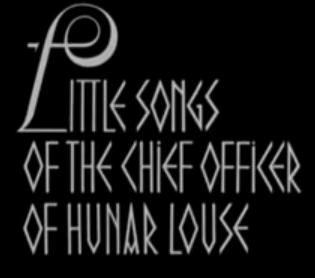

I can't wait to get one of these.

Jens Kutilek: Or implement hyphenation.
That's it, please. Same problem with the Kindle (and web pages for that matter).
We had it since Gutenberg, haven't we?

> I found the page turning effect interesting. It's not something that's been done on an eReader yet (that I know of)...
The page turning and the library seems to be identical to the Classics Iphone app.
Hmm. Now that Classics app page turn — that one seems rather cheesy and artificial to me. I hope the iBooks app isn’t quite like that.

1024x768, 9.7", which is
132 dpi, not too bad for lcd these days
How does that compare to iPhone? If it uses the same rendering (regular antialaising) that's going to look a bit soft isn't it, esp at small sizes?
@kentlew
Thanks for the Stanza tip. I had a feeling I was missing something.
@all
Ran across one wag's thumbnail analysis of the iPad that rings true to me as far as the iPad as an e-book reader:
“As for the Kindle comparisons...
The Kindle is $259. The Kindle DX (similar screen size to the iPad) is $489. Both include free 3g connectivity and have battery life of a week.
The same functionality on the iPad would cost $629 (for the 16Gb with 3G) and then $180 a year for the low plan of 3G wireless access. And your battery would only last 10 hours, so you'd need to plug it in all the time. Plus, the books seem to be about 50% more expensive than on the Kindle. So, as a straight ebook reader, it loses.
Its advantage comes in being more than that. Unfortunately, it's not all it could be. It's basically an iPod Touch with a big screen. No camera (for Skype), no Adobe Flash, no USB ports, no SD expandability, no multitasking, no real PC apps (OpenOffice.org, Firefox, etc).”

Half again the resolution of a normal screen.
I've been looking at the iPhone (150dpi) or equivalent Blackberry (180dpi) as possible
ways to have a higher-res preview of glyphs. Could be useful.
Kind of annoying that a lot of its potential is truncated not by technology but by
a need to control and limit the device.

The iPhone is 163 ppi, not 150. The iPad screen is very close to the ppi of the 17" MacBook Pro (133 ppi).
> 132 dpi, not too bad for lcd these days
?
It's at the very low end. Is Apple supposed to be low-end?
Many HTC phones are 250 dpi. Same with the Sony P mini-netbook.
When it comes to browsing and reading (anything besides looking
at purdy pitcherz) that makes all the difference.
hhp
"no Adobe Flash, no USB ports, no SD expandability, no multitasking, no real PC apps (OpenOffice.org, Firefox, etc).”"
Right, but it's not meant to be a full PC. So I don't think those are detriments. Between the eBook thing and the iWorks/keyboard, it definitely feels like it's going to be heavily targeted at the .edu market.
For most PC users, I think it will be very much like the iPod itself...an accessory.
I'm not sure how it'll work as a eReader, though, given that it's a back-lit screen. Not the most ideal for reading long texts.
> it's not meant to be a full PC.
Which is exactly the problem.
It's just another gadget.
Check out the Viliv.
hhp
>It's at the very low end. Is Apple supposed to be low-end?
The google pad, at 88 dpi, is what then?
Cheers!

I'll admit I would have replaced Cochin by Garamond, and Verdana by Univers... and been strongly tempted to add two more font choices (Caledonia and Bembo, perhaps), but I can't quarrel too much with the selection.
I think it's sort of cute that now people can get a box that is both your iPhone and your Kindle... although I consider computers a more useful application for that kind of electronics.
But, yes, the word spacing is quite wide in the photo, and I can see why Apple doesn't trust itself to hyphenate other people's proprietary and copyrighted texts perfectly every time: they're afraid, I suspect, that if their hyphenation software makes a mistake, they'll offend a publisher. (And letting people turn the hyphenation off would presumably make too confusing and complicated an interface.)
What's a "google pad"?
hhp

I've been using apps like the McSweeneys app on my iPhone that are actually really enjoyable for reading short stories (I've never actually tried reading a full novel on my iPhone). The font is fixed and there is a button to switch between two sizes of text.
I wonder if the author of the e-book on the iPad (or iPhone/osX, if the whole iBook thing trickles down to other devices) will have control to "lock" the typeface, or if the user can change that according to their preference?

in the same space, i think i'd prefer one of these: http://www.litl.com/essays/hardware.htm

Thanks for the tip.


@mike_duggan: Marketing.
or perhaps the vibration feedback touch screen.
They turn software into hardware.
hhp

Some of my best friends are on Apple’s “skeleton staff for type.”
They must spend their days making suggestions of how to talk
about designing type. Which of course explains their results.
hhp
>It's at the very low end.
Sorry, I meant 132 dpi is high res for computer monitors. Anything over 100dpi seems unusual these days. For computer monitors. And the Ipad is not a monitor. Nor a computer. Nor a phone.

I think the page turning is a disaster, as is the bookshelf. Apple consistently
brag about the future and changing the face of various media yet they present
us with this constrained, hypocritical simulacra. They should have concentrated
on the typography. It's like Microsoft Bob all over again. Step backwards.


Remember that Apple will likely be tweaking the interface of the iPad, and hopefully its eBook typography, for the next few weeks, months and years. What bugs me quite a bit is the very blatant "imitation" of the Classics app interface and page turning (as mentioned). Much remains to be seen.
I simply don't understand why the interface needs to be laden with
references to the books/shelves/paper, when that is the very thing
Apple is trying to replace. I'm all for e-reading, but I am disappointed
with this retrograde approach. It's not how sophisticated the illusion
is that disturbs me, it is the compulsion to attempt the illusion itself.
"I simply don't understand why the interface needs to be laden with
references to the books/shelves/paper"
That's my gut reaction most of the time, too.
That said, I think that's probably what has been lacking in the ebook market. People likely do want some of the 'bookiness' in their digital device.
I have a hunch that the 'bookshelf' and 'page turning' may just be options, as well. Given that it's iTunes based, I'm sure there are more modern 'views' to navigate one's way through their library.
I also think the periodical industry is likely pining for a 'paper' version of digital delivery.
I've not liked the concept in the past, but I'm warming up to it as the devices get larger and higher resolutions. I think the NYtimes is heading in the right direction with the technologies they're building. A cross between websites and a paper.
If I could subscribe to magazines on an e-reader, and be able to retain the tactility of pages, but with the added benefit of the technology allowing for certain levels of interactivity, I think that might hit a sweet spot.
I have a hunch that the 'bookshelf' and 'page turning' may just be options, as well. Given that it's iTunes based, I'm sure there are more modern 'views' to navigate one's way through their library.
You are probably right.

Hrant(re. resolution): [132dpi is] at the very low end. Is Apple supposed to be low-end? Many HTC phones are 250 dpi. Same with the Sony P mini-netbook. When it comes to browsing and reading (anything besides looking at purdy pitcherz) that makes all the difference.
Hrant, don't forget to factor in screen size when talking comparatively about resolution. Higher resolution screens have increased incidence of manufacturing faults (dead pixels), and hence attrition in terms of the number of screens rejected in quality assurance. This attrition rate is acceptable in the manufacture of screens for small devices such as phones, but as screen size increases not only are the per unit manufacturing costs higher but the number of potentially dead pixels also increases. The attrition rate becomes unacceptable. For its size, the iPad 132dpi screen resolution cab be considered relatively high.
> For its size, the iPad 132dpi screen resolution
> can be considered relatively high.
But not for its price, nor its prestige-value.
If you look at netbooks, even modest brands are starting to
get "HD" displays: 1366 by 768. They're 10" in size, which
translates to ~160 dpi. My HP 2140 (which I bought about
7 months ago now) has such a screen, and it was $450.
I'm not saying there's a chasm between 132 and 160, but
Apple thinks they can get away with saving a few bucks
on the display, because the iTard population is on a steep
rise. Sadly, they're probably right. And come this Xmas
they'll cut the price drastically*, and all the envious iTard
wannabes will jump from one iFad bandwagon to another.
* But it will still have lousy text.
hhp
.
I wish they would drop the book paradigm completely for eReders. On my iphone, i love just scrolling up through a chapter, not page turning... just my thoughts.
> I bought about 7 months ago now) has such a screen, and it was $450.
I feel sorry for you but let's leave it at that.
Cheers!
It's not their cheesy plastic one, it's the business model, [nearly] fully-loaded. I originally bought it to avoid taking my 17" to Armenia for a month in the summer*, and in tight situations it's just the ticket. I admit it doesn't get used enough, but when it does nothing can replace it. Certainly not an unportable iPod.
* I would've done the same for ATypI-Mexico,
except my presentation wasn't ready. :-/
hhp

Haha, I was thinking the same thing when watching the keynote. Look at those HUGE wordspacing! That is just appalling.

Maybe all future Apple devices should have the words DON'T PANIC
printed on them in large, friendly letters.
Reminds me of the famous Steve Jobs quote...
"And we designed it all into the Mac. It was the first computer with beautiful typography. If I had never dropped in on that single course in college, the Mac would have never had multiple typefaces or proportionally spaced fonts."
As I doubt Steve has forgotten about type, my guess is the ebooks app is a placeholder - something that may get fixed in V2 or V3.
Simon, you're being graciously over-optimistic.
Jobs is not a type person, he's a salesman. Salesmen sell what sells.
And what sells Macs today is lustre (which you can't spell without "lust" :-).
hhp
"what sells Macs today is lustre"
Well, some people actually do appreciate Macs as very good work tools.
But you're probably right in that the hordes who buy them for their sexiness*
are outnumbering us now, and it does seem that Jobs&Co. let them dictate
the agenda. Which, like I said above, does to a degree mean betraying what
Apple originally stood for.
(* Which apparently doesn't [need to] involve good typography…)
"Jobs is not a type person, he's a salesman. Salesmen sell what sells."
The success of Apple, IMHO, is because he's not a typical salesman. Rather, he's a demanding project manager who insists on focusing on the details of the product.
A real salesman doesn't care what he's selling. Jobs does care.
Granted, he doesn't care what we think of it. He only cares what he thinks of it. It's worked fairly well for the company thus far.
A lot of the griping goes away once people touch the device in an Apple Store.

I will probably wait until the next major upgrade before I buy it. I always thought the smartphone screen was too small for me and any laptop too cumbersome. This is a good spot for me but I know Apple will make big improvements after they kick this around for a couple of years.
> A real salesman doesn't care what he's selling. Jobs does care.
I don't believe either of those.
> It's worked fairly well for the company thus far.
Screw the company. I care about users.
> A lot of the griping goes away once people
> touch the device in an Apple Store.
That's exactly part of the problem.
hhp

The iPad reminds me of the datapads on Star Trek. I’ll get to be an ensign turning in my report to Picard or something.
Mike :-)
"I don't believe either of those."
Well, I've known several Sales people that will tell you that. Their passion and skill is in the selling, not the selling of a particular product.
As for Jobs caring, well, it's well known that he is not an easy guy to work for given his demands on the products they produce.
"That's exactly part of the problem."
How so? I'd say the success of the store shows that they are very user-focused products. Lots of people walk in there, touch the stuff, then end up walking out with less money in their wallet.
They are very focused on the worst qualities of users. Politicians and prostitutes are very user-focused too. When I talk about helping users, to a good extent I mean in spite of themselves. To me design is quite a bit like parenting.
When I walk into an Apple store, I never get my questions answered.
I just get dumb buzzwords and dumber smiles.
hhp
"I care about users."
I'm really not necessarily talking about the iPad here but:
1) Computers can be very pretty and still be very good tools.
2) Aesthetics can provide added value beyond a «this is sexay and mah friends will luv it» reaction, and in Macs I think that is the case. While I agree that Apple is now focusing too much on making sexy stuff for the masses, there are a whole bunch of Mac users who are not stupid lifestyle junkies, but do get more satisfaction and more productivity from working in an environment and with a tool that isn't ugly – that provides some basic aesthetic satisfaction, and makes it feel like some thought went into designing it.* A bit like people are more comfortable (and – I would claim – more productive) working in an office that isn't all grey wall paint, cheap plastic, and smelly old carpets, and wiring that runs in ugly ways because it was easier to produce that way.
And parenting? Dunno, but when I work, I don't want to be taught what's good for me, I just want my work environment and tools to not slow me down, and not annoy me, and facilitate a smooth process.
(* Which obviously means other things than just aesthetics too.)
"When I walk into an Apple store, I never get my questions answered."
Sounds like you have a bad Apple store in your neck of the world.
In the US here, the Apple store is one of the few places where I (mostly) trust the salesfolks to know what they are talking about. Granted, this is the land of Best Buy, so we really have no where to go other than up in terms of improving the retail experience.
I agree with your sentiment on 'helping users'. I think Apple does that fairly well, at least compared to your standard off-the-shelf Windows box, which typically involves a bit of knowledge to clean out the system and install the proper security patches and software.
A lot of iPad griping is purely griping about the spec's on paper. Which is fine, but not really of much concern to Apple. Their thing is having people touch their products and that, alone, seems to be a strong enough method of moving product to keep them in a healthy financial position. For every Apple product, there is a competitor's product that is a) cheaper and b) has a more robust spec sheet. Yet they just don't have quite teh same tactile appeal.
1) You keep talking about physical touch. That's why I mentioned lust. Not a good thing.
2) I think it's in the mind. People are sheep.
hhp
"You keep talking about physical touch. That's why I mentioned lust. Not a good thing."
Physical interaction. So both the hardware and software.
You call that lust. I call that user experience.
"I think it's in the mind. People are sheep."
The 'sheep following fashion' factor of Apple's success is way overstated.
Re-focusing: What's really over-stated these days
is Apple's commitment to good type and typography.
hhp
I'd agree with you on that. ;o)
Making broad statements is easy.
As is changing the subject back to something that's been previously agreed upon. But sure, call it «re-focusing» the thread. :-\
Sorry, that might have been a little petty (although
I suspect some people still don't admit the sad truth).
hhp
User selectable fonts in Apple's new iBook app:
I, for one, don't want to change typeface in my books, I just want to read them, and (want to) trust the designer to choose the right typeface for the task.
If it works like other e-books (hardware or software), the same font is used for all books, with an option to choose the default font and size.
> Maybe all future Apple devices should have the words DON'T PANIC
printed on them in large, friendly letters.
Comic Sans is the one then.
If it works like other e-books (hardware or software), the same font is used for all books, with an option to choose the default font and size.
Yes, I know. Mine was just a cry against the shortcomings of current e-books.
apankrat - "Comic Sans is the one then."
So long as the words are set within a requisite speech bubble then Comic Sans would be fine. And certainly preferable to Apple's typographic crime that is/was Chicago.
To see who really cares about typography, go about 1:15 into the
video here: http://news.bbc.co.uk/2/hi/technology/8515915.stm
hhp

@wormwood
Hey, Chicago isn't a bad font, but the way Apple used it was totally uncalled for.
Excuse me?! Chicago is crap.
hhp
Chicago is crap.
Chicago was a brilliant interface typeface in its original pixel form (be it on the first Macs or on monochrome iPods).
It should've stayed there.
Even as a pixel font Chicago has all the charm of broken teeth.
The vector version is simply absurd...

None so blind as an Apple fan?
There should be a wood type edition of Chicago.
I'm a long-time Apple fan, but I have always disliked Chicago, especially the outline version. Bleah.
I like the band Chicago, and the broadway show and movie, Chicago but the font should never have been anything but a bitmap low-rez screen font for early computers.
Just to be clear: I never considered Chicago an handsome typeface by any stretch. I just consider it a successful solution for a very specific problem.
"I just consider it a successful solution for a very specific problem."
Exactly, Riccardo. It is like a temporary brace used in building construction, even though ugly, It does a fine job holding up a wall until the structure is completed but should be discarded after its job is done.
Unfortunately it was replaced with... Charcoal! :-/
Although to be fair the limitations that were put
on Charcoal were probably akin to a straight-jacket.
hhp
>Excuse me?! Chicago is crap.
Coprolite is, I believe, the correct term.
>Unfortunately it was replaced with... Charcoal...
Same thing could happen to you, and I for 1 would not be happy.
Cheers!

For those interested in creating eBooks in the ePub format from InDesign, take a look at this MAX 2009 video Creating an eBook for Distribution on Sony Reader Digital Book, Amazon Kindle, and Apple iPhone by Colin Fleming.
Thanks, Miguel!
There is more typography bundled with the iPad than the picture actually shows. To help Interface-Designers, Art Directors and Software Developers working for the iPad I came up with an App that makes it really easy to explore the Typefaces provided by the iPhone OS: iTalics for iPad. I would be happy if you give it a try and provide some feedback. iTalics is available at the Apple App Store:
There is now a free app that allows you to get a list of all the typefaces on an iPad. It is aptly called Typefaces and can be found at http://itunes.apple.com/us/app/typefaces/id292461457?mt=8
I have used it to create a small poster of all the fonts that ship with iPads. That PDF can be found halfway this page: http://www.prepressure.com/fonts/basics/ios-4-fonts
Captured from web.archive.org on 12 Oct 2013. view this capture