
Right now some of my character's diacritics are getting cut off:
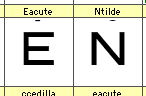
How can I adjust the preview size so I can see the whole character in Fontlab?
Right now some of my character's diacritics are getting cut off:
How can I adjust the preview size so I can see the whole character in Fontlab?

They seem awfully high. You may want to move them down. Otherwise, you could change your vertical metrics by moving the ascender up to include the accents. Right now, it looks like they are higher than the ascender line.

I agree with Mark. When FontLab creates the composites for you, it always places them too high. There is no shame in referencing other designs to look for clues, like offsets of diacritics.

That is exactly the problem I'm having of late.
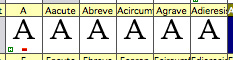
Suddenly, ALL of the files I open do this, where the characters are suddenly too big and all the diacritics get cut off.
If I dump the pref file (Fontlab 5.0.4, OS X 10.5.7 and now 10.5.8) com.fontlab.fontlab5.plist the first time I open a file it'll usually be fine, then I open another and that new one is back to too large, and every other file opened after that is also broken the same way. Even happens to system fonts I've never touched before. The edit screen for each glyph is too large as well, over magnified compared to where it should be regularly.
Should look like this (and does originally):

Then all become like this:
Update:
Turns out, in trying to get a good description of what is happening to compare, it is a specific one of my files - somehow corrupted and causes this problem when I open it. It then cascades to all other files until I dump the prefs again. I copied out my glyphs to an older version of the file and everything works, no problems (so far), and all other files continue to display correctly.
So if these grabs above look like your problem, try dumping the prefs, and then copying to a new or older version and see if that helps.
Mcs

Try "Visual ascender" in Preferences > Glyph > Dimensions. Or put a global guideline in GW, right-click it and select Guideline is > Visual ascender.
Btw, auto-positioning of the accents depends on the font metrics.
Captured from web.archive.org on 16 Apr 2015. view this capture