Typophile

Adding Combining Diacritical Marks?

Smitchell

I've been asked by a client to add Combining Diacritical Marks, from the following table, to a font I'm designing.

http://unicode.org/charts/PDF/U0300.pdf

I've never included these glyphs and I'm unsure how to design them.

What are the Combining Diacritical Marks used for?

On fonts I've looked at with Combining Diacritical Marks, they have no width and a negative left side bearing.

Are the Combining Diacritical Marks positioned with Opentype code? - what code is used to position them?

Any help or links to information to help me understand this would be greatly appreciated.

With Opentype, these aren't needed, as there is enough room for glyphs. The few times I've used them I just type f.ex. “o” followed by “^” and use kerning to obtain the right position. There's no need for any sidebearings, but negative left sidebearing seems like good idea.

An introduction to the subject could be my earlier posts re: using diacretics in InDesign: http://www.typophile.com/node/61330

I never tried, but since the OT feature appears to work just fine in Notepad and Wordpad (the canonical Windows editors), I presume the features would work in other fully OT aware applications.

Frode's using negative sidebearings is the most simple way of minimal support; of course, this does not work for any character, as the negative bearing is a fixed distance. If your target app has basic OTF support, you can substitute accents on regular characters for an accented composite glyph for at least a basic set.

frode frank, Theunis de Jong

Thanks for your replies but I still don't understand what these marks are used for.

Are you saying I should use these marks with a base glyphs to create glyphs in the Extended Latin character - like in this table

http://unicode.org/charts/PDF/U1E00.pdf

Do I use Opentype programming to construct the glyphs in this table from a base glyph and the Combining Diacritical Marks?

I would normally just create these glyphs without Opentype programming

If I created all the glyphs in 1E00 table is there still a need for the Combining Diacritical Marks?

s

It depends on what your client wants to use the font for :-)

There are a few lists that describe which accents are used where (it was mentioned recently somewhere in this forum).
For basic purposes, the basic latin set is enough, covering (from the top of my memory) English (using no diacritics except in a few loanwords), French, German (some dialects have orthographies of their own), Dutch, Italian, Spanish and all (or almost all) Scandinavian languages -- all from Western Europe.
Add a few carons, the l-stroke, e-underdot, and a few more, and you can add Eastern Europe languages (Polish, Czech) as well. Note that at this point on the map, Cyrillic comes into play.

Then there are languages such as latinized Azeri (sp.?), which adds lower and upper case schwa, and latin based orthographies of African languages, with lower and upper case eng (as well as even more accents).
Vietnamese uses the Latin alphabet, but adds a unique accent: the horned 'u' and 'o', and lots and lots of stacked accents as well. That's where it is getting complicated: you can either create each of those characters, or you can rely on OTF aware applications to have the accents placed automatically.

The practical problem is where to draw the line -- how many composite glyphs can you draw before cracking up? So the obvious advantage of including Combining Diacritical Marks is that your client at least has a shot of placing accents himself.

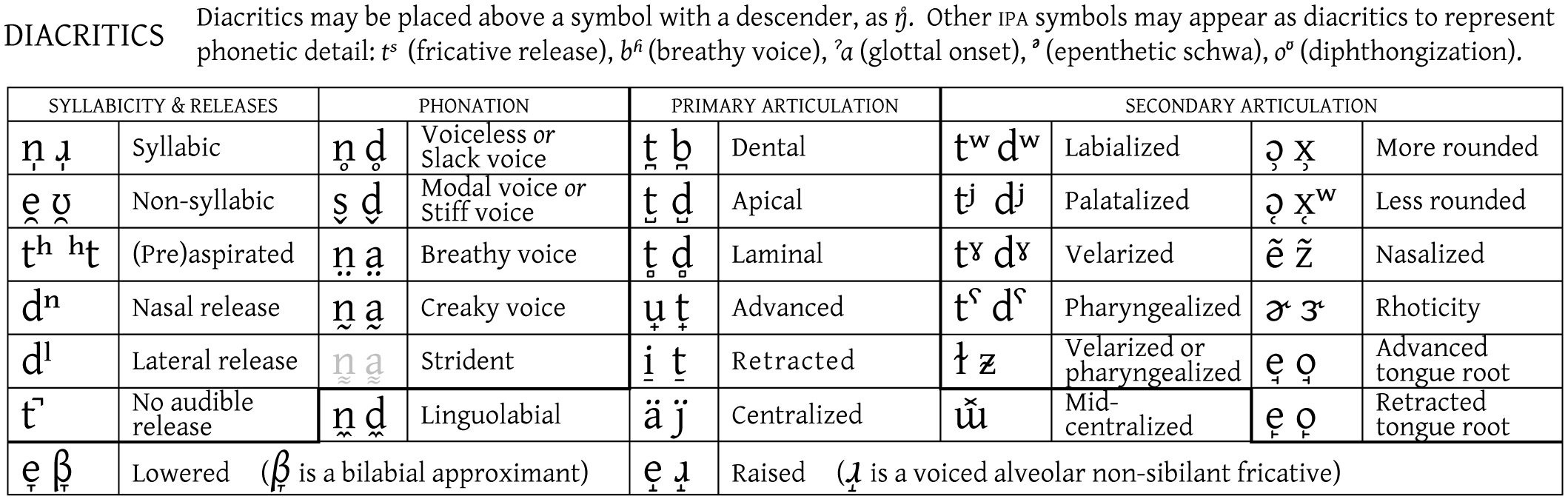
My use of accents goes beyond the UC consortium wildest dreams: phonological (IPA) notation of any random vocal utterance requires any of the 100-odd basic diacritical marks above, below, and sometimes through any latin character, in any number of permutations, plus it needs a fair share of additional forms (the IPA basic set) -- I wouldn't get very far with composite glyphs.

Almost forgot to answer your question :-D

Do I use Opentype programming to construct the glyphs in this table from a base glyph and the Combining Diacritical Marks?

I would normally just create these glyphs without Opentype programming.

You can do both. If your font has an 'a', a combining acute (´), and an a-acute, the user can insert an 'á' right away if his keyboard allows it, or by using something like Insert Symbol (Word) or Glyph Panel (InDesign). If the user enters 'a' then 'acute', you can have opentype magic automatically replace it with the actual 'á' glyph. For accents on lowercase 'i', you can either have just the 'i' replaced with a dotless one, or immediately with the correct glyph-plus-accent.

It has the advantage you can tell the user to always type the base character, then the accent. If the font contains a composite glyph, you can have opentype replace it; otherwise, leave it as it is.

The use of combining diacritics in IPA is summarized in the Wiki table IPA Diacritics; that table is rendered properly in Firefox (on the Macintosh) with a font that has the required glyphs and Glyph positioning subtables; the Wiki diacritic table as an image shows how the diacritics should be positioned.

Combining diacritic marks can be used to encode and, with appropriate font support, display arbitrary letter+diacritic mark combinations, including stacked diacritic marks on a single letter. There are very many languages in the world whose alphabets include diacritic letters that are not separately encoded in Unicode; for these, combining diacritic marks are essential for both encoding and display of text. How the resulting diacritics are displayed, when encoded in text as base letter + diacritic mark, depends on the font and the layout engine. In an OpenType font, you have a choice of either making precomposed glyphs for anticipated diacritic letter combinations (mapping these in GSUB lookups in the 'ccmp' feature) or using dynamic mark positioning (using GPOS mark-to-base and mark-to-mark anchor attachment lookups in the 'mark' and 'mkmk' features). The approach you take should be guided by your client's needs. If your client has a specific list of language support requirements with known diacritic combinations, and this set of not too large, then you might find the GSUB/ccmp approach easiest. You will be able to do this directly in FontLab. If the requirements are very extensive or open ended, i.e. they need to handle arbitrary combinations, then you'll need to use the GPOS solution. For this you will need to use either the MS VOLT tool or the new Adobe FDK or some other non-FontLab option.

You might like to read this FAQ from the Unicode Consortium: http://unicode.org/faq/char_combmark.html .

Linguists, depending on their specialization, often need combining diacritics to properly typeset their work. Theunis de Jong mentioned the International Phonetic Alphabet, and John Hudson mentioned world languages (particularly non-European languages which use the Roman alphabet: think Africa and the Americas). I personally use combining diacritics on an almost-daily basis, for IPA and to typeset Alaska Native languages. One of the most frequent letters in Aleut is an x with a circumflex--there is no single Unicode character corresponding to this letter, as the above FAQ goes to great lengths to emphasize. Iñupiaq has the letter l with stroke and dot below; it's a less-frequent letter, but just as you can't leave out the letter j in English, you can't leave out ł̣ in Iñupiaq; and you can't represent it in Unicode without a combining diacritic mark.

Some resources:

Charis SIL is not the world's most beautiful font, but it has excellent support for combining diacritics, including GPOS anchors: http://scripts.sil.org/cms/scripts/page.php?site_id=nrsi&id=CharisSILFont

FontForge (http://fontforge.sourceforge.net/) has excellent support for adding GPOS anchors to a font. If you'd like to use FontForge for this task (regardless of what program you used for the rest of the font development), I'd be happy to walk you through the process.

Thanks for all your advice - it's been a real help

aric - If I go down the road of using fontforge, I might take you up on your generous offer.

You found a font named Roman Unicode, which is made by Paul Alecsandri which does not support IPA Combining Diacritical Marks. You have to contact Paul Alecsandri (a.k.a. D. Paul Alecſandri) to get Combining Diacritical Marks in Roman Unicode.

To fix Korean appearing as .notdef and change undefined glyph width:

1) Add 2 glyphs after it.
2) Format, Post, Include Postscript, Generate Names.
3) Go to Settings, Ranges.
4) Check the Code Page ranges.

All Code Pages remain enabled as follows:
[X] Latin 1 (1252)
[X] Latin 2: Eastern Europe (1250)
[X] Cyrillic (1251)
[X] Greek (1253)
[X] Turkish (1254)
[X] Hebrew (1255)
[X] Arabic (1256) - will be disabled if you press "Calculate" - try adding Arabic to the font.
[X] Windows Baltic (1257)
[X] Vietnamese (1258)
[X] Reserved for Alternate ANSI - will be disabled if you press "Calculate"
[X] Reserved for Alternate ANSI - will be disabled if you press "Calculate"
[X] Reserved for Alternate ANSI - will be disabled if you press "Calculate"
[X] Reserved for Alternate ANSI - will be disabled if you press "Calculate"
[X] Reserved for Alternate ANSI - will be disabled if you press "Calculate"
[X] Reserved for Alternate ANSI - will be disabled if you press "Calculate"
[X] Reserved for Alternate ANSI - will be disabled if you press "Calculate"
[X] Thai (874) - will be disabled if you press "Calculate"
[X] JIS/Japan (932) - will be disabled if you press "Calculate"
[X] Chinese: Simplified chars--PRC and Singapore (936) - will be disabled if you press "Calculate"
[X] Korean Wansung (949) - will be disabled if you press "Calculate"
[X] Chinese: Traditional chars--Taiwan and Hong Kong (950) - will be disabled if you press "Calculate"
[X] Korean Johab (1361) - will be disabled if you press "Calculate"
[X] Reserved for Alternate ANSI & OEM - will be disabled if you press "Calculate"
[X] Reserved for Alternate ANSI & OEM - will be disabled if you press "Calculate"
[X] Reserved for Alternate ANSI & OEM - will be disabled if you press "Calculate"
[X] Reserved for Alternate ANSI & OEM - will be disabled if you press "Calculate"
[X] Reserved for Alternate ANSI & OEM - will be disabled if you press "Calculate"
[X] Reserved for Alternate ANSI & OEM - will be disabled if you press "Calculate"
[X] Reserved for Alternate ANSI & OEM - will be disabled if you press "Calculate"
[X] Reserved for Alternate ANSI & OEM - will be disabled if you press "Calculate"
[X] Macintosh Character Set (US Roman)
[X] OEM Character Set
[X] Symbol Character Set - will be disabled if you press "Calculate"
[X] Reserved for OEM
[X] Reserved for OEM
[X] Reserved for OEM
[X] Reserved for OEM
[X] Reserved for OEM
[X] Reserved for OEM
[X] Reserved for OEM
[X] Reserved for OEM
[X] Reserved for OEM
[X] Reserved for OEM
[X] Reserved for OEM
[X] Reserved for OEM
[X] Reserved for OEM
[X] Reserved for OEM
[X] Reserved for OEM
[X] Reserved for OEM
[X] IBM Greek (869)
[X] MS-DOS Russian (866)
[X] MS-DOS Nordic (865)
[X] Arabic (864) - will be disabled if you press "Calculate"
[X] MS-DOS Canadian French (863)
[X] Hebrew (862)
[X] MS-DOS Icelandic (861)
[X] MS-DOS Portuguese (860)
[X] IBM Turkish (857)
[X] IBM Cyrillic; primarily Russian (855)
[X] Latin 2 (852)
[X] MS-DOS Baltic (775)
[X] Greek; former 437 G (737)
[X] Arabic; ASMO 708 (708) - will be disabled if you press "Calculate"
[X] WE/Latin 1 (850)
[X] US (437)

5) Calculate the Unicode code page ranges and additional metrics as follows.
6) Save the font.
7) Insert the Combining Diacritical Marks using this code: $0300-$034E, $0360-$0362

and it works

Captured from web.archive.org on 2 Mar 2015. view this capture