
what is the tag for this feature????
in indesign there is a menu for it, but can't find the tag feature...
what is the tag for this feature????
in indesign there is a menu for it, but can't find the tag feature...

You mean wide forms as in Hebrew? I use 'jalt' for this.
Hi John:
Let me explain:
my font features over 40 commands.
there are still things i want to add to the font but have no place to connect them to in the events.
so i am looking for more places i can attach procedures/
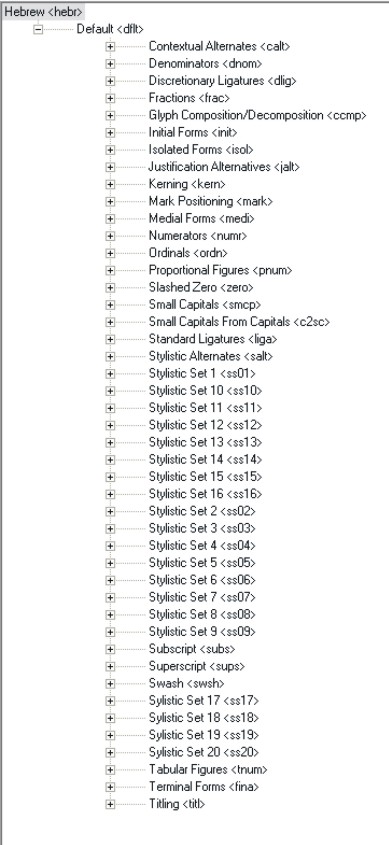
Note that you have spelled ‘Stylistic’ as ‘Sylistic’ for 17-20. This has no effect on the font, but you might find it convenient to have all you stylistic set features grouped together in the feature tree.
Having lots of features, including some that I suspect are ‘hijacked’ -- i.e. does your ‘Titling’ feature actually contain titling forms, or are you using the feature for something else? -- doesn't really ‘explain’ things to me, because I don't know what you're trying to achieve. Is this a Hebrew font? What are all the things that you are putting into these stylistic sets?
Hi John:
The font is indeed a hebrew font.
meny features are indeed "hijacked", but Titling is not one of the.
I use shorter forms for end letters such as kaffinal,pefinal
and qof,ayin,lamed when using in titles as the user makes smaller spacing between lines.
SS17-20 are one group.
to start explaining every function is hard.
but here are some
the font supports automatic distinguish between shevana\nach
dagesh kal\hazak and qamats qatan/rachav
patah genuva
alef,ayin,he with sheva in mittle of a word
mapik he
some features are "hijacked"
for example:
I hijacked the arabic initial and medial forms
for use in bible scripts
assume we have a word that is written one way but said another way, these words come in both versions in the text
so the font allows by bracketing these words to either show the word and hide brackets by using initial forms or hide brackets and and all text in between by using medial forms
however:
I still hav functions i want to add, but have no place to
"HIJACK" :)
Yikes! So you're trying to do ketiv/qere distinction display in glyph substitutions? That seems to me a really bad idea. This is a text distinction, and if you want a text that includes both forms and can switch between different display options, then you probably should use XML tagging of the character strings and base your display options on that. OpenType glyph substitution isn't designed to be able to handle this kind of thing.
Never mind hijacking layout features: you're hijacking the whole layout model.
John:
Not able?
It works prefectly fine
it can even hide multiple lines of text.
this along with other functions that open type is "not designed for", is whats filling up all these menus
and I am looking for some more menus to attach some more functions
but yet not ansawred
how would i access Streched alternates in indesign menu?
i mean what is the tag command for streched alternates???
Oh, I see what you mean now. You want to know how to access the ‘Stretched Alternates’ function that appears in the InDesign ME OpenType menu. Good question. I've never noticed this before. I presume it is intended for use in Arabic, but I can't think to what OTL feature it corresponds. In Arabic, what we might consider stretched alternates are a class of swash letters.
I'll write to my contacts at WinSoft and find out how this function works.
I didn't say that OpenType Layout was not able to do the kind of things you want to do, I said it was not designed to be able to do these things. So if it can do these things it is only by chance, and you can't expect it to always be able to do everything you want in this regard, because you might eventually run into reasonable limitations. And even if you can do these things with OTL, I still maintain that you should not, because what you describe are properly text manipulations, which should be applied at the character level, not at the glyph level.
I wrote to my WinSoft contacts about the 'Stretched Alternates' function in InDesign ME. This is a legacy function that makes use to two private features, not part of the OpenType specification, to identify left and right parts of stretched connecting forms in a particular Arabic font. This was implemented to support this Arabic font, Decotype Naskh (not to be confused with the Naskh type from Decotype used in the new Tasmeem add in to InDesign), which was originally in the Middle East version of PageMaker and which used this mechanism because OpenType contextual substitutions were not available at that time. This function is only included in InDesign ME for backwards compatibility.
thank you john for the info.
and what is
overlapping swashes in indesign????
See page 20 of this document:
http://www.fontshop.de/news/pdf/InDesign-ME_CS3.pdf
I suspect this is also a legacy function, using a private feature for the old Decotype Naskh font. This distinguishes terminal swash glyphs on reduced widths from those on full widths.
Captured from web.archive.org on 3 Feb 2010. view this capture