Typophile

Church Slavonic: A Wikipedia type display fault

Andreas Stötzner

When I choose the Church Slavonic Department of Wikipedia (http://cu.wikipedia.org/wiki/) most text is displayed properly in my proprietary typeface which I set as default in Firefox. There seems at least one particular character missing and I wonder if anyone can tell me which one it is:
Thanks for advice!
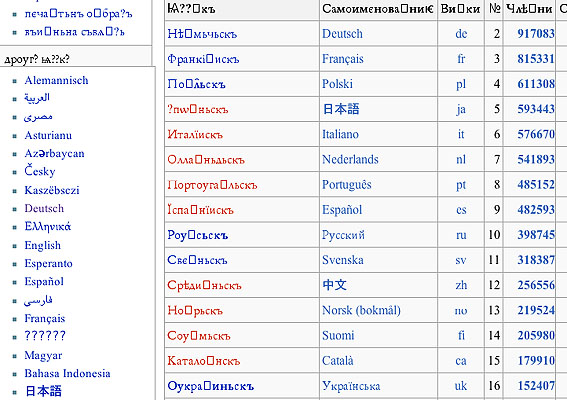
I’m having troubles locating this same page if I click the link. I keep on being redirected to a page called “Гла́вьна_страни́ца”.

Purely rough guess: acute instead of the rectangle.

(I’m assuming you refer to this missing character, I can spot several question marks as well as a very unlikely Cyrillic version of “Deutsch”!)

I agree with Theunis on the redirect: can’t see the page shown in your screenshot in order to compare it...

Try this: select the text with the “dead” character in it. Copy & paste to Word. It’ll probably still show as an empty box there. Select that character in Word and press Alt+X, which should show you the Unicode number for that character. Go to the Unicode charts website and find the chart that covers this script: that should tell you which character you’re missing.
________________________________________________
Ever since I chose to block pop-ups, my toaster’s stopped working.

Yes, one ends up at another page (??) but the problem is the same.
Since I don’t use Word I did a quick test with Apple’s TextEdit. There appeared something like a hidden combining acute, the application doesn’t reveal anything about codepoints. Maybe an apostrophe could be meant? At the end, a possible wrong text encoding? Pure guess … And yes, the ??????s are strange as well.
I wonder about this because my default font is most comprehensively equipped, even in the Cyrillic additions.

Here are a few characters in the file that I am not sure your font covers

U+A640 U+A641 U+A642 U+A651 U+A656 U+A657

I saved the html in utf8 and ran a python script. The list of all characters in the file would be too long.

Michel

The font also contains the following characters that my script fails to find on my mac: characters above FFFF cause me trouble. I had to run the script on Linux.

U+10332, U+10339, U+1033A, U+1033F, U+10343, U+10344

Do you handle those characters above FFFF ?

Michel

Most of the squares appear to be acute stress marks.

Like these: Бел-горю́чь стоит чудесный камень - Алаты́рь. [ ́ ] U+0301

Hard to say about the rest without seeing the actual page.
_____________________________________________
Personal Art and Design Portal of Ivan Gulkov
www.ivangdesign.com

My guess was based on the position (at the end of a probable stressed syllable) and the fact they’re all after vowels. Glad there seem to be agreement :-)

Checking the Wikipedia page,
http://cu.wikipedia.org/wiki/Википє́дїꙗ:Ката́логъ
your empty boxes show up as combining acute accents for me.

Нѣ́мьчьскъ looks to me like a fairly standard Slavic word for German: Russian—немецкий, Polish—niemiecki

I installed Andron Scriptor Web on my mac to see that page with Firefox and here is a grab of what I see:


Is that really the font you are talking about? In the little squares, one can see A641 and so on.

Michel

The entire range Cyrill. Ext. B A640 to A697 is in the font. 0301 as well, naturally.
The 1033x…1034x range is Gothic, it seems to be hardly relevant to Church Slavonic text. However, I’m not sure how reliable my system/app’s handle characters beyond FFFF. It ought to be no problem, though, if required.
I wonder if anybody gets the text of the page in question displayed correctly at all, with any font whatsoever.

The entire range Cyrill. Ext. B A640 to A697 is in the font. 0301 as well, naturally.
The 1033x…1034x range is Gothic, it seems to be hardly relevant to Church Slavonic text. However, I’m not sure how reliable my system/app’s handle characters beyond FFFF. It ought to be no problem, though, if required.
I wonder if anybody gets the text of the page in question displayed correctly at all, with any font whatsoever.

[sorry for my recent post shipped twice; Air connection fault!]

The font I’m talking about is not Andron Scriptor Web (which doesn’t support Cyrillic at all) but Andron Mega, which provides a very strong Cyrillic inventory. If the dubious character is to be a combining diacritic of the 03xx range it might show up without problems since that range is entirely covered by the font.
– ??

If you click on the “Discussion” link of the main page, it is said “For new users: If you’re having troubles with reading Glagolitic (i.e. non-Cyrillic) text, please use MPH 2B Damase font (Zip).

Michel

The list of codepoints in the main html page as I saved it is here. You can check by yourself.

Michel

I doubt that it has something to do with Glagolitic. You won’t find a single glag. char. inside cyrillic words, and Glagolitic is a script of its own in Unicode. But perhaps the rows of ?????? may stand in for some glagolitic parts.
Thanks for the list, Michel. I’ll check as soon as possible and will report.

perhaps the rows of ?????? may stand in for some glagolitic parts

No it is Hindi (Devanagari). When I compare your grab with mine, and after you said what your font covers, I wonder if your problem is not one of setup in Firefox or else there may be a mess in your fonts.

The list of codes in the page Vikipedï? Katalog (the ï the ukranian one and the ? is A657) is here.

Michel

Ah, that’s the page. The one in the “Polski” row, for example, is definitely a combining acute. The question marks in the column head are a641 and a651, a “small letter zemlya” and a “small letter yeru with back yer”, according to the Unicode chart for Cyrillic Extended-B (A640–A689)...

[edit:] oops, just spotted: also shown in Michel’s second link. sorry.

… may be a mess in your fonts.

What mess?

In your code list many characters from Devanagari, Arabic, Georgian etc. are listed. But I still don’t see that this is the problem. As I said before, the Combining Diacritics and Cyrill. Ext.-B ranges are complete in the font …
Sorry for bothering you.

If you just copied the offending characters and pasted them in your answer, one might identify the problematic characters in seconds. Else there is not much we can do.

Michel

I’m not sure if it works but here is a direct paste:

Сѥ́ ѥ́стъ мъногоѩꙁꙑ́ка єнкѷклопє́дїꙗ нарица́ѥма Википє́дїꙗ · ѭ́жє къ́жьдо мо́жєтъ иꙁмѣнꙗ́ти ⁙ Википє́дїꙗ пьса́на словѣ́ньскꙑимь ѩꙁꙑко́мь начѧта́ ѥ́стъ їоу́нїꙗ 2006 лѣ́та
Дьнь́сь Википє́дїи 367 члѣ́нъ сѫ́тъ

As I view this in the comment text window it looks like a *non combining* accent.

– And as I see in the comment preview, the browser picks my proprietary typeface again … so everyone may see it in a different state.

Here are the missing letters (at least when rendered in default Times) from that passage:


_____________________________________________
Personal Art and Design Portal of Ivan Gulkov
www.ivangdesign.com

The white squares are all

0301;́;COMBINING ACUTE ACCENT (Oxia, Tonos)

Michel

Add: or at least, what my browser shows me as white squares; what I see is this

Michel, if your browser with different presets shows a similar mess than it is possibly a failure of the originating website, not of our systems or fonts. In my case, *all* deciphered characters are *in the font*.

What I see on typophile’s site is different from what I see over there on the site that is causing you trouble. I just downloaded the free DejaVu fonts; I just checked and A641 is missing, the other characters A6** seem to be there. Here is what I see with Firefox 3.0.12 (mac ppc OS X 10.4, on the site that is causing you trouble:

That looks like the text you pasted above. The site thus looks fine, so far.

Michel

Add: here are the A6** characters in DejaVu Serif A644, A645, A646, A647, A650, A651, A654, A655, A656, A657

I just ran a script to check and here are exactly the characters in the text pasted that are missing from DejaVuSerif

0469, A641, 0477, 046D, 2059, 0467

They may be rendered by another font, I don’t know which.

Michel

Here is what I see in the problematic main page (text in the left column at the top) in Firefox with the font Code2000 that contains all the non control characters in the text

The site looks quite fine.

Michel

With Code2000, the text you pasted in your post, when viewed in this thread (just above) now looks like this in Firefox


The combining acute is not positioned properly (that is something I can’t stand) but the browser at least displays the characters.

By the way, if your font does not display the text when you paste it in TextEdit, then the problem does not come from the browser. If you are certain you tested those characters in the past and they were working properly, then, as I said, there may be a mess in you fonts, i.e. there may be different versions of the font installed in many places and the one that is accessed by your system is not the one you think. I would go in FontBook, select “All Fonts”, uninstall Andron completely, reboot and than install in one place the last tested version.

Michel

Captured from web.archive.org on 9 Aug 2009. view this capture