Typophile

Conversion of MS Word pt values into PPM values for FontLab

-Rudy-

I havent found anything about this. I hope I can explain it a bit...

For example: I have the character "Q" in MS Word at a size of 16 pt, this size is actualy 21 PPM in FontLab.
I also have the character "€" at a size of 10 in MS Word and which is actualy 13 PPM in FontLab.

Now my question is, does somebody have a list of all these conversions or a formula by which I can convert MS Word pt values into PPM values for FontLab?

Thanks in advance!

The general conversion is

point size * resolution (your OS rasterizer screen resolution) / 72 = PPEM

so this would mean your screen rasterizer is at 96 pixel per inch DPI.

16pt*96/72 = 21.33 or 21 PPEM

12pt*96/72= 16ppem etc.

Just what I've been looking for, thanks Vince!

Rudy

Rudy,

the formula that Vincent has given above is in the FontLab Studio 5 user's manual in the first section ("Font Scaling, PPM") of chapter 9 ("Hinting"). I do recommend reading the FontLab Studio manual since it really includes some useful information about font development :)

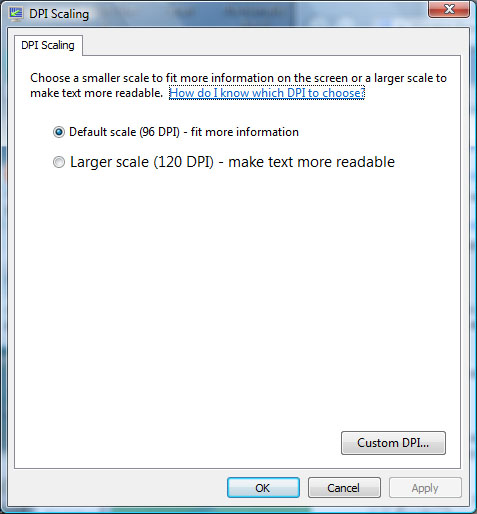
Please note that 96 is not always the default DPI size on Windows. Some notebook manufacturers pre-install Windows with the "Large fonts" (120 DPI) setting, and of course some users have the choice to set a yet different Custom DPI. I used to work on a 133 DPI setting for quite some time on my Dell notebook (which had a 1600×1200 15 inch screen so the pixels really had a physical resolution of 133 DPI, and the default 96 DPI setting rendered type so small that it was unreadable).

Cheers,
Adam

I actualy did read about Font Scaling, PPM in the FontLab manual a few weeks before I posted, only at that time I was searching for other info. By the time I needed this info, I didn't remember where I've read it and what it was called :P

I never change the DPI size of 96, I've gotten to used to it. The manufacturers pre-install always been 96 DPI with me so far.

Btw the manual does have a good explanation about the DPI conversion, thanks for the help Adam :)

Rudy

>I actualy did read about Font Scaling...

Me too! I use this formula a lot, so res/72 * pts = ppm, is the choice of professionals as the easiest input to a calculator.

A higher dpi device generally means a given ppm appears smaller. And, at a higher dpi, a given point size requires more ppm to remain the same size.

So... indicating as that Vista dialog box does, that higher "DPI scaling" yields bigger type must be a windows way of saying 'OS zoom factor', cause though dpi does change from device to device, it does not scale.

Cheers!

Captured from web.archive.org on 22 Oct 2013. view this capture