Typophile

Prevent a single last paragraph word on a new line

west_46

Hi,
I have a problem with (and now I try to explain it in my best Englisch) a single last paragraph word on a new line. I work in InDesign CS3 and I don't want that the last word of a paragraph starts on a knew line. I now the ways of correcting this manually, but I am looking for a way to prevent this. Any one a good idea /tip?

AttachmentSize
Afbeelding 2.png8.27 KB

Hallo Hans,

you can use GREP to solve this issue.
In the search/replace window (in InDesign CS ≥3), there’s a tab called ‘GREP’. Search for \s\w+?\W+?$

\s is a placeholder for ‘any space character’. (That’s the last word space in your paragraph.)
\w+? stands for ‘one or more word characters’. (Matches the last word.)
\W+? is for ‘one or more non-word characters’: it matches the dot, but also the question mark, exclamation mark etc. Why ‘one or more’? Because your paragraph could end with a closing quotation mark and a punctuation mark. Maybe there’s even an additional superscript character, indicating a footnote.
The final $ stands for: ‘look at paragraph endings only’.*

Now you can easily add the ‘no break’ property (directly or via character style) to the hits.
F

*) Maybe there’s a more elegant way; I’m still getting used to GREP. Love to hear ideas.

Upgrade to CS4 :-)

The paragraph formatting routines in CS3 (and earlier versions) contain a somewhat odd artefact, that tends to create such last word endings more often than statistically probable. CS4 uses a different formatting.

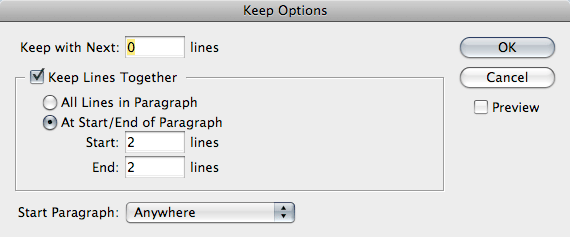
You could also try using the paragraph Keep Options (cmd-option-K)

theunis said:
> The paragraph formatting routines in CS3 (and earlier versions)
> contain a somewhat odd artefact, that tends to create such
> last word endings more often than statistically probable.
> CS4 uses a different formatting.

maybe cs5 will contain a setting to avoid such ugliness automatically.
or cs6. always gotta save those reasons to get people to buy upgrades.

-bowerbird

Ken, with the ‘Keep’ options, one can address a different problem: avoiding orphans and widows, i.e. keeping the first/last n lines of one paragraph within the same column or frame. (It’s not a very sophisticated approach, but it might be of value in some situations.)

Bowerbird, your sarcasm aside, please define ‘ugliness’. A single word in the last line of a paragraph is often the lesser evil, depending on column width, word length/language etc. If there was an automatism, it better should be very intelligent – and customizable.

I can add nothing to the InDesign discussion.

But I am curious to know why a single word on a last line of a para is considered undesirable. I have never felt this to be a bad thing except on some occasions during my stint as an advertising type director. Most book typographers and compositors I've worked with do not see this as a thing to be gotten rid of. At a given size and measure and face, we will often be faced with a single-word exit line on a para. I do not like to see very short single words in that position, for sometimes they can be shorter than the para indent, and that does look bad. Otherwise, let them flow.

And what should be done about an exceptionally long word in such a position? How should, say, the word "typographically" be handled if it is the last word in the para and starts a line?

powers

florian said:
> Bowerbird, your sarcasm aside

wait! no fair! you can't ignore the best part! :+)

> please define ‘ugliness’.

well, in this case, i'm referring to the topic-at-hand,
which is a one-word line at the end of a paragraph...

but you and i both know there are all kinds of ugliness.

still, let's limit it to this one thing for right now, ok?

> A single word in the last line of a paragraph is
> often the lesser evil, depending on column width,
> word length/language etc.

i will agree with you on that.

so where does that leave us?

are you implying that it would be beyond adobe's ability
to puzzle through the various aspects to get a solution?

i will agree with you on that too. (see?, that's sarcasm!)

but seriously, you would think that adobe would have
come to the realization that this is a concern in layout,
and they would have done _something_ to address it...

wouldn't you?

and heck, maybe adobe does have something, i don't
even own a copy of indesign, maybe it's right _there_,
buried in some preference dialog for the cognoscenti.

or maybe they've never thought about it.

or maybe they've thought about it -- a whole lot --
and they've come to the conclusion that it's simply
too darn complicated, and it's been the subject of
much infighting within the indesign design team,
and it's gotten to the point that nobody even dares
to _mention_ it anymore, because it just means that
everybody is going to start yelling at everybody else,
and then they all go home and kick their poor dogs...

i don't know.

maybe someone from adobe will come tell us what's up.
seems like they should have an evangelist here, right?,
listening to the customers who buy and use their stuff...

> If there was an automatism, it better should be
> very intelligent – and customizable.

you want "very intelligent" _and_ "customizable"? both?
you're right. adobe can't do that... ;+)

on the other hand, how does your grep approach do both?
seems to me that it's neither intelligent nor customizable...

-bowerbird

p.s. on a serious note, i think it'd be easy enough to create
a routine that would do the right thing some 99% of the time.
if you wanna be really productive, we could brainstorm it now.

You have a point, Will.
The GREP query can be refined to account for that:
\s\w{1,4}\W+?$

\w{1,4} is for ‘one or up to four adjacent word characters’, or, in plain English, ‘words with less than 5 characters’.

will said:
> But I am curious to know why a single word
> on a last line of a para is considered undesirable.

it's only undesirable if it's ugly.

and, for the most part, it's ugly if it's fairly short...
first of all, that makes it look stubby, by definition.

what's worst is when it's about the same length as
(or shorter than) the paragraph-indented next line,
where it then causes some attentional confusion...

there might be other cases where it's ugly too, but
i trust that you will know them when you see them.

> Most book typographers and compositors I’ve
> worked with do not see this as a thing to be gotten rid of.

in the situations i outline above, they would/should.

> At a given size and measure and face, we will often
> be faced with a single-word exit line on a para.

that's the reason you use multi-line breaking routines,
to avoid the situations where you'd get such ugliness...

> I do not like to see very short single words in that position,
> for sometimes they can be shorter than the para indent,
> and that does look bad. Otherwise, let them flow.

ok, so we're in agreement.

> And what should be done about an exceptionally long word
> in such a position? How should, say, the word “typographically”
> be handled if it is the last word in the para and starts a line?

that's fine, typographically.

but a one-word line in the _middle_ of a paragraph can be bad,
if you do justification, because there's no place to put the slop.

if you're hyphenating at the same time -- with a short measure,
and justification, you'd better be hyphenating too -- you'd then
try to hyphenate that baby across two lines, to get some spaces.

-bowerbird

I've often found that a very short last word looks bad, particularly if it is shorter than the following paragraph indent.

The problem with a "no last word on a line" rule, whether done manually or by computer, it that there are exceptions. If the last word is exceptional long, it should be able to stand alone. And sometimes there will be two or three two letter words, and they can look bad. The computer, or the rule, will not deal with these.

don said:
> sometimes there will be two or three two letter words,
> and they can look bad. The computer, or the rule,
> will not deal with these.

depends on how sophisticated we
make the rule, or the computer...

-bowerbird

I'd echo what Will said. Moreover, we'll even hyphenate the last word of a paragraph, unless the customer specifically prohibits it. If they prohibit it, they pay the price of gappier word spacing.

Our rule is that the end of a paragraph must be visually longer than the paragraph indent of the following paragraph, again as Will said. You can find hyphenated words that have more characters taken down than two words, e.g., "of it." If I had to, I'd break "preconceived;" "-conceived" is significantly longer than any reasonable paragraph indent.

There are places where I'd work real hard to avoid this -- right before a subhead, for example, especially a centered one.

* * *

I keep saying it, but there are always compromises to the "do nots." Usually, they come out of "tight and even word spacing." It isn't that comps are lazy, they are honoring the more basic "do" of tight & even word spacing. As always, there are those who speculate and theorize, and those of us who work for a living.

charles_e said:
> I’d echo what Will said.

will was echoing what everyone else said, right?

> It isn’t that comps are lazy, they are honoring
> the more basic “do” of tight & even word spacing.

well, in the absence of specific examples,
it's hard to say, one way or the other, but...

i would stress that no one is saying that
you should not "honor" the "more basic"
rules that call for tight, even word-spacing.

as i said explicitly above, that's why you
utilize multi-line breaking routines, so
you don't get yourself painted into a corner
where you'll sacrifice one rule for another...

> As always, there are those who
> speculate and theorize, and
> those of us who work for a living.

as always... :+)

-bowerbird

Hi again,

Thanks for your ractions.

I have no problem with a longer single word on a last line. But I don't like a short word (about 5 characters) on that position. I use left alingment and I like regular hyphenation. In my opinion the right gap/indent is to big when a single word on a last line is to short.

Maybe I had to high expectations of InDesign. But there is nothing wrong with doing it manually. I only hoped to save some time.

Hans, did you try the GREP?

Hi Florian,

Not yet, but I am certainly going to try this. I am not familiar with the GREP, so thanks for your input.

I am also interested in other opinions about single words on al last line as being something to avoid or not? What are the typographical 'rules' about this?

I think most general rules or thoughts about this have all already been mentioned:
When working with indents, the ending line better should be longer than the indent below.
In justified setting, the most important aspect is even spacing. Applying a ‘no-break’ attribute to the last two words might counteract that goal.
Certain circumstances (e.g. before subheads, as Charles mentioned, or your example with repeating words; ‘zijn’) are especially unfortunate and might demand a workaround.
In ragged-right settings, things can be handled more permissively. If it’s the last paragraph of the column or page, I try to achieve an ending line with more than one word, ideally filling half the column width or more.

I use left alingment and I like regular hyphenation. In my opinion the right gap/indent is to big when a single word on a last line is to short.

Ah, if you're setting flush-left/ragged-right text, then you can try applying InDesign's "Balance Ragged Lines" command (found in the menu off the Paragraph palette, or the menu off the Control panel when the text tool is active).

As the name implies, this command only takes effect when the text is unjustified.

You may or may not like the overall results for the paragraph, but it will fill out a disproportionately short last line.

-- Kent.

west_46 said:
> What are the typographical ’rules’ about this?

well, the closest you'll get to a "rule" is bringhurst, who says this:
> 2.4.2. avoid leaving the stub end of a hyphenated word, or any
> word shorter than four letters, as the last line of a paragraph.

but bringhurst also says you must always trust your own judgment.

he even ends the section on hyphenation and pagination with this:
> 2.4.11. avoid any and all rules of hyphenation and pagination
> that fail to serve the needs of the text

so i'd say you have the latitude to be more or less strict if you like.

-bowerbird

The hard and fast rule of never allowing a single word on a line is often imposed by somebody in Editorial or up the chain of command who once heard that one word on a line is a bad idea. So the question of whether it's a good rule is unfortunately not left to the designer.

I think the grep as it is now will miss situations with multiple punctuation marks at the end of the paragraph, or other unusual characters...

Maybe grep

\s(?=\S+$)

and replace with non-breaking space?

Alas, P.P. GREP is kind of magic but your expression is not valid (non-GREPpers are excused from reading on). The lookahead stuff does not allow variable lengths.

You need the 2nd part to be variable;

Search: \s(\S+)$

Replace: ~s$1

might work -- but again, it'll happily swallow everything at the end of a line, no matter how long the word.

Pers'nally, I like to do this stuff by hand, so I can choose between either running in (to gain a line on a page), or let it run out with a very modest tracking, making the last line longer.

I think a bigger problem with the last word in a paragraph is in justified copy where the h&j setting allows letterspacing.

So what happens is that the last line of a paragraph is set flush left, with no letterspacing of course, and the adjacent lines may be quite letterspaced. I would apply extra tracking manually to even out the discrepancy.

Just to throw in another $0.02:

@Nick, if you can see any letterspacing (for justification) at all, it is too much.

@pica pusher, I have been known to spend considerable time going over with designers, or editors if necessary, the results of such a rule. Sometimes they insist, and we do as they wish. In such cases, we also try to make sure our name isn't listed as on the copyright page as the typesetter. Telling them that sometimes gets their attention.

Theunis brings up an interesting point -- reasonably often, you have to make or loose a line for pagination. While I'd still not have the last line of a paragraph shorter than the paragraph indent, I will either take up or bring down a word to make/loose a line.

> In such cases, we also try to make sure our name isn’t listed as on the copyright page as the typesetter. Telling them that sometimes gets their attention.

I have used such a ploy in other situations as well: "I will gladly make the [inane] changes you request to your cover, I only ask that you make sure that I *do not* get a credit line, as I have a reputation to uphold." ;-)

-- K.

I've done the same thing as Charles and Kent: take no credit for work I feel is not up to snuff because of "rules" imposed by a client.

powers

@Nick, if you can see any letterspacing (for justification) at all, it is too much.

Not all typography is book work, Charles.

But speaking of book typography and wide columns, what do you do when the last line of a paragraph is flush left with "normal" word space widths, and just about every other line has much wider word spaces? Don't you think that looks odd?

what do you do when the last line of a paragraph is flush left with “normal” word space widths, and just about every other line has much wider word spaces? Don’t you think that looks odd?

Yes, you're right. And it does happen. The frequency depends on the text of course, but also on the layout program. For instance, I find that InDesign does this -- and other infelicities -- if (1) you use the paragraph composer, and (2) you don't get good values for min-ideal-"not honored" (aka max) spacing. The "best" values can change a bit with the size of the type and the measure.

Not to pick on InDesign, TeX had a its oddities too. The penalty for increasing the word space was the same as for decreasing the word space, on a percentage basis. Well, using real numbers, if you set the minimum spaceband to 180 and the maximum (which TeX somewhat honors) to 400, using any value other than 290 as "ideal" (halfway in between) would skew the results, based on change penalties computed as a percentage. But 290 is too big; 240 is more like it. Since using TeX with these parameters "encouraged" adding space to justify, we wrote another routine adding a demerit for setting more lines that absolutely needed in a paragraph. The value you used for this demerit would control the spacing behavior.

Too much information, I know. The point is, for setting extended text, you have to understand how your layout program works, & adapt it to your needs/desires.

> @Nick, if you can see any letterspacing (for justification) at all, it is too much.

I think Nick does newspaper work, and there narrow columns, combined with the inane editor's idea of insetting a photo into half to a third of that column, and you will definitely get letterspacing that you can see. In some cases, it is too much.

The problem with Nick's solution to this (letterspacing the stub) is that design on the newspaper seldom happens within the production schedule. It is too rushed to get the damn page on the press. Going back and tracking a stub is not going to get priority.

...inane editor...

More likely a designer/art director who breaks up the rigidity of the grid by having an image straddle a gutter. So, not so much an image that is a fraction of a column, but an image that is one and a bit columns, or two and a bit columns, etc.

It's not unusual, given the ease with which layout applications can cause text to wrap around a clipping path or picture box.

And not just an image. It could be a pull-quote that's being wrapped around. Or a drop cap.

It's a design issue for any kind of publication that has justified body copy, but of course, if you're going to wrap text round an image, you should be extra careful with how it breaks.

in the must-reflow-to-current-viewport online world,
your program must adjust to any possible line-width,
and there is no "i'll check exceptions manually" option.

and yes, i agree with nick: if the next-to-last line of a
paragraph has a larger wordspace due to justification,
it looks weird for the last line to have normal wordspace.

-bowerbird

.

"

A

z

Captured from web.archive.org on 8 Apr 2015. view this capture