Typophile

A FontLab "sort glyphs" wrinkle . . .

Charles Ellertson

I have a font that has grown over time. I need to sort it by Unicode for ease in use with InDesign. The problem is all those glyphs (186 of them) that don't have Unicode indexes, just names -- all the number variants, small caps, etc. Is there some way I can get FontLab to let me organize them, so that A.smcp - Z.smcp are found sequentially, etc.?

TIA

you have to use the index mode order and drag them into sequential order.

ChrisL

sort by name
switch to Unicode mode
sort by codepage
switch to Index mode
select all unencoded characters and drag to the end of the block
tweak sorting as necesary
save codepage for future sorting

...just a suggestion

First sort by name, then sort by Unicodes.

A.

That seems to be absolutely right ;-)

You can also sort by encoding, so I make a custom .enc file for each font project and use it to control glyph order.

An old thread, revived. As long as it did, I'll report that

First sort by name, then sort by Unicodes

doesn't work for me. I like all my tabular figures together, all my proportional figures together, all my basic small caps together, with the accented ones in a group by themselves, etc.

The control I wanted was over the "unencoded" glphs -- those without a Unicode number. I guess Chris's approach would work, and Paul's might work. What I finally wound up doing was to paste all the unencoded glyphs into a new font window, then paste them back in the order I wanted. Not as good as Chris's method, because when I add enough more glyphs to get lost, I'll have to do it all over again.

I use the same method as John describes here:

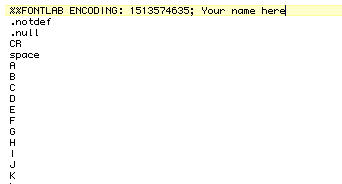
1 — Create a custom .enc file in which you define the order of the glyphs the way you would like to see them in your fontwindow.
2 — In the fontwindow's Names mode you select your custom encoding
3 — Then: Tools > Sort Glyphs > By Encoding
4 — Switch the fontwindow to Index mode to check if the index order now equals your encoding order.

Best,
Artur

Artur:

Works fine as long as you are a font designer only. Might consider shipping your fonts with instructions to graphic designers not to use them when they need characters you haven't included -- like small cap D,H,S,T,Z with dots below.

As someone who uses type, I have found that there is no telling when a (graphic) designer will pick a font to set a text with transliterated Arabic, "Sanskrit", etc. If you think this a rare occurrence, just look a the current political scene . . .

So, I have to do make up characters the (font) designer left out. Worse, I have to do it on an as-need basis; as they come up. No pre-planning. About the only thing I can tell the (graphic) designer is such & such a designer/foundry absolutely prohibits modifying the font, so they'll have to use something else. But sure as shooting, the something else won't support these characters and glyphs either. I'll have to add them, and eventually get to a point it becomes hard to see just what is there.

I have a suggestion for you.

1. Open your font

2. Save an encoding based on the glyphs you have made. Just like that. By doing this you get the names of all the glyphs in a text document.

3. Open that enc-file in a text editor, and sort the glyph names the way you want them. You can take away the numbers before the names, no problem.

In the top of the enc-text document, you can name the encoding as you wish.

Then choose this encoding in FontLab and sort the glyphs by that (sort by encoding). You can now have this encoding file as a base and then further on add more glyphs, or make changes in the order you want the glyphs to appear. Make all these changes in a text editor and then re-select it in FontLab for it to update.

Mmmm okay, I'm not sure I understand what it is you need then.
I thought you were looking for a method which allows to you to easily organize the order of glyphs in InDesign's glyphwindow?

Best,
Artur

Ah crossposting with Goran. This is indeed the method that I mean, but this time with opening an existing font.

Goran -- Thank you. Exactly what I needed.

Captured from web.archive.org on 8 Nov 2013. view this capture