
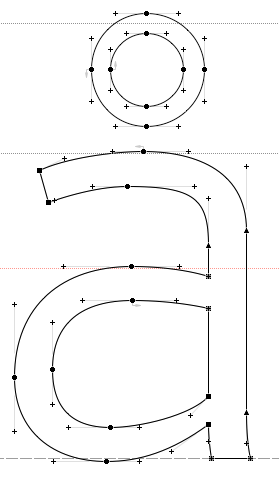
This is what the character å from one of my fonts looks like in Fontlab. I don’t see any problems.
This is what it looks like in Indesign unless I zoom to 1200%. Worse, this is also how it prints on Postscript laser printers.

Any ideas?
This is what the character å from one of my fonts looks like in Fontlab. I don’t see any problems.
This is what it looks like in Indesign unless I zoom to 1200%. Worse, this is also how it prints on Postscript laser printers.
Any ideas?

Two 'a' contours on top of each other?
Have you ran the FDK's CheckOutlines on your font?
Thanks! It wasn’t a double counter, but for some dumb reason I had pasted in the original a contours and not deleted the component in Fontlab.

That is the same as two contours, James. We have all done it :-)
ChrisL

The way I check for this is to do control/command (PC/MAC) - click near an outline. That chooses the outline, lighting it up in red. If there's a second identical contour in black over it, you'll see a little red around the black, rather than a clean red outline. Then you can just delete the extra outline.
The Font Window can also give you a clue that something is wrong with the glyph as the preview appears a little bolder and less smooth.

Captured from web.archive.org on 22 Oct 2013. view this capture