
OK, I've got an InDesign CS2 problem. An image is splitting columns but each column wraps differently. ("speculate" should be flush left rather than wrapping, etc.)
Any ideas on how to fix it? Thanks!
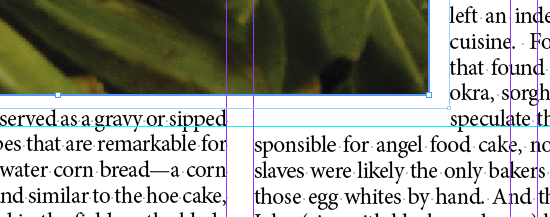
OK, I've got an InDesign CS2 problem. An image is splitting columns but each column wraps differently. ("speculate" should be flush left rather than wrapping, etc.)
Any ideas on how to fix it? Thanks!

Try selecting the object to which the wrap is applied and clicking Object>Convert Shape>Rectangle. Then try the same with the text frame. Check to make sure neither is rotated.
I assume you alright made sure everything is styled the same. Is there some kind of baseline grid align going on?
Ehague,
The objects are rectangles and neither is rotated. No grid.
When I move the image box to the center of the columns so text flows to either side, the problem goes away. As I move the box toward any one column's edge, the text pops down.
Any other ideas?

Looks like the leading may be off on one line on the left.

You might check out this thread on the Adobe forums:
http://www.adobeforums.com/webx?14@@.3bc66829/0

Do you have the text snapping to the baseline?
Captured from commoncrawl.org on 25 Apr 2015. original URL