Typophile

Mosaic Technique - Illustrator effect or hand-drawn?

jimsbee

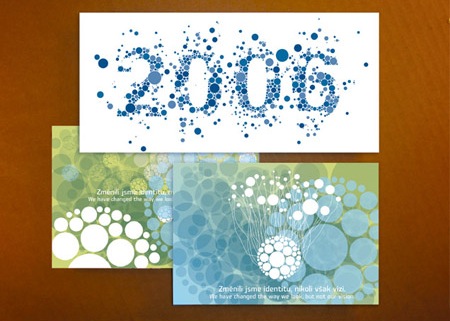
Can anyone help me figure out how this graphic style is achieved?

I’ve seen this used before a number of times, and I find it hard to believe that it’s done by hand - it seems that would take forever. I imagine there’s some sort of Illustrator plugin that automates the process and allows the user to control how the forms are filled. You’ll notice that the ’fill shapes’ are never sliced, but rather resized to accurately define the boundaries of the outer form.

Any ideas? Suggestions?

Thanks so much,
Jim
you could have a look at Scriptographer, a pretty versatile Illustrator plug-in.

Thanks. Looks useful, but I can’t find any existing scripts to do the job.

Any other ideas?

The Symbol Sprayer Tool in Illustrator does this effect quite well
Have a look here
There rest is just patience!

Scriptographer is great too. Thanks Sebastian

Also could I ask you James where you got that image?

Yes, but the symbol sprayer creates overlaps and random spacing...you’d be better off doing the whole thing by hand. If you look at the “2006,” The boundaries are so perfect, it seems there’s some kind of magic assistance involved??

I got the image here:http://www.artgraphics.ru/best/best2006_eng.html

Just scroll down.

The sample you share was most definitely done by hand. Something that organic isn’t the result of a filter or tool. The work of Marian Bantjes and Si Scott, for instance, could never be done with a filter.

I agree that the splatters/stray elements were probably done by hand, but what about the base fill of the numbers? It seems to be very consistent, and I imagine that there would be some way to script a fill like that??

They were simply very careful with the size and placement of the circles. Through Gestalt our eyes are following the shape and that is how it appears to be so perfect.

More interesting work like this.
Leads me to believe that there is a script that does this effect.
Imagine trying to do those by hand!

I´ve also been looking for a plugin/program to do this kind of stuff. It really looks great. I once contacted a guy who did a piece like this and he said it was done by hand, the “Old School” way as he put it.

I have to admit, that those are amazing Seán. I suppose you could define an area using postscript and then the script could be implemented within. :^/ But I still think this is all done by some patient, talented person . . . by hand.

There are some great brushes here that might help.

http://seishido.biz/seishido.html

Sharon

While I am sure that a script does exists to replicate this effect, my own personal experience doing this type of work was painful.
This was my attempt. Except with lightning bolts of course.

I once did a poster where I replicated a colour vision test which did not actually contain any hidden letters or numerals. (Don’t laugh; it was one of those “loose lips sink ships”-type military operation security posters, and it was no work of genius.)

I also looked for ways to automate this, but in the end, it was all done by hand. This involved making hundreds of copies of circles of various sizes and similar hues and positioning each by hand. I think it took me no more than an hour.

종성, what does that say? Google Translate gives: “Uh, security ...? They do not know the security of the blind spot, once again confirmed.” The first part makes sense, but the second part less so. Just curious.

Max, I’m impressed you were able to input the hangul text into Google Translate at all.

The poster says:
어, 안 보이네? 자신도 모를 수 있는 보안의 맹점, 다시 한 번 확인하세요.

or translating liberally?

Huh, I can’t see it! Any blind spots in security you might not know about? Check once again.

Blind spots and colour vision deficiency tests don’t make the most sense, but I just wanted to use the test in a poster.

Jongseong, thanks for the translation.

I learned Hangeul a while ago. I was trying to learn Korean but I didn’t get very far. But being a computer geek, I installed the Korean IME and learned the 2-bul keyboard layout. I hear 3-bul is more efficient, but there’s more to remember, and I don’t use it much anyway.

Captured from web.archive.org on 2 Jul 2009. view this capture