
i’m looking for some software to help me keep files organized on my pc and allow me to find things quickly. something like yojimbo but for windows. anyone have any good suggestions?
i’m looking for some software to help me keep files organized on my pc and allow me to find things quickly. something like yojimbo but for windows. anyone have any good suggestions?

I know Total Commander, which is probably not as good as Yojimbo, it’s basically an enhanced Explorer. I have only used it years ago, it was fairly good, but I have no idea if it still is. But it’s free, so that’s not too bad. :)

FileMaker Pro. Cheesy name, good product.
j a m e s
interesting suggestions. any others?
I find it very helpful to partition hard drives, not merely into two or three, but really carve it up. This allows certain data types to be grouped easily, and you end up with multiple small directory trees, one on each partition, instead of one great big cumbersome tree on C drive. Much easier to navigate and find things, automated searching is quicker.
For example:
C: Sys Vol (the OS and system apps only)
D: Documents (.doc .pdf .rtf .qxd .pm6 .p65 .txt, email)
E: Applications
F: Admin (desktop, shortcut to IN drive, out folder, personal stuff, project folders, shortcuts to key utility proggies. This drive contains any data type)
G: Work drive (.ai .avi .bmp .eps .indd .pcd .psd .psp .gif .jgp .png etc)
H: HTTP 1 (saved webpages from the interwebs)
I: IN drive (my in basket, accessed by shortcuts on F:)
J: Anime (a library of anime artwork I collect)
K: D’Arts (artsy-fartsy artwork of all kinds for reference)
M: Femmes (pictures of attractive women)
N: Webdev (web-based work projects: .html .htm .php .css .txt)
P: Pics (massive library of stock images, different from artsy-fartsy stock)
T: Type (whole drive devoted to fonts and EULAs)
S: Spare (large storage drive for dumping giant-sized files, software, DVD movies and the like)
A place for everything and everything in its place. Having one drive devoted to fonts only makes finding a font manually quite easy, provided you create an extensive hierarchy of category folders. The IN drive has only a few folders, each assigned to whatever clients I’m working with at the moment. I used to have an OUT drive just for outgoing items but found an out folder on the admin drive more efficient :^)
j a m e s

If you ask Microsoft, the answer is ’SharePoint’.
But SharePoint really sucks.
personally, for organizing things on my own HardDrive, I think the solution is diligent folder heierarchies and a decent search tool. Windows doesn’t have a decent search tool built in (and, in fact, I’m not finding Mac’s ’spotlight’ all that great either, though it is fast)
what i thought was really interesting about yojimbo is that it allows users to add tags to their files. i’ll have to see if there’s some kind of tagging functionality built into windows explorer. haven’t looked into it yet...
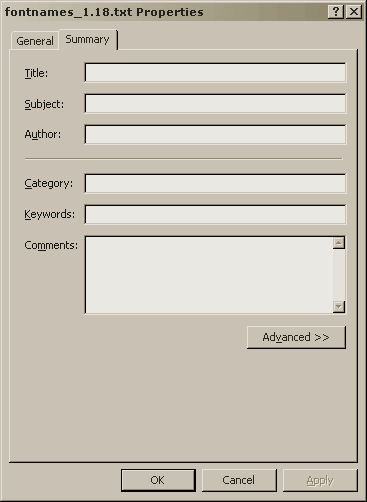
You want advanced properties.
* right click object (file) > properties > Summary tab >
looks like this:
Windows XP has an Indexing Service.
* right click object (file) > Advanced button > check For fast searching, allow Indexing Service to index this file.
Indexing Service can be turned on or off.
- right click My Computer > Manage > Computer Management console > Indexing Service > Stop and Pause buttons appear on console toolbar.
j a m e s
Captured from web.archive.org on 22 Oct 2007. view this capture