
Does anyone know how to acheive such an affect?
typographicly and otherwise.
thank you all.
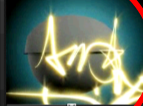
Does anyone know how to acheive such an affect?
typographicly and otherwise.
thank you all.

photography: flashlight and long exposure

My favorite along these lines is the portrait of Picasso made by Gjon Mili. Done just as Stephen describes: shutter open in dark room, Picasso draws figure, at very end pop flash, close shutter.

or if you are not a purist.
Import or scan your base ’type’ design.
Needs to have a photographic background or similar to work, like in your example
Copy the ’type’ layer in Photoshop four/five+ times.
Blur each layer to different amounts, nudge them about a bit, alter the colours, impose different blends on each color dodge/screen/overlay.
Basically experiment to you find what you are looking for.

Instructions here: http://www.pipslab.nl/
Check out: http://www.pipslab.nl/graf/
thank you!
Yep, along with belleisle advice there’s lots of ways to achieve the neon glow effect in Photoshop.

One real simple way is to use the Pen tool to create your shapes and on a new layer above it fill with colour and set the blending mode to Color. You could copy your shape to a new layer below it and apply to slight gauss blurr to achieve a diffused effect. In my example I just used two layers on a black bg.
clauses, groovy linkage. Check out camera tossing on Flickr: http://www.flickr.com/search/?q=camera+tossing
__________
Hiro
Captured from web.archive.org on 10 Oct 2007. view this capture