
Hi all,
It’s time for me to ask for your comments before I forget this project altogether. Partly to teach myself FontLab, I’ve been working on a modified version of Adobe Garamond Pro – so far, just the Regular. (My point of departure was the font that came with InDesign 2. The modified version is strictly for my own use, of course. But I’d really appreciate feedback, so I can learn something.)
The only glyph outlines worth mentioning that I’ve changed are the various “fences”, ( ) [ ] { }, as shown at the top of page 1 of the enclosed PDF. GIF added:
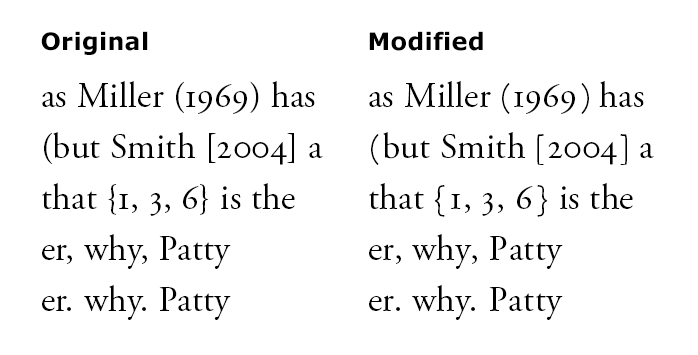
I prefer the traditional (?) kind of fences, with relatively even thickness. I also lowered these glyphs a bit so they’ll look better surrounding old-style numerals. (It occurred to me that you could perhaps use the OT feature “onum” to adjust the vertical position, but I couldn’t get it to work. I didn’t try very hard, though, and can’t remember the details.) Furthermore, I like to have plenty of space on the inside of these glyphs. On the outside, however, they’re negative-kerned (-50) with the word space.
Otherwise, I’ve loosened up the spacing, most importantly (1) the left sidebearings, and kerning with preceding r y, of the period, the comma, and other punctuation marks, also shown near the top of the PDF, and (2) uppercase-lowercase kerning pairs, which take up the rest of the PDF.
As for the latter, I first intended just to loosen the Ta, Te, and To pairs – which looked way too tight to me – but I ended up going through all the uppercase–lowercase pairs and loosening most of them. (The specimen does include some pairs that haven’t been modified, e.g. Hu.)
While all the original uppercase–lowercase kerning pairs were negative, I now have cumulatively perhaps as much positive as negative kerning. I’ve read somewhere that kerning should generally be negative. Is this because fonts may be used without kerning and too loose is better than too tight? (I do agree with the latter principle!) I only intend to use this font with kerning.
The alternative would be to increase the right sidebearing of the caps in such a way that these kerning pairs can all be made negative or zero again. But I thought that for now, it would be better not to touch the sidebearings (and consequently the other kerning pairs involving the caps – though I suspect that these, too, will look too tight to me once I get to them).
I’ve also been planning to increase the sidebearings slightly across the board, and that’s why the specimen has +8 tracking. Wouldn’t the equivalent of this be an increase of 4/1000 em to the sidebearings?
As the above suggests, I generally find today’s fonts too tightly spaced. This is most notable in the case of punctuation and kerning, but I also find myself using positive tracking in InDesign to give the text some breathing room in general; I think (hope) that this improves readability.
Actually, even many metal classics, like Bembo, look a little tight to me. I like the looseness of Stempel Garamond, for example. Some might argue that in that case, I should use Stempel Garamond, rather than trying to make the Adobe face look like it. But AGaramond is otherwise a good face (though it would really benefit from size variants), and I don’t have the Stempel version.
By the way, I’m also tempted to slightly increase the right sidebearing of e and the left sidebearing of z—even though the tightness here might be traditional. Any opinions?
Do you think the above kinds of changes would be too much for a job for which someone else has specified Adobe Garamond? What about the fact that the loosened version will take up more space?
Olli
Sorry: the first PDF was flawed (wrong spacing); corrected version posted Saturday at about 4:50. I also now realize that I haven't actually changed the v. w. v, w, pairs – but I think I should.
| Attachment | Size |
|---|---|
| Garamond_specimen.pdf | 167.96 KB |

