Typophile

Freight Micro glyph snafu?

lemme

I'm trying to figure out why my copy of Freight Micro doesn’t have apostrophes and quote marks where I expect to find them. Has anyone seen this issue before? Any pointers? I have an email into joshuadarden.com as well, but I'm pressed for time so any assistance is appreciated.
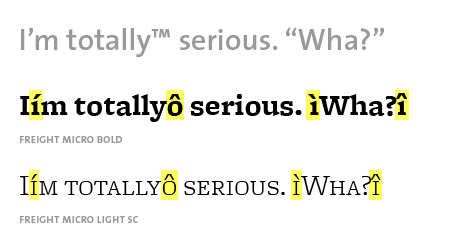
This looks like it could be a font cache issue. Have you tried Font Finagler?

Odd. If I had to guess, I'd guess that it's some weird code-page issue.

What platform and application is this happening on?

Have you tried composing the text in another (text-only) app, copying and pasting it into the target app, and then applying the font formatting (Freight Micro)? If so, at what does the corruption occur?

Conversely, what happens when you copy the incorrectly-appearing text from your target app and paste it into a text-only app?

As memory serves (less & less these days), this looks a lot like what happens when you mix Mac and Windows encodings with Type 1 fonts.

Howdy all.

The Ministry of Tech Support (i.e., me) is following up with Mr. Lemme. We look forward to sorting this out.

Font seems to work fine using the online previewer here...

http://www.fontshop.com/showfont.cfm?fid=GF.118888.0.0

This happens to me occasionally when I already have Illustrator open and then I activate a font. I have to restart Illustrator and then it is gone.

Mr. Darden is on the case. I'll report back -- for posterity -- if he's able to figure out what's going wrong. Thanks for the suggestions! Incidentally...

• restarting AI doesn't fix it
• I haven't tried Finagler
• same issue shows up in TextEdit
• copying error text to another app in another font displays correctly
• correct text from another app pasted into AI then formatted as Freight Micro shows the same error
• Omnes works like a charm

Got a new version from the source. Not sure what the issue was.

Captured from web.archive.org on 15 Oct 2013. view this capture