
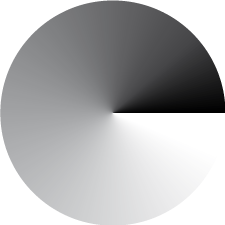
Sorry for such a small image but does anyone know how I do a gradient in illustrator like this? I can only do one that is either linear or radial.
Thanks.

Sorry for such a small image but does anyone know how I do a gradient in illustrator like this? I can only do one that is either linear or radial.
Thanks.

There isn't an easy way to do this gradient in illustrator, but it's possible. You'll have to use the gradient mesh tool and create several small gradients that track around a circle.
Thanks, is there another program that is better for this?

Or depending on the use you could just do it nice and large in Photoshop and place it. A gradient mesh will rasterize in a rip anyway.

Create two rectangles (one black one white). Create a blend between the two. Set the blend to smooth color and to align to path. Create an art brush out of the blend. apply the brush to a circle. Increase the stroke weight until a point is created at the center.
Let me know if any of this doesn't make sense. I was able to recreate your example perfectly.
Josh
Thanks Josh, that sounds good. I'll let you know if i can't do it.
B.
Worked, thanks

Josh, that is what I'd call a power-user move. Slick!
Definitely a Power-user move! I actually don't mind being schooled, that sounds like a really cool solution, I'm going to try it tomorrow.

Wow, it works really well! Thanks for the tip!
Biff, now that we all know how to do this in like 10 seconds, what are you using it for? I don't see the application.
I’m of the mind that there is nothing that can’t be done in Illustrator albeit in some convoluted manner.
Glad I could help.
Josh
I’m of the mind that there is nothing that can’t be done in Illustrator albeit in some convoluted manner.
I'm definitely in that camp... I'm almost at a point where, if I can't do it in illustrator, it wasn't meant to be done.

I´m sorry, but for me, it doesnť make sense. I need more description...please. Thanks Tereza
Captured from web.archive.org on 18 Oct 2014. view this capture