Typophile

Opentype features take a vacation with one font using FL5 Mac

Chris Lozos

I have been working on a typeface called Tovarich which has several opentype features which used to work fine until a few days ago. I can't figure out what I did to screw it up but I must have done something bone-headed.
From within FontLab 5, my features compile properly without complaint. They show up and work as expected in the preview screen. When I output the font as PostScripot flavored OTF, my features vanish in both InDesign and Illustrator CS. There are brackets around the feature names in the menu indicating "nobody home" and the features don't work. For the past few days, I have been trashing my features and redoing them all to no avail. I trashed them and then imported features from one of my other fonts which is working fine but it still does not work! I have trashed my cashe several times, rebooted, resaved the font under a new name and redone the features again all with the same unpleasant result, terminal frustration! What the heck have I done wrong? Why will the exact same feature code work on one font and not another?
I would be tearing my hair out but that ship has long sailed,

Any help would be appreciated,

ChrisL

how about trashing your adobefnt files?

Josh,

How do I do that?

ChrisL

do a search for “adobefnt” it should bring up a bunch of files ending in .lst
sometimes trashing all these files fixes some problems.
I’m on a Mac… don't know if it’s the same on PC.

Thanks Josh. I am on a Mac as well.

ChrisL

are there cyrillic characters in your font?
This thread may address the same problem?

Yes, there is a whole Cyrillic set in it. But no Greek this time.

ChrisL

I remembered that thread and set only basic Roman with no help. I then added greek but still no help!
My font has CE Latin extended A, Cyrillic with the extended Cyrilic for Baltic. What I don't get is that all my other fonts that I have designed work just fine. It is only this one that baffles me :-/

ChrisL

Do you have the language system(s) declared properly? If you only declare

languagesystem DFLT dflt;

you will see no layout features in InDesign CS2 (and earlier, I presume). The DFLT/dflt language system is relatively new, and should work all by itself someday, but for now, some apps don't know about it. For now, you should always include some other language system declaration (and that usually means latn/dflt).

Of course, if you really did import all features from some other font that works, including the language system declarations, then I guess I am stumped.

Do I declare the language system in InD or in FontLab? I assume it must be in the Opentype feature in FontLab because I don't know where to find it in InD.

ChrisL

Here is my feature code:

feature tnum { #tabular numbers
sub @num by @TNUM;
} tnum;

feature numr { # Numerators
# Latin
sub @num by @numr2;
language AZE ; # Azeri
language CRT ; # Crimean Tatar
language DEU ; # German
language FRA ; # French
language ITA ; # Italian
language MOL ; # Moldavian
language ROM ; # Romanian
language SRB ; # Serbian
language TRK ; # Turkish
script cyrl; # Cyrillic
sub @num by @numr2;
script grek; # Greek
sub @num by @numr2;
} numr;

feature sups {# superior figures
sub @num by @supnum;
sub @infnum by @supnum;
sub @numr2 by @supnum;
sub @dnom1 by @supnum;
} sups;

feature locl { # Localized Forms
# Latin
language MOL exclude_dflt; # Moldavian
sub [Scedilla scedilla] by [Scommaaccent scommaaccent];
language ROM exclude_dflt; # Romanian
sub [Scedilla scedilla] by [Scommaaccent scommaaccent]; } locl;

feature frac { # Fractions
lookup frac1 {
sub one' [slash fraction]' four' by onequarter;
sub one' [slash fraction]' two' by onehalf;
sub three' [slash fraction]' four' by threequarters;
sub one' [slash fraction]' three' by onethird;
sub two' [slash fraction]' three' by twothirds;
sub one' [slash fraction]' eight' by oneeighth;
sub three' [slash fraction]' eight' by threeeighths;
sub five' [slash fraction]' eight' by fiveeighths;
sub seven' [slash fraction]' eight' by seveneighths; } frac1;
} frac;

feature liga { # Standard Ligatures
# Latin
lookup liga1 {
sub f f i by f_f_i;
sub f i by fi;
} liga1;
lookup liga2 {
sub f f l by f_f_l;
sub t t i by t_t_i;
sub f l by fl;
sub f f by f_f;
sub t t by t_t;
sub t i by t_i;
sub T T by T_T;
} liga2;
language TUR exclude_dflt;
lookup liga2;
} liga;

I just checked Apples "Pages" and "Keynote" applications. Liga works fine with them but I don't think they support frac anyway. Liga does not work with Adobe aps though :-/

ChrisL

Josh,
I tried trashing “adobefnt” but it didn't help.

ChrisL

Ah, here we go:

http://typophile.com/node/28277

There's some discussion about languagesystem in there. I forgot that DFLT/dflt is so new that FontLab doesn't yet recognize it (right?), but perhaps the language system tags in general are your problem.

By the way, only delete AdobeFnt*.lst files, not the AdobeFnt.db file (if you have it).

Cheers,

T

Some opentype features for cyrillic script which works in AdobeCS for Windows don't works in AdobeCS for MacOSX 10.4.x, f.ex. liga, howewer calt is working...

Thanks Christopher, I assume you meant:
"However, in the FDK 2.0, the default script is “DFLT”, so the effect is saying:
script DFLT;
language ROM;

and the only legal language tag for the DFLT script is the ‘dflt’ language.

To get what you want, you should put the lines:
languagesystem DFLT dflt;
languagesystem latn dflt;
languagesystem latn ROM;

at the beginning of the feature file; all features not registered under a specific language will then be registered under these three script/language pairs.

In features where you specify any language or script, you need to spell out all the script language combinations, and explicitly include the appropriate features under each, e.g
script DFLT;
language dflt;
lookup LOOKUP_1 {
… lots of rules
} LOOKUP_1;

script latn;
language ROM;
lookup LOOKUP_1; # reference to the previously defined LOOKUP_1,
# so that it will be included under latn-ROM as well as DFLT-dflt."

I thought that only applied to the Adobe FDK2 tool? Unless you can tell me I need to put something similar in my FontLab5 features?

What is weird is that it only does wrong on this font, not any of the others I've done the same way.

ChrisL

Thanks Thomas, I only deleted the .lst files but to no avail.

ChrisL

To further fuel the debate, I just loaded my problematic Tovarich font here at the office. I do all my font development at home on a different computer. At home, I have my personal copy od InDesign CS suite. Here at the office, I have the newer CS2. Both home and office computers are Macs running the same system software Mac OS 10.4.8. Both are pre-Intel G5s.
Although the "OSF" icon does not show up on the Tovarich I loaded here at the office, ALL OF MY OTF FEATURES WORK HERE! Again, the for certain difference is that here I am using CS2 instead of CS at home. There may be more to it than that but that is a start. This would all make sense if all my OTF fonts behaved the same way, but they don't. Every other opentype font on my system at home works on the older Adobe CS just fine EXCEPT Tovarich--go figure.
Has Adobe heard any other CS vs. CS2 font issues with opentype?

ChrisL

Here is a PNG file showing working OTF features in CS2.

ChrisL

I was hoping a FontLab expert would chime in with some guidance about the languagesystem declarations. I am not sure if FontLab allows you to just put those statements in the OpenType panel, or if FontLab is generating its own language system tags using something in the font info.

Try putting the line
languagesystem latn dflt;
in the "global" part of the OpenType panel.

Thanks Christopher, I will give it a try.

ChrisL

"I was hoping a FontLab expert would chime in with some guidance about the languagesystem declarations."

Me too. Maybe Adam Twardoch will see this thread and set me straight :-)

ChrisL

PS: Have there been any complaints to Adobe about this kind of thing with CS before?

Another issue: Now the font has moved down the list to the foreign script area at the bottom, Even though I don't have anything other than basic Latin checked? Is there a fix for this too?

ChrisL

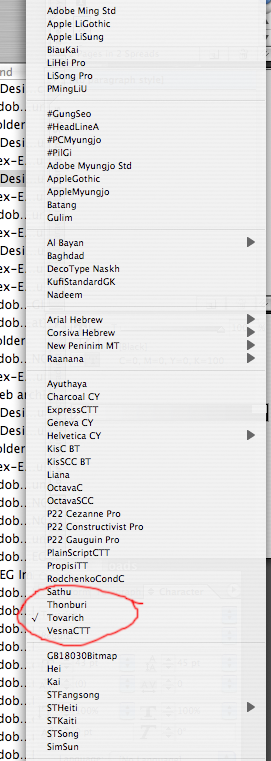
Hereis a PNG of the font menu in CS:

ChrisL

Chris,

your OpenType code looks like a result of some wild grab-and-paste action, randomly collected from other people’s fonts. In short, your OpenType code doesn’t make any sense at all.

1. In the lower-right part of the OpenType panel, declare *all* the languagesystems that your OT code uses.

You should at any case declare these two:

languagesystem DFLT dflt;
languagesystem latn dflt;

Then, you should declare all the languages that use the Latin script for which you have some special handling. For the Scedilla->Scommaaccent "locl" behavior, declare Moldavian (MOL) and Romanian (ROM). For the special "i" casing and ligature treatment, declare Azeri (AZE), Crimean Tatar (CRT) and Turkish (TRK, *not* TUR!):

languagesystem latn AZE;
languagesystem latn CRT;
languagesystem latn MOL;
languagesystem latn ROM;
languagesystem latn TRK;

If your font includes any Cyrillic glyphs, you should also declare the Cyrillic script:

languagesystem cyrl dflt;

If you want to include special Serbian glyphs in locl, declare Serbian as well:

languagesystem cyrl SRB;

If your font includes any Greek language glyphs (i.e. not mathematical Greek), you should also declare the Greek script:

languagesystem grek dflt;

So your lower-right part of the OpenType panel may look like this:

languagesystem DFLT dflt;
languagesystem latn dflt;
languagesystem latn AZE;
languagesystem latn CRT;
languagesystem latn MOL;
languagesystem latn ROM;
languagesystem latn TRK;
languagesystem cyrl dflt;
languagesystem cyrl SRB;
languagesystem grek dflt;

This provides a map for all the languagesystems that will be included in your font. If a feature definition does not use any exceptions, it will be automatically assigned to all the languagesystems defined there.

If a feature definition defines any exceptional handling for any of the languagesystems, you must enumerate all of these languagesystems once again, inside of the feature definition, and you must specify for each of them the appropriate action (i.e. "exclude_dflt" or "include_dflt" plus some lookups if necessary).

As for "smcp", "c2sc" and "liga" handling of Turkish "i", I recommend using the new Adobe approach. That is,

feature locl { # Localized Forms
script latn;
# Handling of Turkish i
language TRK exclude_dflt;
lookup locl_TRK {
sub [i I.smcp] by [i.TRK Idotaccent.smcp];
# The "i.TRK" glyph should be an identical copy of "i"
} locl_TRK;
language AZE exclude_dflt;
lookup locl_TRK;
language CRT exclude_dflt;
lookup locl_TRK;
# Handling of Romanian Scommaaccent
language ROM exclude_dflt;
lookup locl_ROM {
sub [Scedilla scedilla] by [Scommaaccent scommaaccent];
sub Scedilla.smcp by Scommaaccent.smcp;
} locl_ROM;
language MOL exclude_dflt;
lookup locl_ROM;
} locl;

(You may also want to include the Serbian glyph handling there).

This way, you will avoid the need to deal with "script" and "language" in ANY other OpenType feature definition.

Simply make sure that in the feature definition of "smcp" (or in the appropriate classes), "i" gets replaced by "I.smcp" and "i.TRK" by "Idotaccent.smcp". Of course "dotlessi" should be replaced by "I.smcp" as well.

Regards,
Adam

Thanks Adam! I will try and digest all of that in my feeble way :-)

ChrisL

Adam,
I did what you suggested and IT WORKED! I knew I had done something boneheaded!
THANKS for figuring it out!

Now I wonder why it works in CS2 messed up as it was originally? Maybe CS2 has a bonehead debugger built right in :-)

ChrisL

Adam, are you sure that the 'exclude_dflt' statements need to be used inside 'locl', as in your example?

AFAIK they don't, because:
1. In 'locl' we want to define language specific behavior, so neither 'script DFLT;' or 'language dflt;' commands should ever be used there, and
2. Since 'language dflt;' is not used, there's no default behavior specified, so there's no reason for using 'exclude_dflt;'.

Am I missing something?

You should at any case declare these two:

languagesystem DFLT dflt;
languagesystem latn dflt;

Adam, will the DFLT tag cause any problems with the current version of FLS5?

"# The “i.TRK” glyph should be an identical copy of “i”"

Not the dotless i Adam? If it is exactly the same, why not just point to the Latin "i"? I am really missing something here. Itmay be that I just don't understand the contexts in Turkish which need a substitution( or lack there of).

ChrisL

I think I see it now Adam. If, in Turkish, I substitute "i.trk" for "i" before I apply the liga feature, then the liga feature will only be applied to the Latin i in non-Turkish usage. This would eliminate the repetition of locl exclusions for multiple ligatures.

ChrisL

> If, in Turkish, I substitute “i.trk” for “i”
> before I apply the liga feature, then the liga
> feature will only be applied to the Latin i in
> non-Turkish usage. This would eliminate the
> repetition of locl exclusions for multiple
> ligatures.

Exactly. This is the technique Adobe adopted in Garamond Premier Pro and later releases. In "locl", you chage the "identity" of the letter i without changing its appearance, and then the rest of your code is clean and easy, without the necessity of dealing with various exceptions, and without the need to think about it in all the OpenType features you may think of.

> will the DFLT tag cause any problems with the
> current version of FLS5?

Unfortunately, yes. Inside the font file, a script tag " " (four spaces) rather than "DFLT" will be produced. This is an unregistered tag, so I don’t think it will break anything, but it’s not optimal. As soon as we upgrade FontLab Studio to make use of AFDKO 2, the feature syntax will automatically produce the correct result.

A.

Unfortunately, yes. Inside the font file, a script tag ” ” (four spaces) rather than “DFLT” will be produced.

is this something can be fixed simply with TTX?

can i just replace the line
<ScriptTag value=" "/>
with
<ScriptTag value="DFLT"/>
?

Yes. I’ve just compared the output of AFDKO 2 and FontLab Studio 5, and the GSUB table was the same except for that very difference. You can do the replacement manually. But I have just written a Python script that will perform the fix on an arbitrary number of fonts automatically:

http://www.silesian.com/software/FixDFLTScriptTagSL.zip

From the README.TXT:

FixDFLTScriptTagSL 1.0 (061115)

Changes invalid default OT Layout script tag ' ' to 'DFLT'
in all OpenType fonts found in a folder (current or specified).
Keeps a backup copy of the original font file (.bak extension).

Copyright (c) 2006 by Silesian Letters, http://www.silesian.com/
Written in Python 2.4 by Adam Twardoch. FREEWARE.

usage: python FixDFLTScriptTagSL.py [folder]

Requires the Python source version of FontTools/TTX:
http://www.font.org/software/ttx/

The OpenType Layout feature definition statements such as
'languagesystem DFLT dflt;' or 'script DFLT;' errorneously
produce a script tag ' ' instead of the intended 'DFLT'
inside of the font file when the font is produced using
Adobe FDK for OpenType (AFDKO) version 1.6, FontLab 4.x,
or FontLab Studio version up to 5.0.2. Using AFDKO 2.0
produces correct results. This Python script corrects
the errorneous entries in existing OpenType fonts.

Enjoy,
Adam

I am assuming your script is for P{C only, correct Adam?

ChrisL

The script runs on both Mac OS X and Windows. I have just uploaded a revised version 1.1 of the script to

http://www.silesian.com/software/FixDFLTScriptTagSL.zip

that can run conveniently inside of FontLab Studio 5 as well as from the commandline.

INSTALLATION

1. Make sure you have Python installed.

On Mac OS X 10.4, Python 2.3 is installed by default. It will work fine, but installing Python 2.4 is recommended. On Windows, install Python 2.4 from http://www.python.org/

2. Install the source Python version of FontTools/TTX.

Download and unzip the file
http://fonttools.sourceforge.net/cvs-snapshots/zip/fonttools-current-sna...

Open the Terminal (Mac OS X) or the command-line window (Windows)

Go to the folder where you unzipped FontTools (using the 'cd' command). If you unzipped the file on your Mac OS X Desktop, you will probably need to type in cd Desktop/fontTools. Then, type in, on Mac OS X:

sudo python setup.py install

or on Windows:

python setup.py install

3. To test if the installation was correct, open FontLab Studio 5, open the Edit Macro panel, type in:

import fontTools.ttLib

and click on "Run macro". If an error message appears, your installation of FontTools/TTX failed. If nothing appears, you have a correct installation of the source Python version of FontTools/TTX.

4. Locate your FontLab Studio 5 data folder using Windows Explorer/Finder.

Go to Options/Preferences / General Options / Folders and paths,
and check the "FontLab Studio 5 files" textfield.
If the textfield is empty, and you're on Mac OS X, go to
%yourusername%/Library/Application Support/FontLab/Studio 5/
Otherwise, go to the folder specified in that textfield. This is your FontLab Studio 5 data folder.

5. Inside of your FontLab Studio 5 data folder, there should be a folder named "Macros". If it is not there, create one.

6. Inside of the Macros folder, create a folder named "Silesian".

7. Unzip FixDFLTScriptTagSL.zip and put the file FixDFLTScriptTagSL.py into the Silesian folder.

8. Restart FontLab Studio and in the Macro toolbar, choose Silesian from the Macro folders list, and then choose Fix DFLT OT Script Tags [SL] from the Macro programs list. Click on the Run button.

(It is also possible to run this macro from the commandline outside of FontLab Studio).

Adam, do you have any idea when the version of FontLab with AFDKO 2 incorporated will be released?

> do you have any idea when the version of FontLab
> with AFDKO 2 incorporated will be released

We don’t currently have anything to announce about this.

A.

Thanks for the update Adam!

ChrisL

Adam, what about my question ?

Miguel,

you are right, it’s not necessary but it doesn’t harm -- the output is identical. I like to include it just to make sure just for the sake of good coding practice and consistency. Whenever I write code, I like to make sure that my snippets are always "cut-and-pastable" without paying attention to modality/context too much. I prefer explicit vs. implied, so I always specify either the "exclude_dflt" or the "include_dlft" statement whenever I do language-specific processing.

Indeed, in "locl", there usually is no "language dflt" statement so the exclude_dflt statement is not required. However, had this kind of processing been done in a different feature, one would need to use exclude_dflt, so I simply include it as a means to make sure that I know where I am.

A.

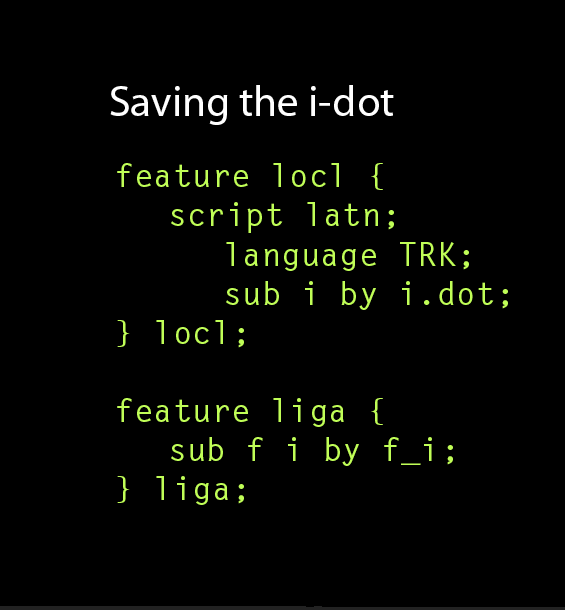
Also, for whatever it may be worth, in the PDF of slides used for Christopher Slye's talk on OpenType feature files (at the ATypI 2006 Lisbon conference) one finds this snippet:

Saving the i-dot

feature liga {
script DFLT;
language dflt;
sub f i by f_i;
script latn;
language dflt include_dflt;
language TRK exclude_dflt;
} liga;

Said PDF is available at:
http://blogs.adobe.com/typblography/atypi2006/slye_lisbon-05.pdf

Seems to me it can't hurt.

@RC--Thanks for posting that! The pdf of Christopher's presentation is something I wish I had seen before.

@Christopher Slye--Your pdf goes a long way in showing the "why" and "how: of feature code. Prior to this, I was just trying to decipher what I had seen and make some sense of it. As you can see from my code above, I was fishing in the dark and trying to teach myself how to do it (a blind-man fishing in the dark). I also didn't realize until now that you worked for Adobe, the collective pronouns you used now make sense to me :-) a very big THANK YOU for your help! The fog is starting to lift and I can now at least see the water :-)

@Punchcut gang--What a wonderful place Typophile is to get real help and expert Advice from people like Christopher, Adam, Miguel, and Paul. KEEP UP THE GOOD WORK!

ChrisL

rcc,

you don’t need to do this kind of treatment if your "locl" feature replaced i with i.TRK for Turkish.

A.

One of the other slides in Christopher's presentation shows the "i.dot" solution Adam mentioned.

ChrisL

you don't need to do this kind of treatment if your "locl" feature replaced i with i.TRK for Turkish.

Adam,

Right... I suspected someone might call me on this bit. (Mere newcomer's angst, that?)

However, being mindful of the current scarcity of 'locl' support and suchlike, I raised the issue for its 'belt-and-braces' potential, reckoning thus: if one as-yet-unimplemented feature doesn't execute the intended substitution, the other one ought to do so, yes? And later, if one projects a few months/years down the chronological road, such coding redundancies ought to be smoothly ignored when applications do in fact support the anticipated feature(s). (Though by that time, one would likely wish to amend and update one's feature code and issue revised versions anyway.)

Or is that dreadfully wrongheaded? What, if one can state them, are 'best practices' on such issues? Wiser counsel won't be disregarded.

Thank you.

rcc,

in theory, you’re right. It is possible that an OpenType Layout engine would do language-sensitive OpenType processing (i.e. process OpenType features assigned to languages other than "dflt"), but it would not automatically apply the "locl" feature. But this is *very* unlikely. Currently, major applications do not use the language-sensitive processing. Adobe applications currenly only apply features assigned to "latn dflt" while Microsoft applications apply features for complex scripts assigned to the dflt language in the respective scripts (arab, hebr etc.).

Especially for the non-complex scripts, I think it is safe to assume that if an application processes language-sensitive lookups, it will also apply "locl".

Regards,
Adam

Thanks for the additional insight, Adam. It's truly appreciated.

Best,
rcc

@ Adam

lookup locl_TRK {
sub [i I.smcp] by [i.TRK Idotaccent.smcp];

Even in Turkish it should be allowed to set an dotless I.smcp. Your code requires an additional character "dotlessi.smcp".

In http://typophile.com/node/69063 I propose to either keep the font absolutely symmetrically with regard to dotlessi and i or to break the symmetry of the dotlessi.

E I T H E R
Dotlessi, Dotlessi.smcp, dotlessi, Idotaccent, Idotaccent.smcp, idotaccent, I, I.smcp and i. (Please, symmetrie also with regard to the names – not i.trk and Idotaccent or idotaccent and I.trk!)

O R
same as above, but without Dotlessi and without Dotlessi.smcp

-------------------

Everyone is cooking his own soup there. In Athelas (TypeTogether) only i.smcp is substituted by idotaccent.smcp in the locl feature, but not i by idotaccent.

Arno,

“Dotlessi” and “idotaccent” are not PDF-compatible glyphnames. They resolve to an unknown character. Instead of “idotaccent”, Adobe recommends using “i” with any suffix (after a dot), and FontLab recommends “i.TRK”, specifically.

I’m not sure what you mean by “symmetry in glyphnames”. Adobe and FontLab publish extensive guidelines on glyphname naming, and there is nothing in there about symmetry. The fact that the name “Aacute” is used for the glyph which represents the Unicode character U+00C1 (Á, LATIN CAPITAL LETTER A WITH ACUTE), and “aacute” is used for U+00E1 (á, LATIN SMALL LETTER A WITH ACUTE).

As it happens, “Aacute” is the uppercase variant of “aacute” does not mean that all uppercase variants have the same glyphname as the lowercase letters except that the first letter of the glyphname is uppercase. The fact that it works for some glyphnames is just incidental.

The glyphname for the character U+01F5 (ǵ, LATIN SMALL LETTER G WITH ACUTE) is “uni01F5”, but the glyphname for its uppercase counterpart, U+01F4 (Ǵ, LATIN CAPITAL LETTER G WITH ACUTE) is *not* “Uni01F5” but is “uni01F6”.

The glyphname “Idotaccent” is used for the character U+0130 (İ, LATIN CAPITAL LETTER I WITH DOT ABOVE), and the glyphname “I” is used for the character U+0049 (I, LATIN CAPITAL LETTER I). The lowercase variant for both of them is U+0069 (i, LATIN SMALL LETTER I). There is no LATIN SMALL LETTER I WITH DOT ABOVE in Unicode, and the name “idotaccent” doesn’t mean anything. It may look “pretty” according to your symmetry rules, but it doesn’t work.

Same thing for “dotlessi”. It’s a glyphname for U+0131 (ı, LATIN SMALL LETTER DOTLESS I) but its uppercase counterpart is U+0049 (I, LATIN CAPITAL LETTER I). There is no LATIN CAPITAL LETTER DOTLESS I in Unicode, so there is no such thing as “Dotlessi”.

Of course everyone is cooking his own soup. But some people’s soup may contribute to a stomach pain. Font developers are free to use invented, non-PDF-compatible glyphnames — but this will result in less usable fonts. PDFs produced with such glyphnames may not be searchable, and copy-paste may not work properly.

We at Fontlab Ltd. agree with Adobe that it’s a good idea to duplicate the small cap glyphs, though we recommend naming the glyphs “A.c2sc” and “a.smcp”, which makes clear what their purpose is. Since PDF applications often need to parsing glyphnames to recreate the original text string (when searching or copy-pasting), keeping separate glyphname prefixes for glyphs that semantically represent uppercase or lowercase letters allows better text accessibility.

PDF readers will know that “A.c2sc” stands for a smallcap version of the “A” character, while “a.smcp” stands for a smallcap version of the “a” character. This way, copy-paste and searching will still work properly even if the text is set in smallcaps.

This is the code that I recommend using:

# This goes into the lower-right section of the FLS OpenType panel.

languagesystem DFLT dflt;
languagesystem latn dflt;
languagesystem latn AZE;
languagesystem latn TRK;

# This goes into the features list in the FLS OpenType panel.

feature locl {
language TRK;
sub i by i.TRK;
language AZE;
} locl;

feature c2sc {
sub I by I.c2sc;
sub Idotaccent by Idotaccent.smcp;
} c2sc;

feature smcp {
sub i by i.smcp;
sub i.TRK by i.TRK.smcp;
sub dotlessi by dotlessi.smcp;
} smcp;

This requires the following glyphs to be present in the font: “I”, “Idotaccent”, “i”, “i.TRK”, “dotlessi”, “I.c2sc”, “Idotaccent.c2sc”, “i.smcp”, “i.TRK.smcp”, “dotlessi.smcp”.

The feature code above presumes that the “locl” lookups are written before the “smcp” lookups. If you put “locl” after “smcp”, then the “locl” would need to exchange the smallcap glyphs. But this makes less sense: the “locl” lookup for Turkish should be defined early in the font because it should influence other features such as “liga”.

Sure thing however, every font vendor is free to make fonts that don’t work. ;)

A.

Ps. I’m including a link to the related discussion:
http://typophile.com/node/69063#comment-404694

@ Adam

Dotlessi and idotaccent are not PDF-compatible glyphnames. They resolve to an unknown character. Instead of "idotaccent", Adobe recommends using "i" with a suffix, and FontLab recommends "i.TRK", specifically.

Now I am totally confused. This shocks me. I thought, that the only important thing is, that the characters have the correct Unicode and if you search for a string "Adam" in a PDF, the characters are first translated to Unicode. I thought, that the character names are totally unimportant for the user in case of OpenType fonts. I thought for example, that I could name the letter b "barbarella", as long as the Unicode is correct.

Now I am totally confused. This shocks me. I thought, that the only important thing is, that the characters have the correct Unicode and if you search for a string “Adam” in a PDF, the characters are first translated to Unicode.

Citing the FontLab Studio manual, published in 2006. The chapter “Glyph Naming and Character Encoding” (which I have written), page 145, says:

————————————————————————————————————

When fonts are embedded in electronic documents or sent to a printer, under some circumstances only the information about the glyphs (their glyph indexes, names and outlines) are retained, while the encoding information (the associated Unicode codepoints) is lost. The electronic document “looks right” but the underlying text streams are obscured or not available. In such cases, meaningfully constructed glyph names can be used as a help to rebuild or at least approximate the original text. A practical example: the user creates a text document that uses an OpenType PS font. The document is printed to a PostScript file. Since PostScript does not support OpenType PS, the font is embedded in the print stream as Type 1. The OpenType information such as layout tables or Unicode codepoints is lost. If Acrobat Distiller is used to convert the PostScript file to a PDF document, the application first tries to locate the original OpenType PS font on the user’s system: if the font is found, Distiller is able to use its original Unicode codepoints and embed them in the PDF document. But if the original OpenType PS font is not available to Distiller (for example because the PS-to-PDF conversion happens on a different machine), Distiller embeds the Type 1 font found in the PostScript stream, with no Unicode information. Now, when the text in the PDF document is being searched, copy-pasted or otherwise extracted by an application such as Acrobat or Google, the application can attempt to rebuild the Unicode codepoints basing on glyph names included in the embedded Type 1 font. For Latin or Cyrillic scripts, the recreated text will likely be a very close match of the original; for Thai or Hindi, the text recreated that way will probably be only a crude approximation, with letters arranged in incorrect sequence, and some information missing. But yet, some is often better than nothing.

————————————————————————————————————

Apart from Distiller, there are many other PDF creation applications, and only some embed the Unicode codepoints in the PDF file. The backup option is always the glyphnames, which is why they need to be “meaningful”.

This mechanism has also been described in several other locations, including here on Typophile. I recommend reading the section “Advanced Glyph Naming and Encoding” (p. 145 ff.) of the FontLab Studio manual, which is quite essential reading on this topic.

Adobe has also published about this:
http://www.adobe.com/devnet/opentype/archives/glyph.html

This information has been up for a long time now, and still is relevant.

@ Adam

With regard to the names I begin to understand, but why do you recommend having small capitals two times in the font, alphabet.smcp and Alphabet.c2sc?

Dotlessi and idotaccent are not PDF-compatible glyphnames

Because of the missing suffixes – would I.dotless and i.dotaccent work? Why is i.TRK PDF-compatible? What are "meaningfully constructed glyph names"? I will read that chapter of the FontLab manual.

Thanks.

Arno,

1. I thought I explained it already twice:

PDF readers will know that “A.c2sc” stands for a smallcap version of the “A” character, while “a.smcp” stands for a smallcap version of the “a” character. This way, copy-paste and searching will still work properly even if the text is set in smallcaps.

In other words: if you want to preserve the case difference of the original text in the typeset PDF even if the text is set is smallcaps, you would duplicate the glyphs. Specifically: the searchability and copy-paste of the PDF will work the same regardless of whether the PDF was created with Unicode codepoints included or without them.

If you include just one set of smallcap glyphs, let’s say “A.sc”, and use them in both the “smcp” and “c2sc” features, then copy-pasting smallcap text from one PDF may result in the text “Arno Enslin” (if the Unicode codepoints were embedded in the PDF) while doing it from other PDFs (where the Unicode codepoints were not embedded) would produce “ARNO ENSLIN”.

Duplicating the smallcap glyphs is Adobe’s practice, very sensible in my opinion. Using kerning classes and CFF subroutinization will cause the font be only minimally larger than if you don’t duplicate them, but the functionality of the font will be more consistent.

Adobe recommends including separate glyphs if the Unicode character information should be maintained separately. This also means that Adobe includes separate glyphs for U+002D (-, HYPHEN OR MINUS SIGN) called “hyphen” and for U+00AD (DISCRETIONARY HYPHEN) called “uni00AD”, and also separate glyphs for U+2126 (Ω, OHM SIGN) called “Omega” and for U+03A9 (Ω, GREEK CAPITAL LETTER OMEGA) called “uni03A9”.

Some font vendors tend to assign multiple Unicode codepoints to one glyph if the glyph looks the same for several Unicode characters, and they use the same glyph in OpenType Layout features even if the underlying text character is different. This is a matter of policy and practice. At FontLab, we recommend following Adobe’s policy because it has important technical reasons (which I detailed above) and results in fonts that behave more consistently and provide better functionality for the end-user — even if producing such fonts (with duplicated glyphs) is a bit more tedious.

2. “Meaningful” glyphnames are glyphnames in which the basename (i.e. anything up to the optional suffix which is separate by a dot) can be resolved to a Unicode string. Each component of the basename (i.e. either a single portion or several portions separated by underscores in case of ligatures) should follow the Adobe glyphname conventions, i.e. they should either be in the Adobe Glyph List for New Fonts (AGLFN) or have a “uniXXXX” form for four-digit Unicodes and a “uXXXXX” form for five-digit Unicodes. This means that names such as “aacute”, “aacute.smcp”, “aacute.whatever”, “s_t”, “sacute_t” or “s_t.dlig” are all meaningful, but “aacutesmall”, “st” or “sacutet” are not.

Please read the FontLab Studio manual chapter for more information as well as the Adobe document that I linked in my earlier post.

I recommend reading the manual in general, anyway (not just the ”Glyph Naming and Character Encoding” chapter), because it *does* include important information on various topics related to font development.

The suffix after the dot doesn't matter. “i.TRK” and “i.dotless” are equally meaningful. The advantage of using “i.TRK” is that future FontLab applications such as Fontographer 5.1 will recognize this name and build the “locl” OpenType Layout feature automatically.

Similarly, using “A.c2sc” and “a.smcp” rather than, say, “A.sc” and “a.sc” will allow Fontographer 5.1, TransType 4 and FontLab Studio 6 to build the “c2sc” and “smcp” features automatically since the suffix will indicate which OpenType Layout feature the glyph “belongs to”.

BTW, the reason why the OHM SIGN and not GREEK CAPITAL LETTER OMEGA carries the glyphname “Omega” is historical and clearly looks somewhat inconsistent. But it’s just a glyphname, which, as I indicated, is primarily intended to allow the glyph being identified properly in the PostScript and PDF formats. This is why the glyphnames in an OpenType TT font is stored in the “post” table. Since glyphnames are for PostScript and PDF, they should primarily conform with recommendations developed by the creators of PostScript and PDF — which happens to be Adobe.

FontLab’s glyphname conventions and recommendations are compatible with Adobe’s, but are a bit more specific: they provide additional guidance which will help font developers get additional functionality (i.e. automatic OpenType Layout generation in our upcoming applications). Since our applications will soon ship with an additional set of new encoding files, adhering to FontLab’s conventions will allow developers to use those encodings.

Of course, font developers can use different glyphname suffixes which are not compatible with FontLab’s recommendations, as long as they follow Adobe’s recommendations for glyph basenames. This will result in PDF-compatible glyphnames but may not leverage the full functionality in our new applications.

@ Adam

I thought I explained it already twice

I am so shocked, that I could not imagine, that you also were regarding to the doubling of the whole alphabet, which I will not do for the OTF that I build, because – compressing or not – somehow it is unaesthetic. Thanks for clarifying.

Have as nice weekend, I must buy nourishments now. And later I must feed a rabbit (no joke).

Arno,

there are tons of aspects of the OpenType font format or the Unicode Standard which are “somehow unaesthetic”. Both OpenType and Unicode are technical standards which try to make a compromise between the “theoretical models” of how text encoding and digital fonts could be made in an idealized world, and the “pragmatic technical implications” which result from decades of software development.

Outline font formats (OpenType), text encoding formats (Unicode), and printable file formats (PDF) have a long history. They originated years ago, in very limited environments. They usually emerged from older formats (OpenType from TrueType and Type 1, PDF from PostScript, Unicode from a variety of different text encoding standards).

All of those formats have the one or another “original sin” which has been carried on over those decades. Some of them are “buried deep” in the formats and can no longer be changed without breaking backwards compatibility. So we’re stuck with them for good — at least until completely new, fresh formats emerge that are developed from scratch. Plus, well, there is no guarantee that the “new fresh formats” will be free of any problems. They may solve some problems for good, but they are likely to introduce other limitations that will become cumbersome in 20 years.

It’s evolution.

As I said — every font developer is free to make the fonts in any way they like. It’s your discretion. I’m trying to plot out the consequences for each choice a font developer makes, and I’m recommending the solutions which I believe are beneficial for the end-users. But some aspects are, of course, less debatable than others. This particular aspect we’re discussing is certainly one of the more debatable ones. There is no single clearly prescribed solution — but there are good reasons to consider the consequences of doing it one way or another.

Of course in the code sample in a few posts above:

sub Idotaccent by Idotaccent.smcp;

it should say:

sub Idotaccent by Idotaccent.c2sc;

Sorry for the typo.
Adam

@Adam: If you include just one set of smallcap glyphs, let’s say “A.sc”, and use them in both the “smcp” and “c2sc” features, then copy-pasting smallcap text from one PDF may result in the text “Arno Enslin” (if the Unicode codepoints were embedded in the PDF) while doing it from other PDFs (where the Unicode codepoints were not embedded) would produce “ARNO ENSLIN”.

Why is it not preferable to always use "A.smcp"-method glyphs in both c2sc and smcp features?
If text from a pdf file with small caps is then imported into an unsmart application which does not support small caps, or is set in an unsmart font which doesn't include small caps, then both "c2sc" and "smcp" features will result in ARNO ENSLIN, which is a best practice, IMO.

If a pdf document has text set in the "smcp" feature with "a.smcp" method, then importing its text into an "unsmart" document will result in the U&lc "Arno Enslin", which offers no distinction from normal U&lc setting, which is its likely environment. Surely the point of setting small caps mixed in with U&lc is to provide a meaningful distinction, which gets lost with fonts that have the "smcp" feature implemented with "a.smcp" glyphs!

These questions regarding search and copy-and-paste in/from PDFs apply to every PDF 'taste'? PDF X/1, X/3 or XML-structured does not handle this? Is there any option in PDF generation to avoid these problems?

I'm developing a font with more than 2500 glyphs and really want to avoid duplexing a whole set of characters (due to language support, each group of lowercase, uppercase, small caps, petite caps and swashes goes over to 300 glyphs).

Another question: if text copied from a PDF loses Unicode information, glyphs built with combining diacritics will be come unreadable in the destination? The name (say uni01230a011e00) is enough to a smart applcation rebuild these complex glyphs with diacritics?

(Actually, the search question seems more important to me as OT smart applications are very few by now).

Freiberger,

there can be a /ToUnicode resource in the PDF which stores the true glyph-to-Unicode mapping, and there can be Tagged PDF structures that give a parallel true text contents. Thomas Merz of PDFlib explained this here:
http://typophile.com/node/2994#comment-140541
and more recently, Adobe's Miguel Sousa talked about this:
http://typophile.com/node/34108#comment-304550

But the main point is that both PDF tags and the /ToUnicode resource are optional. There are and will be PDFs around that come without it, just with plain strings of glyphs in the page contents. For those, extracting the text contents from glyphnames is the only option. (For example, if /ToUnicode is missing, Acrobat will analyse the document add it when the document is resaved as PDF/X or when tags are added. That analysis is based on glyphnames).

Adam

@Nick:

If the underlying text should be all-caps, then the user should set it that way and apply c2sc. If the underlying text is upper-and-lowercase, as in say the opening line of a book, then the user should set it that way and apply smcp.

The idea that the font shouldn't change the underlying text is fairly basic to the character/glyph model of Unicode and OpenType. This principle that led to the ill-formed "crcy" and "dpng" features being deprecated and later dropped from the OpenType spec. What you are suggesting would be to go against that principle. Of course, you're welcome to do what you want in your own fonts, but in this case it's counter to the philosophy of the standards involved.

Cheers,

T

Nick,

the intention of electronic text is to preserve the characters that are input. If the Unicode codepoints are natively embedded in the PDF, then the application will recreate the input as it was done. If I input "Arno Enslin", apply smcp and c2sc, I will still get Arno Enslin back. If I input "arno enslin", I will get "arno enslin". If I input "ARNO ENSLIN", I will get "ARNO ENSLIN".

If the Unicode codepoints are not natively embedded and need to be recreated using glyphnames, you have two options:

1. To still behave the same way as above, i.e. you get out what you put in. But this can be only done if you provide separate "identities" for the glyphs, i.e. dupe them as "A.c2sc" and "a.smcp". This approach will give you CONSISTENT behavior.

2. To behave DIFFERENTLY, INCONSISTENTLY, i.e. no matter what you input ("Arno Enslin", "arno enslin", "ARNO ENSLIN", you'll always get "ARNO ENSLIN" back). This is what you get if you only put "A.sc" or "A.smcp" or whatever glyphs into the font. This approach means: in half the cases (where the Unicode codepoints have been natively embedded), you'll get one result, in other half of cases (where they need to be recreated using glyphnames), you'll get another result. In fact, you may get two different results using the same app depending on whether the OpenType font was PostScript- or TrueType-flavored.

I for one am for predictable and consistent behavior for the user. Inconsistent behavior will result in user's confusion, uncertainty and disappointment.

Best,
Adam

Many thanks, Adam. So the best practice is to duplicate the small caps set as any workaround causes problems. Hope a font with almost 3,000 glyphs does not cause any performance issue.

I know this is off-topic, but I cannot find the answer: after copy-and-append a set of glyphs in FLS5, how can I change the suffix of the whole set in an automatic way? Is this posible?

after copy-and-append a set of glyphs in FLS5, how can I change the suffix of the whole set in an automatic way? Is this posible?

command click on the glyph.
From the 'more' submenu choose 'add suffix to name' and check the first checkbox in the resulting dialog box.

I recommend also checking the second box so you are presented with the dialog box by default when you append glyphs.

André

Great, André! Many thanks.

This thread is really enlightening. Thank you.

By the way, I've read an explanation of the Adobe Glyph and some info related. I understand haphazardly as follows:

  1. That all the glyphs should be mapped back into the map table and encoding based AGL AGLFN last ver for OT fonts today.
  2. PDF is a sort of "catalyst" to determine the quality of an OT font, so the naming and coding of glyphs absolutely must meet the standards on above (number 1).
  3. Glyphs which included into the range as wide as any, remain to be defined into unicode which will only lead to - at least - 31 characters. So I tried to make an example of naming "A" glyphs an the related alternate, as follows:

0x0041 !A.alt1
0x0041 !A.alt2
0x0041 !A.alt3
0x0041 !A.medi1
0x0041 !A.medi2
0x0041 !A.ss01
0x0041 !A.ss02
0x0041 A

Will they be defined as "A" and the glyphs variant of ?

Please verify and explanation, if I've being lost? :-) Thanks

Best regards
Andi

Andi,

no, this portion of .nam will cause that A.ss01 will get the Unicode U+0041 if you do "Generate Unicode", and A will also get that Unicode, and you'll get conflicts. In a font, only one glyph should exist out of those which have the same Unicode in a .nam file. Basically, what you're showing is that if your font has A.ss01 and no A, and you'll do "Generate Unicode" and then "Generate Names", then your A.ss01 will be renamed to A. Which I don't think is what you want.

Do not put any glyphs that should be accessed through OpenType Layout features into the .nam file. The .nam file specifies glyphnames that should have Unicodes, and glyphs that have Unicodes are accessible directly through the "cmap" table, without OpenType Layout.

All glyphs that are accessible though OpenType Layout features should only be specified in the OpenType Layout feature definitions (OpenType panel and perhaps Classes panel).

Best,
Adam

Thanks Adam, it really opened my horizons

After testing generated, indeed this way it produces .NULL on alternate ss01 (opened via indesign). Does that mean any alternates glyphs to be accessed via OTLF its codepoint should be blank?

At this time, my understanding of your explanation is A.ss01 not require codepoint, and let the features OTLF do the rest. In other words, alternate glyphs do not need to be placed inside .NAM file and will be accessible via OTLF, despite having no codepoint. Is this true?

Would you be more specific in the handling of codepoint -- for instance -- A.alt, A.ss01, A.medi, A.fina .... and also how about f_j, f_j.alt1, f_j.alt2 ?

This is to ensure that I was on the right path :-)

Your explanation certainly will make this problem does not drag on. (I found a similar problem on many threads on this site)

Thanks in advance
Best regards

> At this time, my understanding of your explanation is A.ss01 not require
> codepoint, and let the features OTLF do the rest. In other words,
> alternate glyphs do not need to be placed inside .NAM file and will
> be accessible via OTLF, despite having no codepoint. Is this true?

Yes. The typesetting process, when OpenType Layout is involved, works like the following:

1. The application has a Unicode text string, i.e. a series of Unicode codepoints — the entire text of a document, or a text thread or frame. The application splits the text string into "text runs", i.e. a series of Unicode codepoints which belong to the same writing system (script), have the same directionality (LTR or RTL), and should be rendered using the same font and size. So an English word inserted into Arabic text would be put into a separate text run, and also a word set in italic font within text set in a roman font would be put into a separate text run.

2. For every text run, the application looks up the font which should be used, and reads its "cmap" table, which contains a mapping of Unicode codepoints to the "default glyphs" for each codepoint. Therefore, each Unicode codepoint which your font supports must have one default glyph — and that's the glyph which you assign the Unicode codepoint to. So you'd have Unicode codepoints assigned to "A", "f", "j" etc.

3. The application stores the glyph ID (the numerical index of a glyph, visible in FLS in the Index mode of the Font Window) of the default glyphs for every codepoint in the text run. In other words, a text run is internally "replaced" by a glyph ID run. At this point, the Unicode codepoint no longer matter. Everything from now on is performed on glyph IDs. (So obviously, each glyph in your font has a glyph ID — but there is no way for it not to have it. All glyphs in a font are just a list, and the first glyph in the list has the ID 0, the second glyph has the ID 1 etc.)

4. The application reads the font's "GSUB" table, and replaces the default glyphs' IDs with the glyph IDs of the alternate glyphs — depending on which OpenType Layout features are applied to the glyph ID run (Those features can be either specified by the user, such as "liga" or "smcp" or "ss01", or they can be demanded by the script shaping engine, such as "init", "medi", "fina" or "isol" for Arabic). So if the "ss01" feature is applied, and the font's GSUB table specifies that the glyph "A" (with a certain glyph ID) is to be replaced by the glyph "A.ss01" (with a different glyph ID), then those glyph IDs are replaced. In some cases, multiple glyphs are replaced by one glyph (e.g. if "liga" is applied, the glyphs "f" and "j" are replaced by the glyph "f_j" — again, we're using glyph names here for human-readability, but in the process actually the numerical glyph IDs are used).

5. For every feature that should apply to the glyph ID run, and every lookup specified in the "GSUB" table, the replacements are being performed again and again until a final glyph ID run is produced (so at some point, if the user has specified both "liga" and "ss01", then first "f" "j" are replaced by "f_j", and in a later lookup, "f_j" is replaced by "f_j.ss01" — this process is iterative). Again: in all this, the app only tracks the glyph IDs. Unicode codepoints no longer matter at this point, they only matter at the beginning. And the glyph names actually don't matter at all — they're only there for font developers to make the glyphs a bit more "accessible". Well, actually, the glyph names are also used by some PDF readers to reconstruct the Unicode codepoints of a glyph ID run once it has been exported to PDF, but that's a totally different story.

6. Typically, the application keeps track somehow of the mapping between the original Unicode text run and the final glyph ID run in order to enable the user to use the text cursor, perform text selection etc. But if the application is not interactive (e.g. it's a server app that generates PNGs or PDFs), this doesn't necessarily happen.

7. At this stage, the application needs to know not only the glyph IDs but also the sizes of the "box" in which each glyph will be placed, measured in font units. The height of the box is determined by the font's linespacing values (ascender and descender in the "hhea" or "OS/2" table, depending on the OS and app), and the width is the distance between the left and right sidebearing. So these are "metric boxes", not "bounding boxes" (which are determined by the actual glyph's outlines). At this stage, the app does not need to know anything about the glyphs' outlines at all. The application reads the font's "GPOS" table, and adjusts the positioning of each glyph in the final glyph ID run accordingly (using the "kern", "mark", "mkmk" and other features). In other words, the application "moves around" those boxes.

8. After the "moving around" of the boxes has happened, the application knows the final width of the entire box that encompasses the glyph ID run. It scales each "glyph ID run box" to the point size in which the glyph ID run will be rendered, and then glues together all the processed glyph ID runs until the width of the text frame or page is reached, and then breaks the line if necessary. In this case, it will often need to perform the whole above process again (or even several times), because it needs to insert some hyphens if there's hyphenation, or it needs change the way contextual alternates work (because now the text run is truncated to a certain line length). Linebreaking is performed differently by different applications: e.g. in InDesign the "single-line composer" basically just breaks each line at the point where the next glyph would not fit into the frame width, and then, if the text is set to be full-justified, it stretches the word spaces to fill up the entire width of the frame, but the "paragraph composer" makes several (approximately 7-8) different approaches on how to distribute the space, and chooses the "most optimal" version according to some internal criteria. In this process, depending on the app and the linebreaking algorithm, the entire process described above is performed several or even many times. The more lookups, especially contextual lookups, the font uses, the longer the process takes. But in general, this process is very fast on today's computers.

9. Only after the app has a final set of glyph IDs, their "boxes" and their positions for a given line, it calls the rasterizer which reads the font's "CFF" or "glyf" table and "paints" the glyph images into the boxes, at the given point size. So only at this final stage, the actual glyph outlines come into place.

So, that's the entire "typesetting process using OpenType Layout features" in a nutshell. The steps 1-8 describe the process of "line layout and linebreaking", and step 9 describes "rendering" or "rasterization". As you may have notices, the actual line layout and linebreaking is actually a much more complex process from the rendering or rasterization itself. Of course in real life, those processes interact a bit, because, for example, TrueType hinting programs can modify the width of the glyphs (and the width is needed to determine the size of the "boxes"), so in reality, the rasterization of the glyphs may happen earlier. But conceptually, those processes are separate.

A more extensive description of the process has been written by John Hudson: Windows Glyph Processing: an OpenType Primer.

I hope this is helpful.

Best,
Adam

Thanks Adam, for the philosophical explanation and your time. You really took us wandered (banc) into a "The typesetting process". Of course this is a very valuable lesson. (I beg permission to publish the translated version on our website sometime in the future). A lesson best will always come from the best teachers.

Although I can say that I now understand what you explain word by word, but I am ashamed to say that I've fully understood in its application. Proved with the a dizzying following cases:

In case of revision of a font, a change commonly done by moving the entire codepoint of glyph alternates from the PUA to blank. The result is a font OT-PS which was normal in the running text, especially on the Adobe InDesign application. It also runs (partly) in MSWord 2010, but the OT is not supported at all on the Corel Draw application.

The entire script OTLF work well on text runs. But the gaffe occurred when "insert glyph" is performed (InDesign). I can show a little description:

  1. Some alternates glyphs get the right reference from the main glyph codepoint assigned, while others not at all, for example on the frame of the InDesign user interface, the GID 644 reads as the Null. But if the "Insert glyph" is applied it will produce the appropriate glyph, although it is .Null.

    Conversely, the GID 617 are referenced from the ligature f_f (0066 + 0066), but if the "Insert glyph" is applied it will produce inaccurate glyphs. Application of this yields only f + f (normal) and not ligature alternate as the proper purpose.

  2. In other cases, the scenario of naming glyphs like this: L, L.alt1, L.alt2, L.end1. L.end2 L.sso1, L.ss02. But strangely, L.end2 and L.ss02 referenced as the Null. However OTLF in applications has gone well. Does this indicating a laying false OTLF's script?

    I've tried to track down this problem by trying to put the script OTLF into best possible place as is ligature into the LIGA and contextual ligature into CLIG. Although a ligature tags it turn out can also be placed inside sso1 (Because it is work well?). But the result remains the same, some glyphs as NULL. So temporary conclusion, not the source of the problem are OTLF script. Can you tell me something that I do not know in this case?

  3. Actually, it has been done "sort glyphs by index" before generating the font. But the case no. 1 and 2 may shows that the process had no relation at all with the order and position in the glyph index.

thanks
Take a great weekend
Best Regards

This alternate ligature bit seems to be a bug in InDesign.

I've been working on a font that has alternate forms for the "f" ligatures. If the alternate ligature is inserted using the Glyph palette, the result is individual glyphs (in some cases, alternate forms of the "f" or "l", which are also present in the font). If I select the incorrect glyphs and look at the OpenType popup menu, ligatures will have been disabled. If I re-enable it, the proper alternate ligature is displayed.

It seems that inserting an alternate ligature (or alternate discretionary ligature) causes InDesign to disable ligatures (and/or discretionary ligatures). I haven't done extensive testing in other apps, but the alternate ligatures work correctly in other apps so far, such as Illustrator and QuarkXPress. I've tried everything I can think of to rewrite the OT features to get it to work properly in InDesign with no success. Adobe fonts, such as Poetica, are similarly affected.

Given all that, I can only conclude that it's a bug in InDesign and it's not possible to fix it in feature code. I'm not looking forward to writing instructions for users on how to work around it. It may be that the best solution is to abandon single-glyph ligatures in favor of contextual alternates.

Thanks, Mark!

Thanks Mark, I was not feel alone :)

If it's a bug may indeed be prudent with your solution. But this is certainly not reducing our efforts to find the best solution in the future.

@Dezzcom, Thanks for letting me write in your thread.

Best regards

No problem, Andi, t would have been Threadbare lately without you ;-)

Captured from web.archive.org on 28 Nov 2014. view this capture