
...why I can’t use 610000 (yep, six hundred ten thousand) UPM as resolution for a typeface? In FontLab...
...why I can’t use 610000 (yep, six hundred ten thousand) UPM as resolution for a typeface? In FontLab...

do you really need to???
Does it not only go up as far as 20176? Maybe that’s just with the Demo I have.
Not really. If judging from the image below (work in progress), what resolution is best for me and what minimal set of characters can I get away with (I really don’t want to spend the time to render accented foreign language characters and ligatures)?
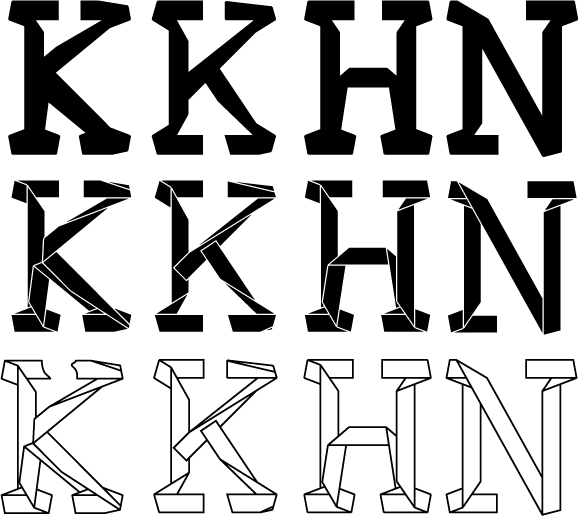
bump

I can’t see why you need anything more than
the standard 1000-unit em for this thing.
You probably need to manage your point placement
carefully to make those thin lines look totally even,
but that’s about it I’d say.
> I really don’t want to spend the time to
> render accented foreign language characters
That’s pretty strange coming from a European!
Anyway, yes it’s tedious, but if this font is going
to be used by more than you it will need a full,
or nearly full character set.
hhp
>You probably need to manage your point placement
>carefully to make those thin lines look totally even,
>but that’s about it I’d say.
It is more tedious than the accented characters and is exactly what I want to avoid doing by increasing the resolution instead
If you make the slopes of your lines a quotient of integers (for example 2/5) instead of degrees (which is in fact a spurious measure in digital type design) you’ll have a much easier time, because you can predict/control the thickness of the lines by relying on fixed point movements.
hhp

A 610,000 unit em seems excessive, even for the reasons you describe. For instance, given an output device with 3000 dpi resolution (typical high resolution), a 10-inch tall character would be rasterized to no more than 30,000 pixels, less than 1/20th of the available resolution in your font. You would not reach a one-to-one ratio until the character was over 20 inches tall. Go ahead and use 610,000 if you can, but 30,000 will probably be enough, and well within FontLab’s limits. I seriously doubt whether the difference will be visible, or even measurable, on typical output devices.
Thanks! 30,000 it is.
Btw, I do not really draw it point by point by hand, the process is 50% automated

what minimal set of characters can I get away with
If you name it, say, “Tape Initials” or “Tape Titling”, then it will be clear to users that it doesn’t have a full character set — certainly not lower case.
It would be in good company with Forum, Trajan, etc.
Although those still have dozens of extra characters
that I suspect Mikhail would rather avoid making. :-/
hhp
here’s the full charset for Goudy Initials, one of our best-selling Lanston fonts:
http://www.myfonts.com/fonts/lanston/ltc-goudy-initials/regular
I’m planning to make upper case A-Z, 0-9, and basic punctuation

The UPM size in the OpenType/TrueType specification is limited to 65,535. That is a limitation of the format. However, point coordinates in FontLab Studio are also limited to 65,635, which is a limitation of our application. Therefore, it’s impractical to work even at a UPM size of anything close to 65,535. However, I pretty much feel that a UPM size of 10,000 should be OK for you. If not, try 20,000 or 30,000.
A.
I’ll just note that having a really huge UPM size will affect both the file size of the generated font, and the rendering performance of the font.
Cheers,
T

Cool looking font. Reminds me of the Möbius strip. Actually that’s how the infinity (∞) should look like for that typeface :^)
Captured from web.archive.org on 9 Oct 2007. view this capture