Typophile

How to embed fonts in PDF from InDesign

maxack

Hello,

(I tried to find anything on the issue, but no luck, sorry in advance if it has come up before)

When exporting a PDF from InDesign (Mac OSX), how can I make sure all fonts are embedded? It only gives this uninformative notice about permission bits...

Can I check later in Adobe Reader if fonts are embedded, and if so, how?

Thank you for helping.

1. In the box "subset fonts when percent of characters used is less then" put in: 100%
The informative notice you're talking about is a hint for the user to check if the font policy allows embedding, so if that's ok, just click "ok", that is: go on with exporting. If there is no appropriate permission, the pdf exporting will stop anyway. So generally it's recommendable to check permission issues before using a font in a publication.

2. In Adobe Acrobat uncheck "use local fonts" (Cmd + Shift + Y), you'll find this option under "Advanced". Possibly there is a similar option in Acrobat Reader.

Thanks, tina.

However, does "subset" really make a difference for embedded/not embedded? I always have it set to 0% so that all characters are included, not only used characters.

According to your answer, "use local fonts" means local fonts on your computer, right? Or could it mean "local to the opened document"?

It means fonts on your computer. i.e. if the box is unticked, it will only render the document using the fonts which are embedded. Other text will appear in a substitute font.

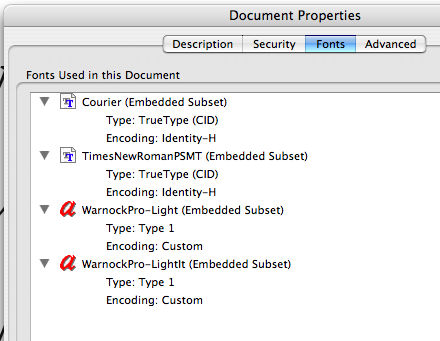
In Acrobat (or Reader) File >Properties > Fonts will give you full information whether fonts are embedded, subset embedded or if a subsitute is being used for display (in which case it'sll tell you which)

Great, thanks for that!

Hi

This is *apparently* clear. I say "apparently" because in fact this does not always work. I use InDesign CS2 on PC and find that I cannot fully embed all fonts. When I create a PDF from the InDesign file, even if I select Embed All Fonts and Subset ... 0%, what I actually get is a file with embedded *subsets* only. This causes untold problems with my service bureau who say that they need to remove all the multiple instances of the subsets before the file will print correctly on their Docutech digital printer.

Does anyone know what causes this problem and what is the solution? Help needed urgently, please!

David Bray

I believe InDesign CS2 always embeds fonts (even the Base 14) and it always subsets fonts (despite putting the value to 0%).
Why would anyone want/need to embed 100% of every single font used in the document?

AFAIK, there's no "Use Local Fonts" option in Adobe Reader (former Acrobat Reader). Nonetheless, it's possible to check if a given font is embedded or not, by analysing the Fonts panel in Document Properties.


In this case the fonts are all embedded and subset.

>>Why would anyone want/need to embed 100% of every single font used in the document?>>

Because some book printers require it. We just got a note from a printer that a lot of our customers use, indicating that they have a new proofing system. One of the changes they require is that all fonts be (fully) embedded.

BTW, we created an InDesign CS2 document on the PC, specified 0% in the subsetting block, and generaed a PDF.The text was simply "Hello world" (using Warnock Pro Regular). On opening the PDF, we were able to edit it, to add the characters "iu", which I believe would not be possible if the font had been subsetted. And in looking at the PDF file, Preferences > fonts showed "embedded."

So I too am confused about David Brey's post.

Captured from web.archive.org on 23 Feb 2015. view this capture