Typophile

FontLab5.o1 Mac hang and freeze

Chris Lozos

The scenario:
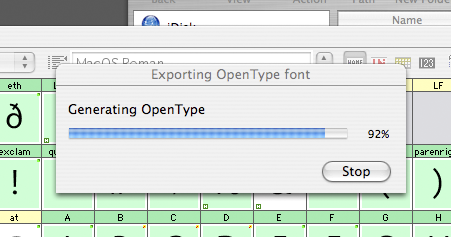
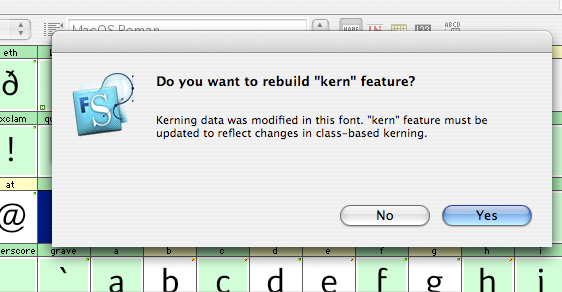
I opened a weight of a typeface I started in FL-4.6 Mac and am now working on FL-5.01 Mac. I then edited the file including making changes to kerning. I saved the file and renamed it. Then, I output the file as a OTF PS flavor. A dialogue (see first image) pops up asking me if I want FL5 to convert the kern feature since I made changes. I click yes. A status bar pops up showing progress that moves swiftly until it reaches 92% (second image below). Then, FL5 hangs with a spinning beach ball and freezes their forever. After waiting a millennium, I went to the Finder and force-quit FL5.
Next I reopened FL5 and the file and tried it again with the freeze at the exact same 92% spot. Undaunted, I force-quit FL5 again and reboot and start the thing over again. It freezes again exactly as it did the other times,
Then, I start over as before with one exception; when the dialogue box asks me to rebuild the kern feature this time, I say NO. The OTF font file gets built perfectly this way and in jiffy time. I check the kerning in Adobe InD CS and the kerning corrections that I had done were all made and everything is just jim-dandy.
Whahhzzzup? Is this just me or is this a bug in FL5 Mac?

ChrisL
Chris, doubtless Adam or someone better-versed in the details of FLS5 will stop by momentarily, but let me just say this: ALWAYS click NO to that question. I don’t quiote know what, when, or why, but the fonts I generated adter answering know to this question work perfectly, and on the rare occasions when I have clicked Yes by mistake, my kern feature has gotten dumped.

What happens if you “update the kern feature” via “kerning assistance...” before generating the font?

Thanks Chester, I will take your advice.

Mark,
I did not use “kerning assistance” or do any class-based kerning. I did all my kerning in the Font Metrics window the old fashioned way. I copy kerning from one glyph to many by using the “paste special” feature.

ChrisL

Mark, to complete the picture: I don’t use kerning assistance either, and I don’t do my kerning in the Metrics window, but write a class-based OpenType kern feature. And I still get that message.

Chris, good luck.

I have posted only the kerning relevant stuff from my recent “Apex New” font here:
http://www.vllg.com/files/OpenType_kerning/

You can save this text as a .fea file, import it through the OpenType panel of FLS, and compile yourself an OpenType kern feature. (Note that there lots of accents and small caps, so you’ll need to go through the kern classes to edit to your font’s glyph set.)

Also note that this method requires that you clear out your Classes and Collections panel; everything resides in the OpenType panel.

Thanks Chester for sharing your dark secrets!

ChrisL

You’re welcome Chris. I hope that they’re not too dark, and they’re really not that secret. I’ve had a ton of help with this stuff, and I don’t claim expert status, but that class-based kern feature is really useful.

There is indeed a bug which will be fixed in 5.0.2.
Regards,
Alex Petrov

Thanks Alex!

ChrisL

Hello Mr Lozos!

— What happens if you “update the kern feature” via “kerning assistance…” before generating the font?
— I did not use “kerning assistance” or do any class-based kerning. I did all my kerning in the Font Metrics window the old fashioned way. I copy kerning from one glyph to many by using the “paste special” feature.

Even then you can use the “update kern feature” button. In your case (if no classes have been defined) the button will create or update a kern feature without classes. But better check if it did a good job or not. :)

Karsten

Thanks Karsten!

I have grown very leary of “automatic” stuff as well. I am beginning to think it becomes “automatically wrong” :-)

ChrisL

Just for info this also happens on 5.0.1 on Windows. and by reimporting the OT fea corrects this. ta

Kern classes have their advantages. The classes result in a compressed size of the kerning information in the font and they also make it easier to keep an overview over kerning pairs during production. The latter can at the other hand also result in an unwanted levelling/simplification of the kerning information, because the resulting groups can contain pairs that actually need a (slightly) different treatment. Some grouping can also demand a very well organized standardization of the spacing of fonts.

I had a brief look at Chester’s features file for Apex and I noticed that for instance P and Thorn are placed in one group. I don’t know if it works in this case, but the chances that the Thorn needs the same kerning as the P are small, I think.
I was also wondering what happens with the accented variations of the a when the T_a or V_a combinations are kerned –90. With this negative value I would expect enumerating pairs for the a’s with accents, but I could be completely wrong, of course.

I have actually no idea how kerning and especially the kern class files are handled by FontLab, but from what Chester writes I conclude that the kern class file must match the font’s glyph set in some way. In DTL FontMaster the stuff is actually handled in a quite straight forward manner: in KernMaster one can select a kern class file and a file containing the kerning pairs and the output is a kern features file. Because everything in FM is batch oriented, the classes and pairs can be used for generating kern features files for a series of fonts at once.

For professional font production a reproducible result is one of the most important things. In FM for instance the OpenType features output is controlled by standardized features files (Adobe syntax). If the features are updated or enhanced, the improvements can be applied to all applicable OT fonts by generating new versions in batch in DataMaster.
Also reproducible kerning is of importance. I don’t think that there is better software for this purpose available than KernMaster. After generating the kerning pairs, sometimes it might be necessary to make some minor improvements by hand, but overall KM will handle the most complex situations, including the kerning of Cyrillic and Greek extremely well.

I shall add that since version 4.0, FontLab has been using the Adobe FDK for OpenType code to generate the OpenType Layout tables, including the “kern” feature. So from the same .fea syntax defining OpenType Layout features you will get the same binary tables — no matter whether you use FontLab/FontLab Studio, DTL FontMaster or the stand-alone Adobe FDK for OpenType.

A.

Captured from web.archive.org on 13 Dec 2007. view this capture