Typophile

sidebearings in FOG

istitch

hello,

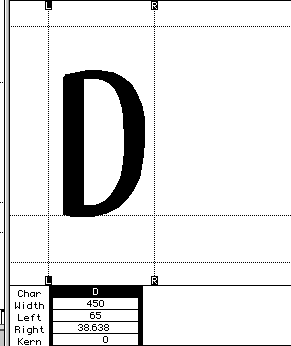
how do you set your sidebearings and character widths so that they are nice round numbers. i can set my character width to a certain width and my left side bearing, but not my right. it seems like only two out of the three numbers can be whole.

also, is 450 too big for a character width?
sorry if this is obvious. thanks in advance,

—————————
nick cottrell

Seems that the right-most node of your D is on a decimal, which is not going to work out for you in PostScriptLand. Fontographer allows you to put nodes and BCPs on decimals, but the generated fonts will be “flattened”: nodes and BCPs moved to the closest whole unit.

And, no 450 is not too great a character width, but it seems that you’re not really using your em-square of 1000 units to the best advantage, jufging by this cap D. (It IS a cap D, right?)

thank you for the reply Chester,

i am importing the glyphs from illustrator and i suppose this is why they are not the right size. what should i do to fix this? is there something i can do in illustrator, or can i import the glyphs and fix the width(so that both left and right node rest on whole numbers) from there? (…even if my glyphs become slightly warped, which i suppose i can fix afterwards…)

not really sure how to address the M square issue either… does it have to be 1000 units?

———————————————-
nc

Nick — The whole idea of the em square is that the widths of the characters are measured relative to the line size (distance from baseline to baseline of two consecutive lines). When saved as a font your characters are saved with a line height of 1. Character set widths are then determined by multiplying the set size (what the user chooses in the font dialog, menu, et al) by the unit set wid

Captured from web.archive.org on 6 Oct 2008. view this capture