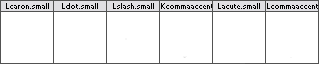
This is probably a simple issue, but how does one re-arrange glyph order in FontLab? In the shot below notice that "Kcommaaccent.small" is stuck between the "L"s? I can't seem to figure out a simple way of shifting it back into position. I've tried sorting glyphs based on name, unicode, encoding under the Glyph menu, but that just messes everything up. Is there an easy way to just move glyphs into the position you want them?