Typophile

typeface testing

nicolaj

Hi there, I'm about to reinvest in a printer for testing typefaces. Both in small size bodytext and bigger size design testing.

Does anybody have any good advices about printer type, postscript (software) rip, testing methodes etc. How do I simultate ex. offset book printing?

Thanks

Nicolaj Bak

2400 dpi for serious small text work.
Postscript preferable.

hhp

Thanks hhp, does any desktop printer print 2400 dpi? and what about software rips for mac osX, does they actually work - do you have any experiences with this (printer type, rip) ???

Nicolaj

What is the least expensive way to get that? I have been looking into it & it seems like we are talking about a Xante. I have also found a Ricoh that might be okay at 1200 dpi with PS but it is hard to find a retailer that has them. Not that Xantes are so easy to find either...

From the xante site:

Accel-a-Writer 4G Printer [$2,285.99 ( lowest price I have found so far ) ]
Accel-a-Writer 4G provides the highest resolution available of any printer in its class - up to 2400 x 2400 dpi. The Accel-a-Writer 4G printer is an outstanding graphics printer that delivers superior halftones up to 150 lpi, oversized output, .....

AW1200 Printer - [ $1385 ( lowest price I have found so far) ]
The new AW1200 excels in output up to 11" x 17" and printing at 1200 x 1200 dpi.

Has anybody found a good source for a used ricoh or xante? I would like to spend sub $1000 if possible!

Hrant, What do you have? You use a PC right?

-e.

It seems that this Xantes printers prints up to A3+. I could easyly do with A4 - must be cheaper ..?

Nicolaj

Everybody seems to agree that if you can go Xante - it's best. Most laser printers these days are inexpensive or expensive 600x600 1200x600 or 2400x600. There are some 1200x1200 too but usually there is a missing feature - real postscript instead of emulation of some kind. HP seems useless for our purposes unless ( is it true? ) you can just use a PDF format to get around the issue. Maybe even then.

Assuming you want real Postscript not emulation & 1200x1200dpi, don't care about color or duplexing & cannot affort a Xante - here is what I have found as altrenates. Prices are suggested retail from the company sites not retailers actual prices.

--------
Xerox Phaser 4500 ( PS3 & true 1200x1200dpi )
25ppm

4500 - $899.00 - usb only
4500n - $999.00 - with ethernet

cost per page: 1.3 cents based 5% coverage
works with mac & pc: yes

--------
Oki: B6200 ( PS3 & true 1200x1200dpi )
25ppm

B6200 $524.99
B6200n $681.99 - with ethernet
cost per page: 2 cents
works with mac & pc: yes

--------
Minolta: PagePro 9100 N ( PS3* & true 1200x1200dpi )
35ppm

PagePro 9100 N

* I am still working on finding out if this or other minolta printers have real postcript. So no prices on this one yet

Yes, I'm on Windows. But anyway my printer is cheese-factor-5...
I go to a bureau and get veloxes whenever it's show time.

Eben, thanks for the legwork! I might get one of those soon.
Oh, and cool jack-o-lantern.

hhp

I am still hoping to hear something interesting from Xante too - so hang in there. RE: the pumpkin - Thanks! I had fun making them last year & it seemed like the right sort of season...

Oh, and Lexmark - NO real postscript in ANY of their current line of printers. They use 100% emulation.

What is a Velox? This aught to get my post #s up.... :-p

We bought the Xanté AW 1200 a few years ago, and have been very happy with it.

However, 1200 dpi is not an accurate representation of type (especially if it is being used for looking at finer details)! Even at 1200 dpi, fonts look fatter than they should. We did a comparison of the results from an imagesetter at 2400 dpi and our printouts, and the difference was huge (we had posted scans of the two samples on the old typophile, but I can't find it).

Just to say, if you are working on type, and if you don't want surprises (like seeing the final printed 500 page book and finding everything too LIGHT for easy reading!), you should in my opinion look only for 2400x2400.

Or make a velox, as Hrant suggest, before finalising your first pages (any excellent idea, in fact).

- Robert

A velox is like a heavy and glossy printout - almost like your typical photo paper, but not that thick, and not grainy. The way my place does it is they make regular imagesetter film, then they burn (?) velox copies from that, and each velox costs like $7. Another way is to run an imagesetter with "paper" instead of film, but a lot of bureaus don't like that because it involves swapping cartridges in their imagesetter; and if you want multiple copies of something without running an imagesetter repeatedly it's better to go from film instead of "paper". What I don't know though is exactly how they make veloxes from the film...

--

Robert, I'd like to see your comparisons - could you possibly find them?

hhp

I think I did a search on this topic via google & pointed at Typophile - and saw those images. If I find them again I will link to the info. We still can't post inline images or I would grab the images & post 'em.

Since 2400x2400 costs 2k+ I think I will trake this velox thing seriously - especially for text faces!

How is a *high end* inkjet with fancy paper in comparison to velox or 2400x2400 on a xante? That is probably $3 a sheet & can be done at home or in the studio! The reson I wanted to get a laser printer was to get get me 90% there. If the last 10% can be acheived using fancy paper & a HP designjet that does 2400x2400 on photo film or something... That might be a good way to have your cake & eat it too!

Anybody tried that?

I personally don't trust ink[jets].

BTW, I can think of a way to save money on a high-end printer: simply learn to gauge what a face will really look like based on what a 600 dpi laser printer does to it... Probably easier said than done though. By extension, one could do a one-time comparison using hi-res (2400 dpi) scans of a velox and one's own printer, measure the difference, and use a custom precisely-lighter weight of the face for proofing on the lo-res printer...

hhp

I got my Xante AW 1200 for under $1000 from a dealer who had it sitting on his shelves for some time. Note you that can adjust the density of print on the AW 1200 and that the 'light' setting will get you close to the image setter on paper, but it will still be a little heavy. But the AW 1200 is not a substitute for proofing from the image setter, I think. The 2400 dpi printers may be, but I don't know.

If you want to use an Inkjet, you will have to get a RIP in order to get printouts that are half-way acceptable.

Also, it is about 3 dollars a page IF the printer doesn't splotch or streak, or do any of the number of other things Inkjets tend to do. Then, the cost for a single page goes way up!

Our inkjet was 2400x2400, and we had a rip, but we pretty much stopped using it once we got the AW 1200. Even though the AW1200 is only 1200 dpi and monochromatic, it wasted less of our time and was generally less stressful.

Here is a cached link through Google of the previous descusion of this issue
http://72.14.207.104/search?q=cache:w7vtwhUFY-AJ:www.typophile.com/forum...

I have the pictures, but is it possible to post them?

- Robert

BTW - here is what I found available direct from Xante today October 11th 2005

These are refurbs: 4g 256mb ram 2400x2400dpi $3395.00

there are some 1200x1200dpi models too. This is a large format printer. 128 MB $2078.25, 64 MB $1865.75

There is also the 1200x1200 dpi AW 1200. It goes for $995 new

It's also semi large format. Check the web site for other specs & so on.

I am on the fence again. Maybe Hrant's Velox solution is best!

As other said look for a 2400 dpi postscript printer. Preferably a black & white instead of a color one. It will give you a better output. Other suggestion, send your file to a printing shop, it will print your file really close of «reality».

hee hee. I had been thinking something like that for a while. I wonder what that might cost... Of course then you get into what paper you are printing on... What press is being used and thousands of other subtle variables. But your right. That is reality.

Of course if you are designing a face for newsprint or other rough/poor paper then this kind of test is the ONLY way.

But if your standard output is going to be on fairly smooth paper a velox or 2400x2400 xante seems like it might be pretty good. They might be too perfect!

Oh, pie in the sky...

How much does an imagesetter cost? What if someone on these boards were to buy one, and sell printouts to thos who wanted tight test prints?

Great idea.

Another potential collaborative effort:
The Design Magazine Scout Squad: Each person in a group is assigned a single magazine to scour each month, and report back with a short review, so the others are alerted to anything that might interest them without wasting too much time.

hhp

Imagesetters will get cheaper as they are replaced by Computer-to-Plate technology. However, be aware that, for film or velox output, you need not only the imagesetter but a processor as well. Then you have the problem of chemical recycling (silver can be recovered from the fixer) and disposal (used litho developer is really nasty stuff, and most municipalities frown on your pouring it doen the drain).

Hrant, inkjets are as reliable as the RIP that drives them. In the shop I work in, we employ a Delta ROOM (RIP Once, Output Many) system to drive CPT for plates and generate proofs with a high-end Epson inkjet. The same file that prints the plates prints the proofs (although proofs are printed composite, while plates are separated) and, with the slight exception of some PMS colors which simply CANNOT be accurately rendered in CMYK (nor, for that matter, in CMYK + Light Cyan + Light Magenta), the proofs match the finished printed product extremely well. And the inkjet has the added advantage of not having to deal with toxic byproducts.

RIPs are expensive software however, and the ink for inkjets is too. The question is ( probably ) how many sheets will you print in testing. 1,000 or 10,000 or more? The closer you get to 10,000 the more the xante is going to look good on a pure cost basis. Plus the laser option prints faster.

However, It would be interesting to compare a RIP/inkjet generated letter at high rez to a printed letter & laser printed letters. It is possible (maybe) that the RIP letter would somehow resemble the ouffset printed letter more closely than the laser letter...

Maybe we could arrange a test. We could compare an offset letter from an existing offset printed job ( to reduce cost!) with the output from an HP deskjet with RIP, a xante & maybe Nick's Epson. First, we need a volunteer with a some offset printed work to share/show...

Let's do it, yes!

hhp

We should maybe get specific about what we want to see offset. Helvetica might, for instance, be a less than ideal test subject. Also what point size range. Hrant, I expect that this kind of specificity would be your forte - no? Also, Do you have a velox & a printed example that we could start with? Maybe of Patria?

My problem is my scanner: only 600 optical. :-(
If you can recruit Raph (sorry, Raph :-) he's got a really good scanner.

hhp

A couple of comments:

1. I am moderately happy with my Minolta 9100. The biggest issue has been the reliablility of the toner cartridge. I have yet to have toner cartridge that does not fail and do something strange like print ghost images etc well before the cartridge is empty. Fortunately, Minolta has been awesome with their support. They fedex me new cartridges overnight when I call them. Free. I am now on cartridge number 4. The current one has worked flawlessly for the last 4 months. Print quality works for me at this stage of my business.

2. There is looking at type, and then there is LOOKING at type. Don't discount the amount of training your eyes require to need the difference between 600/1200/2400. Yes, you can obviously see there is darkening. But I think 1200 is good enough to see proportion issues, modulation irregularities etc. Or at the very least to see that something is not quite right with a letter. From there you can go in and play detective at larger sizes.

I supect that 1200 is sufficient for the vast majority of *designers* on this site. Myself included. To make the jump to 2400 I think you either need to have extra cash laying around, or derive a large part of your income from designing text typefaces so you can justify the business expense, and know what you're looking at.

R

> 1200 is good enough to see ...

Interesting.
Could you put your finger on how 600 fails for that?

hhp

Or you are just curious about the issue... and want to be able to check something in future. Your right it is a narrow audience. But some of us here *are* that audience.

I think for a type designer the difference between 600 & 1200 is huge. Also, while you can look at type blown up to large sizes to see shapes in the abstract - it really isn't the same as seeing it properly when it is small on paper. You are trying to evaluate subjective experience - and that can't be done if you are not having the experience. If you are interested I will explain further.

The Minolta 9100 uses PS emulation doesn't it? They sent me a nice test print. I have to admit it looks dandy. Too bad about the cartriges! I remember it having a sweet price point. But the lack of real postscript seems damning to me. Maybe I am being to ivory tower. Would you be willing to print & send/scan something for us so we can judge?

BTW

I also found this

xerox 4500N ( N=ethernet network )
true ps
standard paper 8.5x11 only
1200x1200 dpi
$999 , or + $329 3 years on-site service
I am having a printed sheet sent to me because reviews say the quality is iffy. Then again, were they using the PS?

Whoops! It's emulation. Not real PS. Oh well.

Your right it is a narrow audience. But some of us here *are* that audience.
Fair enough. It seems clear that a Xante or getting outputs from a service bureau is best for you. It becomes an ecomonic issue to decide which.

The Minolta 9100 uses PS emulation doesn’t it?
Yes. I think so.

Would you be willing to print & send/scan something for us so we can judge?
Yes. I'll post something in a few minutes.

Could you put your finger on how 600 fails for that?
No. I don't have a 600 dpi printer. But I suspect even 600 is good enough to see if the bone structure of a text face is good. At least 75% of a good text face is bone structure. Is the trap in the v too small? Fagedaboudit.

Hakim's Razor strikes again: Only design text typefaces for laser printers! QED.

R

> Only design text typefaces for laser printers!

You really think so?
Design for the market that cares least about fonts?

hhp

Does anybody have a test doc they like to use? I was thinking of sending a PDF from underware or something...

Hrant: That was a joke.

Ok. Here is a sample. I was actually a little surprised at how close the color was. The trade off is that outline fidelity goes down due to the dithering at the edges (i think that's dithering). I have no idea how printers are hinted. This is a pdf printed out of Preview on a mac, on ultra bright white supersmooth laser paper. The print sample is on uncoated stock (hey! give the laser a chance :-) It is 9pt, which I think is pushing is quite a lot for a laser.

I accidentally removed the background on the prints, and realized one level of undo too late that I shouldn't have.
Note: my scanner is crap so take all of this with a grain of salt, though I did use the same sharpen level for the two 9pt scans.

http://www.aquatoad.com/typophile/print_sample.jpg

R

> Hrant: That was a joke.

Oh. On the other hand there is such a thing as over-designing.

> http://www.aquatoad.com/typophile/print_sample.jpg

That half-bitting should not be happening, I'm pretty sure.
Maybe that's a flaw of PS-emulation?

hhp

There are a number of true Postscript imagesetters for sale on eBay at this very moment, some -- slightly outdated but still serviceable -- going for a song. Big problem: most are local pickup only; bigger problem: they take up a fair amount of room and have special electrical requirements; biggest problem: the processor byproduct issue mentioned earlier.

Most imagesetters today output between 2400 & 3000 dpi (my boss's Heidelberg does 2540) and it is noticeably different from the output from our 1200 dpi Xante Accel-a-writer (used for intermediate/in-house proofs), though not as dramatically different from the Epson output (4800 dpi).

I have been using a Minolta QMS Pagepro 1250E. It claims true 1200 dpi, and for the most part I think it is ok. I have uploaded a scan of it's output vs offset for comparison, using Pontifex at 9.4 and 6.5 pt. It is rather interesting, as the width is the same, but the overall height of the type from the laser is greater. I don't know what this means, perhaps my scanner is decalibrated. For the record, the scanner is 1200 dpi optical, and all images have been sharpened the same amount.

kris.

Kris,
Your samples show the typical laser problem. The laser stuff is darker with a bit more rounding at the joins. Yours is better than most though.

ChrisL

Yeah, it is good enough for the time bean. I wonder if there is a way to counteract it? I have also noticed that when I look at the laser vs offset, there is only a *slight* optical darkening, so it is pretty darn close. I reckon a 2400 dpi machine would be suitable for most purposes.

I think it is the nature of toner to spread and smear. 2400 shoul;d help for most things but Linotronic is the only real option for absolute detail. And damn expensive too :-)

ChrisL

One could argue that Linotronic, or any ot that image setter stuff is not accurate, and maybe a high-resolution laser print (2400dpi) is a better indication of how a type will image in an offest litho environment. Perfectly imaged photo repro is hardly the same as plate-blanket-paper image transfer.

One could!

One could argue quite successfully, and I imagine that one has the 2400dpi laser device mentioned elsewhere, and one finds that rather adequate!?

My problem is my scanner: only 600 optical. :-(
If you can recruit Raph (sorry, Raph :-) he’s got a really good scanner.

Hrant,

I hardly use my 1200 dpi scanner since I got a digital camera.

I adapted my 35mm copy stand with lights to take my digital camera.
The detail and sharpness is better than I got with the scanner. Also I am also no longer limited to the size of the scanner glass.

gln

"One could argue that Linotronic, or any ot that image setter stuff is not accurate, and maybe a high-resolution laser print (2400dpi) is a better indication of how a type will image in an offest litho environment. Perfectly imaged photo repro is hardly the same as plate-blanket-paper image transfer."

No, offset printing is not the same as Lino output but neither is Laser printing. Most laser printers add more weight to horizontals than to verticals and toner blotting is not the same as inkspread on press. Offset printing does not add as much weight overall as toner either. Inkspread varies with many factors, human and mechanical. I only argue that Lino shows you what is in your postscript file and eliminates the other variables. There is no substitute for offset printing but who can afford it as a test method.
I don't have a 2400 dpi printer so I don't know how much better it is. I sure would like to get an Asanté though, it has got to be better than my HP. Big bucks problem again :-)

ChrisL

Hi guys,

I haved an imagesetter and processor that I can use for testing. I can even put paper instead of film (if they still sell the paper). The only problem is that it is PS1 and it sometimes gives errors. I am hoping to get a PS3 RIP for it in the near future.

If the final offset print will be on coated paper, the imagesetter output is very close. But even on an uncoated paper, imagesetter output is much closer than laser.

Gerald, I can actually get over 2000dpi with my mid-range (if old) digital camera. But: I have to use a tripod and careful lighting; and only the tiny middle part is fully in focus.

Levon, maybe people should send you and somebody with a 1200/2400 laser some PDFs, pay for mailing all the outputs to Gerald, and then we can see some serious comparisons?

hhp

I recommend making friends with a printer and asking them to run small tests of your types in the off-cut areas of print jobs for other clients. This is the only cheap way to do real press proofing of fonts in development.

There is another way: give/sell a beta copy of your font to the right person. I have Patria on both high-gloss and newsprint thanks to that (and I even made money from it).

hhp

Hrant, that’s presuming that the typeface is in a fit state to be seen in public. I’m talking about testing during the design phase, even with incomplete glyph sets.

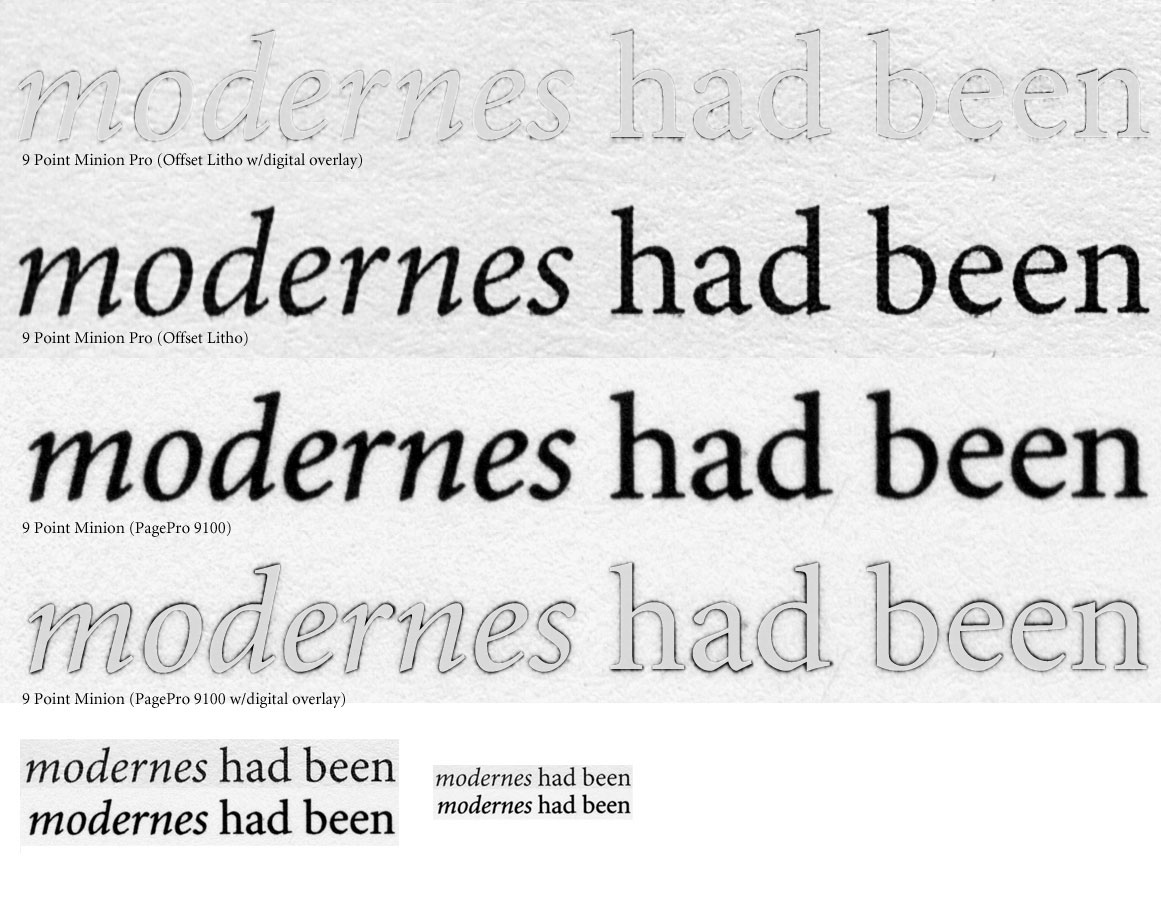
I’m back with another PagePro 9100 vs. Offset.

A couple things to note:
1. In my first sample I printed from the type itself. In this sample I printed from a 1200 dpi photoshop bitmap. The results are much better. I think this may have to do with Postscript emulation. No crappy dithering anymore. This is an anoying extra step, but it is nice to be able to get more out of a cheaper printer.

2. I realized I was comparing Minion Pro with Minion. This is a useful thing because there are slight design differences between the two. See the italic r. This is clearly visible in the printout. This is what I was getting at with being able to see pretty fine structural differences at 1200.

3. The two problems are the traps and the overall darkening. You might be tempted to overdo the traps if you only looked at the laser, or didn’t look for this phenomenon. The darkening is definitely greater than offset (which what totally minimal). This is partly the fidelity of the laser print, and partly the nature of toner vs ink. Toner is like laying black paper over white paper, while offset is like black paint on white. Toner is a blacker black.

Anyhow, I hope this helps people make decisions. I think this shows you can get rather far in the design and testing process with 1200dpi, but again it depends on you and your comfort/skill level. All things considered this seems pretty good for an $800 printer at 9pt.

Randy,
Thanks for posting your scans. You show another proof of the weight gain difference. This still seems to be the main bugaboo in Laser print vs offset. Printing in reverse also tells the tale but inchoking way.

ChrisL

Randy, thanks (again).
It’s funny, in the overlays the gain of the laser seems minimal, but when you look at the results on their own it’s clear as day. On the other hand, as I think you’ve said, weight gain is something you can account for “blindly”, while in the case of outline infidelities you’re lost. The thing is, don’t you think the laser has [more] troublesome bumps?

> I printed from a 1200 dpi photoshop bitmap.

Don’t you think this might have introduced some gain?
Like how convert-to-outlines does.

BTW, does the Minion-Pro italic lc “r” have a trap where the non-Pro didn’t? Huh, maybe Slimbach’s long-standing anti-trapping stance has a kink after all...

—

What would be nice now is to compare Randy’s 1200 laser to a 2400 laser, although the emulation/rasterization issues have to be handled carefully. Probably the only way to get an accurate comparison is to also rasterize the type on the 2400 output too. Assuming it matters, just in case: Randy, which version of Photoshop did you use?

hhp

Thanks Randy! Therse were very useful - especially looking at the offset with digital overlay.

Randy, what type of paper are you using? I just realized that the grains are different. That also may account for some difference in weight gain. Or maybe it is just the scans that came out like that.

Hrant, and anyone interested, I am willing to print some pages for you. If you send me the PDFs I’ll rasterize them in photoshop at 2400 and print. I can also scan the prints and post them or send them, or mail the actual prints.

Levon, very kind of you to offer.
Question: What optical resolution does your scanner have?

hhp

The thing is, don’t you think the laser has [more] troublesome bumps?
Yes for sure. Looking at the bottom of the e. Also the counters of the s. The laser at this size sometime lookes squarish in places that are really round. Remember that this is 9 point. I wouldn’t trust 9 point prints for much other than getting the general feel of the type. It just happened to be the sample in front of me (a veer print)

Don’t you think this might have introduced some gain? (like convert to outlines)
I don’t think so. I typed it directly into the photoshop (7) 1200dpi bitmap from the font file, so I think it uses the hinting in the font — or at least adobe’s rasterizer. Conversely, sending outlines to a printer, there is no hinting at all. At any rate, the tests show that p-shop’s rasterizer is a heck of a lot better than Minoltas.

does the Minion-Pro italic lc “r” have a trap where the non-Pro didn’t?
No, actually. I think the terminal shape is slightly different. I think the above offset (uncoated) shows that Minion doesn’t need traps, even in the italic. Slimbach is a giant. Everyone heralds Matthew Carter (rightly so), but Slimbach’s body of work is staggeringly good (IMHO). I’m glad adobe has a badass on their team.

Randy, what type of paper are you using?
I’ve since thrown out the paper wrapper. It’s ultra bright laser paper (28lb i think), that I got a Staples. It came in an orange shrinkwrap. Sorry I can’t get more specific. I’m using the same paper for all my prints. The offset is on a cream colored uncoated stock (and was very lightly printed).

Randy

> I think it uses the hinting in the font — or at least adobe’s
> rasterizer. Conversely, sending outlines to a printer, there
> is no hinting at all.

The reason to worry is not [just] the hinting. Convert-to-outlines for one comes out thicker (by an average of half a dot) because the rendering algorithms for outlines are different than for type... And the same could be the case in Photoshop.

And to find out for sure, you can’t even use your setup, because we don’t know if the emulation is gaining (or losing) in addition to that half-bitting. So maybe send something to Levon?

> p-shop’s rasterizer is a heck of a lot better than Minoltas.

Overall, I agree. It remains to be determined if Photoshop and/or the PS emulator are altering the weight.

> Minion doesn’t need traps

1) In the offset, the crotch of the “r” seems fine, but not any of the other crotches... A fluke?
2) Traps aren’t just for gain, they help optically as well (especially at smaller sizes).
3) Not all printing is offset! :-)

Slimbach: great work; would be even better with judicious trapping.
And it’s interesting to note here that Myriad -which was co-designed
by Slimbach and Twombly*- does have gentle trapping... which is
probably one manifestation of their historic bickering.

* Designer of the boldly trapped Mirarae.

hhp

Hrant, my scanner is 600dpi optical. I use it for low-res scanning to use for proofing. I have access to a Linotype-Hell drum scanner, but that would cost. I can also send it to someone here to scan. But I wouldn’t want to scan the text for the final test. If someone wants to test their font I prefer sending them the film/paper output, so they have the real thing in their hands.

Randy, offset ink tends to spread on uncoated paper more than on coated paper because it is oil based and paper absorbs it and spreads. On a laser printer, the ink is powder and not oil based. The spread is due to the way it is applied to the paper, which should be the same on both coated and uncoated paper. Imagesetter output is exact, there is no spread. There could be some weight change when burning to plate from the film, so CTP gives the best result (exact until applied to paper).

My point in all this is: what is it that you really want to test? If the font is to be used on offset, then offset is the best test. It is possible but pretty expensive. I can do that at a reasonably cheap price if you are not in a hurry in getting your tests. I can add some text around jobs. But you have to wait unti I get a job that uses a paper and ink within an acceptable range of your inteded use. I can also do the imagesetter output for you, no wait necessary.

This is a bit OT, but the answers might bring up things relevant to nicolaj’s and others’ questions and thoughts on printers:

I’ve recently asked in the Build section if someone might be able to account for a phenomenon I’ve recently noticed: using an HP LaserJet 1300 in Mac OS 10.4, characters in documents printed from InD CS and Word seem all to be aligned exactly on the baseline (hence giving the rounded characters like a and o, and vs, the subtle but noticeable appearance of floating higher than the other characters).

I wonder if anyone else has noticed this—the 1300 and its cousins, non-PS all, are pretty popular—and might be able to account for it. If this were something widespread, it would make 1300s rather unsuitable for any sort of font testing, no?

It sure sounds like it! What happens in other apps? Also, HP lasers have been bashed on typophile for these purposes before. Well maybe not bashed - derided? This was partly because of soft looking output in general and partly because they lack real PS - they just have an emulator. And the consensus is that the emulator is poor.

Eben:

The problem seems to be global. I have traded a couple of message with T Phinney on another thread in this section and he seems to recall the same thing happening with a type designer he knows using an HP; Thomas is pretty certain it’s the emulator. I gave things a go with the printer at work, using a PC, and found the same problems. Thomas would be better at explaining the problem he suspects than I.

So, here’s a question (that perhaps requires another thread of its own?): Is there out there a $500 (or sub-) laser printer of reasonable quality, with 1200x resolution, that has native Adobe PS capability? That might allow reasonable quality for type testing (and some home-grown final production) without breaking the type designer’s bank.

Barring that, has anyone tried to write their own (better) drivers for printers without native PS?

This is the closest thing I have found. In fact it is the only PS laser near this price I have found. It isn’t something I would recommend to do testing on because I have not seen the output just the specs and because I now think 2400x2400 is really closer to what you would want for type tests but:

Oki: B6200 ( PS3 & true 1200x1200dpi ) Also come in a Network version for ethernet
25ppm
B6200 aprox price - $524.99

The thing is the printer is hard to find. For me in Alaska anyway.

http://www.okidata.com/mkt/html/nf/B6200Spec.html

See also

http://www.pcmag.com/article2/0,1759,1651952,00.asp

Notice they say : ” Text quality is a touch below par for monochrome lasers.”

Of course maybe they were not invoking the PS and ere using some kind of emulator because of the source application - word or excel most likeley. But maybe it’s not all that wonderful. I can’t tell yet. I’d like to see a sample. Most likeley I will save up for a Xante or find another route.

The big thing I notice with my HP2300 is the overshoot is overshot—meaning it is greater than it should be (I have compared this to imagesetter output.). This may also be partially the hinting or how HP interprets it.
I do notice that my results are better with pro design apps like the Adobe CS Suite than they are with stuff like Microsoft puts out. I guess Microsoft figures people who use their apps are not going to care about the nuances of type.

ChrisL

That’s funny. The problem other folks were having with the 1300 was that the overshoot was being suppressed to much too high a ppem size, resulting in the appearance of rounded characters “floating” up above the baseline.

Of course, with any device there is going to be a range of sizes (possibly a couple) at which overshoot is having a slightly larger than expected effect, where it is first kicking in. This will be more apparent with lower res devices. However, intelligent usage of setting the blue zones (or their equivalent in TT hinting) should suppress overshoot at sizes where it would be particularly troublesome.

It’s also possible that HP’s solution for the “overshoot is being suppressed to too large a size” was to turn off overshoot suppression altogether, or that their attempt to fix it went too far in the opposite direction. (I don’t know why either of these things would occur, seeing as this stuff is pretty clear in the Type 1 spec, but what do I know.)

I’d be curious to hear from all the people having these various problems exactly how old their HP devices are. I expect things are better with more recent versions of their PS emulation.

Regards,

T

T

Thomas,
The problem occurs at text sizes, 12pt and below. Larger sizes look fine. I have a 2300, not a 1300 if that matters. I bought it new about a year and a half ago. I use it at its highest resolution which is a fudged 1200dpi (They somehow use software to fake 1200 out of 600.) The fonts bundled with Microsoft apps don’t suffer as badly as others and TrueType looks better than type 1.
I mostly use it to test fonts that I am designing so hinting is either minimal or nonexisting in the early stages. It makes it tough to decide on proper overshot if your printer is imposing errors. Wish I could afford a 2400dpi Xanté.

ChrisL

Again, sorry for coming to this thread late.

After some careful printing, I believe I can recommend a good inkjet printer and glossy paper for type proofing.

I found a delicate type specimen in the latest New Yorker, matched it on my trusty Epson 2200, and scanned the results. Of course I used Ghostscript for the RIPping, because I have total control over resolution, ink drop size, and color management (I carefully tuned all these parameters to avoid any dither patterns). Here are the results.

I think the Epson compares favorably with other tests posted upthread, including the Minolta QMS PagePro 1250E, the Minolta 9100, and the Xante AW1200.

The 2200 is not the current model. I’m sure the R2400 is just as good or better, and likely the R1800 as well. Indeed, I wouldn’t be surprised if the R800 (at $400 list) would give excellent results at the A4 size. It certainly has the specs for it.

If people are serious about using Epson inkjets for proofing type, I can make a GS software kit available. I can’t vouch for the quality using the standard Windows driver.

Raph, I think you should give a presentation at TypeCon about this.

hhp

What is Ghost Script? And does it work on OSX?

And... Even though it is impressive I see some anomallies... The cross bar on the lc e, the feeling of height in the lc r, the gap between the lc ’t’&’y’, the right side of the Cap U.

Still, it pretty good!

The main downside is ( still) cost per page.

Eben, ghostscript is a postscript RIP. It is available for OS X but it is a unix or X11 app, and setting up needs some work. I think there are also installers that will work in OS X without X11 or terminal.

There are certainly better RIPs for the job, but ghostscript is free.

I take your point.

Thanks for that! I’ll look into it.

Captured from web.archive.org on 3 Jun 2012. view this capture