Typophile

Wide Sans

David Yeiser0 votes

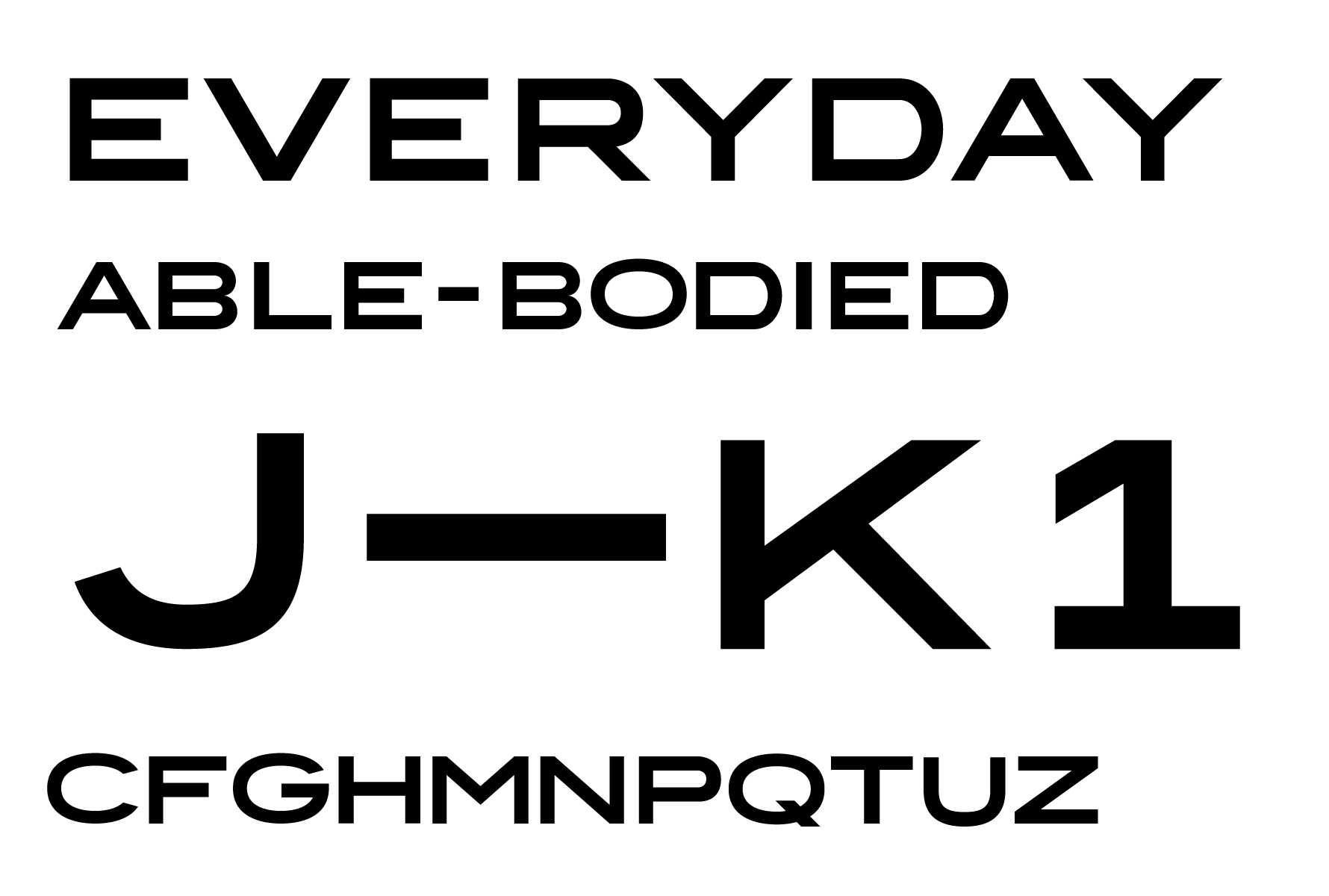
Hello Everyone, this is my first foray into making my own typeface. It's based on a mark I created for myself. I started with D, and then I needed letters to spell out EVERYDAY. And then I just kept drawing letters…

For how to approach a letter, I've used Benton Sans Wide and Idlewild as references, leaning more heavily on Benton Sans. Though of course I'm trying to bring my own ideas and touch to it rather than just copying.

I'm almost finished with the letters and then I'm going to move to numbers and glyphs. It's going to be an uppercase only font.

Any comment, feedback, criticism, etc. is welcome. This is new territory for me.

One thing I've learned already: the capital S is hard!

Large image here

At the risk of oversimplification, I can offer a very short comment:
Most low contrast sans-serif fonts make an optical correction to reduce the thickness of the horizontal strokes compared to the vertical strokes -- which produces the illusion that the strokes are the same thickness -- unless the objective is to produce what is called a reverse or inverted contrast font. An example of the latter is Antique Olive.
If you are trying to produce a reverse contrast font then your design is generally O.K. Otherwise the horizontal and diagonal strokes look too thick.
Don

For similar optical correction reasons the mid portion of a curved stroke, such as on the bowl of _D_ is thicker than the straight vertical stroke that extends from top to bottom of the the letter.
Again this is something that you can ignore if there is a special purpose for your font. For example, if you are trying to produce a font that mimics old time sign lettering by store owners who are not professional sign painters, or lettered propaganda phrases painted on walls in the 1930s.
Don

Adding to Don’s spot-on advice, I would also note that, even in a display typeface, the curves of round glyphs should extend a bit below the baseline and over caps-height.
Here two primers discussing optical correction:
http://typographica.org/on-typography/making-geometric-type-work/
http://ilovetypography.com/2007/10/29/so-you-want-to-create-a-font-part-2/

Relevant: Trusting Your Eyes
Not only relevant to FontForge, though.

Thanks all, this is very helpful. I adjusted the horizontal strokes of the H and the T, but now looking at it with fresh eyes, the E is way too heavy. I'll reevaluate them all. Thanks for the advice on the D as well.

For the curves I have made the glyphs taller, but I forgot to lower them below the baseline in Glyphs. I had manually adjusted a few of them before posting the image, but forgot to do all of them. I'll make this change across the board. Thanks for those links too.

I'll post a new sample once I've made these optical adjustments and hopefully created more letters.

Thanks again!

Tons of imperfections still — the "S" is atrocious — but making some progress.

Still haven't figured out the “S” but I'm letting it be while I move to other characters. I can also see hours and hours of tweaking and polish work ahead.

Captured from web.archive.org on 6 Aug 2017. view this capture