
The example I'm trying to learn FontForge with is a very simplistic font, not the actual font I want to create. I figured it is best to try to learn with something with extremely simplistic glyphs. So no need to critique this font itself, it's just practice and learning.
Here is the concept that I am attempting to learn with:

I created an SVG file that is 1000 x 1000 with the ascender guide at y=200, decender guide at y=800, baseline at y=684, x height guide at y=287. For this practice font, ascender and cap height are the same (as they are with, say, Helvetica)
PNG rendition of my Letter A imposed over the guide:
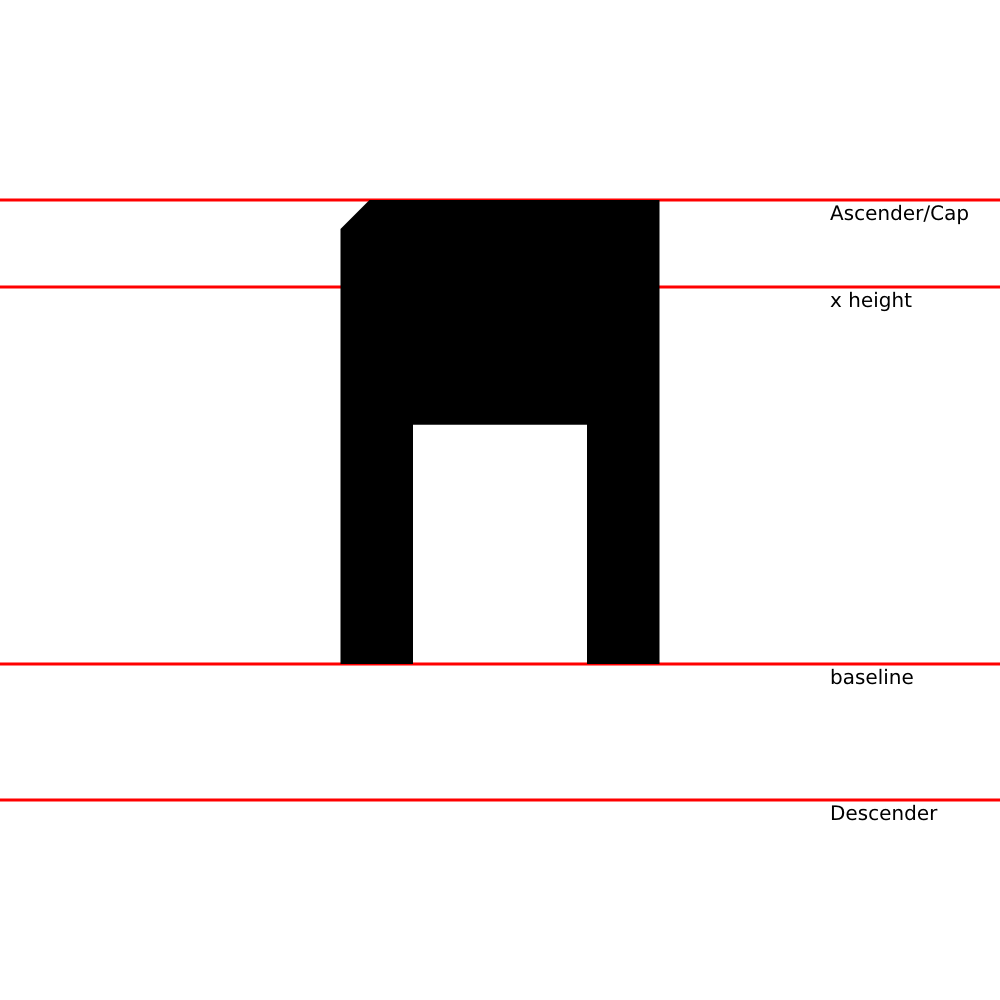
The SVG path to create the A -
<path d="M340.5,664
         l              0      -435
         l             29       -29
         l            290         0
         l              0       464
         l            -72.5       0
         l              0   -239.25
         l           -174         0
         l              0    239.25
         l            -72.5       0
         "/>
The result of importing it into fontforge:

Is that correct? It seems that fontforge doesn't know what my baseline is or my cap height, and I guess that makes sense because there is nothing in the SVG to specify that. Is there someplace in fontforge where I can specify the baseline, x-height, and cap-height?
Looking at the fontforge import, it does Y coordinates reverse from SVG and it looks like it would have the baseline at 140, possibly 136 (which would be 800 - my SVG baseline of 664)
To do the least amount of work after import, should I use SVG coordinates of y=800 for my baseline or is that something I can configure in FontForge?
Thank you for any tips.