Typophile

Illustrator Aliasing Issue

ashcant

Hi All!

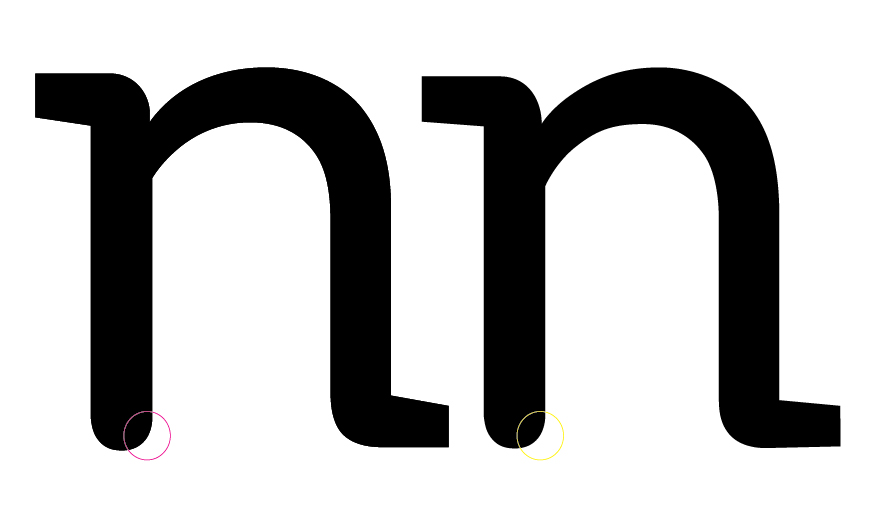
While working on a typeface in Illustrator CS6, I came across an aliasing issue, that I'm not sure what to do about. I've attached a screen cap of two different "n"s worked on in different occasions, (same system, same software) there was another post regarding aliasing in illustrator on this forum but it wasn't this particular problem. I tried saving the file in a legacy format and pasting them back in, but I really am just shooting in the dark...

Any help would be appreciated!
Those are vector shapes, you don't need to bother with aliasing.

Your right Ralf it doesn't effect things functionally speaking, but after a while it's all I can see :S specially when comparing forms for discrepancies, any suggestions?

Buy a higher-resolution display? ;-)
If those shapes are identical they can only look identical on your screen unless they would accidentally fall exactly the same way on your personal pixel grid in the current zoom settings.

Oh they aren't the same shapes at all, they're very different forms done at different widths the biggest give away is the differing serifs.

Just for those who experienced this as well I found out that it was two overlapping compound shapes, the same form was duplicated on top of its' clone and it was held together somehow in one compound object, illustrator couldn't decipher the two from one another, but as soon as I pasted the form into fontlab, I was able to remove the duplicate that was causing those issues, god bless fontlab, I think I'll just try to work in fontlab from beginning to end. yay!

Captured from web.archive.org on 11 Aug 2014. view this capture